This thread has been locked.

If you have a related question, please click the "Ask a related question" button in the top right corner. The newly created question will be automatically linked to this question.

TINA power source

Hello -

I am new to this forum community, and undoubtedly in the wrong place. but i can't seem to find the right place.

i am using TINA, and i have a question about reference power sources. what i mean is, i seem to recall that i could put  a certain symbol in different places around the circuit as power point sources, and they were all referenced to one, so that if i changed that one, they would all change. but i can't remember how to do it. Help is no help. none of the icons seem to work.   

would someone direct me to the right place to ask this question ?

  • Hugh,

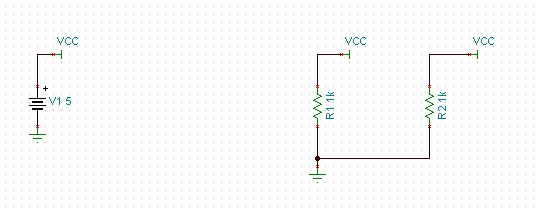
    I am making an assumption here that you are talking about a voltage source that you would like to reference at multiple places in the schematic. If so, you would need to use the jumper. It can be found in the Basic tab:

    Here is a very simple example. It connects 5V to all of the VCC jumpers:

    If this is not the answer to the question you were asking, please let us know.


  • Britt -

    thanks for the reply. yes, this is what i was trying to remember. i had tried to use a jumper before i wrote that question, but i didn't have one connected to a power source also.
    may i ask, can you have more than one (i.e., one to say a 5v battery and another to a 10v battery). it says that i can change the parameters, but there is no explanation for what that means, and i can't get it to change anything except the label.

    Pat

  • ok. got it figured out. thanks for your help.

    Pat