This thread has been locked.

If you have a related question, please click the "Ask a related question" button in the top right corner. The newly created question will be automatically linked to this question.

LM5175 - "Undefined Parameter: SS" when using Transient Model in PSpice

Other Parts Discussed in Thread: LM5175

Hello,

I just started working on a 4 switch buck-boost converter using the LM5175. I got the encrypted PSpice transient model OK and I imported the model into Orcad OK using Capture CIS. When I run a transient simulation I get a few warnings and an error in PSpice:


WARNING(ORPSIM-15196): Duplicate library entry for srlatchrhp_basic_gen, (type SUBCKT).

First entry in C:\Cadence\SPB_17.2\tools\capture\library\pspice\LM5175_PSPICE_TRANS\LM5175_TRANS.lib, duplicate in C:\Cadence\SPB_17.2\tools\capture\library\pspice\LM5175_PSPICE_TRANS\LM5175_TRANS.lib.
Duplicate entry ignored.

WARNING(ORPSIM-15196): Duplicate library entry for d_d1, (type SUBCKT).

First entry in C:\Cadence\SPB_17.2\tools\capture\library\pspice\LM5175_PSPICE_TRANS\LM5175_TRANS.lib, duplicate in C:\Cadence\SPB_17.2\tools\capture\library\pspice\LM5175_PSPICE_TRANS\LM5175_TRANS.lib.
Duplicate entry ignored.

Index has 67 entries from 1 file(s).

ERROR(ORPSIM-15167): Undefined parameter: SS.

Any ideas on how to fix this? At this point I have the model connected as it is in the suggested Webench schematic. From there I was going to modify it, but I can't get it to run.

Thanks,

Lenny

  • Lenny,

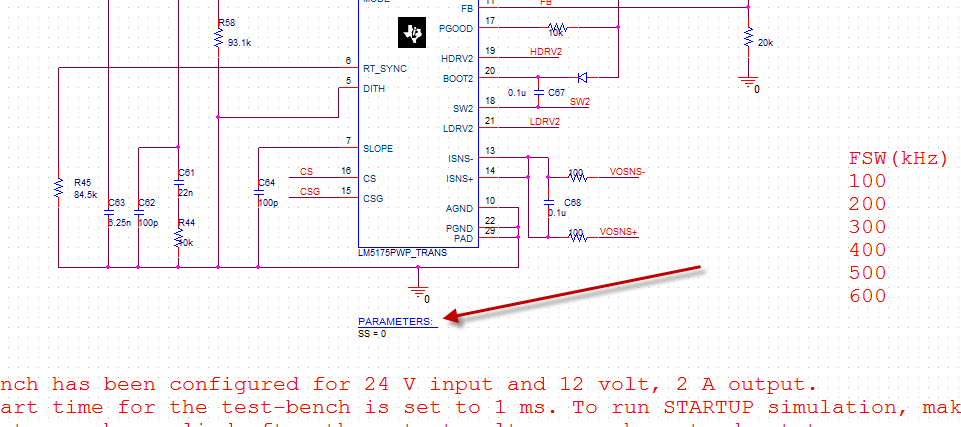
    Have you ever added a PARAMETERS block to your schematic? Here is what the reference design looks like from the product folder:

    To add the parameter block, simply click on the Place Part icon and search for PARAM. Place the block and enter the parameter name as SS and the value as 0 (for startup) or 1 (for steady state). The reference designs (steady state and startup) run correctly when I open it up.

    Currently, I am not using 17.2, but an older version (16.2).

  • Thanks Britt. Simple mistake on my part, I had missed the PARAM block. It's simulating OK now.

    One quick question, I don't see a reference schematic that I could have used in Orcad Capture (17.2). If I try to open the TR.sim files present in the PSpice model folder, nothing happens. Is that the reference design?
  • Lenny,

    When you download the .zip file you should have seen an .opj file to open. This should contain the reference design. There is also a .dsn file that could be opened as well. The designs are released using version 16.2 because that is the last version that was forward and backward compatible form PSpice version 15.7 or higher. I believe that 17.2 will open up the reference design from the product folder, Tools and Software tab.