This thread has been locked.

If you have a related question, please click the "Ask a related question" button in the top right corner. The newly created question will be automatically linked to this question.

WEBENCH® Tools: Captivate design Center GUI Issue

Tool/software: WEBENCH® Design Tools

Hello,

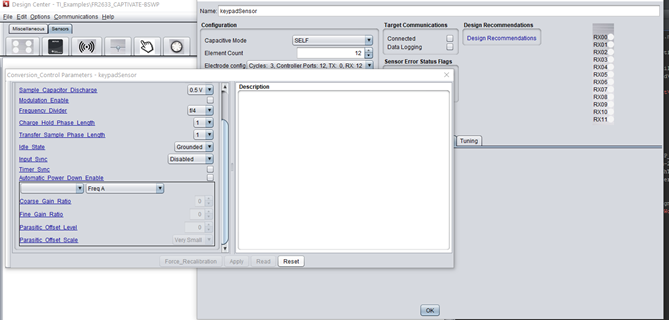
          Its difficult to set,read,apply the parameters. when more than 5 self cap buttons are used. i have attached screen shot for reference. Please do improve the GUI for next updates.

  • Hello Gourav,

    I see from your screen shot that you have all the buttons in a sensor group.  This is good.

    For a sensor group there is only 1 prox threshold that applies to all buttons within the group and the touch threshold value can be applied to all as well.  Yes, agreed, if you need to go and set individual touch threshold for each channel this is time consuming.  But 99% of the time you wouldn't need to do this.

    Is this what you were referring to?

    If you can describe more accurately what you don't like and propose a method you feel is better, I would be more than happy to bring this up with our GUI engineer.

  • Hello Dennis,

    Dennis Lehman said:

    For a sensor group there is only 1 prox threshold that applies to all buttons within the group and the touch threshold value can be applied to all as well.  Yes, agreed, if you need to go and set individual touch threshold for each channel this is time consuming.  But 99% of the time you wouldn't need to do this.

    Is this what you were referring to?

    No I am not referring to this. I mean the Apply, Force Recalibration, Read, Reset buttons are disappeared, as you can see from the screen shot. These buttons are required when re-calibrating to the custom board. And also when setting the element count to >= 5 in Self Capacitive Mode, it does'nt  show up in the GUI. For this Problem solution is setting the element count to 10 in  Mutual capacitive mode , then changing the mode to Self Capacitive mode.

  • Hi Gourav,

    Ok, I can see this is a problem.

    I have reached out to our GUI developer for help.

  • Hi Gourav,

    Our GUI engineer has the following feedback:

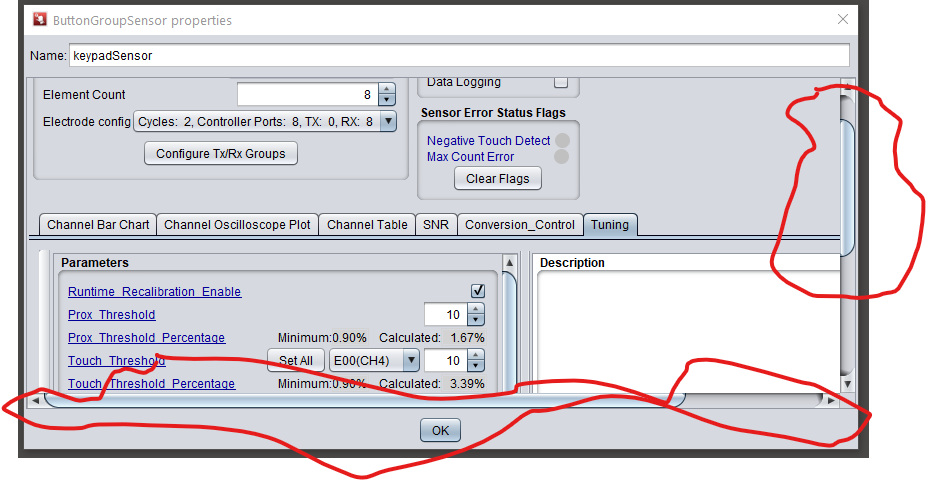
    This can happen if the customer has resized the customizer window and reduced the height.  On second reading of the issue, I see that setting the button group to something that produces a long “column” of buttons this can happen too. The fix is the same, resize the customizer window height.

    I tried to create 12 button, as you did, and yes, the customizer window didn't fully open.  If you grab bottom or corner with mouse, you should be able to expand the window.  Try it and let me know.

  • Hi Dennis,

              My laptop screen size is 14.1 inch, that is the max I can stretch/Extend the the customizer window. If you could change display of long column of buttons (vertical) to long row of buttons(horizontal), this might solve the issue.

    There is another issue as I had mentioned above in the post, I would like to repost it .

    When setting the element count to >= 5 in Self Capacitive Mode, it does'nt  show up in the GUI. For this Problem solution is setting the element count to 10 in  Mutual capacitive mode , then changing the mode to Self Capacitive mode. Why does this happen?

  • Hi Gourav,

    Which MSP430 do you have selected in the GUI?

    I'll run your issue with the smaller screen by our GUI engineer.

  • Hi Dennis,

       I have selected MSP430FR2676TPT.

  • Ok.

    Our GUI engineer is suggesting that you can "undock" the sensor tuning or conversion control tab from the sensor properties view by clicking on and dragging away the wide bar to the left of the parameters.  Here is a picture.  The undocked view should provide you enough room to expand it to see the missing buttons.

    Regarding the issue with not being able to create more than 5 self cap sensors, both he and I were not able to recreate the issue.

    His suggestion is to create the 10 mutual sensors but don't switch them to self cap, save the project (.ser file) and attach to your reply posting.

  • Hello Dennis,

          It is too cumbersome, if we undock 2-3 windows, eg Channel data, Tuning and Conversion Control. So I suggest to change display of long column of buttons (vertical) to long row of buttons(horizontal).

  • Ok.  I'll feed this back to our engineer.  BTW, what is you screen resolution, in case he asks?

  • Hi Dennis,

            Screen Resolution is 1,366 x 768 pixels. By mistake I have clicked my issue has been resolved, Is there a way to undo it???

  • Hi Gourav,

    Looks like this thread is still open.

    I see your resolution so let me send to our GUI engineer.

  • Hi Gourav,

    The design center has been updated to include sliders as shown here.  Next release end of April.