This thread has been locked.

If you have a related question, please click the "Ask a related question" button in the top right corner. The newly created question will be automatically linked to this question.

CC2640R2F: Initial Hardware Bringup

Part Number: CC2640R2F

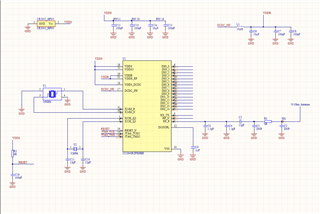
I am attempting to perform the initial hardware bring up on a custom board with the CC2640R2F and a single ended RF configuration (schematic). 

I have done the pin terminate in the LAUNCHXL.c file and change the define in the LAUNCHXL.h file to CC2650EM_4XS as shown in the picture.  I am not seeing any peripheral show up in my BLE scanning applications once loading the app.  Is there something I am missing here, or is that all that should be needed?  

I am able to tx and rx packets with smartRF studio so I don't believe this is a hardware related issue.

  • No that doesn't help.  I'm following the initial board bring up documentation and have done what it suggests for the base simple_peripheral application.

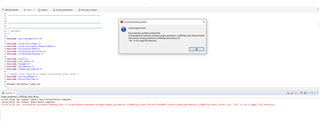
    I am also getting an error when first trying to load the ble stack to the board:

    I am under the impression that this needs to be loaded to the board prior to loading the simple_peripheral app. 

  • Hi Morgan,

    To clarify, is the program you are attempting to flash on the device an unmodified simple_peripheral project? Do you have access to a CC2640R2 LaunchPad? If so can you try flashing the same project and ensuring that the device behaves as expected?

    Best Regards,

    Jan

  • Yes, Jan.  It is unmodified with the exception of making the changes to the board files as shown in the pictures of the initial post to switch the board to 4XS and PIN_TERMINATE to disable all GPIO's.  I am just trying to verify that a simple SW application will run correctly on custom BLE board and the connectivity is reliable, but I cannot seem to get it to show up as a peripheral on any of my BLE scanning applications.

    The initial board bring up documentation only refers to these two steps to modify the simple_peripheral app, if there are more steps, could you please outline them to get the simple_peripheral app to work with my 4x4 custom board (CC2640R2FRHBR)

  • Hi Morgan,

    Have you ever flashed a CC2640R2F Launchpad with simple peripheral and you verified it working? If not do so to get familiar.

    I have lots of experience bringing up custom CC2640R2F 4x4 and 5x5 boards. The original simple peripheral that runs on the launchpad will work with the CC2640R2F custom board with some modifications.

    The first 2 modifications you did are correct.

    At CC2640R2_LAUNCHL.c CC2640R2_LAUNCHXL_initGeneral() comment out the Board_initHook();, this will cause a hang.

    void CC2640R2_LAUNCHXL_initGeneral(void)
    {
        Power_init();
    
        if (PIN_init(BoardGpioInitTable) != PIN_SUCCESS) {
            /* Error with PIN_init */
            while (1);
        }
    
        /* Perform board-specific initialization */
        Board_initHook();
    }

    Lastly you need to flash the modified simple peripheral to your custom board and debug it and make sure it passes Simple Peripheral Init. Verify it advertises using IOS LightBlue App or nRF Android Connect App.

    With regards to the board files. At Simple Peripheral startup folder you can delete board.c and copy paste Board.h, CC2640R2_LAUNCHXL.h, CC2640R2_LAUNCHXL.c, CC2640R2_LAUNCHXL_fxns.c to the startup folder.

    -kel

  • Thank you, Kel, this was a very detailed response and I will give it a try.  I wanted to confirm, you do have to flash the BLE stack lib prj in code composer prior to loading the simple peripheral app correct? 

  • do have to flash the BLE stack lib prj

    No.

  • Kel, I was able to discover the SimpleBLEPeripheral after commenting out the board_initHook as you suggested, thank you very much.  I am however getting an error when trying to connect: "Timeout interrogating the peripheral".  Could this be due to incorrect RF front end settings?  The front end settings are simply done with changing the define in the LAUNCHXL.h file to CC2650EM_4XS correct?  My board is using a 5x5 CC2640R2FRHBR so wanted to make sure setting it to the 4XS was the correct option?

  • Hi Morgan,

    You need to set that define according to your RF configuration. It seems you are trying to do a single ended RF internal bias. The define is not available. But from what I read here in the forum CC2650EM_4XS define should also work. Upon, review of your single ended RF internal bias circuitry seems to be wrong. However, I am not an expert with the RF circuitry. Better for a TI engineer to comment.

    -kel

  • Kel, it is singled ended with rf internal bias, I believe 4XS works for this.  I just wanted to confirm that that define only affects the rf front end config.  My rf circuitry posted originally is the internal bias with a pi network added to the right for tuning purposes.  This design has been approved and tuned by a TI engineer.   I'm sorry I had posted the wrong schematic, it is below:

  • I just wanted to confirm that that define only affects the rf front end config

    Yes.

    At one of my projects using single ended RF internal bias, I created a custom define. I will check my code files and get back to you.

    -kel

  • Hi Morgan,

    At ble_user_config.h I added code line for define CC2650EM_4IS.

    #if defined( CC26XX )
    
    #if defined( CC2650EM_7ID )
    
      #define RF_FE_MODE_AND_BIAS           ( RF_FE_DIFFERENTIAL |                 \
                                              RF_FE_INT_BIAS)
    
    #elif defined( CC2650EM_5XD ) || defined( CC2650EM_4XD ) || defined( CC2650M5A )
    
      #define RF_FE_MODE_AND_BIAS           ( RF_FE_DIFFERENTIAL |                 \
                                              RF_FE_EXT_BIAS)
    
    #elif defined( CC2650EM_4XS )
    
      #define RF_FE_MODE_AND_BIAS           ( RF_FE_SINGLE_ENDED_RFP |             \
                                              RF_FE_EXT_BIAS )
    
    #elif defined( CC2640R2EM_CXS )
    
      #define RF_FE_MODE_AND_BIAS           ( RF_FE_SINGLE_ENDED_RFN |             \
                                              RF_FE_EXT_BIAS )
    #elif defined( CC2650EM_4IS )
      #define RF_FE_MODE_AND_BIAS           ( RF_FE_SINGLE_ENDED_RFP |              \
                                              RF_FE_INT_BIAS )
    #else // unknown device package
    
      #error "***BLE USER CONFIG BUILD ERROR*** Unknown package type!"
    
    #endif // <board>

    At CC2640R2_LAUNCHXL.h I set the define CC2650EM_4IS

    /*
     *  ============================================================================
     *  RF Front End and Bias configuration symbols for TI reference designs and
     *  kits. This symbol sets the RF Front End configuration in ble_user_config.h
     *  and selects the appropriate PA table in ble_user_config.c.
     *  Other configurations can be used by editing these files.
     *
     *  Define only one symbol:
     *  CC2650EM_7ID    - Differential RF and internal biasing
                          (default for CC2640R2 LaunchPad)
     *  CC2650EM_5XD    – Differential RF and external biasing
     *  CC2650EM_4XS    – Single-ended RF on RF-P and external biasing
     *  CC2640R2DK_CXS  - WCSP: Single-ended RF on RF-N and external biasing
     *                    (Note that the WCSP is only tested and characterized for
     *                     single ended configuration, and it has a WCSP-specific
     *                     PA table)
     *
     *  Note: CC2650EM_xxx reference designs apply to all CC26xx devices.
     *  ==========================================================================
     */
    
    #define CC2650EM_4IS

    If you set this define wrong you will have problem with RF. I tested this through experimentation.

    I can not remember if CC2650EM_4XS define will also work for single ended RF internal bias.

    -kel

  • So I made those changes (from what I've read both 4XS and 4IS should work), but I am still getting a "Timeout interrogating the peripheral" when trying to connect to the peripheral. 

  • Hi Morgan,

    I see that are not using 32Khz crystal. You need to modify the code so it would use the internal 32 Khz RC oscillator or have you done that already?

    -kel

  • Yep that's already done by default in the simple peripheral application, as well as the simple broadcaster.  The device is showing up and showing what looks to be solid RSSI, but when I try to connect to it like I am able to on the launchpad, I get that timeout error.

  • Yep that's already done by default in the simple peripheral application, as well as the simple broadcaster.

    No, that is not done by default. The example program works with the launchpad which has external 32Khz crystal.

    Anyway here is the procedure:

    1. Set pre define symbol USE_RCOSC.
    2. At Application folder right click rcosc_calibration.c and un-check Exclude from build.
    3. At Startup folder right click ccfg_app_ble.c and check Exclude from build.
    4. At Startup folder right click ccfg_app_ble_rcosc.c and un-check Exclude from build.
    5. Rebuild-all

    -kel

  • Kel, Thank you! That was it.  I'm sorry, I know I read somewhere in some TI documentation that the peripheral and broadcaster applications were already set up for RCOSC.  Anyways, I can now connect to the peripheral, appreciate all your help!

  • Kel, I switched over to try to get the simple_broadcaster working and for some reason now I can't load any BLE applications onto my custom board.  Even the simple_peripheral with the settings we did above is no longer doing anything, the peripheral won't even pop up in the list of devices in LightBlue.  Any ideas what could've caused this? Is it possible I have bricked the device? I have tried erasing with flash progrrammer 2 and still am unable to load any ble app onto my board.

  • Hi Morgan,

    To confirm, you aren't able to flash any image onto your board? If you connect your board to SmartRF Studio or to Flash Programmer 2, does it get recognized by the software? Do you get any error messages? If so, then can you share these messages? Has anything changes in the hardware or the wiring?

    Best Regards,

    Jan

  • Hi Morgan,

    The above steps should work. Now the problem maybe at the IOS LightBlue App side. At your smart phone turn off and on the Bluetooth then try again.

    -kel