This thread has been locked.

If you have a related question, please click the "Ask a related question" button in the top right corner. The newly created question will be automatically linked to this question.

LAUNCHXL-CC26X2R1: CC2652R1

Part Number: LAUNCHXL-CC26X2R1

Hi Sir,

I am working on cc2652R1F launch pad. For getting started, I have explored project zero and host test projects. And simple central and simple peripheral projects.

Now I want to perform the same functionality as simple central and simple peripheral, but without the button press operation.

I want the central device to get connected to the target peripheral device for which I have modified the code accordingly by giving the address of peripheral device.

I have trigerred the functions, 

SimpleCentral_doDiscoverDevices();

SimpleCentral_doConnect();

SimpleCentral_doSelectConn();

in the case GAP_DEVICE_INIT_DONE_EVENT in function, SimpleCentral_processGapMsg().

and the function SimpleCentral_doGattWrite(),  in the case GAP_LINK_ESTABLISHED_EVENT of SimpleCentral_processGapMsg() function.

By doing so, the device is able to discover and connect to the target device but not write into the target peripheral device.

What is the reason for which it is not able to write? Are there any other events that must be trigerred other than those mentioned?

NOTE : As a beginner, I want to use the same SDK code , with simple_profile_char1 UUID and characteristic ID, and perform the read and write operations without button press.


  • Hi Anushka,

    Do you see the same failure if you insert a small time delay in between the GAP_LINK_ESTABLISHED_EVENT and the SimpleCentral_doGattWrite()? I would recommend placing a 100-1000 ms delay by setting a timer to begin counting in the GAP_LINK_ESTABLISHED_EVENT and triggering 1 second later to call the SimpleCentral_doGattWrite() function. This delay required may be shorter, but 100 ms should be enough for testing.

    Best,

    Nate

  • Hi Nathan, 

    I have inserted a delay of 1sec before calling SimpleCentral_doGattWrite() inside the case GAP_LINK_ESTABLISHED_EVENT . But still I am facing the same issue.

  • How do you insert a delay of 1sec before calling SimpleCentral_doGattWrite? Do you create a delayed timer event to achieve this?

  • Hi YiKai Chen,

    I have given delay using a for loop, by calculating the delay in ms with respect to crystal frequency. of CC2652R1F

    can I call the function HCI_EXT_DelaySleepCmd(1000) for giving 1 sec delay?

    Please guide me on creation of delayed timer event. I have least idea on how to create this.

  • You can search clkRpaRead in simple_peripheral example to get example codes for setup SP_READ_RPA_EVT with a delay time defined by  READ_RPA_PERIOD

  • I checked by giving the delay using the function Util_constructClock(&clkRpaRead,SimpleCentral_ClockHandler,READ_RAP_PERIOD,0,true,SC_EVT_READ_RPA) before SimpleCentral_doGattWrite(), with defined READ_RAP_PERIOD as 1000.

    But still the same issue exists.

  • What do you mean "by giving the delay using the function Util_constructClock(&clkRpaRead,SimpleCentral_ClockHandler,READ_RAP_PERIOD,0,true,SC_EVT_READ_RPA) before SimpleCentral_doGattWrite()"? Can you show me your code when calling SimpleCentral_doGattWrite?

  • case GAP_LINK_ESTABLISHED_EVENT:
    {
    uint16_t connHandle = ((gapEstLinkReqEvent_t*) pMsg)->connectionHandle;
    uint8_t* pAddr = ((gapEstLinkReqEvent_t*) pMsg)->devAddr;
    BLE_LOG_INT_TIME(0, BLE_LOG_MODULE_APP, "APP : ---- got GAP_LINK_ESTABLISHED_EVENT", 0);
    if (autoConnect)
    {
    if (memberInProg != NULL)
    {
    if (osal_memcmp((uint8_t *)pAddr, (uint8_t *)memberInProg->addr, B_ADDR_LEN))
    {
    //Move the connected member to the tail of the list.
    osal_list_remove(&groupList,(osal_list_elem *)memberInProg);
    osal_list_put(&groupList,(osal_list_elem *)memberInProg);
    //Set the connected bit.;
    memberInProg->status |= GROUP_MEMBER_CONNECTED;
    //Store the connection handle.
    memberInProg->connHandle = connHandle;
    memberInProg = NULL;
    }
    }
    }
    uint8_t connIndex;
    uint32_t itemsToDisable = SC_ITEM_STOPDISC | SC_ITEM_CANCELCONN;
    uint8_t* pStrAddr;
    uint8_t i;
    uint8_t numConnectable = 0;
    uint8_t pairMode = 0;

    // Add this connection info to the list
    connIndex = SimpleCentral_addConnInfo(connHandle, pAddr);

    // connIndex cannot be equal to or greater than MAX_NUM_BLE_CONNS
    SIMPLECENTRAL_ASSERT(connIndex < MAX_NUM_BLE_CONNS);

    connList[connIndex].charHandle = 0;

    pStrAddr = (uint8_t*) Util_convertBdAddr2Str(connList[connIndex].addr);

    Display_printf(dispHandle, SC_ROW_NON_CONN, 0, "Connected to %s", pStrAddr);
    Display_printf(dispHandle, SC_ROW_NUM_CONN, 0, "Num Conns: %d", numConn);

    // Disable "Connect To" until another discovery is performed
    itemsToDisable |= SC_ITEM_CONNECT;

    // If we already have maximum allowed number of connections,
    // disable device discovery and additional connection making.
    if (numConn >= MAX_NUM_BLE_CONNS)
    {
    itemsToDisable |= SC_ITEM_SCANPHY | SC_ITEM_STARTDISC;
    }

    for (i = 0; i < TBM_GET_NUM_ITEM(&scMenuConnect); i++)
    {
    if (!memcmp(TBM_GET_ACTION_DESC(&scMenuConnect, i), pStrAddr,
    SC_ADDR_STR_SIZE))
    {
    // Disable this device from the connection choices
    tbm_setItemStatus(&scMenuConnect, SC_ITEM_NONE, 1 << i);
    }
    else if (TBM_IS_ITEM_ACTIVE(&scMenuConnect, i))
    {
    numConnectable++;
    }
    }

    // Enable/disable Main menu items properly
    tbm_setItemStatus(&scMenuMain,
    SC_ITEM_ALL & ~(itemsToDisable), itemsToDisable);

    GAPBondMgr_GetParameter(GAPBOND_PAIRING_MODE, &pairMode);

    if ((autoConnect) && (pairMode != GAPBOND_PAIRING_MODE_INITIATE))
    {
    SimpleCentral_autoConnect();
    }

    Util_constructClock(&clkRpaRead, SimpleCentral_clockHandler,
    READ_RPA_PERIOD, 0, true, SC_EVT_READ_RPA);

    SimpleCentral_doGattWrite(0);
    break;
    }

  • you cannot call SimpleCentral_doGattWrite right after you call "Util_constructClock(&clkRpaRead, SimpleCentral_clockHandler, READ_RPA_PERIOD, 0, true, SC_EVT_READ_RPA)". Actually, Util_constructClock(&clkRpaRead, SimpleCentral_clockHandler, READ_RPA_PERIOD, 0, true, SC_EVT_READ_RPA) would trigger SC_EVT_READ_RPA event READ_RPA_PERIOD milliseconds later and you should call SimpleCentral_doGattWrite inside "case SC_EVT_READ_RPA:.." of SimpleCentral_clockHandler.

  • If, SimpleCentral_doGattWrite(0) function is called inside "case SC_EVT_READ_RPA:.." of SimpleCentral_clockHandler.

    then whenever the function, "Util_constructClock(&clkRpaRead, SimpleCentral_clockHandler, READ_RPA_PERIOD, 0, true, SC_EVT_READ_RPA)" is called, gatt write operation will be done. 

    I have called the functions SimpleCentral_doDiscoverDevices(), SimpleCentral_doConnect() and SimpleCentral_doSelectConn() inside the case GAP_LINK_ESTABLISHED_EVENT,  which is working fine.

    BUT, In simple central SDK code, "Util_constructClock(&clkRpaRead, SimpleCentral_clockHandler, READ_RPA_PERIOD, 0, true, SC_EVT_READ_RPA)" function is called in case GAP_LINK_ESTABLISHED_EVENT,  before SimpleCentral_doDiscoverDevices(), SimpleCentral_doConnect() and SimpleCentral_doSelectConn()  functions.  Which means the gatt write function is performed even before it is connected to  a perticular device.

    Even if I call the functions SimpleCentral_doDiscoverDevices(), SimpleCentral_doConnect() and SimpleCentral_doSelectConn() before Util_constructClock(&clkRpaRead, SimpleCentral_clockHandler, READ_RPA_PERIOD, 0, true, SC_EVT_READ_RPA), and call SimpleCentral_doGattWrite()  inside SimpleCentral_clockHandler, I am not able to write to peripheral device.

  • You should create you own event instead of using SC_EVT_READ_RPA directly. You can call Util_constructClock to create one-shot clock for your own event right after you get  GAP_LINK_ESTABLISHED_EVENT.

  • But, calling SimpleCentral_doGattWrite  inside GAP_LINK_ESTABLISHED_EVENT  is not helping me. Is there any other event in which I can call this write function?

  • I don’t ask you to call SimpleCentral_doGattWrite inside GAP_LINK_ESTABLISHED_EVENT. Please read my previous reply again.

  • Hi Anushka,

    What Yikai and I are suggesting is starting the clock inside the GAP_LINK_ESTABLISHED_EVENT case, then when the clock triggers, using a callback function with a call to SimpleCentral_doGattWrite inside it. You can model your structure around the 6th step in the custom profile lab of the bluetooth 5 simplelink academy. Note this task is for a periodic clock and what you want is a 1-shot clock. The overall structure remains the same though.

    Best,

    Nate

  • I created an event and called SimpleCentral_doGattWrite()  inside that event, right after GAP_LINK_ESTABLISHED_EVENT.

    Here is the screen shot of declaration, function call and function implementation.

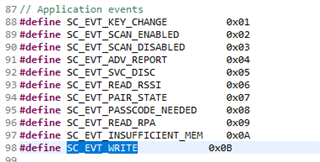
    defining the value for new event created.

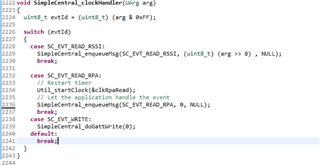
    function trigger inside the event created.

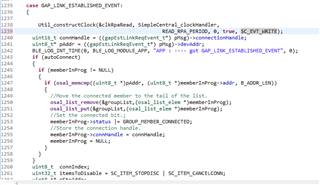
    function call after delay.

    Is this the right way to do it? 

    I tried by this method, but I am not able to write

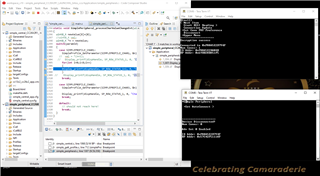
    The output in tera-term is as below:

    I tried verifying if the central is writing, by placing the breakpoint in peripheral code where it gets printed on tera term window, but I am not able to see any output.

  • Do you put a breakpoint on your SimpleCentral_doGattWrite in your SC_KEY_WRITE and make sure it is called?

  • yes, i checked that. In simple central, always the breakpoint hits SimpleCentral_doGattWrite() function and it executes completely. But neither Iam able to see the output " Write Sent : 0x00" in the tera term window of simple central, nor it is hitting breakpoint in simple peripheral and printing "Char 1: 0x00" in tera term window of simple peripheral.

    But the output is visible, if I do the same thing with button pressing operation.

  • I am not sure why you cannot make this work. Maybe try to refer to Anil’s example code at e2e.ti.com/.../rtos-launchxl-cc1352r1-how-to-write-read-data-from-peripheral-in-cc1352r1

  • I have gone through this link, I used the same program as the one written by Anil. He has written it for cc1352R1. But anyways, the functions remains the same.

    I had an error with UARTAPP.h file. 

    Instead, I replaced uart_write function in Anils code with Display_Printf function in SDK code.

    But with this, I could only discover the devices, but not connect and write.

  • If SimpleCentral_doGattWrite is triggered but you cannot see anything happens on your peripheral side, I would suggest you to debug into SimpleCentral_doGattWrite to see what exactly happens.

  • Please tell us when you're able to insert this delay and we'll be happy to continue to debug.

    Best,

    Nate

  • I have gone through Anils code, There is a modification done for connection handle part.

    req.handle = 0x0020;
    req.len = 1;
    if(count%2)
    req.pValue[0] = 0x01;
    else
    req.pValue[0] = 0x02;
    // req.pValue[0] = charVal = charVals[index];
    // req.pValue[0] = 0x01;
    // req.pValue[1] = 0x01;
    req.sig = 0;
    req.cmd = 0;
    count++;
    status = GATT_WriteCharValue(scConnHandle, &req, selfEntity);

    and some modifications are also done with respect to the MAC address:

    char ADV[15] = {0x00};
    memcpy(ADV,pAdvRpt->pData,11);
    if(memcmp(ADV+7,"Anil",4)==0)
    {
    PIN_setOutputValue(LEDPinHandle,IOID_7,!PIN_getOutputValue(IOID_7));
    UART_write(uart, "P F", 3);
    memcpy(MAC_ID,pAdvRpt->addr,6);
    }
    Index_Count++;
    if(memcmp(MAC_ID,pAdvRpt->addr,6) == 0)
    {
    PIN_setOutputValue(LEDPinHandle,IOID_6,!PIN_getOutputValue(IOID_6));
    Dummy_Count++;
    if((memcmp(scanList[0].addr,MAC_ID,6) == 0))
    {
    // memset(MAC_ID,0x00,6);
    SimpleCentral_doStopDiscovering(0); // for Stopping the Discovering
    SimpleCentral_doConnect(0);
    // SimpleCentral_doSelectConn(0);
    Util_stopClock( &startDiscClock); // after 1 sec of discovery it will hit here so need to stop the timerClock
    UART_write(uart, "P C", 3);

    Util_startClock( &Scanning_Interval_Clock);
    // Util_startClock( &ATT_Read_Clock);
    // Util_startClock( &ATT_Write_Clock);
    }
    }

    Can you please explain this part? So that I can use the same logic to connect and write to my target peripheral device.

    Regards,

    Anushka

  • Hi Anushka,

    I cannot be certain because this code lacks context, but it seems that the call to Util_startClock( &Scanning_Interval_Clock); triggers a clock called Scanning_Interval_Clock to begin counting. I'd be willing to be there's a callback defined in the code that triggers when the Scanning_Interval_Clock reaches the appropriate value (likely in an initializer function where the Scanning_Interval_Clock is likely defined).

    If you're still struggling on figuring out how to accomplish this, I'd also recommend reviewing the Timers.h section of the driverlib API reference. The examples are very well documented.

    Best,

    Nate