This thread has been locked.

If you have a related question, please click the "Ask a related question" button in the top right corner. The newly created question will be automatically linked to this question.

CC2642R: adjust the time in TRNG function

Part Number: CC2642R

Hello,

I would like to fill an entropy pool of 64 bytes in 10ms. 

After reading the documentation, I think I can do this by first changing the entropy pool compile flag to 8 (TRNGCC26XX_ENTROPY_POOL_SIZE=8) and recompiling TRNGCC26XX.c.  I have done this and I have verified that that entropyPoolBuffer has 8 elements instead of 4.

Second, I've created a second TRNG configuration with a entropy generation cycles of 60000.  When I open the handle, I've verified the samplesPerCycle on the object is 60000.

I then wrote the following test code for Simple Peripheral when I press the left button:

/*********************************************************************
 * @fn      SimplePeripheral_trng_test
 *
 * @brief   tests TRNG.
 *
 * @param   none
 */
static void SimplePeripheral_trng_test(void)
{
    static TRNG_Handle handle = NULL;

    CryptoKey entropyKey1, entropyKey2;
    uint8_t entropyBuffer1[32] = {0};
    uint8_t entropyBuffer2[32] = {0};

    if(handle == NULL)
        handle = TRNG_open(CONFIG_TRNG_1, NULL);

    if(handle != NULL)
    {
        //TRNGCC26XX_setSamplesPerCycle(handle, 60000);
        CryptoKeyPlaintext_initBlankKey(&entropyKey1, entropyBuffer1, 32);
        TRNG_generateKey(handle, &entropyKey1);
        CryptoKeyPlaintext_initBlankKey(&entropyKey2, entropyBuffer2, 32);
        TRNG_generateKey(handle, &entropyKey2);
        //TRNG_close(handle);  Leave TRNG handle open
    }
    else
    {
        ASSERT(0);
    }
}

I captured the following with Energy Trace and it's taking 50ms for the test code:
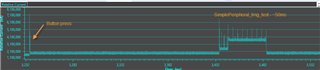
Can you help me understand why it's taking 50msec when I'm expecting 10ms.

Thanks,

Dawn

  • Hello Dawn,

    Thanks for posting your question, I've alerted the appropriate expert so please allow time for them to formulate a response.  Meanwhile it would be great if you could provide SysTick / Clock functionality or other Debug tools to confirm that these operations are consuming the time shown as compared to other simple peripheral tasks.

    Regards,
    Ryan

  • Dawn,

    Can you trying your test in a project without BLE? For example, a simple Ti-Driver example? The BLE stack uses the TRNG driver/hardware as well so I want to make sure that's not impacting your measurements. 

    In addition to the debugging resources Ryan linked, I would also suggest using the Execution Graph tool. This can show you task states to see if something else is blocking your task. https://dev.ti.com/tirex/explore/content/simplelink_academy_cc13x2_26x2sdk_5_20_02_00/modules/rtos/tirtos_basics/tirtos_basics.html#execution-graph 

    Regards,

    Daniel

  • Hello daniel_o,

    I've changed my test over to use buttonled example.  I've commented out all the init and runtime for the button example and replaced it with my TRNG test.  I also added the compile flag to increase the entropy pool to 8 elements and added the TRNG files to the project so they would compile with the new flag.  I've verified the SysTick and Clock functionality and everything is running as expected.  It took me a while to figure out the Execution Graph but I ran that and saw that only my 1 task/loop was running.  The execution graph is a very small snapshot in time so it was a bit hard relating it back to the Energy Trace.

    Question: Can the Energy Trace be run when logging is enabled for the Execution Graph. 

    I did get different results using the buttonled project but they are still not as expected.  Here's the Energy Trace:

    The test is called from the main loop of the buttonled task.  After each call, there is a Task_sleep of 100ms.  Every other time, the test calls TRNG_generateKey twice for two 32 byte keys as described in the code posted earlier.  Each time the 2 keys are generated, the graph shows it takes 40ms which matches up with the documentation for default cycle time and pool size but I'm changing those values as described in the first post to happen in 10ms so the first question is why does changing the entropy pool size and samples per cycle not seem to make a difference.

    The second question I have is how do I get the entropy pool to fill in the background?  I'm leaving the TRNG handle open and I can see a single spike on the energy trace at the 10ms mark where TRNG_generateKey is not being called, but it doesn't seem to help with the time in the next call of TRNG_generateKey.  I looked at the source code for TRNGCC26XX.c and it looks like TRNGCC26XX_hwiFxn() is what is filling the entropy pool at the end of getting the random bytes and not just when the driver is opened.  Could you help me understand how I can fill the entropy pool in the background.

    Thanks,

    Dawn

  • Dawn,

    I just wanted to let you know I've been able to recreate the issue of the driver taking 40mSec time to generate your keys regardless of the value of samplesPerCycle. I'm working on getting a solution as soon as possible.

    Regards,

    Daniel

  • Dawn,

    In the meantime, I want to point out that for security use case you should not modify the TRNG settings. An alternative to generate a non-secure random number would be to use a PRNG algorithm like what is available in source\ti\drivers\utils\Random.h. This example generates a random number in only 82 instructions (1.7uS). It seeds with a low-entropy source from the TRNG.

    Regards,

    Daniel

  • Hi Daniel, can you explain why "for security use case you should not modify the TRNG settings"?

    Also in the meantime, can you explain the second question I had above...how do I get the entropy pool to fill in the background?

    Dawn

  • Hey Dawn, I'm asking the TI Driver Software Development Team on your behalf and will get back with you as soon as possible.  Please allow for a delay as several employees are out of the office for U.S. Thanksgiving holiday.

    Regards,
    Ryan

  • They were able to provide a rapid response: "The TRNG works by sampling several free running oscillators and mixes these samples together in a linear feedback shift register. You need to let it do that for long enough for the output to be sufficiently random statistically.  Otherwise you would not have a uniform distribution of the output numbers over a large sample set.  This is not something we can observe by just eyeballing the numbers though. You would need to run statistical analyses on a very large dataset.

    The TRNG entropy pool is refilled asynchronously by a state machine. Once you call TRNG_init(), you need to do nothing. It will refill automatically."

    Please let me know if you have any more questions.

    Regards,
    Ryan

  • Hi Ryan,

    Thank you for all the information.  I get it now and we will not be changing the default setting for samples per second so there is no need to look into this issue any longer for our purposes.  Thanks again and you can consider this posting to be closed.

    Dawn