This thread has been locked.

If you have a related question, please click the "Ask a related question" button in the top right corner. The newly created question will be automatically linked to this question.

LAUNCHXL-CC26X2R1: current consumption in standby mode

Part Number: LAUNCHXL-CC26X2R1
Other Parts Discussed in Thread: ENERGYTRACE, SYSCONFIG

hi all

based on datasheet current consumption in standby mode should be around 1µA. 

and as stated in SDK, RTOS handle power management and device should enter standby mode when nothing to done. I have also defined the POWER_SAVINGS preprocessor symbol.

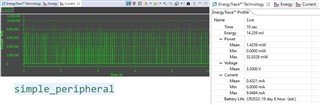
But results that I got from EnergyTrace does not confirm entering standby mode for simple peripheral example.
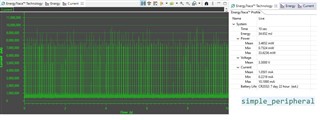
Then I tested pin standby example and again current consumption was way more than expected. 
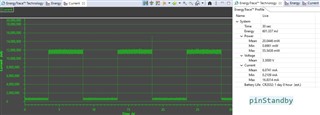
I also checked current consumption with multimeter. results were same with EnergyTrace for both simple peripheral and pin standby examples.

so what is the problem here? why current in standby mode is not as expected?

I have already checked SWRA478D and SPRUI18J documents. 

SDK version for simple peripheral :  SimpleLink CC13xx CC26xx SDK (5.30.01.01)

SDK version for pin standby : SimpleLink CC13x2 26x2 SDK (5.10.00.48)

code composer studio version : 11.1.0.00011 

Thanks in advance

  • Hi,

    Can you share picture of your test setup?

    Thanks

  • Hi kim,

    EnergyTrace will be most accurate when using the standalone tool and all jumper pins except for 3V3 and GND are disconnected, if using the debugger it is recommended to be free-running.  Otherwise the debugger circuitry will consume additional current.  The pinStandby example toggles a GPIO connected to an LED on a LaunchPad, so if this is not disconnected through the jumper then it will easily cause the power consumption observed.  There is a note on EnergyTrace in the LaunchPad Getting Started Guide.

    Regards,
    Ryan

  • Hi FI and Ryan,

    thanks for your response

    I use EnergyTrace in standalone mode but i had not removed some jumpers.

    now current consumption in pin standby example is as expected(around 1µA) when in standby mode.

    In simple peripheral example though, device enters standby and current consumption is ok in this mode, But there are some events that occurs each 100 ms so mean current is 0.5 mA.

    what are these events and how can I disable them?

    in fact, my goal is to have a program that sends data each 1 minute and enter standby mode rest of the time.

    how can I modify simple peripheral example to reach this goal?

    best regards

  • Hi kim,

    I assume that the spike observed every 100 ms is due to the advertising interval which is explained in Section 2 and Figure 4 of SWRA478.  It can be modified inside the SysConfig -> BLE -> Broadcaster Configuration -> Advertisement Set -> Advertisement Parameters module.  I would also recommend that you review the BLE5-Stack User's Guide and Scanning and Advertising SimpleLink Academy Lab.

    Regards,
    Ryan

  • Hi Ryan,

    Thanks for your help. I changed the advertising interval and current consumption decreased. 

    But as I intend to reach very low power, I wonder if I can remove these advertisement sets and if possible how can I do that?

    If not possible, is it ok to set interval time a long time like 480000 ms or use Limited Advertising as described in  Scanning and Advertising SimpleLink Academy Lab?

    best regards

  • I suggest that you follow the recommendations given in the resources I provided and post a new E2E question if you need more information about BLE advertising limits.

    Regards,
    Ryan