This thread has been locked.

If you have a related question, please click the "Ask a related question" button in the top right corner. The newly created question will be automatically linked to this question.

CC2650: CC2650 LaunchPad

Part Number: CC2650
Other Parts Discussed in Thread: , , CC2640, BLE-STACK,

I have a cc2650 launchpad. I am totally new to this product and started with TI RTOS (ADC project). After "Build All", "Debug" when I play. I don't see the LED 1 Toggling. I have connected the cc2650MODA with the lauchpad. Is my connection fine? 

Can anyone guide me through the steps for 1st TI RTOS lab?

Is there any video tutorial available for TI RTOS?

Thanking you in advance

  • Do you download ADC example to CC2650 on LAUNCHXL-CC2650 or cc2650MODA? If it's cc2650MODA, you might need to follow application note: using TI Certified Bluetooth® low energy Module (CC2650MODA) as Single-Chip Wireless MCU

  • Hi Muhammad,

    Are you using the LAUNCHXL-CC2650 or BOOSTXL-CC2650MODA?  As YK mentioned, it is critical that you use the correct software resources.  Here are further resources for either in TIREx:

    CC2650 LaunchPad Getting Started
    CC2650MODA BoosterPack Getting Started
    TI-RTOS for CC2650

    Regards,
    Ryan

  • I have downloaded the ADC example. I tried cc2650 booster pack and cc2650MODA.  with boosterPak I get  "Error connecting to the target:
    (Error -242 @ 0x0)" after pressing debug and with cc2650MODA I get "Error with PIN_init" after resume or F8.

  • Can you take some pictures to show me how you connect launchpad and cc2650 booster pack and cc2650MODA?

  • When I connect cc2650MODA, and after applying my code I get this error now

    "Cortex_M3_0: GEL Output: Board Reset Complete.
    Cortex_M3_0: GEL: Encountered a problem loading file: C:\ti\simplelink\ble_cc26xx_2_01_01_44627\Projects\ble\Sensor\WirelessPressureSensor_stack\Debug\WirelessPressureSensor_stack.out Could not open file
    Cortex_M3_0: Error: (Error -1170 @ 0x0) Unable to access the DAP. Reset the device, and retry the operation. If error persists, confirm configuration, power-cycle the board, and/or try more reliable JTAG settings (e.g. lower TCLK). (Emulation package 8.4.0.00006)
    Cortex_M3_0: Unable to determine target status after 20 attempts
    Cortex_M3_0: Failed to remove the debug state from the target before disconnecting. There may still be breakpoint op-codes embedded in program memory. It is recommended that you reset the emulator before you connect and reload your program before you continue debugging"

    This is how I connected the BoosterPack. I have used two jumpers 1)"XDS110 power" on the Lauchpad and 2) "Current Measure" on the BoosterPack. 

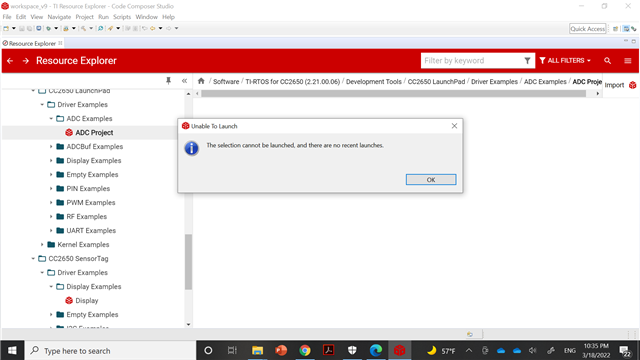
    When I select "ADC" I get this error

    When I debug it , I get this error

  • You should application note: using TI Certified Bluetooth® low energy Module (CC2650MODA) as Single-Chip Wireless MCU to connect debug when you use BOOSTXL-CC2650MODA. For your custom board, please make sure the Jtag connection is correct and your CC2650moda is well powered.

  • JTAG connections are verified previously, this custom board was previously tested by another person. It was working well.

    Can you tell me the reason why I get this error?

  • Typically this error occurs because the project build failed and thus the debugger cannot find a program to load.  Are you able to build the project successfully and is the described out file located in the directory shown?

    Regards,
    Ryan

  • When I build the project. I get this console, Can you locate the problem in the console?

    "


    **** Clean-only build of configuration Debug for project WirelessPressureSensor_stack ****

    "C:\\ti\\ccs930\\ccs\\utils\\bin\\gmake" -k -j 4 clean -O

    DEL /F "WirelessPressureSensor_stack.hex" "WirelessPressureSensor_stack.out"
    DEL /F "HAL\Common\hal_assert.obj" "HAL\Target\CC2650\Drivers\hal_flash_wrapper.obj" "HAL\Target\CC2650\Drivers\hal_rtc_wrapper.obj" "HAL\Target\CC2650\Drivers\hal_trng_wrapper.obj" "HAL\Target\CC2650\_common\mb_patch.obj" "ICallBLE\ble_dispatch.obj" "NPI\npi.obj" "OSAL\osal.obj" "OSAL\osal_bufmgr.obj" "OSAL\osal_cbtimer.obj" "OSAL\osal_clock.obj" "OSAL\osal_memory_icall.obj" "OSAL\osal_pwrmgr.obj" "OSAL\osal_snv_wrapper.obj" "OSAL\osal_timers.obj" "PROFILES\gap.obj" "PROFILES\gapbondmgr.obj" "PROFILES\gattservapp_util.obj" "PROFILES\sm_ecc.obj" "Startup\ble_user_config.obj" "Startup\icall_startup.obj" "Startup\osal_icall_ble.obj" "Startup\rom_jt.obj" "TOOLS\onboard.obj"
    DEL /F "HAL\Common\hal_assert.d" "HAL\Target\CC2650\Drivers\hal_flash_wrapper.d" "HAL\Target\CC2650\Drivers\hal_rtc_wrapper.d" "HAL\Target\CC2650\Drivers\hal_trng_wrapper.d" "HAL\Target\CC2650\_common\mb_patch.d" "ICallBLE\ble_dispatch.d" "NPI\npi.d" "OSAL\osal.d" "OSAL\osal_bufmgr.d" "OSAL\osal_cbtimer.d" "OSAL\osal_clock.d" "OSAL\osal_memory_icall.d" "OSAL\osal_pwrmgr.d" "OSAL\osal_snv_wrapper.d" "OSAL\osal_timers.d" "PROFILES\gap.d" "PROFILES\gapbondmgr.d" "PROFILES\gattservapp_util.d" "PROFILES\sm_ecc.d" "Startup\ble_user_config.d" "Startup\icall_startup.d" "Startup\osal_icall_ble.d" "Startup\rom_jt.d" "TOOLS\onboard.d"
    Could Not Find C:\ti\simplelink\ble_cc26xx_2_01_01_44627\Projects\ble\Sensor\WirelessPressureSensor_stack\Debug\HAL\Common\hal_assert.obj
    Could Not Find C:\ti\simplelink\ble_cc26xx_2_01_01_44627\Projects\ble\Sensor\WirelessPressureSensor_stack\Debug\HAL\Target\CC2650\Drivers\hal_flash_wrapper.obj
    Could Not Find C:\ti\simplelink\ble_cc26xx_2_01_01_44627\Projects\ble\Sensor\WirelessPressureSensor_stack\Debug\HAL\Target\CC2650\_common\mb_patch.obj
    Could Not Find C:\ti\simplelink\ble_cc26xx_2_01_01_44627\Projects\ble\Sensor\WirelessPressureSensor_stack\Debug\ICallBLE\ble_dispatch.obj
    Could Not Find C:\ti\simplelink\ble_cc26xx_2_01_01_44627\Projects\ble\Sensor\WirelessPressureSensor_stack\Debug\NPI\npi.obj
    Could Not Find C:\ti\simplelink\ble_cc26xx_2_01_01_44627\Projects\ble\Sensor\WirelessPressureSensor_stack\Debug\OSAL\osal.obj
    Could Not Find C:\ti\simplelink\ble_cc26xx_2_01_01_44627\Projects\ble\Sensor\WirelessPressureSensor_stack\Debug\PROFILES\gap.obj
    Could Not Find C:\ti\simplelink\ble_cc26xx_2_01_01_44627\Projects\ble\Sensor\WirelessPressureSensor_stack\Debug\Startup\ble_user_config.obj
    Could Not Find C:\ti\simplelink\ble_cc26xx_2_01_01_44627\Projects\ble\Sensor\WirelessPressureSensor_stack\Debug\TOOLS\onboard.obj
    Could Not Find C:\ti\simplelink\ble_cc26xx_2_01_01_44627\Projects\ble\Sensor\WirelessPressureSensor_stack\Debug\HAL\Common\hal_assert.d
    Could Not Find C:\ti\simplelink\ble_cc26xx_2_01_01_44627\Projects\ble\Sensor\WirelessPressureSensor_stack\Debug\HAL\Target\CC2650\Drivers\hal_flash_wrapper.d
    Could Not Find C:\ti\simplelink\ble_cc26xx_2_01_01_44627\Projects\ble\Sensor\WirelessPressureSensor_stack\Debug\HAL\Target\CC2650\_common\mb_patch.d
    Could Not Find C:\ti\simplelink\ble_cc26xx_2_01_01_44627\Projects\ble\Sensor\WirelessPressureSensor_stack\Debug\ICallBLE\ble_dispatch.d
    Could Not Find C:\ti\simplelink\ble_cc26xx_2_01_01_44627\Projects\ble\Sensor\WirelessPressureSensor_stack\Debug\NPI\npi.d
    Could Not Find C:\ti\simplelink\ble_cc26xx_2_01_01_44627\Projects\ble\Sensor\WirelessPressureSensor_stack\Debug\OSAL\osal.d
    Could Not Find C:\ti\simplelink\ble_cc26xx_2_01_01_44627\Projects\ble\Sensor\WirelessPressureSensor_stack\Debug\PROFILES\gap.d
    Could Not Find C:\ti\simplelink\ble_cc26xx_2_01_01_44627\Projects\ble\Sensor\WirelessPressureSensor_stack\Debug\Startup\ble_user_config.d
    Could Not Find C:\ti\simplelink\ble_cc26xx_2_01_01_44627\Projects\ble\Sensor\WirelessPressureSensor_stack\Debug\TOOLS\onboard.d
    Finished clean

    **** Build Finished ****

    **** Build of configuration Debug for project WirelessPressureSensor_stack ****

    "C:\\ti\\ccs930\\ccs\\utils\\bin\\gmake" -k -j 4 all -O

    "c:/ti/simplelink/ble_sdk_2_02_01_18/tools/lib_search/lib_search.exe" C:/TI/simplelink/examples/ble_examples_2_02_extra/examples/cc2650lp/spp_ble_server/ccs/stack/../../iar/stack/build_config.opt "c:/ti/simplelink/ble_sdk_2_02_01_18/tools/lib_search/params_split_cc2640.xml" c:/ti/simplelink/ble_sdk_2_02_01_18/src/../blelib "C:/TI/simplelink/examples/ble_examples_2_02_extra/examples/cc2650lp/spp_ble_server/ccs/stack/../config/lib_linker.cmd"
    makefile:217: recipe for target 'pre-build' failed
    process_begin: CreateProcess(NULL, c:/ti/simplelink/ble_sdk_2_02_01_18/tools/lib_search/lib_search.exe C:/TI/simplelink/examples/ble_examples_2_02_extra/examples/cc2650lp/spp_ble_server/ccs/stack/../../iar/stack/build_config.opt c:/ti/simplelink/ble_sdk_2_02_01_18/tools/lib_search/params_split_cc2640.xml c:/ti/simplelink/ble_sdk_2_02_01_18/src/../blelib C:/TI/simplelink/examples/ble_examples_2_02_extra/examples/cc2650lp/spp_ble_server/ccs/stack/../config/lib_linker.cmd, ...) failed.

    gmake[1]: [pre-build] Error 2 (ignored)

    makefile:184: recipe for target 'all' failed
    gmake[1]: *** No rule to make target 'C:/ti/simplelink/ble_sdk_2_02_01_18/src/components/hal/src/common/hal_assert.c', needed by 'HAL/Common/hal_assert.obj'.
    gmake[1]: *** No rule to make target 'C:/ti/simplelink/ble_sdk_2_02_01_18/src/components/hal/src/target/_common/hal_flash_wrapper.c', needed by 'HAL/Target/CC2650/Drivers/hal_flash_wrapper.obj'.
    gmake[1]: *** No rule to make target 'C:/ti/simplelink/ble_sdk_2_02_01_18/src/components/hal/src/target/_common/hal_rtc_wrapper.c', needed by 'HAL/Target/CC2650/Drivers/hal_rtc_wrapper.obj'.
    gmake[1]: *** No rule to make target 'C:/ti/simplelink/ble_sdk_2_02_01_18/src/components/hal/src/target/_common/hal_trng_wrapper.c', needed by 'HAL/Target/CC2650/Drivers/hal_trng_wrapper.obj'.
    gmake[1]: *** No rule to make target 'C:/ti/simplelink/ble_sdk_2_02_01_18/src/components/hal/src/target/_common/cc26xx/mb_patch.c', needed by 'HAL/Target/CC2650/_common/mb_patch.obj'.
    gmake[1]: *** No rule to make target 'C:/ti/simplelink/ble_sdk_2_02_01_18/src/icall/stack/ble_dispatch.c', needed by 'ICallBLE/ble_dispatch.obj'.
    gmake[1]: *** No rule to make target 'C:/ti/simplelink/ble_sdk_2_02_01_18/src/common/cc26xx/npi/stack/npi.c', needed by 'NPI/npi.obj'.
    gmake[1]: *** No rule to make target 'C:/ti/simplelink/ble_sdk_2_02_01_18/src/components/osal/src/common/osal.c', needed by 'OSAL/osal.obj'.
    gmake[1]: *** No rule to make target 'C:/ti/simplelink/ble_sdk_2_02_01_18/src/components/osal/src/common/osal_bufmgr.c', needed by 'OSAL/osal_bufmgr.obj'.
    gmake[1]: *** No rule to make target 'C:/ti/simplelink/ble_sdk_2_02_01_18/src/components/osal/src/common/osal_cbtimer.c', needed by 'OSAL/osal_cbtimer.obj'.
    gmake[1]: *** No rule to make target 'C:/ti/simplelink/ble_sdk_2_02_01_18/src/components/osal/src/common/osal_clock.c', needed by 'OSAL/osal_clock.obj'.
    gmake[1]: *** No rule to make target 'C:/ti/simplelink/ble_sdk_2_02_01_18/src/components/osal/src/common/osal_memory_icall.c', needed by 'OSAL/osal_memory_icall.obj'.
    gmake[1]: *** No rule to make target 'C:/ti/simplelink/ble_sdk_2_02_01_18/src/components/osal/src/common/osal_pwrmgr.c', needed by 'OSAL/osal_pwrmgr.obj'.
    gmake[1]: *** No rule to make target 'C:/ti/simplelink/ble_sdk_2_02_01_18/src/components/osal/src/mcu/cc26xx/osal_snv_wrapper.c', needed by 'OSAL/osal_snv_wrapper.obj'.
    gmake[1]: *** No rule to make target 'C:/ti/simplelink/ble_sdk_2_02_01_18/src/components/osal/src/common/osal_timers.c', needed by 'OSAL/osal_timers.obj'.
    gmake[1]: *** No rule to make target 'C:/ti/simplelink/ble_sdk_2_02_01_18/src/profiles/roles/gap.c', needed by 'PROFILES/gap.obj'.
    gmake[1]: *** No rule to make target 'C:/ti/simplelink/ble_sdk_2_02_01_18/src/profiles/roles/gapbondmgr.c', needed by 'PROFILES/gapbondmgr.obj'.
    gmake[1]: *** No rule to make target 'C:/ti/simplelink/ble_sdk_2_02_01_18/src/host/gattservapp_util.c', needed by 'PROFILES/gattservapp_util.obj'.
    gmake[1]: *** No rule to make target 'C:/ti/simplelink/ble_sdk_2_02_01_18/src/host/sm_ecc.c', needed by 'PROFILES/sm_ecc.obj'.
    gmake[1]: *** No rule to make target 'C:/ti/simplelink/ble_sdk_2_02_01_18/src/icall/stack/ble_user_config.c', needed by 'Startup/ble_user_config.obj'.
    gmake[1]: *** No rule to make target 'C:/ti/simplelink/ble_sdk_2_02_01_18/src/common/cc26xx/icall_startup.c', needed by 'Startup/icall_startup.obj'.
    gmake[1]: *** No rule to make target 'C:/ti/simplelink/ble_sdk_2_02_01_18/src/examples/simple_peripheral/cc26xx/stack/osal_icall_ble.c', needed by 'Startup/osal_icall_ble.obj'.
    gmake[1]: *** No rule to make target 'C:/ti/simplelink/ble_sdk_2_02_01_18/src/rom/rom_jt.c', needed by 'Startup/rom_jt.obj'.
    gmake[1]: *** No rule to make target 'C:/ti/simplelink/ble_sdk_2_02_01_18/src/common/cc26xx/onboard.c', needed by 'TOOLS/onboard.obj'.
    gmake[1]: Target 'main-build' not remade because of errors.
    gmake: *** [all] Error 2

    **** Build Finished ****"

  • Yes, the out file is located in the directory.

  • According to your build log, your application project needs ble_sdk_2_02_01_18. Do you install ble_sdk_2_02_01_18 in your C:/ti/simplelink/?

  • Yes, I already have it installed.

    This is the release note

    Release Notes BLE-Stack 2.2.1

  • According BLE-Stack 2.2.1 release note, the matched CCS version is 6.2.0. Maybe you should use CCS version is 6.2.0 to build your application. By the way, if you try to build original example in your installed BLE-Stack 2.2.1, can it be compiled successfully?

  • Installed the 6.2.0 version. It is not working in it either.

  • Do you try to build original example in your installed BLE-Stack 2.2.1 to check if it can be compiled successfully?

  • I am not sure how to do that?

    My steps 

    1) I copied the directory "C:\ti\simplelink\ble_sdk_2_02_01_18\examples\cc2650stk\sensortag_light"

    2) Open CCS version 6.2.0 and from "view" select "Explore Project"

    3) Right click in the "Explore Project window" click "Import CCS project" and past directory "C:\ti\simplelink\ble_sdk_2_02_01_18\examples\cc2650stk\sensortag_light"

    4) Check both App and stack 

    5) Build Stack first then build App

    6) Debug Stack first and I get this error, However I clicked proceed

    7) Then the error I get "Error connecting to the target:
    (Error -1040 @ 0x0)
    A firmware update is required for the debug probe. Click the "Update" button to update the firmware and connect to the debug target.
    DO NOT UNPLUG THE DEBUG PROBE DURING THE UPDATE.
    (Emulation package 6.0.407.3)"

    Are my steps correct?

    If not which step I am doing wrong?

  • Can you post your build error on stack project?

  • These are the error Message I get

    and

    This is the console data when I build stack

    **** Build of configuration FlashROM for project sensortag_light_cc2650stk_stack ****

    "C:\\ti\\ccs930\\ccs\\utils\\bin\\gmake" -k -j 4 all -O

    "C:/ti/simplelink/ble_sdk_2_02_01_18/examples/cc2650stk/sensortag_light/ccs/stack/../../../../../tools/lib_search/lib_search.exe" C:/ti/simplelink/ble_sdk_2_02_01_18/examples/cc2650stk/sensortag_light/ccs/stack/build_config.opt "C:/ti/simplelink/ble_sdk_2_02_01_18/examples/cc2650stk/sensortag_light/ccs/stack/../../../../../tools/lib_search/params_split_cc2640.xml" C:/ti/simplelink/ble_sdk_2_02_01_18/examples/cc2650stk/sensortag_light/ccs/stack/../../../../../src/../blelib C:/ti/simplelink/ble_sdk_2_02_01_18/examples/cc2650stk/sensortag_light/ccs/stack/../config/lib_linker.cmd
    <<< Using Library: host_pxxx.a >>>
    <<< Using Library: cc2640_ctrl_pxxx.a >>>
    <<< Using Library: cc26xx_hci_tl_none.a >>>
    <<< Not Modifying lib_linker.cmd. Stack configurations have not changed. >>>

    Building file: "C:/ti/simplelink/ble_sdk_2_02_01_18/src/common/cc26xx/icall_startup.c"
    Invoking: ARM Compiler
    "C:/ti/ccs930/ccs/tools/compiler/ti-cgt-arm_18.12.4.LTS/bin/armcl" --cmd_file="C:/ti/simplelink/ble_sdk_2_02_01_18/examples/cc2650stk/sensortag_light/ccs/stack/../../../../../src/config/build_components.opt" --cmd_file="C:/ti/simplelink/ble_sdk_2_02_01_18/examples/cc2650stk/sensortag_light/ccs/stack/build_config.opt" -mv7M3 --code_state=16 --abi=eabi -me -O4 --opt_for_speed=0 --include_path="C:/ti/ccs930/ccs/tools/compiler/ti-cgt-arm_18.12.4.LTS/include" --include_path="C:/ti/simplelink/ble_sdk_2_02_01_18/src/examples/sensortag/cc26xx/stack" --include_path="C:/ti/simplelink/ble_sdk_2_02_01_18/src/inc" --include_path="C:/ti/simplelink/ble_sdk_2_02_01_18/src/common/cc26xx" --include_path="C:/ti/simplelink/ble_sdk_2_02_01_18/src/components/hal/src/target/_common" --include_path="C:/ti/simplelink/ble_sdk_2_02_01_18/src/components/hal/src/target/_common" --include_path="C:/ti/simplelink/ble_sdk_2_02_01_18/src/components/hal/src/target" --include_path="C:/ti/simplelink/ble_sdk_2_02_01_18/src/components/hal/src/target/_common/cc26xx" --include_path="C:/ti/simplelink/ble_sdk_2_02_01_18/src/components/hal/src/inc" --include_path="C:/ti/simplelink/ble_sdk_2_02_01_18/src/components/osal/src/inc" --include_path="C:/ti/simplelink/ble_sdk_2_02_01_18/src/components/services/src/saddr" --include_path="C:/ti/simplelink/ble_sdk_2_02_01_18/src/components/services/src/nv/cc26xx" --include_path="C:/ti/simplelink/ble_sdk_2_02_01_18/src/components/services/src/nv" --include_path="C:/ti/simplelink/ble_sdk_2_02_01_18/src/components/icall/src/inc" --include_path="C:/ti/simplelink/ble_sdk_2_02_01_18/src/inc" --include_path="C:/ti/simplelink/ble_sdk_2_02_01_18/src/rom" --include_path="C:/ti/simplelink/ble_sdk_2_02_01_18/src/controller/cc26xx/inc" --include_path="C:/ti/simplelink/ble_sdk_2_02_01_18/src/components/services/src/aes/cc26xx" --include_path="C:/ti/simplelink/ble_sdk_2_02_01_18/src/components/npi/src" --include_path="C:/ti/simplelink/ble_sdk_2_02_01_18/src/common/cc26xx/npi/stack" --include_path="C:/ti/simplelink/ble_sdk_2_02_01_18/src/icall/inc" --include_path="C:/ti/simplelink/ble_sdk_2_02_01_18/src/profiles/roles" --include_path="C:/ti/tirtos_cc13xx_cc26xx_2_20_01_08/products/cc26xxware_2_24_02_17393" --c99 --define=CC26XX --define=CC26XXWARE --define=DATA= --define=EXT_HAL_ASSERT --define=FLASH_ROM_BUILD --define=GATT_NO_CLIENT --define=INCLUDE_AES_DECRYPT --define=NEAR_FUNC= --define=OSAL_CBTIMER_NUM_TASKS=1 --define=OSAL_MAX_NUM_PROXY_TASKS=8 --define=OSAL_SNV=1 --define=POWER_SAVING --define=USE_ICALL --define=xDEBUG --define=xDEBUG_ENC --define=xDEBUG_GPIO --define=xDEBUG_SW_TRACE --define=xNO_BLE_SECURITY --define=xPM_DISABLE_PWRDOWN --define=xTESTMODES --define=xTEST_BLEBOARD --diag_warning=225 --diag_suppress=48 --diag_suppress=16004 --diag_wrap=off --display_error_number --preproc_with_compile --preproc_dependency="Startup/icall_startup.d_raw" --obj_directory="Startup" "C:/ti/simplelink/ble_sdk_2_02_01_18/src/common/cc26xx/icall_startup.c"

    >> Compilation failure
    Startup/subdir_rules.mk:16: recipe for target 'Startup/icall_startup.obj' failed
    "C:/ti/simplelink/ble_sdk_2_02_01_18/src/common/cc26xx/icall_startup.c", line 47: warning #78-D: this declaration has no storage class or type specifier
    "C:/ti/simplelink/ble_sdk_2_02_01_18/src/common/cc26xx/icall_startup.c", line 47: error #66: expected a ";"
    "C:/ti/ccs930/ccs/tools/compiler/ti-cgt-arm_18.12.4.LTS/include/machine/_types.h", line 57: warning #12-D: parsing restarts here after previous syntax error
    "C:/ti/ccs930/ccs/tools/compiler/ti-cgt-arm_18.12.4.LTS/include/machine/_types.h", line 88: error #20: identifier "__int8_t" is undefined
    "C:/ti/ccs930/ccs/tools/compiler/ti-cgt-arm_18.12.4.LTS/include/sys/_stdint.h", line 37: error #20: identifier "__int8_t" is undefined
    3 errors detected in the compilation of "C:/ti/simplelink/ble_sdk_2_02_01_18/src/common/cc26xx/icall_startup.c".
    gmake[1]: *** [Startup/icall_startup.obj] Error 1
    gmake[1]: Target 'main-build' not remade because of errors.
    gmake: *** [all] Error 2
    makefile:185: recipe for target 'all' failed

    **** Build Finished ****

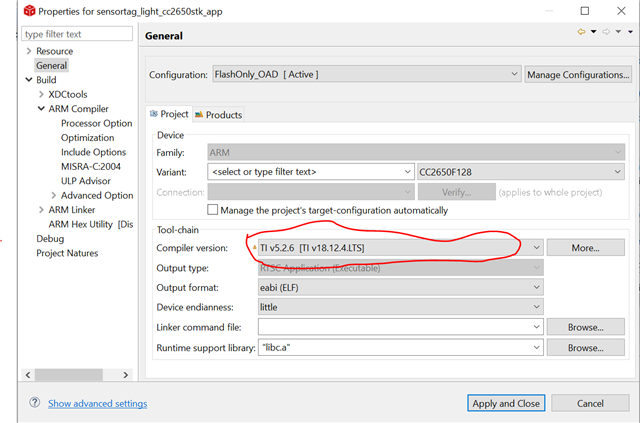
  • I try to install ble_sdk_2_02_01_18 to build sensortag_light_cc2650stk_stack and sensortag_light_cc2650stk_app successfully. Do you use TI v5.2.6 as Compiler version in your project?

  • The Parenthesis part is different, How can I change it?

  • You have to install version 5.2.6 and then you can select it.

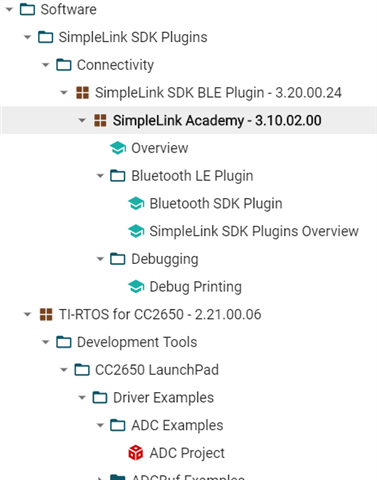
  • Thanks for the compiler. I have successfully built the sensortag_light project. I am trying to find the Lab in simple link academy using resource explore the option. I don't see any project titled "Lab 1".  Under software I have two options: 1) Simple link SDK and TI-RTOS.

    Where I can find the Lab 1 for CC2650 LaunchPad?

  • I have downloaded the simplelink_academy but I cannot navigate the lab in "Resource Explore"

  • CC2650 SimpleLink Academy has been deprecated for a while and I don't think it can be navigated in "Resource Explore"

  • Then How can I build Lab 1

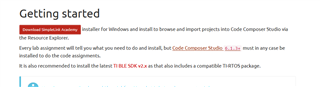
  • Do you mean to run this?

  • Yes, How to run? I mean I am new to this product. I don't know much about it.

  • You can download and install CC2650 SimpleLink Academy to C:\ti\simplelink_academy_01_11_00_0000 and use CCS to import ble_projectzero from C:\ti\simplelink_academy_01_11_00_0000\modules\projects\ folder.

  • I have the folowing four folders in project zero

    which one I should build first?

  • You should build project_zero_stack_cc2650 first.

  • To run a project zero do we need any target. I mean should I connect the booster pack or run it with out booster pack?

    Also tell me the sequence of the project I need to build and debug in the following list

  • If you mean to run it on CC2650 booster pack, you should do the following steps.

    1. build project_zero_stack_cc2650 and download it to your CC2650

    2. Revise project_zero_app_cc2650launchxl according to CC2650MODA pin out to build and download it to your CC2650 booster pack.

  • When I build Project_zero_stack_cc2650. it shows many error in consle 

    I just simple need to click on "build project" or need something other than that?

    Alos I don't know, how to revise project_zero_app_cc2650launchxl. I mean I am using xds110 Jtag for debug. can you explain the process?

  • What build error do you see on your console? For revising project_zero_app_cc2650launchxl according to CC2650MODA pin out, you should follow application note: using TI Certified Bluetooth® low energy Module (CC2650MODA) as Single-Chip Wireless MCU.

  • I was following the document and I wast stuck in  page 5 whcih say update "C:\ti\simplelink\ble_sdk_2_02_01_18\src\boards\CC2650_LAUNCHXL\CC2650_LAUNCHXL.h." for correct mapping.

    when I go to the directory and past the code in page 6 i.e. 

    /* RF Configuration definition */
    #define CC2650EM_5XD /* RF Configuration for CC2650 Module */
    // #define CC2650EM_7ID /* Default RF config for CC2650 LaunchPad */
    /* Mapping of pins to board signals using general board aliases
    * <board signal alias> <pin mapping>
    */
    /* Discrete outputs */
    #define Board_RLED IOID_4
    #define Board_GLED IOID_2
    #define Board_LED_ON 1
    #define Board_LED_OFF 0
    /* Discrete inputs */
    #define Board_BTN1 PIN_UNASSIGNED
    #define Board_BTN2 PIN_UNASSIGNED
    /* UART Board */
    #define Board_UART_RX IOID_1 /* RXD */
    #define Board_UART_TX IOID_0 /* TXD */
    #define Board_UART_CTS PIN_UNASSIGNED /* CTS */
    #define Board_UART_RTS PIN_UNASSIGNED /* RTS */
    /* SPI Board */
    #define Board_SPI0_MISO IOID_12 /* RF1.20 */
    #define Board_SPI0_MOSI IOID_11 /* RF1.18 */
    #define Board_SPI0_CLK IOID_10 /* RF1.16 */
    #define Board_SPI0_CSN PIN_UNASSIGNED
    #define Board_SPI1_MISO PIN_UNASSIGNED
    #define Board_SPI1_MOSI PIN_UNASSIGNED
    #define Board_SPI1_CLK PIN_UNASSIGNED
    #define Board_SPI1_CSN PIN_UNASSIGNED
    /* I2C */
    #define Board_I2C0_SCL0 PIN_UNASSIGNED
    #define Board_I2C0_SDA0 PIN_UNASSIGNED
    /* SPI */
    #define Board_SPI_FLASH_CS PIN_UNASSIGNED
    #define Board_FLASH_CS_ON 0
    #define Board_FLASH_CS_OFF 1"

    It does not work and also changes the file type from ".h" to a notepad or Wordpad file.

    Is my method correct?

    How to change the pin mapping directly in ccs?

  • I usually click the file, such as CC2650_LAUNCHXL.h, in CCS Project Explorer to open and revise it in CCS editor.

  • What pin Information do I need to revise?

    Where to get the Information that I need to change?

  • You should ask yourself which pin on your CC2650MODA your application wants to use as LEDs, Buttons, or other peripheral to revise accordingly. I cannot help much on your own application and HW pin out.

  • I am using boosterPack. I am not sure about the pin information. I just want to run any simple application to understand how it works.

    Do you have any resources, Where I can learn working on CCS and cc2650 from the scretch?

  • If you follow steps in application note: using TI Certified Bluetooth® low energy Module (CC2650MODA) as Single-Chip Wireless MCU, you should be able to run simple_peripheral example in ble_sdk_2_02_01_18 on your CC2650MODA boosterPack.

  • When I run Simple_peripheral example, I get this error

    "Cortex_M3_0: GEL: Encountered a problem loading file: C:\ti\simplelink\ble_sdk_2_02_01_18\examples\cc2650stk\simple_peripheral\ccs\app\FlashOnly_OAD_ExtFlash\simple_peripheral_cc2650stk_app.out Could not open file"

  • I suppose you should use simple_peripheral for cc2650 launchpad not cc2650stk and you have to make sure you connect XDS110 to your CC2650 correctly.

  • Make sure the project builds cleanly (i.e. no errors), the Project Properties -> Build -> Arm Linker -> Basic Options -> Specify output file name contains a location (like ${ProjName}.out), and the directory to confirm the existence of this generated file.

    Regards,
    Ryan

  • I get error "Cortex_M3_0: GEL: Encountered a problem loading file: C:\Users\C2U Project\OneDrive - BUITEMS\Desktop\ProjectZero\project_zero_stack_cc2650\Debug\project_zero_stack_cc2650.out Could not open file" 

    Do I need to update the file directory in the "Specify output file'?

  • I assume that the directory listed is nonexistent and that your workspace variables are corrupted.  They continue to change each time you attempt to share this error.  You will need to confirm that the .out file is being created in the folder pointed to by the Build -> Builder using the Build -> Environment variables and that your Debug Configurations understand the correct location from which to source the output.

    Regards,
    Ryan

  • each time I run a project, I create a different workspace folder for it. Is it because of that?

  • How do you create a different workspace folder each time you run a project?

  • before launching CCS, Brows=> Create new folder and Launch

  • I recommend using one workspace and creating several projects within it.

    Regards,
    Ryan