This thread has been locked.

If you have a related question, please click the "Ask a related question" button in the top right corner. The newly created question will be automatically linked to this question.

LAUNCHXL-CC1352R1: SysMin linker error

Part Number: LAUNCHXL-CC1352R1
Other Parts Discussed in Thread: SYSBIOS

I would like to add SysMin to an existing example project (dmm_zr_light_remote_display_oad_app_CC1352R1_LAUNCHXL_tirtos_ccs). I adjusted the ble_oad_releaes.cfg to look like the following:

var SysMin = xdc.useModule('xdc.runtime.SysMin');
SysMin.bufSize = 768;
System.SupportProxy = SysMin;
//var SysCallback = xdc.useModule('xdc.runtime.SysCallback');
//System.SupportProxy = SysCallback;
//SysCallback.abortFxn = "&myUserAbort";
//SysCallback.exitFxn  = "&myUserExit";
//SysCallback.flushFxn = "&myUserFlush";
//SysCallback.putchFxn = "&myUserPutch";
//SysCallback.readyFxn = "&myUserReady";

I added the '-DCUI_DISABLE' option to the file dmm_zr_light_remote_display_app.opts and using the System_printf() function inside the ZStack application task. When I try to build the code i get the following linker error:

 undefined                            first referenced                                                                                                                                       
  symbol                                  in file                                                                                                                                            
 ---------                            ----------------                                                                                                                                        
 xdc_runtime_SysMin_Module_startup__E /Users/aforino/workspace_v11/dmm_zr_light_remote_display_oad_app_CC1352R1_LAUNCHXL_tirtos_ccs/Release/configPkg/package/cfg/ble_oad_release_pem4f.oem4f
 xdc_runtime_SysMin_abort__E          /Users/aforino/workspace_v11/dmm_zr_light_remote_display_oad_app_CC1352R1_LAUNCHXL_tirtos_ccs/Release/configPkg/package/cfg/ble_oad_release_pem4f.oem4f
 xdc_runtime_SysMin_exit__E           /Users/aforino/workspace_v11/dmm_zr_light_remote_display_oad_app_CC1352R1_LAUNCHXL_tirtos_ccs/Release/configPkg/package/cfg/ble_oad_release_pem4f.oem4f
 xdc_runtime_SysMin_flush__E          /Users/aforino/workspace_v11/dmm_zr_light_remote_display_oad_app_CC1352R1_LAUNCHXL_tirtos_ccs/Release/configPkg/package/cfg/ble_oad_release_pem4f.oem4f
 xdc_runtime_SysMin_putch__E          /Users/aforino/workspace_v11/dmm_zr_light_remote_display_oad_app_CC1352R1_LAUNCHXL_tirtos_ccs/Release/configPkg/package/cfg/ble_oad_release_pem4f.oem4f
 xdc_runtime_SysMin_ready__E          /Users/aforino/workspace_v11/dmm_zr_light_remote_display_oad_app_CC1352R1_LAUNCHXL_tirtos_ccs/Release/configPkg/package/cfg/ble_oad_release_pem4f.oem4f

In my understanding the SysMin module defines the functions like abort and exit so why do I get a linking error?

  • Hi Aforino, 

    Which version of the simplelink SDK are you using? Have you tried to perform a clean build after adding the module to ble_oad_releaes.cfg ?

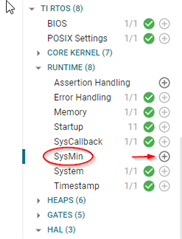
    I also see that there is a SysMin module in syscfg which is not enabled by default in some examples. Is it enabled in your application?

    Regards,

    Fausto

  • Hi Fausto, 

    I am using the following SDK: simplelink_cc13xx_cc26xx_sdk_6_10_00_29. I did not enable SysMin in syscfg but also I do not have the TI RTOS option as you do:  

    Do I need to enable SysMin in syscfg also in the SDK version 6.10.00.29. And if yes how do I do it? Is this maybe only the case in the TI-RTOS7 examples?

    Best,

    Alessandro 

  • Hi Alessandro,

    I apologize for the delay. You are correct, my settings are relative to tirtos7 and I had missed that you were using tirtos, so you can disregard my previous comment. 

    Starting from a clean dmm_zr_light_remote_display_oad_app_CC1352R1_LAUNCHXL_tirtos_ccs example, I followed the modification indicated in the TIRTOS documentation, also indicated in your first comment, to the file ble_oad_release.cfg.

    This succesfully build without any errors.

    I then modified 

    -DxCUI_DISABLE to -DCUI_DISABLE in dmm_zr_light_remote_display_app.opts and i got an unresolved symbol error, however unrelated to SysMin

     undefined                       first referenced
      symbol                             in file     
     ---------                       ----------------
     zclSampleLight_dmmPausePolicyCb <whole-program> 

    Have you made any advancements on this? 

    Regards,

    Fausto

  • Hi Fausto,

    I tried with the armcl compiler (the 'ccs' version) and also saw the same result that it works as expected. However I was using the tiarmclang compiler (the 'ticlang' version) example and this will not compile with the aforementioned changes to the ble_oad_release.cfg.

    Regarding the error you get: Yes I encountered this error as well. Its a bug present in the zcl_samplelight.c file in the simplelink SDK. The definition of

    zclSampleLight_dmmPausePolicyCb()

    should be before line 2788 because it does have nothing to do with the CUI and should not be undefined by the CUI_DISABLE flag.

    Best,

    Alessandro

  • Hi Alessandro,

    I also tried the ticlang version of the example dmm_zr_light_remote_display_oad_app_CC1352R1_LAUNCHXL_tirtos_ticlang and could build it with sysmin enable without encountering errors. 

    Have you tried adding sysmin to a clean example taken from the simplelink SDK?

    Regards,

    Fausto

  • Hi Fausto,

    For the above examples I tried a completely clean example and a freshly installed simplelink SDK. However I found the problem now: when I change the ble_oad_release.cfg and do a rebuild inside of CCS the sysbios (rom_sysbios.am4f) is not triggered. Therefore whenever I need to change ble_oad_release.cfg I need to execute a 'make' command inside of 'simplelink_cc13xx_cc26xx_sdk_6_10_00_29/source/ti/dmm/apps/common/tirtos/src/sysbios'. 

    I am using macOS and my guess is that this is not the case on Windows which is why it works for you normally. There seems to be a problem with the build system on macOS but for me the manual creation of the rom_sysbios.am4f works for now. 

    Best,

    Alessandro

  • Hi Alessandro, 

    Thanks a lot for your update. I do not have a mac here to try the build, but what you describe sounds very reasonable. I will close the thread then.

    Best regards,

    Fausto