This thread has been locked.

If you have a related question, please click the "Ask a related question" button in the top right corner. The newly created question will be automatically linked to this question.

CC2642R: Bonding issue

Part Number: CC2642R
Other Parts Discussed in Thread: SYSCONFIG

Hi team 

when trying to debug my app for OAD I ends on  a bonding issue 

strangely on my laptop bonding is not working I see the connection but it falls off immediatly 

I have no display or button on my custom board and I've try with and without MITM enable in syscfg

what is the most strange is that on my phone bonding is working flawlessly

I'have dump a BT exchange with wireshark if someone want's more details

drive.google.com/.../view

than'ks for any help 

  • Hi,

    Thank you for reaching out.

    In order to debug the issue I would recommend the following:

    - Mass erase the two devices, re-flash then and re-run the test. Doing so will ensure old bonding information is erased.

    - Leverage the debugging guide (see here). Among others, I would recommend to identify the error codes obtained on both devices.

    If more assistance is needed, please specify the devices used, the SDK version and the examples leveraged.

    As a side not, I cannot open the document you have linked - please consider using the "insert file" option.

    Best regards,

  • Hi!

    I've already try the mass errase it has no effect 

    sorry for the file you can't open here's a zip  

    bonding issue.zip

    I will try to do a dump with smartrf packet sniffer 

    I'm working on custom board with a cc2642R.. regarding SDK rev right now I'm running the 6.30.1.03 but I can try going back to 6.20 or something else
    thank's for the help

  • Hi again,

    I have managed to review the sniffer log provided. I see packet 484 "Pairing Failed: Unspecified Reason" (0x08). Typically this error occurs when the device experiences a heap issue.

    In order to debug this, I would recommend to asses using the debugging guide whether an heap issue is occurring.

    By the way, I have noticed a few "Error response - Attribute Not Found". Even if these are not related to this issue, they may require your attention at one point.

    Best regards,

  • thank's 

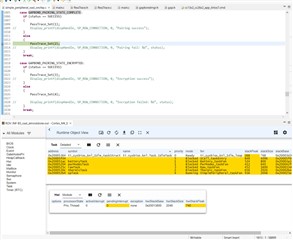
    I just finish to trace inside simple peripheral bond callback the status 

    i get a GAPBOND_PAIRING_STATE_COMPLETE with status 0x08 
    I will check heap tahnks 

  • that doesn't look like a heap overflow


    regarding HEAP MGR

  • ok last test 

    I took the default permanent app and default simple peripheral on chip oad exemple and I've flash it into launchpad 

    and I have same issue Disappointed

  • Hi,

    Sorry you are experiencing this.

    Could you please specify the following?

    - which device is used as central?

    - do you manage to reproduce the issue with the non-OAD simple_peripheral? Do you manage to reproduce with older SDK versions?

    - have you tried to collect Bluetooth sniffer traces both with the phone and the other central and compare?

    Regards,

  • I get trouble to collect BT logs from the phone so it quite hard to compare BT logs from pc and phone 

    I have no issue when trying to bond in a non OAD configuration

    when using my laptop as central (and get in trouble for bonding ) the device is a  Qualcomm QCA61x4A 

  • Hi again,

    I have noticed one more element that you may want to consider.

    Based on the log you have provided, it looks like the debug keys are used for pairing - this can be seen in packet 416. "Debug Mode" keys as defined in Vol 3, Part H, section 2.3.5.6.1 of the Bluetooth 5.2 Core specifications.

    Devices and stacks generally have ways to allow/disallow working with debug keys. For example, the CC2642R will allow you to do so using the function GAPBondMgr_SetParameter with parameter GAPBOND_ALLOW_DEBUG_KEYS:

    /**
     * Allows to receive debug keys during pairing, in the public keys exchange phase.
     *
     * If TRUE,  receiving debug keys is allowed.
     * If FALSE, receiving debug keys is not allowed, pairing will fail with invalid
     *           paramters code.
     *
     * @note if both devices are allowing it, and both are sending debug keys, it
     *       will fail due to mirror attack suspicion
     *
     * size: uint8_t
     *
     * default: TRUE
     *
     * range: TRUE (allow receiving debug keys).
     *        FALSE(reject debug keys).
     */
    #define GAPBOND_ALLOW_DEBUG_KEYS       0x416

    For information, Microsoft Windows should also disallow usage of the debug mode keys.

    Could you please check whether something in this direction could help?

    Regards,

  • hello clément thanks for your kind help 

    I've made 2 test 

    one disabling debug keys into sysconfig bond param panel 

    second one disabling also MITM protection 

    unfortunately nothing change Disappointed it's so sad because every thong is working great on phone but all the serial injection and other calibration tool i Have made are working on laptop 

    bonding no debug key.zipbonding no debug key no MITM protection .zip

  • ok guys I think I'm fed up with this issue

    to simplify as OAD setup is working perfectly I will try to use Host_Test app and launchpad as gateway between devices and and my laptop 

    I'm looking at Host_test source to understant API between Host_test and BTool 

    I have only 2 questions 

    it looks that host_test's blestack is not defined using sysconfig I dont know how many devices it can connect at the same time (as my primary objective is to connect to bunch of device during manufactoring for custom data injection and calibration. 

    second question is there somewhere a definition of API  of serial between BTool and Host_test ( avoiding losing time again in source diving)

    thank's again

  • Hi,

    I am sorry to hear this. For information, the two last traces you have shared show a different issue (Pairing failed: Invalid Parameters (0x0A)). In addition to that, I am not sure SysConfig in the version you are using can overwrite GAPBOND_ALLOW_DEBUG_KEYS, this is why it might be better to add the call I mentioned.

    In general, questions about a different topic should be asked in a separate thread. I'll make an exception for this time, but, in case of follow-up questions, please open a new thread.

    - Using host_test and BTool with CC2642, you should manage to connect up to eight devices. Actually, there is no SysConfig configuration for this parameter as unlike simple_central example, the number of connections is not limited by the application running on the device.

    - The API exposed by host_test is the Bluetooth HCI API (defined in the Bluetooth specifications). Even if TI's documentation cannot replace the Bluetooth specification, you may want to review this document. To these, TI adds its own Vendor Specific Commands (see Vendor Specific Command Guide). 

    I hope this will help,

    Best regards,

  • thank's for your answer Ineed to work on somthing else but I will try soon the GAPBOND_ALLOW_DEBUG_KEYS set in code than'ks for info on different topic and sorry to mix topics (I promess no to do in the future ;) ) 

  • WOW !! I've not made a lot of test bute it looks juste adding 

    uint16_t r=0;
      bStatus_t res=GAPBondMgr_SetParameter(GAPBOND_ALLOW_DEBUG_KEYS,1,&r);

    into my main task init solved all my issues !!! 

    thank's for your help again clement !! 

    ps : why it's has a different behaviour in or out OAD context stays a mistery ;)

  • nop sorry I got just one bind correct ( the first one ... sorry for this mistakes)

  • Hi,

    Great to see it is working now!

    Well done in getting this debugged :)

    Best regards,