This thread has been locked.

If you have a related question, please click the "Ask a related question" button in the top right corner. The newly created question will be automatically linked to this question.

CC2340R5: Connection fail

Part Number: CC2640R2F
Other Parts Discussed in Thread: CC2340R5, SYSCONFIG

Hi Team, 

My customer is using latest CC2340 SDK and test simple_peripherial on CC2340R5 EVM.

When power on after 20 minutes, the following two issues are founded :

1. TI IOS APP: SimpleLink Starter can not find CC2340R5 EVM.

2. TI IOS APP: SimpleLink Starter can find CC2340R5 EVM but connection can not be established.

Please help to provide comments.

Thanks.

  • Hey Mike,

    Thanks for posting on e2e. To confirm my understanding, does this issue occur after leaving the device for 20 minutes? After the waiting time, the customer tries to connect using the TI IOS app and is unable to. Is this correct? Does this issue occur if the customer attempts to connect soon after the device reset?

    Has this only been testing using an iOS device? Any observations on Android to share?

    I've assigned this post to a colleague who can comment further.

  • Hi Mike,

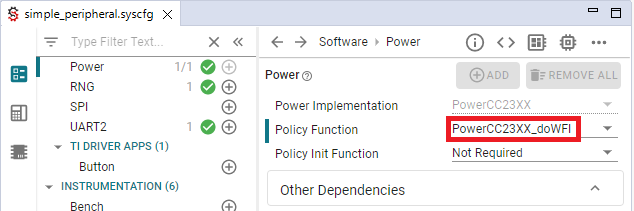
    This issue looks like one issue we have identified and we will be fixed in a future release. A workaround is to change the power policy to "PowerCC23XX_doWFI." To do so, using SysConfig, navigate to TI Drivers > Power and update “Policy Function” to “PowerCC23XX_doWFI”

    This workaround prevents the device to enter standby.

    Best regards,

  • Hi,

    It works. 

    Thanks for your prompt reply.

  • Hi, 

    Please the following comments:

    does this issue occur after leaving the device for 20 minutes?

    --> Actually, it shall be 18 min.

    After the waiting time, the customer tries to connect using the TI IOS app and is unable to. Is this correct?

    --> Yes

    Does this issue occur if the customer attempts to connect soon after the device reset?

    --> No. It  will connect successfully when  connect soon after the device reset.

     Has this only been testing using an iOS device? Any observations on Android to share?

    --> IOS device and Android both can reproduce this issue.

    Thanks.

  • Hi Mike,

    Thank you for the details.

    The issue has been identified and should be fixed in next release.

    For the moment, I recommend to reset the device every 10 minutes or so to avoid the apparition of the issue.

    Please note I will be out of the office until mid-January. If additional support is needed, I'll kindly ask you to open a new thread.

    Best regards,