A related question is a question created from another question. When the related question is created, it will be automatically linked to the original question.
If you have a related question, please click the "Ask a related question" button in the top right corner. The newly created question will be automatically linked to this question.
In the SimpleLink LowPower F3 SDK 7.10 release, the RSSI Reading feature is not yet fully implemented. This feature is under final test and expected to be included soon in the SDK. Reading scan reports and and advertising reports is supported and can be implemented using the basic_ble example. To confirm, are you using the 7.10 SDK release available on ti.com? We will provide some additional information on how to read the scan reports and scan advertisements soon.
In order to enable the basic_ble example to handle scan reports you will need to add it to the Event Handler. The Handler can be found in the app_central.c file located inside the app folder of the project.
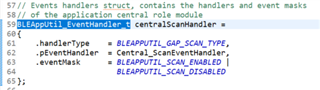
First you must need to register the event in for the handler. This is done in the BLEAppUtil_EventHandler_t struct. By default it is
you will need to add the ADV_Report eventmask (Ex.):
// Events handlers struct, contains the handlers and event masks
// of the application central role module
BLEAppUtil_EventHandler_t centralScanHandler =
{
    .handlerType    = BLEAPPUTIL_GAP_SCAN_TYPE,
    .pEventHandler  = Central_ScanEventHandler,
    .eventMask      = BLEAPPUTIL_SCAN_ENABLED |
                      BLEAPPUTIL_SCAN_DISABLED |
                      BLEAPPUTIL_ADV_REPORT
};
*This is found in the global variable section in the app_central.h file.
Once registered you can then add a case for the handler to process whenever the device receives an adv_report.
* @fn Central_ScanEventHandler
*
* @brief The purpose of this function is to handle scan events
* that rise from the GAP and were registered in
* @ref BLEAppUtil_registerEventHandler
*
* @param event - message event.
* @param pMsgData - pointer to message data.
*
* @return none
*/
void Central_ScanEventHandler(uint32 event, BLEAppUtil_msgHdr_t *pMsgData)
{
BLEAppUtil_ScanEventData_t *scanMsg = (BLEAppUtil_ScanEventData_t *)pMsgData;
switch (event)
{
case BLEAPPUTIL_SCAN_ENABLED:
{
centralScanIndex = 0;
MenuModule_printf(APP_MENU_SCAN_EVENT, 0, "Scan status: Scan started...");
break;
}
case BLEAPPUTIL_SCAN_DISABLED:
{
uint8 i;
for(int i = 0; i < APP_MAX_NUM_OF_ADV_REPORTS; i++)
{
memset(¢ralScanRes[i], 0, sizeof(App_scanResults));
}
// Go over the advertise reports that was saved in the host level and save it
for (i = 0; i < scanMsg->pBuf->pScanDis.numReport; i++)
{
GapScan_Evt_AdvRpt_t advReport;
// Get the address from the report
GapScan_getAdvReport(i, &advReport);
// Add the report to the scan list
Central_addScanRes(&advReport);
}
MenuModule_printf(APP_MENU_SCAN_EVENT, 0, "Scan status: Scan disabled - "
"Reason: " MENU_MODULE_COLOR_YELLOW "%d " MENU_MODULE_COLOR_RESET
"Num results: " MENU_MODULE_COLOR_YELLOW "%d " MENU_MODULE_COLOR_RESET,
scanMsg->pBuf->pScanDis.reason,
scanMsg->pBuf->pScanDis.numReport);
break;
}
BLEAPPUTIL_ADV_REPORT:
{
//Process the adv_report; Maybe print them?
break;
}
default:
{
break;
}
}
}
For good reference the Adv_report looks like the following