This thread has been locked.

If you have a related question, please click the "Ask a related question" button in the top right corner. The newly created question will be automatically linked to this question.

CC2340R5: Central is going to hang when invoke function is given to the gpio callback

Part Number: CC2340R5
Other Parts Discussed in Thread: SYSCONFIG

Hi

I'm working on BLE central. My requirement involves enabling a GPIO callback and executing a function in response to the gpio interrupt. Inside the callback function, I am invoking a handling function "BLEAppUtil_invokeFunction(HandlingFunction2, pData);"  to send some data to the peripheral. But as soon as I give the gpio interrupt, the system is going to hang state. Hang state as in, it is not responding, it needs a power restart to function again properly.

Note: I have confirmed the system is acting strange when I am giving BLEAppUtil_invokeFunction(HandlingFunction2, pData); fxn. and HandlingFunction2 fxn is nothing but a uart message.

Help me to resolve this issue ASAP. I'm using the latest SDK, "simplelink_lowpower_f3_sdk_7_10_00_35", basic_ble code in Central mode.

  • Hi,

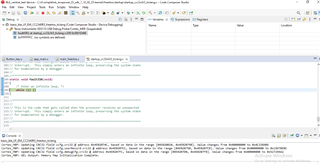
    Thank you for reaching out. Can you share a code snippet of the gpio callback where you are calling the BLEAppUtil_invoteFunction() as well as the HandlingFunction2(). Could you share a screenshot of the call stack (when you pause executiong when it hands can you share a picture of the debug window)?

    Also, the 7.20 SDK has been released recently and contains many improvements and bug fixes. I would highly recommend using this SDK release going forward.

    Best Regards,

    Jan

  •  

    void BUTTON_ENBLE(keysPressedCB_t appKeyCB){
        GPIO_init();
        GPIO_setCallback(START_BUTTON, StartButtonfxn);
        /* Enable interrupts */
        GPIO_enableInt(START_BUTTON);
    
    }
    void StartButtonfxn(uint_least8_t index)
    {
        keysPressed = 0;
        char *pData;
        if (GPIO_read(START_BUTTON) == 0 )
        {
            keysPressed |= KEY_START_PRESS;
            startPressed = 1;
            if (!functionCalled)
                {
                char leadMePacket[4] = { 0x24, 0xAC, 0x04, 0x24 };
                pData = &leadMePacket[0];
                BLEAppUtil_invokeFunction(HandlingFunction2, pData);
                functionCalled = 1; // Set the flag to indicate the function has been called
                UART2_write(uart, "Button_start",12,0);
                }
        }
    } 

    Debug window

    "Also, the 7.20 SDK has been released recently and contains many improvements and bug fixes. I would highly recommend using this SDK release going forward."

    Sure, but from my end, it will take some while to change the SDK. Soon I will be working on it. Meanwhile, please do help me figure this issue out using the previous SDK. The requirement is urgent. 

  • Hi,

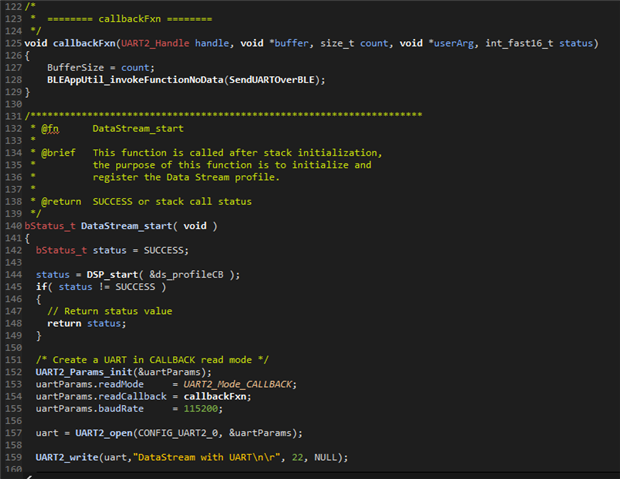
    Thank you for the code snippet. Can you share which file you are calling this in? Has the BLEAppUtil task/framework been set up already? We have a UART over BLE project that uses the invoke function inside of a callback with no issues, but this is done after the ble app util framework is set up. The relevant code snippet is shown below:

    The example project may be found here: https://github.com/TexasInstruments/ble_examples/tree/simplelink_low_power_f3_sdk-7.20/examples/rtos/LP_EM_CC2340R5/ble5stack/data_stream_UART_over_BLE

    Best Regards,

    Jan

  • Hi Jan 

    Invoking in Uart call back is working fine for me. I am clear about that part. But the GPIO interrupt is where I am facing this issue. 

    Can you share which file you are calling this in?

    I have a separate file in the application for GPIO interrupt which I am calling void BUTTON_ENBLE(keysPressedCB_t appKeyCB) fxn.

    Has the BLEAppUtil task/framework been set up already? 

    I am confused what framework you meant, if it is this file #include <ti/bleapp/ble_app_util/inc/bleapputil_api.h> , yes I am adding it to my file.

  • Hi

    Understood. Thank you for the clarity. I will take a look at this and provide an update by Monday.

    Best Regards,

    Jan

  • Hi Jan 

    Any updates?

  • Hi,

    I have implemented using the BLEAppUtil_invokeFunctionNoData() inside a GPIO interrupt successfully. I have modified the data_stream example to perform different characteristics write based on the GPIO interrupt that occurs. All code modifications were made in app_data_stream.c (with some SysConfig changes). The content of the app_data_stream.c file is shown below:

    /******************************************************************************
    
    @file  app_data.c
    
    @brief This file contains the Data Stream application functionality.
    
    Group: WCS, BTS
    $Target Device: DEVICES $
    
    ******************************************************************************
    $License: BSD3 2022 $
    ******************************************************************************
    $Release Name: PACKAGE NAME $
    $Release Date: PACKAGE RELEASE DATE $
    *****************************************************************************/
    
    //*****************************************************************************
    //! Includes
    //*****************************************************************************
    #include <string.h>
    #include <time.h>
    #include <ti/drivers/GPIO.h>
    #include <ti/bleapp/profiles/data_stream/data_stream_profile.h>
    #include <ti/bleapp/ble_app_util/inc/bleapputil_api.h>
    #include <ti/bleapp/menu_module/menu_module.h>
    #include <app_main.h>
    
    //*****************************************************************************
    //! Defines
    //*****************************************************************************
    #define DS_CCC_UPDATE_NOTIFICATION_ENABLED  1
    
    //*****************************************************************************
    //! Globals
    //*****************************************************************************
    
    //*****************************************************************************
    //!LOCAL FUNCTIONS
    //*****************************************************************************
    
    static void DS_onCccUpdateCB( uint16 connHandle, uint16 pValue );
    static void DS_incomingDataCB( uint16 connHandle, char *pValue, uint16 len );
    
    //*****************************************************************************
    //!APPLICATION CALLBACK
    //*****************************************************************************
    // Data Stream application callback function for incoming data
    static DSP_cb_t ds_profileCB =
    {
      DS_onCccUpdateCB,
      DS_incomingDataCB
    };
    
    
    char myRedString [] = "Red\n\r";
    char myGreenString [] = "Green\n\r";
    
    void SendRed(){
        DSP_sendData( (uint8 *)myRedString, 5 );
    }
    
    void SendGreem(){
        DSP_sendData( (uint8 *)myGreenString, 7 );
    }


    void gpioButtonFxn0(uint_least8_t index)
    {
        /* Toggle an LED */
        GPIO_toggle(CONFIG_GPIO_LED_GREEN);
        BLEAppUtil_invokeFunctionNoData(SendGreem);
    }
    
    /*
     *  ======== gpioButtonFxn1 ========
     *  Callback function for the GPIO interrupt on CONFIG_GPIO_BUTTON_1.
     *  This may not be used for all boards.
     *
     *  Note: GPIO interrupts are cleared prior to invoking callbacks.
     */
    void gpioButtonFxn1(uint_least8_t index)
    {
        /* Toggle an LED */
        GPIO_toggle(CONFIG_GPIO_LED_RED);
        BLEAppUtil_invokeFunctionNoData(SendRed);
    }
    
    
    //*****************************************************************************
    //! Functions
    //*****************************************************************************
    /*********************************************************************
     * @fn      DS_onCccUpdateCB
     *
     * @brief   Callback from Data_Stream_Profile indicating ccc update
     *
     * @param   cccUpdate - pointer to data structure used to store ccc update
     *
     * @return  SUCCESS or stack call status
     */
    static void DS_onCccUpdateCB( uint16 connHandle, uint16 pValue )
    {
      if ( pValue == DS_CCC_UPDATE_NOTIFICATION_ENABLED)
      {
        MenuModule_printf(APP_MENU_PROFILE_STATUS_LINE, 0,
                          "DataStream status: CCC Update - connectionHandle: "
                          MENU_MODULE_COLOR_YELLOW "%d " MENU_MODULE_COLOR_RESET
                          "Notifications enabled", connHandle);
      }
      else
      {
        MenuModule_printf(APP_MENU_PROFILE_STATUS_LINE, 0,
                          "DataStream status: CCC Update - connectionHandle: "
                          MENU_MODULE_COLOR_YELLOW "%d " MENU_MODULE_COLOR_RESET
                          "Notifications disabled", connHandle);
      }
    }
    
    /*********************************************************************
     * @fn      DS_incomingDataCB
     *
     * @brief   Callback from Data_Stream_Profile indicating incoming data
     *
     * @param   dataIn - pointer to data structure used to store incoming data
     *
     * @return  SUCCESS or stack call status
     */
    static void DS_incomingDataCB( uint16 connHandle, char *pValue, uint16 len )
    {
      bStatus_t status = SUCCESS;
      char dataOut[] = "Data size is too long";
      char printData[len+1];
      uint16 i = 0;
    
      // Clear lines
      MenuModule_clearLines(APP_MENU_PROFILE_STATUS_LINE1, APP_MENU_PROFILE_STATUS_LINE3);
    
      // Toggle LEDs to indicate that data was received
      GPIO_toggle( CONFIG_GPIO_LED_RED );
      GPIO_toggle( CONFIG_GPIO_LED_GREEN );
    
      // The incoming data length was too large
      if ( len == 0 )
      {
        MenuModule_printf(APP_MENU_PROFILE_STATUS_LINE1, 0,
                          "DataStream status: Incoming data - connectionHandle: "
                          MENU_MODULE_COLOR_YELLOW "%d " MENU_MODULE_COLOR_RESET
                          "Error: " MENU_MODULE_COLOR_RED "%s" MENU_MODULE_COLOR_RESET,
                          connHandle, dataOut);
    
        // Send error message over GATT notification
        status = DSP_sendData( (uint8 *)dataOut, sizeof( dataOut ) );
      }
    
      // New data received from peer device
      else
      {
        // Copy the incoming data to buffer before printing it
        memcpy (printData, pValue, len );
        printData[len] ='\0';
    
        // Print the incoming data
        MenuModule_printf(APP_MENU_PROFILE_STATUS_LINE1, 0,
                          "DataStream status: Incoming data - "
                          "connectionHandle: " MENU_MODULE_COLOR_YELLOW "%d " MENU_MODULE_COLOR_RESET
                          "length: " MENU_MODULE_COLOR_YELLOW "%d " MENU_MODULE_COLOR_RESET,
                          connHandle, len);
        MenuModule_printf(APP_MENU_PROFILE_STATUS_LINE2, 0,
                          "Data: " MENU_MODULE_COLOR_YELLOW "%s" MENU_MODULE_COLOR_RESET,
                          printData);
    
        // Change upper case to lower case and lower case to upper case
        for ( i = 0; i < len; i++ )
        {
          if ( pValue[i] >= 'a' && pValue[i] <= 'z' )
          {
            pValue[i] = pValue[i] - 32;
          }
          else if ( pValue[i] >= 'A' && pValue[i] <= 'Z' )
          {
            pValue[i] = pValue[i] + 32;
          }
        }
    
        // Echo the incoming data over GATT notification
        status = DSP_sendData( (uint8 *)pValue, len );
        if ( status == SUCCESS )
        {
          // Copy the changed data to buffer before printing it
          memcpy (printData, pValue, len );
    
          // Print the echo data
          MenuModule_printf(APP_MENU_PROFILE_STATUS_LINE3, 0,
                            "Echo: " MENU_MODULE_COLOR_YELLOW "%s" MENU_MODULE_COLOR_RESET,
                            printData);
        }
        else
        {
          // Print error message
          MenuModule_printf(APP_MENU_PROFILE_STATUS_LINE3, 0,
                            "Send data - Error: " MENU_MODULE_COLOR_YELLOW "%d " MENU_MODULE_COLOR_RESET,
                            status);
        }
      }
    }
    
    /*********************************************************************
     * @fn      DataStream_start
     *
     * @brief   This function is called after stack initialization,
     *          the purpose of this function is to initialize and
     *          register the Data Stream profile.
     *
     * @return  SUCCESS or stack call status
     */
    bStatus_t DataStream_start( void )
    {
      bStatus_t status = SUCCESS;
    
      status = DSP_start( &ds_profileCB );
      if( status != SUCCESS )
      {
        // Return status value
        return status;
      }
    
      /* Call driver init functions */
      GPIO_init();
    
      /* Configure the LED and button pins */
      GPIO_setConfig(CONFIG_GPIO_LED_GREEN, GPIO_CFG_OUT_STD | GPIO_CFG_OUT_LOW);
      GPIO_setConfig(CONFIG_GPIO_LED_RED, GPIO_CFG_OUT_STD | GPIO_CFG_OUT_LOW);
      GPIO_setConfig(CONFIG_GPIO_0, GPIO_CFG_IN_PU | GPIO_CFG_IN_INT_FALLING);
    
      /* Turn on user LED */
      GPIO_write(CONFIG_GPIO_LED_GREEN, CONFIG_GPIO_LED_ON);
    
      /* Install Button callback */
      GPIO_setCallback(CONFIG_GPIO_0, gpioButtonFxn0);
    
      /* Enable interrupts */
      GPIO_enableInt(CONFIG_GPIO_0);
    
      /*
       *  If more than one input pin is available for your device, interrupts
       *  will be enabled on CONFIG_GPIO_BUTTON1.
       */
      if (CONFIG_GPIO_0 != CONFIG_GPIO_1)
      {
          /* Configure BUTTON1 pin */
          GPIO_setConfig(CONFIG_GPIO_1, GPIO_CFG_IN_PU | GPIO_CFG_IN_INT_FALLING);
    
          /* Install Button callback */
          GPIO_setCallback(CONFIG_GPIO_1, gpioButtonFxn1);
          GPIO_enableInt(CONFIG_GPIO_1);
      }


      // Set LEDs
      GPIO_write( CONFIG_GPIO_LED_RED, CONFIG_LED_OFF );
      GPIO_write( CONFIG_GPIO_LED_GREEN, CONFIG_LED_ON );
    
      return ( SUCCESS );
    }
    

    The entire project can be viewed here.

    6175.data_stream_LP_EM_CC2340R5_freertos_ticlang.zip

    At a glance, a difference I am able to stop is that you did not configure the gpio buttons using the GPIO_setConfig() function before setting up the callback or enabling the interrupt. Can you do so in the way that it is done in my sample code and checking if the error persists? If it does, then can you try commenting out the invoke function call to see if the behavior goes away? I would like to further isolate this behavior if possible. The project provided is for the 7.20 SDK release.

    Best Regards,

    Jan