This thread has been locked.

If you have a related question, please click the "Ask a related question" button in the top right corner. The newly created question will be automatically linked to this question.

LP-EM-CC2340R5: how to automatically connect peripheral to central

Part Number: LP-EM-CC2340R5
Other Parts Discussed in Thread: CC2340R5, ENERGYTRACE

Hello 

I want to automatically connect peripheral to central without menu.

how can I connect when my both board(peripheral(cc2340r5) and central(cc2340r5)) is on automatically scanning and connect   


  • Hello Umesh,

    You can refer to the following thread: Central to Peripheral Automatically Connect.

    However, do you need more details on how to implement this?

    Best regards,

    David.

  • I want connect like without menu 

    so my board will connect automatically if device(peripheral) found at the time of scanning will be start.  

  • Hello Umesh,

    The modifications I described here do not require the connect menu for a central device to connect to a peripheral. The central will connect automatically with the peripheral which address it is actively looking for. If you want to connect to any device, then I would suggest to remove the IF case where the address is evaluated (inside app_central.c).

    Make sure to start the peripheral first, before the central.

    Hope this helps.

    David.

  • my query is not like that.

    I want to know how to scan automatically when board is on or power up. like that without menu

    regards 

    Umesh 

  • Hello Umesh,

    I would suggest checking the Scanning and Advertising basics SLA and see if that is a good starting point for you.

    What is not working for you exactly?

    Best regards,

    David.

  • I want scan directly without any menu or press button.

    Automatically start scanning power-up.

  • Hello Umesh,

    I assume you are working with the basic_ble project and that you have modified the project for peripheral and central as mentioned in the thread Central to Peripheral Automatically Connect.

    The modified app_central.c can start scanning without menu after power up by adding the following to the Central_Start() function.

    status = BLEAppUtil_scanStart(&centralScanStartParams);
        if(status != SUCCESS)
          {
              // Return status value
              return(status);
         }

    Have you tried this? What exactly is not working?

    Best regards,

    David.

  • Hello David,

    Thankyou for your reponse, but have I already tried this one but that is not working.

    So when my board is powered-up that time I am pressing  the button and scanning  will start that is predefine but I want to work  my board as soon as I  powered-up at the same  time scanning should start automatically.

    So now what is  happening  I am going to tis file app_menu.c and calling  to menu_start() function.

    I have mentioned it below for your reference. 

    bStatus_t Menu_start()
    {
      bStatus_t status = SUCCESS;
    
    #if !defined(Display_DISABLE_ALL)
      MenuModule_params_t params = {
    #if ( HOST_CONFIG & ( CENTRAL_CFG | OBSERVER_CFG | PERIPHERAL_CFG ) )
        .mode = MenuModule_Mode_MENU_WITH_BUTTONS
    #else
        .mode = MenuModule_Mode_PRINTS_ONLY
    #endif // #if ( HOST_CONFIG & ( CENTRAL_CFG | OBSERVER_CFG | PERIPHERAL_CFG ) )
      };
    
    #if ( HOST_CONFIG & ( CENTRAL_CFG | OBSERVER_CFG | PERIPHERAL_CFG ) )
      status = MenuModule_init(&mainMenuObject, &params);
    #else
      status = MenuModule_init(NULL, &params);
      if(status == SUCCESS)
      {
    
        // Print the application name
        MenuModule_printf(APP_MENU_GENERAL_STATUS_LINE, 0,
                          MENU_MODULE_COLOR_BOLD MENU_MODULE_COLOR_CYAN
                          "Basic BLE" MENU_MODULE_COLOR_RESET);
      }
    #endif // #if ( HOST_CONFIG & ( CENTRAL_CFG | OBSERVER_CFG | PERIPHERAL_CFG ) )
    
    #endif // #if !defined(Display_DISABLE_ALL)
      return status;
    }
    

    than after calling the function  MenuModule_init(&mainMenuObject, &params); then the  function below is getting called 

    //*****************************************************************************
    //! Globals
    //*****************************************************************************
    #if ( HOST_CONFIG & ( CENTRAL_CFG | PERIPHERAL_CFG ) )
    // The current connection handle the menu is working with
    static uint16 menuCurrentConnHandle;
    #endif // #if ( HOST_CONFIG & ( CENTRAL_CFG | PERIPHERAL_CFG ) )
    
    #if ( HOST_CONFIG & ( CENTRAL_CFG | OBSERVER_CFG ) )
    // Scan Menu
    const MenuModule_Menu_t scanningMenu[] =
    {
     {"Scan", &Menu_scanStartCB, "Scan for devices"},
     {"Stop Scan", &Menu_scanStopCB, "Stop Scanning for devices"}
    };
    
    MENU_MODULE_MENU_OBJECT("Scanning Menu", scanningMenu);
    #endif // #if ( HOST_CONFIG & ( CENTRAL_CFG ) )
    
    #if ( HOST_CONFIG & ( CENTRAL_CFG | PERIPHERAL_CFG ) )
    // Connection Menu
    const MenuModule_Menu_t connectionMenu[] =
    {
    #if ( HOST_CONFIG & ( CENTRAL_CFG ) )
     {"Connect", &Menu_connectCB, "Connect to a device"},
    #endif // #if ( HOST_CONFIG & ( CENTRAL_CFG ) )
     {"Work with", &Menu_workWithCB, "Work with a peer device"}
    };
    
    MENU_MODULE_MENU_OBJECT("Connection Menu", connectionMenu);
    
    // Work with menu
    const MenuModule_Menu_t workWithMenu[] =
    {
     {"Change conn phy", &Menu_connPhyCB, "1M, Coded or 2M"},
     {"Param update", &Menu_paramUpdateCB, "Send connection param update req"},
     {"Disconnect", &Menu_disconnectCB, "Disconnect a specific connection"}
    };
    
    MENU_MODULE_MENU_OBJECT("Work with Menu", workWithMenu);
    
    // Phy selection menu
    const MenuModule_Menu_t connPhyMenu[] =
    {
     {"1 Mbps", &Menu_connPhyChangeCB, ""},
     {"2 Mbps", &Menu_connPhyChangeCB, ""},
     {"1 & 2 Mbps", &Menu_connPhyChangeCB, ""},
     {"Coded", &Menu_connPhyChangeCB, ""},
     {"1 & 2 Mbps & Coded", &Menu_connPhyChangeCB, ""},
    };
    
    MENU_MODULE_MENU_OBJECT("Set Conn PHY Preference", connPhyMenu);
    
    #endif // #if ( HOST_CONFIG & ( CENTRAL_CFG | PERIPHERAL_CFG ) )
    
    // Main menu
    #if ( HOST_CONFIG & ( CENTRAL_CFG | OBSERVER_CFG | PERIPHERAL_CFG ) )
    const MenuModule_Menu_t mainMenu[] =
    {
    #if ( HOST_CONFIG & ( CENTRAL_CFG | OBSERVER_CFG) )
     {"Scanning", &Menu_scanningCB, "Scan menu"},
    #endif // #if ( HOST_CONFIG & ( CENTRAL_CFG | OBSERVER_CFG ) )
    #if ( HOST_CONFIG & ( CENTRAL_CFG | PERIPHERAL_CFG ) )
     {"Connection", &Menu_connectionCB, "Connection menu"},
    #endif // #if ( HOST_CONFIG & ( CENTRAL_CFG | PERIPHERAL_CFG ) )
    };
    
    MENU_MODULE_MENU_OBJECT("Basic BLE Menu", mainMenu);
    #endif // #if ( HOST_CONFIG & ( CENTRAL_CFG | OBSERVER_CFG | PERIPHERAL_CFG ) )
    

    Then this function is getting called  MENU_MODULE_MENU_OBJECT("Connection Menu", connectionMenu);  and then I  press the  button and scanning will start. But I don't want this one I want scanning to be started automatically when powered-on.

    Regards,

    Umesh

  • Hello Umesh,

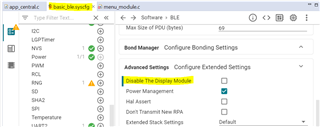
    Please try disabling the Display Module, you can also take out the buttons using syscfg as well if you want.

    Hope it helps,

    David.

  • Hello David,

     I tried disable the Display Module but scanning is  not working.

    So in that case can I call directly scan function?

    Regards,

    Umesh

  • Hello Umesh,

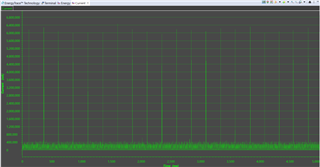
    How are you checking if the device is or not scanning? I would suggest taking a look at EnergyTrace. It could give you a good idea of what is happening when you start running the program. Flash the device with the modified project code and start EnergyTrace.

    You should be able to see something like this after clicking on the start symbol.

    Make sure to reset your board first, even while running EnergyTrace.

    Best regards,

    David.