This thread has been locked.

If you have a related question, please click the "Ask a related question" button in the top right corner. The newly created question will be automatically linked to this question.

CC2564C: SPP server and two or more clients

Hi, in our application on a custom board we have an SPP server and we would like to allow two SPP clients to connect at the same time.

Starting from the examples (Bluetopia stack 5.1.1.1), we have successfully implemented the SPP server for a single connection.

For now, we open two server ports by calling the OpenServer() twice (with two different ServerPort numbers). Then the first client connects correctly and opens a connection up to the SPP layer. After this, the second client seems to establish a connection but no more SPP port becames available.

I'm pasting some stack log:

------- first client requests to connect -------------------------
atLinkKeyRequest: 0x1237800CF82B
GAP_Authentication_Response() Success.
atPINCodeRequest: 0x1237800CF82B
Respond with the command: PINCodeResponse
PIN Code Response: 000000000
atLinkKeyCreation: 0x1237800CF82B
Link Key: 0x94DE7901CA9F44C75E9C130D7D7205B8
Link Key NOT Stored
SPP Open Indication, ID: 0x0001, Board: 0x1237800CF82B.
SPP Port Status Indication: 0x0001, Status: 0x000B, Break Status: 0x0000, Length: 0x0000.
--------------- first connection accepted and working correctly ------------------
--------------- second client requests to connect -------------------
atIOCapabilityResponse: 0xC0B6F9F9B7DE
Remote Capabilities: Display Yes/No, MITM
atIOCapabilityRequest: 0xC0B6F9F9B7DE
GAP_Authentication_Response() Success.
Auto Accepting: 514050
GAP_Authentication_Response() Success.
Secure Simple Pairing Complete
atLinkKeyCreation: 0xC0B6F9F9B7DE
Link Key: 0xFC49601DBE3A19BD4A1734D157CD9321
Link Key NOT Stored
------ second connection doesn't get the SPP Open Indication ---------

What is the correct approach to implement support for multiple clients?

Is it correct to use the OpenServer() twice? Or the server is one and the in the SPP callback we have to distinguish the data from the two clients by using the BDADDR or other fields?

thanks

  • Hi Andrea,

    If you are using our demo code, it for some reason has a limit of opening one port when using the command OpenServer.

    However the function to open another server port it is 

    SPP_Open_Server_Port

    Here is the Max number of ports the device supports

    0x1E so 31 ports

    Best,

    Rogelio

  • Thanks Rogelio,

     I didn't mention that I had modified the OpenServer(). Sorry for that.

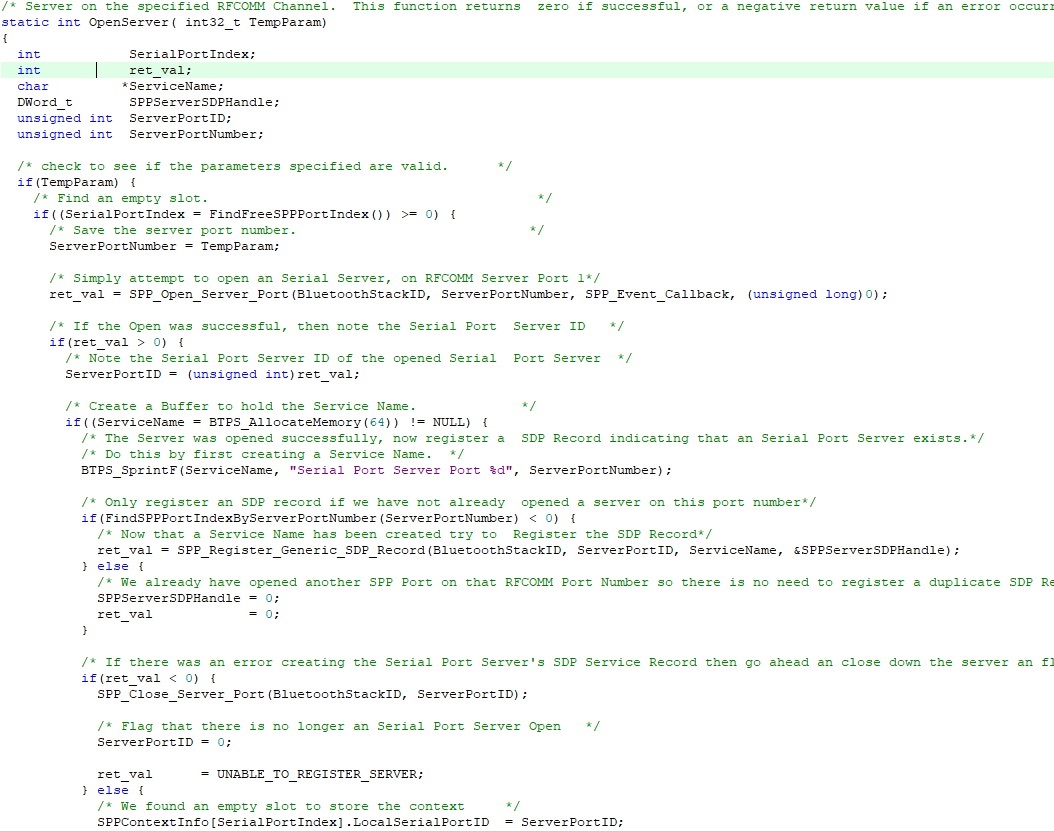
    I had modified the demo code in this way:

    After opening the stack, I call

    OpenServer(1)

    OpenServer(2)

    and in both calls I check that the returned val is 0.

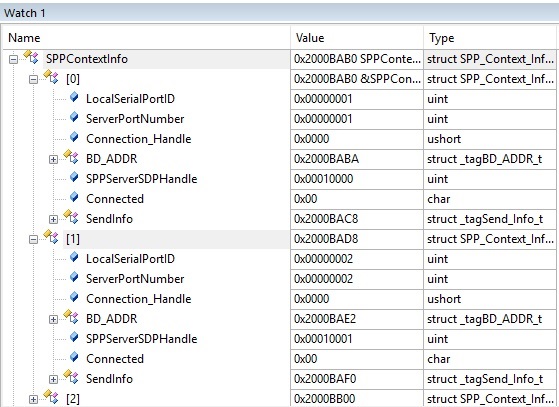
    I think that they complete correctly because the SPPContextInfo structs looks well initialized:

  • Hi Andrea, 

    I went ahead and removed that check on the demo and was able to connect 2 clients to different server ports.

    Here are the uart terminal logs.

    Server

    OpenStack().
    Bluetooth Stack ID: 1
    Device Chipset: Unknown (greater 4.1)
    BTPS Version  : 5.1.1.0
    PLAT Version  : 1.0
    App Name      : SPPDemo
    App Version   : 0.3
    Project Type  : 6
    FW Version    : 12.24
    Local BD_ADDR: 0x88C255D1D64D
    
    ******************************************************************
    * Command Options: Server, Client, Help                          *
    ******************************************************************
    
    Choose Mode>server
    
    ******************************************************************
    * Command Options: Inquiry, DisplayInquiryList, Pair,            *
    *                  EndPairing, PINCodeResponse, PassKeyResponse, *
    *                  UserConfirmationResponse,                     *
    *                  SetDiscoverabilityMode, SetConnectabilityMode,*
    *                  SetPairabilityMode,                           *
    *                  ChangeSimplePairingParameters,                *
    *                  GetLocalAddress, GetLocalName, SetLocalName,  *
    *                  GetClassOfDevice, SetClassOfDevice,           *
    *                  GetRemoteName, SniffMode, ExitSniffMode,      *
    *                  ServiceDiscovery,                             *
    *                  Open, Close, Read, Write,                     *
    *                  GetConfigParams, SetConfigParams,             *
    *                  GetQueueParams, SetQueueParams,               *
    *                  Loopback, DisplayRawModeData,                 *
    *                  AutomaticReadMode, SetBaudRate, Send          *
    *                  Help, Quit                                    *
    ******************************************************************
    
    Server>open 1
    Server Opened: 1.
    
    Server>open 2
    Server Opened: 2.
    
    Server>
    SPP Open Indication, ID: 0x0001, Board: 0xC8DF8425682B.
    HCI Connection Handle: 0x0001.
    
    Server>
    SPP Port Status Indication: 0x0001, Status: 0x0003, Break Status: 0x0000, Length: 0x0000.
    
    Server>
    SPP Open Indication, ID: 0x0002, Board: 0xC8DF8425643A.
    HCI Connection Handle: 0x0002.
    
    Server>
    SPP Port Status Indication: 0x0002, Status: 0x0003, Break Status: 0x0000, Length: 0x0000.
    
    Server>
    SPP Data Indication, ID: 0x0002, Length: 0x0016.
    
    Server>
    SPP Data Indication, ID: 0x0001, Length: 0x0016.
    
    Server>read 2
    Read: 22.
    Message: This is a test string.
    

    Client 1

    ******************************************************************
    * Command Options: Inquiry, DisplayInquiryList, Pair,            *
    *                  EndPairing, PINCodeResponse, PassKeyResponse, *
    *                  UserConfirmationResponse,                     *
    *                  SetDiscoverabilityMode, SetConnectabilityMode,*
    *                  SetPairabilityMode,                           *
    *                  ChangeSimplePairingParameters,                *
    *                  GetLocalAddress, GetLocalName, SetLocalName,  *
    *                  GetClassOfDevice, SetClassOfDevice,           *
    *                  GetRemoteName, SniffMode, ExitSniffMode,      *
    *                  ServiceDiscovery,                             *
    *                  Open, Close, Read, Write,                     *
    *                  GetConfigParams, SetConfigParams,             *
    *                  GetQueueParams, SetQueueParams,               *
    *                  Loopback, DisplayRawModeData,                 *
    *                  AutomaticReadMode, SetBaudRate, Send          *
    *                  Help, Quit                                    *
    ******************************************************************
    
    Client>ub
    Invalid Command: UB.
    
    Client>inquiry
    
    Client>
    Inquiry Entry: 0x88C255D1D64D.
    
    Client>
    Inquiry Entry: 0xF84D8997F1F8.
    
    Client>
    Inquiry Entry: 0xB07D47D3E197.
    
    Client>
    Inquiry Entry: 0x00EBD5D45C67.
    
    Client>
    Inquiry Entry: 0x84B517083CEF.
    
    Client>
    Inquiry Entry: 0xA86DAA1E22AF.
    
    Client>
    Inquiry Entry: 0xC8DF8425643A.
    
    Client>
    Inquiry Entry: 0x709CD10450AF.
    
    Client>
    Inquiry Entry: 0x84B51708D1AD.
    
    Client>
    Inquiry Entry: 0x84B51708BD35.
    
    Client>
    Inquiry Entry: 0x84B517080D81.
    
    Client>
    Inquiry Entry: 0xB07D47D36D23.
    
    Client>
    Inquiry Entry: 0x00B0E1EE3243.
    
    Client>
    Inquiry Entry: 0x84B51708870B.
    
    Client>
    Inquiry Entry: 0x84B51708D00B.
    
    Client>
    Inquiry Entry: 0x84B51708C481.
    
    Client>
    Inquiry Entry: 0x2C73A02CEA57.
    
    Client>
    Inquiry Entry: 0xB07D47D34931.
    
    Client>
    Inquiry Entry: 0x84B51708D215.
    
    Client>
    Result: 1, 0x88C255D1D64D.
    Result: 2, 0xF84D8997F1F8.
    Result: 3, 0xB07D47D3E197.
    Result: 4, 0x00EBD5D45C67.
    Result: 5, 0x84B517083CEF.
    Result: 6, 0xA86DAA1E22AF.
    Result: 7, 0xC8DF8425643A.
    Result: 8, 0x709CD10450AF.
    Result: 9, 0x84B51708D1AD.
    Result: 10, 0x84B51708BD35.
    Result: 11, 0x84B517080D81.
    Result: 12, 0xB07D47D36D23.
    Result: 13, 0x00B0E1EE3243.
    Result: 14, 0x84B51708870B.
    Result: 15, 0x84B51708D00B.
    Result: 16, 0x84B51708C481.
    Result: 17, 0x2C73A02CEA57.
    Result: 18, 0xB07D47D34931.
    Result: 19, 0x84B51708D215.
    
    Client>open 1 1
    
    SPP_Open_Remote_Port success.
    
    Client>
    SPP Open Confirmation, ID: 0x0001, Status 0x0000.
    
    Client>
    SPP Port Status Indication: 0x0001, Status: 0x0003, Break Status: 0x0000, Length: 0x0000.
    
    Client>write
    Wrote: 22.
    

    Client 2

    ******************************************************************
    * Command Options: Inquiry, DisplayInquiryList, Pair,            *
    *                  EndPairing, PINCodeResponse, PassKeyResponse, *
    *                  UserConfirmationResponse,                     *
    *                  SetDiscoverabilityMode, SetConnectabilityMode,*
    *                  SetPairabilityMode,                           *
    *                  ChangeSimplePairingParameters,                *
    *                  GetLocalAddress, GetLocalName, SetLocalName,  *
    *                  GetClassOfDevice, SetClassOfDevice,           *
    *                  GetRemoteName, SniffMode, ExitSniffMode,      *
    *                  ServiceDiscovery,                             *
    *                  Open, Close, Read, Write,                     *
    *                  GetConfigParams, SetConfigParams,             *
    *                  GetQueueParams, SetQueueParams,               *
    *                  Loopback, DisplayRawModeData,                 *
    *                  AutomaticReadMode, SetBaudRate, Send          *
    *                  Help, Quit                                    *
    ******************************************************************
    
    Client>inquiry
    
    Client>
    Inquiry Entry: 0x84B51708D1AD.
    
    Client>
    Inquiry Entry: 0xA86DAA1E22AF.
    
    Client>
    Inquiry Entry: 0x84B51708870B.
    
    Client>
    Inquiry Entry: 0xB07D47D36D23.
    
    Client>
    Inquiry Entry: 0x84B51708BD35.
    
    Client>
    Inquiry Entry: 0x84B517080D81.
    
    Client>
    Inquiry Entry: 0x00B0E1EE3243.
    
    Client>
    Inquiry Entry: 0x709CD10450AF.
    
    Client>
    Inquiry Entry: 0x84B51708D00B.
    
    Client>
    Inquiry Entry: 0xC8DF8425682B.
    
    Client>
    Inquiry Entry: 0x84B51708D215.
    
    Client>
    Inquiry Entry: 0x00EBD5D45C67.
    
    Client>
    Inquiry Entry: 0x88C255D1D64D.
    
    Client>
    Inquiry Entry: 0x84B517083CEF.
    
    Client>
    Inquiry Entry: 0xB07D47D34931.
    
    Client>
    Result: 1, 0x84B51708D1AD.
    Result: 2, 0xA86DAA1E22AF.
    Result: 3, 0x84B51708870B.
    Result: 4, 0xB07D47D36D23.
    Result: 5, 0x84B51708BD35.
    Result: 6, 0x84B517080D81.
    Result: 7, 0x00B0E1EE3243.
    Result: 8, 0x709CD10450AF.
    Result: 9, 0x84B51708D00B.
    Result: 10, 0xC8DF8425682B.
    Result: 11, 0x84B51708D215.
    Result: 12, 0x00EBD5D45C67.
    Result: 13, 0x88C255D1D64D.
    Result: 14, 0x84B517083CEF.
    Result: 15, 0xB07D47D34931.
    
    Client>open
    
    Usage: Open [Inquiry Index] [RFCOMM Server Port].
    .
    Function Error.
    
    Client>open 13 2
    
    SPP_Open_Remote_Port success.
    
    Client>
    SPP Open Confirmation, ID: 0x0001, Status 0x0000.
    
    Client>
    SPP Port Status Indication: 0x0001, Status: 0x0003, Break Status: 0x0000, Length: 0x0000.
    
    Client>ri
    Invalid Command: RI.
    
    Client>write
    Wrote: 22.


    What other changes have you made to the code that could explain the change in behavior?

    Best,

    Rogelio

  • Hi, thanks for the new example.

    Perhaps I'm completely off track, but I think the problem might be that I don't have complete control over the clients.

    In your last example you have chosen not only the device but also the RFCOMM port, so you could manually connect every client to a free server port. But in my case the clients are PCs or legacy machines where I can only set the BD address of the server, so I think that I have to implement in the server a way to "suggest" each client to use a different port. Perhaps by manipulating the SDP records? 

    Perhaps unregister the SDP record of the first server port after the connection to the first client is opened? so the second client will find only the SDP record of the second port. I'm just speculating here, in the SPP profile specification I couldn't find an "official" way to handle this problem.

  • Hi Andrea,

    I see the issue, are there any other commands you can use in these legacy machines that could maybe help us out. For example service discovery?

    Best,

    Rogelio

  • Hi Rogelio, I'm Andrea's collegue.
    After some investigation with service discovery it looks like that if I setup our application by calling our custom OpenServer() twice with the same ServerPort, i.e.

    OpenServer(1);

    OpenServer(1);

    then I get two SPP Open Port indication when the two clients connect. I still have to sort out some details but it seems the right direction to solve our problem.

    Do you have any hints on this?

  • Hello,

    When you get the Open port indication, do you also receive different IDs for the connections?

    Best,

    Rogelio

  • Yes, the IDs are different


    atLinkKeyRequest: 0x1237800CF82B
    GAP_Authentication_Response() Success.
    atPINCodeRequest: 0x1237800CF82B
    Respond with the command: PINCodeResponse
    PIN Code Response: E60B8599CD15
    atLinkKeyCreation: 0x1237800CF82B
    Link Key: 0x89B02626F491EB55542B7DD6ADE63C21
    Link Key NOT Stored
    SPP Open Indication, ID: 0x0001, Board: 0x1237800CF82B.
    SPP Port Status Indication: 0x0001, Status: 0x000B, Break Status: 0x0000, Length: 0x0000.
    atIOCapabilityResponse: 0xC0B6F9F9B7DE
    Remote Capabilities: Display Yes/No, MITM
    atIOCapabilityRequest: 0xC0B6F9F9B7DE
    GAP_Authentication_Response() Success.
    Auto Accepting: 928679
    GAP_Authentication_Response() Success.
    Secure Simple Pairing Complete
    atLinkKeyCreation: 0xC0B6F9F9B7DE
    Link Key: 0x6A299BF66B876AE079702D22382DF53A
    Link Key NOT Stored
    SPP Open Indication, ID: 0x0002, Board: 0xC0B6F9F9B7DE.
    SPP Port Status Indication: 0x0002, Status: 0x000B, Break Status: 0x0000, Length: 0x0000.

  • Hello,

    Sorry for the delay, are you able to send data from both clients now that they are able to connect?

    Best,

    Rogelio

  • Hi,

    I had to suspend for some days due to illness, I'm restarting to work on the topic in a few days

    thanks

  • Hi Rogelio, now the communication is working correctly to both clients, I think you can close this thread

    thanks

    Mir A

  • Hello Mir A,

    Im glad communication is working! 

    Best of luck,

    Rogelio