This thread has been locked.

If you have a related question, please click the "Ask a related question" button in the top right corner. The newly created question will be automatically linked to this question.

Is it possible to disable 1M PHY?

Part Number: CC2340R5

Tool/software:

Hi all,

In my case, the communication device support 2M PHY, and I want only use this PHY, is there have a way to disable 1M PHY after connection?

  • Hello Xuefeng.jin

    I hope you are doing well. I wanted to ask which SDK you are developing on, and which base example you are using. Which specific 2M PHY are you trying to use? 

    Reference our TX RX SLA for help getting setup with proprf: Basic RX and TX (ti.com)

    Thanks,
    Alex F

  • Hi Alex,

    In this link, it used Custom RF stack, but I have lots settings in BLE RF stack.

    Is there have a way to disable 1M PHY with code?

    Thanks.

  • Hello Xuefeng.jin,

    Reference the picture below (CCS 12.7, F3 SDK 8.10) on how to change from 1M BLE to 2M or Coded BLE:

    If you happen to have the rf configs defined in code you could define the "feature" to use: 

    Thanks,
    Alex F

  • Hi Alex F,

    Is there have a sample code to set PHY? In my code I found a initial code as bellow

    #ifdef USE_RCL
        llUserConfig.lrfTxPowerTablePtr = &LRF_txPowerTable;
        llUserConfig.lrfConfigPtr = &LRF_config;
        llUserConfig.defaultTxPowerDbm = defaultTxPowerDbm;
        llUserConfig.defaultTxPowerFraction = 0;
        llUserConfig.rclPhyFeature1MBPS = RCL_PHY_FEATURE_SUB_PHY_1_MBPS;
        llUserConfig.rclPhyFeature2MBPS = RCL_PHY_FEATURE_SUB_PHY_2_MBPS;
        llUserConfig.rclPhyFeatureCoded = RCL_PHY_FEATURE_SUB_PHY_CODED;
        llUserConfig.rclPhyFeatureCodedS8 = RCL_PHY_FEATURE_CODED_TX_RATE_S8;
        llUserConfig.rclPhyFeatureCodedS2 = RCL_PHY_FEATURE_CODED_TX_RATE_S2;
    #endif

    Is this place to keep 2M setting and disable others?

  • Hello Xuefeng.jin,

    Please reference the example code snippet below on how I configured code to do this in the past:

     /* Initialize and open RCL */
                       if(phy == 0)  //these are the selectable PHYs
                       {
                           txCmd.common.phyFeatures = RCL_PHY_FEATURE_SUB_PHY_1_MBPS_BLE;
                           rclHandle = RCL_open(&rclClient, &LRF_configBle);
                       }
                       else if(phy == 1)
                       {
                           rclHandle = RCL_open(&rclClient, &LRF_configMsk250Kbps); 
                       }
                       else if(phy == 2)
                       {
                           rclHandle = RCL_open(&rclClient, &LRF_configMsk250KbpsFec);
                       }
                       else if(phy == 3)
                       {
                           txCmd.common.phyFeatures = RCL_PHY_FEATURE_SUB_PHY_2_MBPS_BLE ;
                           rclHandle = RCL_open(&rclClient, &LRF_configBle);
                       }
                       else if(phy == 4)
                       {
                           txCmd.common.phyFeatures = RCL_PHY_FEATURE_SUB_PHY_CODED_BLE;
                           rclHandle = RCL_open(&rclClient, &LRF_configBle);
                       }

    You would only want to define the 2_MBPS PHY feature in your own code (leave the other features out) before opening the RCL. 

    Thanks,
    Alex F

  • Hi Alex,

    Could you support more details?

    I have RCL in .syscfg, but I have no idea where to put your example code.

    Where the phy and txCmd defined, and how to get the phy value...

    Thanks!

  • Hello xuefeng.jin, 

    Sorry for not clarifying here, so the "phy" term is just a variable to select which PHY feature to use, you do not need to use it in your case.

    If you are using the RCL in syscfg you can view the files (rf configs) in the debug folder after building specifically in, debug/syscfg/ti_radio_config.c/.h. 

    Basically, if you would want to use the 2M BLE PHY you would:

    setup the RCL commands (just follow the rfpacketTx and rfpacketRx here) 

    define the RCL_PHY_FEATURE_SUB_PHY_2_MBPS 

    open the RCL instance with RCL_open(&rclClient, &LRF_config); 

    and the "txCmd" is basically an extension of the command for example it could also be defined as rclPacketTxCmdGenericTx:

    Thanks,
    Alex F

  • Hi Alex F,

    Thanks for your information, but I need more details.

    In my project, ti_radio_config.c/.h be generated in syscfg folder, but haven't call RCL_open at top app codes, RCL_open called in SDK function RCL_AdcNoise_get_samples_blocking. 

    And there's no RCL commands like yours.

  • Hello,

    Is there have a sample code to set PHY? In my code I found a initial code as bellow

    Fullscreen
    1
    2
    3
    4
    5
    6
    7
    8
    9
    10
    11
    #ifdef USE_RCL
    llUserConfig.lrfTxPowerTablePtr = &LRF_txPowerTable;
    llUserConfig.lrfConfigPtr = &LRF_config;
    llUserConfig.defaultTxPowerDbm = defaultTxPowerDbm;
    llUserConfig.defaultTxPowerFraction = 0;
    llUserConfig.rclPhyFeature1MBPS = RCL_PHY_FEATURE_SUB_PHY_1_MBPS;
    llUserConfig.rclPhyFeature2MBPS = RCL_PHY_FEATURE_SUB_PHY_2_MBPS;
    llUserConfig.rclPhyFeatureCoded = RCL_PHY_FEATURE_SUB_PHY_CODED;
    llUserConfig.rclPhyFeatureCodedS8 = RCL_PHY_FEATURE_CODED_TX_RATE_S8;
    llUserConfig.rclPhyFeatureCodedS2 = RCL_PHY_FEATURE_CODED_TX_RATE_S2;
    #endif
    XXXXXXXXXXXXXXXXXXXXXXXXXXXXXXXXXXXXXXXXXXXXXXXXXX

    Is this place to keep 2M setting and disable others?

    yes just keep llUserConfig.rclPhyFeature2MBPS = RCL_PHY_FEATURE_SUB_PHY_2_MBPS; and remove all others (1_mbps, coded, rate_s8, rate_s2). 

    Are you using BLE Proprf PHY, or BLE stack? 

    Thanks,
    Alex F

  • Hi Alex F,

    I use BLE stack.

    Thank you very much.

  • Hi Alex,

    Through test, seems this force 2M PHY code not work.

    I used a old laptop with 4.x bluetooth, it also can transform data normal.

  • Hello Xuefeng.jin,

    Just to preface I am not as experienced on BLE stack as I am with proprf however I should be able to help guide through the initial steps:
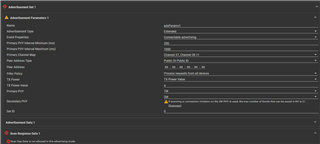
    Could you check your broadcaster configuration in syscfg? There is a field for the PHY setting here which is a little different from what I recommended above. 

    To enable 2M PHY we would need to change the advertisement type from "legacy" to "extended" and set the secondary PHY to 2M (the only option for Primary PHY is 1M it seems).

    Thanks,
    Alex F

  • Hi Alex,

    Thank you for explain. when change this to extend, have bellow questions.

    1. When use extended mode, scan response is not allowed. but i have some manual modify in this part.

    2. And this primary PHY don't have 2M. so it can't only keep 2M.

    3. This part is advertisement, but what I care is just after connection data transfer.

  • Hello Xuefeng.jin,

    Extended advertising is able to be scanned. 

    2m PHY are only for extended advertising. 

    We do have good SLA trainings that will give you a good start to the BLE Stack on TI devices: SimpleLink basic_ble example (ti.com)

    Thanks,
    Alex F