This thread has been locked.

If you have a related question, please click the "Ask a related question" button in the top right corner. The newly created question will be automatically linked to this question.

CC2340R5-Q1: OAD implementation

Part Number: CC2340R5-Q1
Other Parts Discussed in Thread: SYSCONFIG

Tool/software:

Hello Team,

I am using CC2340R5-Q1 in which i implemented OAD. After flashing this Initially DIO 14(Launchpad Red LED) is High where as I disable this pin in sysconfig. Can you tell me what should i do for this. This LED will ON only at initially when power connected.

  • Greetings Divyani,

    Following up our offline discussion here. I will firstly capture the details of our conversation:

    - Your GPIO14 pin is held high which is connected to the red LED on the launchpad.

    - This causes a problem in your system and you would like to keep this pin low during startup

    - You have turned off LED in the basic_ble_oad example, but still notice that the LED is turning on.

    To progress further, can you confirm the following:

    - Are you using the pre-built mcuboot hexfile from the SDK, in your OAD example? Or are you building the hex for your own MCUBoot image using the example from the SDK (MCUBoot example from under examples/nortos/LP_EM_CC23xx)

    I believe that the GPIO control isn't coming from the basic_ble_onchip_oad piece of SW, but the MCUboot SW. This is because the example projects for both of those SWs configures the GPIO14 (Red LED). When you remove the GPIO14 from the basic_ble_onchip_oad SW, there is still the MCUBoot SW that controls the same GPIO. The next steps here would contain looking at removing the GPIO14 control from the MCUBoot SW if you are using the pre-built hex, or enabling you to build the MCUBoot example where the GPIOs are removed.

    Best,
    Achyut Ray

  • Thak you for reply. 

    Yes, I am using the pre-built hex file. Can you please guide me how can i build MCU boot example because in SDK it is not available.

  • Greetings Divyani,

    The MCUBoot example should be available under simplelink_lowpower_f3_source_sdk_8_40_00_61\examples\nortos\LP_EM_CC2340R53\mcuboot. Regarding the specifics of building this for the OAD example, I am checking and will get back to you.

    Best,
    Achyut Ray

  • Greetings again Divyani,

    The following information is how you would configure the MCUBoot example to work together with the basic_ble_onchip_oad example:

    - Using the latest SDK it is straightforward.

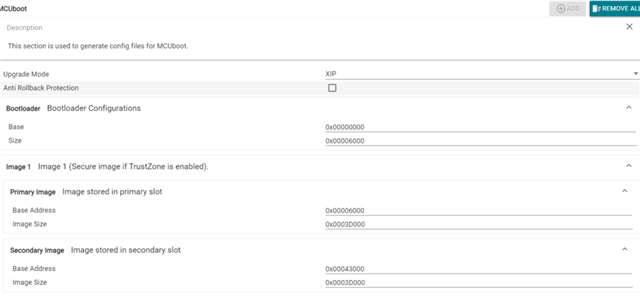
    - In the sysconfig for the mcuboot project, please do the following:

    - Additionally, remember to remove the leds you don't need.

    - Make sure that the primary and secondary image size is correct based on your actual application in the MCUBoot SysConfig.

    - When you now build the project, the MCUBoot image should be ready to work with the OAD example.

    Thank you  for your help with this.

    Hoping this helps,
    Achyut Ray

  • Thank You for the help. It's working now.

    Can you also tell me how I can build production .bin file because when i combine MCUboot, Persistant and application file then size of .bin file is 12,78,082KB so I am not able to flash it.

  • Greetings Divyani,

    Yes, certainly. I am working on that in parallel. Let us continue on the other thread you have created for the bin file topic, and close this thread here. That helps with making topics easier to track. You can close this thread by clicking "This resolved my issue" button on the suggested answer.

    Thanks and best,
    Achyut Ray