This thread has been locked.

If you have a related question, please click the "Ask a related question" button in the top right corner. The newly created question will be automatically linked to this question.

CC2340R2: BLE Error when Migrating from CC2340R5 to CC2340R2

Part Number: CC2340R2
Other Parts Discussed in Thread: CC2340R5, , SYSCONFIG

Tool/software:

Hello, 

I am currently working on a project using the CC2340R2. The Code I use is based on the Example project Basic BLE and runs on a CC2340R5 without problems. However, when migrating to a CC2340R2 encounter a problem which is not described in the migration guide. I get the following Error

{
    "resource": "file:///c%3A/Users/admin/workspace_ccstheia/Basic_BLE_R5_final_R2_no_pins_copy",
    "owner": "ccs-client",
    "severity": 1,
    "message": "/ti/ble/ble: An attempt was made to change the setting '$name' which does not exist. Click here to acknowledge and dismiss this error. This is most likely due to a difference in the board or device.  ",
    "startLineNumber": 0,
    "startColumn": 0,
    "endLineNumber": 0,
    "endColumn": 0
}

I have no idea what setting is ment and how to change it. I am poting this error in the bluetooth forum because of the path ti/ble/ble given in the error message. 

Thanks for helping :)

  • Hi !

    This error is due to the migration tool not being able to translate a SysConfig file for CC2340R5 to a SysConfig file for CC2340R2. When you open SysConfig with CCS you will see a graphical interface to make the user experience easier, but if you look at SysConfig in a regular text editor, you will see a version of SysConfig that is easily editable and parsable.

    Here, it's likely that the migration script was looking for a property with a $name, but could not find it. More specifically, the ble module did not have a $name field.

    The possible fixes are to make sure your device have a name in SysConfig, and in the worst case, to add the $name field yourself by adding the line :

    ble.$name = "BLE device"

    Kind regards,
    Maxence

  • Thank you for your quick response. I added the line of code as you suggested. Now I get another error:

    {
        "resource": "file:///c%3A/Users/admin/workspace_ccstheia/Basic_BLE_R5_final_R2_no_pins_copy",
        "owner": "ccs-client",
        "severity": 1,
        "message": "cannot set '$name' to 'BLE device': Forbidden modification: $name is fixed for this instance",
        "startLineNumber": 0,
        "startColumn": 0,
        "endLineNumber": 0,
        "endColumn": 0
    }

    So the question is, what is the fixed name for that instance? I also tried to use the device name that is automatically attributed in the same file

    ble.deviceName = "BLE R2";

    But I then get the same error.

  • Hi !

    I tried to port the Basic_BLE example from CC2340R5 to CC2340R2 and I experienced the same error as you. I think you have found a bug in our migration tool and I will report it.

    In the meanwhile, can you tell me exactly what commands are you running migrate your project ? I don't have the exact same output as you since I use SysConfig's graphical interface, and I want to make sure that I experience the same bug as you.

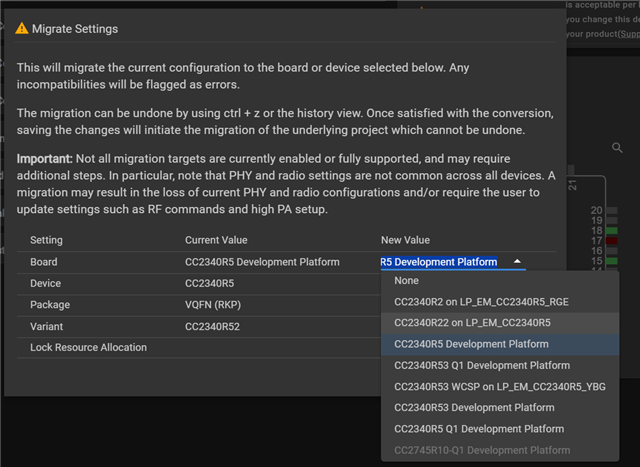
    A workaround you could do is to use CCS Theia's graphical interface for SysConfig to migrate your project. What you could do is the following :

    - Open your project in CCS Theia
    - Open the SysConfig file
    - Open Device View by clicking the chip button on the top right

    - Click "Switch" in the Device View

    - Select the right board in the migration settings (CC2340R2 if you have RGE packaging, or CC2340R22 if you have RKP packaging)

    - When seeing the error about the "Name" field not existing, you can click the "here" button to dismiss the error and fix it.

    I hope this workaround will work for you. Please don't forget to send the commands or method you used to migrate the project so we can fix this for other users !

    Kind regards,
    Maxence

  • Hi Maxence,

    thank you for your quick response. 

    I migrated as you described via the graphical Interface for the sysconfig.

    I used the following migration Settings:

    Board -> None (we use a customized Board, no devkit)
    Device -> CC2340R2
    Package then automatically changes to VQFN (RGE)
    Lock Ressource Allocation remains checked
    press Confirm

    When doing this with the Basic-BLE-example I get a few errors related to GPIOS that exist in R5 but not in R2 and the error mentioned in my first post. The GPIO Errors do not exist in my customized software because I do not use the GPIOS there, so I am left with the error above. 

    Dismissing the error was the first thing I tried, but then the Project does not build properly, instead I then get the following error:

    {
        "resource": "file:///c%3A/Users/admin/workspace_ccstheia/My_ble_3",
        "owner": "ccs-client",
        "severity": 1,
        "message": " #10099-D: program will not fit into available memory, or the section contains a call site that requires a trampoline that can't be generated for this section, or the section contains padded functions. run placement with alignment fails for section \".data\" size 0xeba.  Available memory ranges:",
        "startLineNumber": 0,
        "startColumn": 0,
        "endLineNumber": 0,
        "endColumn": 0
    }

  • Hi,

    I think that the automatic switching from RKP to RGE is unintended. Is the package of the CC2340R2 you're using RGE or RKP ? If the package is RKP, you should definitely select RKP in the migration popup.

    If you're not sure of the packaging of your CC2340R2 MCU, the main difference between RGE and RKP is its size : RGE has 6 "pins" per side, while RKP has 10 "pins".

    Kind regards,
    Maxence

  • Hi, okay the packaging helped. I could succesfully migrate the basic_ble project to the R2 RKP variant. I could flash it and start it and using the debugger I could see that is runs the main()-function in the main_freertos.c. 

    However using the BLE test tool forthe smartphone I could not see the project advertising its BLE interface, as it did in an the R5 evaluation board before migrating. 

  • Using this example 
    https://dev.ti.com/tirex/explore/node?node=A__AcrwHdZt.SBRoZj0q1LDWQ__SIMPLELINK-ACADEMY-CC23XX__gsUPh5j__LATEST
    I built a small program that uses the additonal thread in the empty.c to read sensor data and transmit it through a customized bluetooth interface. This program runs succesfully on the R5 evaluation board. When I migrate it to the R2 variant of the chip, the debugger does not stop at breaking points in the mainThread in the empty.c file. 

  • Hi !

    It's good that at least you're able to migrate the project in Sysconfig.

    It seems like you have multiple problems. First of all, could you try to import the regular basic_ble project without any change for the R5 board, port it to the R2 board and confirm that you are unable to debug the software correctly and that you cannot see the BLE advertisements as you did with the R5 ?

    Kind regards,
    Maxence

  • - I create the basic ble project using the project wizard

    - I change the device to R2 RKP

    - I dismiss the error that occurs (changing the setting Name)

    - I build the project succesfully

    - I start debugging, program is loaded onto the device, program is halted right at the main(), I can step through the program

    - I press continue and let the program run, the program is not advertized 

  • Hi !

    Sadly after reproducing the exact steps mentioned above on a CC2340R53, I do not see the same problem as you have. Can you confirm that this also happens on your R5 evaluation board ?

    Kind regards,
    Maxence

  • When using the R5 Evaluation board the advertizing does work and i can transmit data using bluetooth

  • Hi,

    There are actually more changes to port a project from the CC2340R5 to the CC2340R22.
    You can find the appropriate migration guide in the BLE user guide.

    Could you try to follow this guide and tell me if you have more issues ?

    Kind regards,
    Maxence