This thread has been locked.

If you have a related question, please click the "Ask a related question" button in the top right corner. The newly created question will be automatically linked to this question.

CC2340R2: FW programming progress 98%

Part Number: CC2340R2
Other Parts Discussed in Thread: UNIFLASH

Tool/software:

Hi Team,

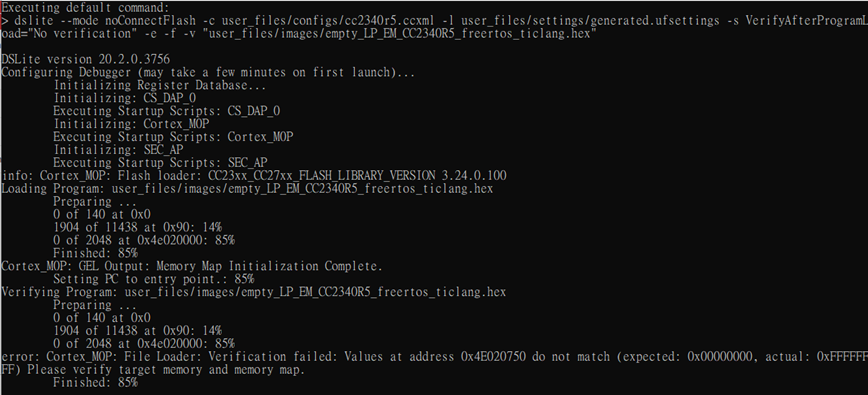
My customer is preparing pilot run for CC2340R2 but found FW programming progress of dslite-Cortex_M0P.bat just 98%, not show 100%.

It seem's that FW programming is successful. 

The following is the environment info:

SDK VERSION:simplelink_lowpower_f3_sdk_9_10_00_83

UNIFLASH VERSION: 8.8.1.4983

LOG:


Please help to provide comments.

Thanks.

  • Hi ! 

    It looks like the error comes from a verification failure. Is your customer able to flash the device using the graphical interface of UniFlash ? Is the customer trying to flash a blank device, or was the device already flashed before ? 

    It's also possible that the error comes from an invalid CRC values in the CCFG. Do you run the unmodified basic_ble example ? Does this error also happen with other hex files ?

    Kind regards,
    Maxence

  • Hi Maxence,

    I got the same error when using the empty example.


    The UniFlash GUI works perfectly.


    Thanks,

  • Hi !

    The error you're seeing is a CRC missmatch. When building a firmware using our SDK, the hex file has a section called the CCFG, which contains a lot of useful informations about boot and more. This CCFG also contains CRC values of the firmware, you can see them as hashes of your firmware. When the firmware is uploaded, the CRC computation is executed by the FW programming tools and compares it to the CRC values of your firmware.

    In the case where the CRC match, all is good and the firmware is successfuly flashed. If the CRC do not match, there are two possible behaviors depending on the tool your're using :
    - Uniflash will assume that the upload was correct and that you forgot to add the CRC. It will write the CRC itself into the flash and continue flashing.
    - Other tools may not make this assumption, and will halt the flashing process.

    In your case, the solution is to add the CRC values to your CCFG. The SDK has a CRC tool under C:\ti\simplelink_lowpower_f3_sdk_9_11_00_18\tools\common\crc_tool that you can use to add the CRCs to your firmware.

    In most example projects, the CRC is added as a post-build step with the following command : ${COM_TI_SIMPLELINK_LOWPOWER_F3_SDK_INSTALL_DIR}/tools/common/crc_tool/crc_tool patch-image --elf ${BuildArtifactFileBaseName}.out --symbol-prefix ti_utils_build_GenMap_sym_CRC_CCFG -o ${BuildArtifactFileBaseName}.out

    You can read more about CRCs in this chapter of the user guide.

    Kind regards,
    Maxence