This thread has been locked.

If you have a related question, please click the "Ask a related question" button in the top right corner. The newly created question will be automatically linked to this question.

CC2745R10-Q1: CC2745 Secure Boot Issue

Part Number: CC2745R10-Q1
Other Parts Discussed in Thread: SYSCONFIG, UNIFLASH

Tool/software:

Hi,

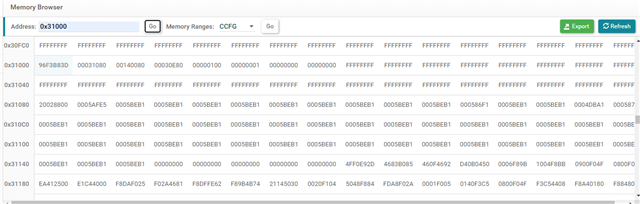
CC2745 I tested Secure Boot, I used the default configurations from the official engineering, and burned the basic_persistent_LP_EM_CC2745R10_Q1_freertos_ticlang_sb.hex and basic_ble_oad_onchip_LP_EM_CC2745R10_Q1_freertos_ticlang_sb.bin files. After the chip boots, it runs the basic_persistent program. I read the firmware area of 0x00 on the chip and found it was 0xFF, meaning only 0x31000 has firmware, and the firmware in 0x00 has been erased. Refer to my previous post for this issue that has not yet been resolved: e2e.ti.com/.../5766226

My requirement is to use Secure Boot. During production, the chip will be programmed with two firmwares: basic_persistent and basic_ble_oad_onchip. I want Secure Boot to prioritize checking the validity of basic_ble_oad_onchip upon power-up. If it is valid, it should run basic_ble_oad_onchip directly. If it is invalid, then run basic_persistent. How should this requirement be configured to be implemented?

  • Hello,

    My requirement is to use Secure Boot. During production, the chip will be programmed with two firmwares: basic_persistent and basic_ble_oad_onchip. I want Secure Boot to prioritize checking the validity of basic_ble_oad_onchip upon power-up. If it is valid, it should run basic_ble_oad_onchip directly. If it is invalid, then run basic_persistent. How should this requirement be configured to be implemented?

    This is done by default in the example, so no configuration is needed. If you take a look at the Secure Configuration settings in the sysconfig files for the projects, you'll see that one of the projects has a lower version number than the other. Secure Boot will always boot into the image that has the highest version number. 

    The way the example works is actually much like you stated, when an update is to occur, it will invalidate the current running image.

    CC2745 I tested Secure Boot, I used the default configurations from the official engineering, and burned the basic_persistent_LP_EM_CC2745R10_Q1_freertos_ticlang_sb.hex and basic_ble_oad_onchip_LP_EM_CC2745R10_Q1_freertos_ticlang_sb.bin files. After the chip boots, it runs the basic_persistent program. I read the firmware area of 0x00 on the chip and found it was 0xFF, meaning only 0x31000 has firmware, and the firmware in 0x00 has been erased. Refer to my previous post for this issue that has not yet been resolved: e2e.ti.com/.../5766226

    To flash these images, a specific flashing sequence must be followed. You cannot flash both images at the same time. If you want to flash both at the same time, they must be combined into one image using a tool like srec_cat.

    1. First ensure the chip is blank by doing two mass erases. This will also clear the HSM firmware. We do this to make sure the device is in a known state.

    2. Flash the .out file located in <SDK Root>/bin/hsm/cc27xxx10_hsm_fw_v3.0.0.out file. Once flashed, reset the device, and ensure that the green light on the EVM blinks or turns on. This will flash the HSM firmware without having to do multiple flashes.

    3. Ensure that the HSM firmware is loaded on the device via Uniflash:

    Click the Read HSM System Information button. If it succeeds you should see the HSM version information.

    4. Flash the basic_ble_persistent_sb.hex file using Uniflash. 

    5. Before flashing the basic_ble_oad_onchip_sb.bin file, ensure that the setting in Settings & Utilities --> Do not erase before program load is checked. If you flash the device without setting this, the previous image will be erased.

    6. Connect to the device and do OAD.

    If you find that you're not able to flash anything to the device, it may be because the device entered ROM Panic. In order to get out of this, you must erase the chip again (and keep retrying if it fails) to get it out of ROM panic.

    Please let me know if you run into any issues.

    Best,

    Nima Behmanesh

  • Hi,

    I merged basic_persistent_LP_EM_CC2745R10_Q1_freertos_ticlang_sb.hex and basic_ble_oad_onchip_LP_EM_CC2745R10_Q1_freertos_ticlang_sb.bin into a single test.hex file using the script command:
    srec_cat.exe -o test.hex -intel basic_ble_oad_onchip_LP_EM_CC2745R10_Q1_freertos_ticlang_sb.bin -Binary -offset 0x31000 basic_persistent_LP_EM_CC2745R10_Q1_freertos_ticlang_sb.hex -intel
    After flashing test.hex, the basic_ble_oad_onchip program runs (confirmed by the Bluetooth name), but when I read the data at address 0x00 with UniFlash, it is all 0xff, which means the basic_persistent application is still being erased. My goal is that when both applications are valid, the system should jump to and run the basic_ble_oad_onchip application (without erasing basic_persistent). However, when I perform an OAD update, I will erase the header of the basic_ble_oad_onchip application and then reset the system, at which point I expect the program to jump to and run the basic_persistent application.

    Thank you

  • Hi,

    Please allow me another day to look into this.

    Best,

    Nima Behmanesh

  • Hi,

    I looked into this a bit and I found that I'm seeing the same behavior when the images are combined. However, I believe it has to do with the overall configuration of the project. I'm going to try and will get back to you on EOD or Monday.

    Best,

    Nima Behmanesh 

  • Hello, may I ask if there is any latest progress

  • Hello,

    I apologize for the delay. I believe the issue is that one of the projects must be configured as a secondary secure bootloader. I'm trying to migrate the basic_persistent project from taking an app slot to an SSB slot and combining them to see if I see the same behavior.

    I'm still working on this migration but once it's finished, I'll provide a link for you to try. Additionally, you can try this in parallel in your application.

    Best,

    Nima Behmanesh

  • Thank you, please inform me promptly if there are any new developments, as I have a formal project to use.

  • Hello,

    I'm going to work on this issue this week, and will have an update by EOD on Wednesday. I'll let you know any findings before that date as well.

    Best,

    Nima Behmanesh

  • Hello, I would like to know the latest developments

  • Hello,

    I apologize. We are currently experiencing limited bandwidth. 

    This is unexpected and I've been working with the R&D teams to identify the issue. The suggested fix above has not been tested yet, but I hope to test it this week and provide feedback. 

    Best,

    Nima Behmanesh

  • Hi,

    I found that the solution is to make a couple of changes:

    1. The basic_persistent application must be placed in the secondary slot, and it's firmware version must be set to the same version as basic_oad_onchip.

    2. basic_oad_onchip must be placed in the primary slot, and it's version must be matched to the firmware version as basic_persistent.

    Making these changes will allow you to combine the images and flash them without any of the slots erasing.

    Best,

    Nima Behmanesh