This thread has been locked.

If you have a related question, please click the "Ask a related question" button in the top right corner. The newly created question will be automatically linked to this question.

CC2745R10-Q1: STACK_OVERFLOW_ERROR after closing CAN.

Part Number: CC2745R10-Q1

Hi TI Team,

We are facing an issue where our code is hitting HAL_ASSERT_CAUSE_STACK_OVERFLOW_ERROR.

We observed that this issue occurs when we close the CAN  using the closeCANInterface() function. Below, I have attached a code snippet for your reference.

From the fault screenshot (attached), it can be seen that the system is going into HAL_ASSERT_CAUSE_STACK_OVERFLOW_ERROR due to an IDLE task stack overflow.
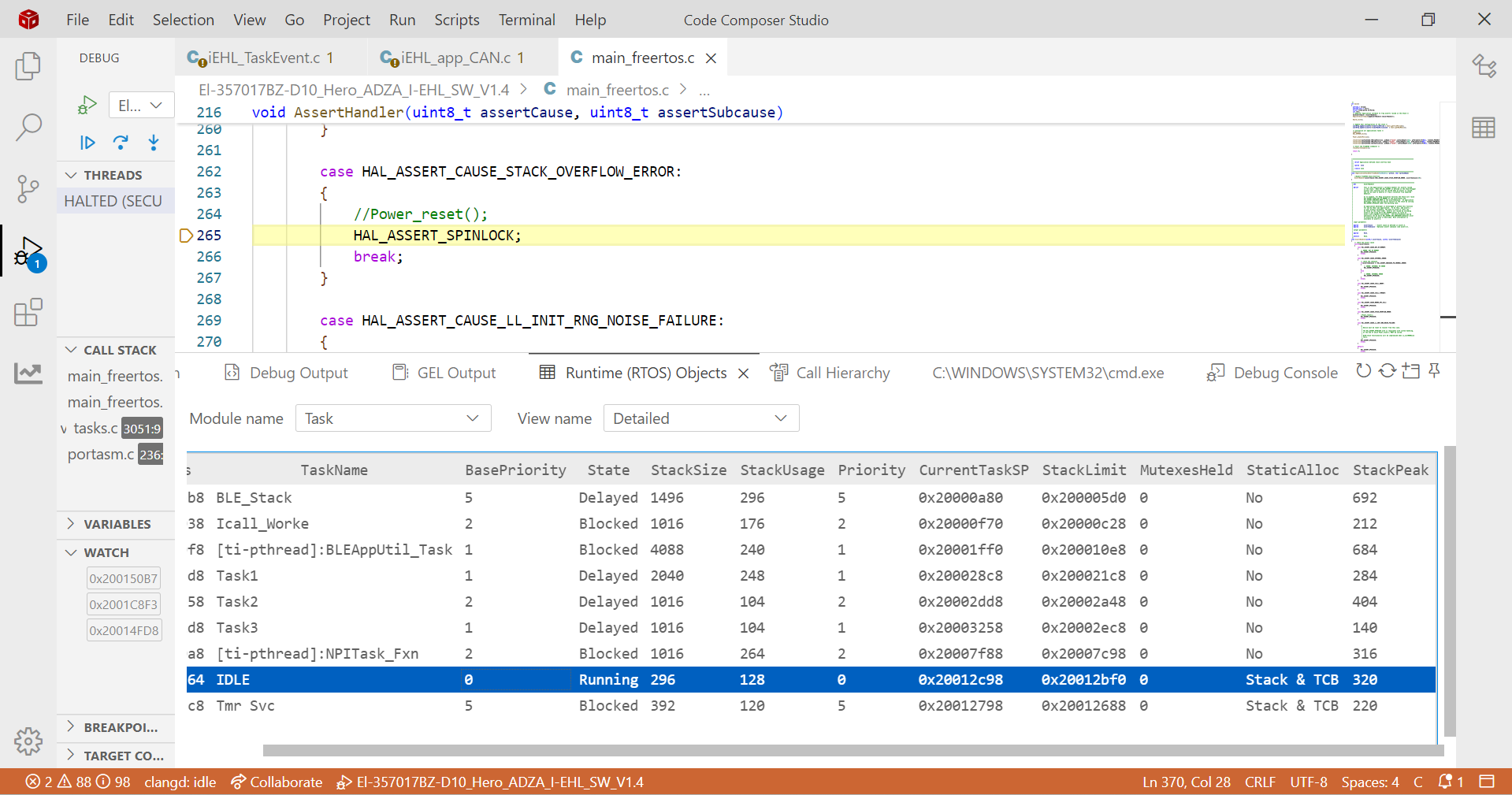
Screenshot 2026-01-09 155835.png

CAN communication works correctly, but when I try to close the CAN, the system later enters the stack overflow assert.

Code Reference:
void MainFunction(void *ptr)
{
    iEHL_canInit();
    GPIO_write(iEHL_CAN_Control_STB, GPIO_LOW); // Enable CAN transceiver
    closeCANInterface();
    vTaskDelay(pdMS_TO_TICKS(100));
}

void iEHL_canInit(void)
{
    if (CAN_handle == NULL)
    {
        CAN_init();
        CAN_Params_init(&canParams);

        canParams.eventCbk  = eventCallback;
        canParams.eventMask = CAN_EVENT_RX_DATA_AVAIL |
                              CAN_EVENT_ERR_PASSIVE |
                              CAN_EVENT_BUS_OFF |
                              CAN_EVENT_RX_FIFO_MSG_LOST |
                              CAN_EVENT_RX_RING_BUFFER_FULL;

        canParams.msgRamConfig = &msgRamConfig;

        CAN_handle = CAN_open(CONFIG_CAN_0, &canParams);
        if (CAN_handle == NULL)
        {
            while (1); // Failed: system halt or error logging
        }
    }
}

void closeCANInterface(void)
{
    if (CAN_handle != NULL)
    {
        CAN_close(CAN_handle);
        CAN_handle = NULL;
    }
}
Environment Details:

Controller: CC2745R10

SDK: simplelink_lowpower_f3_sdk_9_11_01_13

Kindly help me understand the root cause of this stack overflow issue and suggest the correct way to safely close the CAN interface.

Thank you,
Ratan.

  • Hello,

    In what context are you closing the CAN interface? Is this happening in the BLE task?

    What is the size of the task stack size of all the tasks that are on the system; how many tasks are on the system?

    Additionally, I'd recommend upgrading your SDK from 9.11.01.13 to the latest (9.14.xx.xx) since there were many critical changes introduced in the later versions of the SDK.

    Best,

    Nima Behmanesh

  • Hello Nima,

    We are using these three tasks in our project:
    xTaskCreate(MatLabFunction, "Task1",512, NULL, tskIDLE_PRIORITY + 2, &MatLabHandle);
    xTaskCreate(MainFunction, "Task2", 256, NULL, tskIDLE_PRIORITY + 1, &MainFunHandle);
    xTaskCreate(Authentication, "Task3", 256, NULL, tskIDLE_PRIORITY + 1, &AuthHandle);

    I have already provided the code reference. The CAN interface is closed in MainFunction(). When there are no tasks to execute for 5 seconds, the MCU turns off or disables all drivers to save power. At that moment, we close the CAN handle so that the CAN pins can be used as external hardware interrupts. If any external CAN signal is detected, the MCU immediately wakes up and resumes execution.

    I have already shared a screenshot showing a stack overflow occurring in the IDLE task.

    Regards,
    Ratan.

  • Hi Ratan,

    I'd recommend increasing the stack size of the task responsible for closing the CAN handle. Please test this and let me know what the results are.

    Best,

    Nima Behmanesh

  • Hi Nima,

    After increasing the stack size of the task responsible for closing the CAN handle, the issue is still not resolved. However, when I increase the stack size of the IDLE task from the system configuration, the problem gets resolved.

    I am not sure whether increasing the IDLE task stack size is a good or recommended approach, and I would appreciate your guidance on this.

    Regards,
    Ratan.

  • Hi Nima,

    I have a new observation to share. There are actually two different base codes involved:

    TI Legacy code, where channel sounding is run using Python.

    TI Embedded code, which was shared directly by TI with us (this code is not available on the TI website). This is the codebase in which we are currently running our application.

    Today, I tested the TI Legacy code using the car_node example, and I observed that there is no issue when closing the CAN handle in this setup.

    SDK used: simplelink_lowpower_f3_sdk_9_14_00_39
    Example code: car_node

    Based on this, it seems the issue may be specific to the TI Embedded base code that we are using. Could you please suggest a better solution or recommended approach to handle this properly?

    Regards,
    Ratan

  • Hi Ratan,

    Increasing the IDLE task size is fine. I would just ensure that after repeated closing of the CAN handle that the memory is not overflowing. 

    As far as the TI embedded code, this code is fully embedded and therefore is different than the legacy code. I suggest following the above and increasing the IDLE task size while monitoring for overflow.

    Best,

    Nima Behmanesh