CC2340R5: Basic BLE standby

Part Number: CC2340R5
Other Parts Discussed in Thread: SYSCONFIG, ENERGYTRACE,

I have product firmware that uses pretty much everything on this chip. Timers, SPI, I2C, UART etc. I would like to take the MCU in and out of standby based on a bluetooth message. The message is properly received into an application task that has its own event loop. The task handles all the buses and data flow, so the handler is in this context. The handler sets a semaphore and waits on it to suspend the app task and ideally puts the chip in standby. It does not work now but rather continues to run normally with BLE advertising and such. 

To start with something simple, what modifications to the Basic BLE example would need to be made to have it enter standby, say maybe on a button press? I have added the policy function setting standby in sysconfig and added the predifined symbol POWER_SAVING to the project based on some things I've read. Is there a list of items to set/change I can follow?

With two event loops, I can imagine things are more complicated. How do I handle the Blutooth task?

Thanks,

Bill 

  • Hey Bill,

    Thanks for reaching out! This is a great question. 

    The out-of-box example typically goes into standby when it's called by the idle task. This feature is already implemented as the device already automatically wakes up to receive/send BLE information. Please let me know if I'm misunderstanding the question.

    As for handling the BLE task, there are a few things to keep in mind. First, to avoid any complications and stack starvation, the BLE stack should always have the highest priority in the project. Also, whenever calling BLE outside the BLE task context, it is highly recommended to use either the BLEAppUtil_invokeFunction or BLEAppUtil_invokeFunctionNoData APIs, as these will take the function and add it to a queue running within the BLE task context.

    I hope this answers your questions, but please let me know if you have any more!

    Best Regards,

    Tarek D

  • Hi - Thanks for the reply. I'm doing ok with two tasks in general. What I'm trying to do is see the effect of standby. My app code is waiting forever on a  semaphore as I said above and so it should not be scheduled by the RTOS. However, the BLE task seems to running along and advertising and accepting connections. The same is true for the basic_ble example which is why I asked about it. 

    This is not standby in my mind. The dev board is continually drawing about 7ma no matter what. I want the chip to draw little power and not do anything until an interrupt. I do want to retain RAM. Should i try to stop advertising? What will need to change to make the BLE task and the chip do nothing until I want it to? 

    Thanks again for your time

  • Hey Bill,

    This is fairly strange, the device should typically be going into standby in-between advertisements. I do have a few questions regarding this behavior:

    • What is the advertising interval being used?
    • What is the size of the advertisement data and scan response data?
    • Are any peripherals active during this?
    • Out of curiosity, do you notice the device going into standby if advertising is disabled?

    The behavior you're describing and trying to achieve is definitely possible, there may be a misconfiguration or perhaps a tight advertising interval that could be causing this.

    Best Regards,

    Tarek D

  • Hi Tarek, What current draw would you expect from the unmodified basic_ble app that has no bluetooth connection and is doing nothing? I set the advertising sets to zero in syscfg but I don't see any change in current. I am not set up to see the current use in any detail yet. I'm just looking at usb current draw with an ammeter running basic_ble on the EVK board. The current is about 22ma. I can get into the energy trace stuff if need be. 

    Again, the real question is how do I get this to go into standby at super low power, which maybe is actually what do I need to turn off? It would seem advertising at least. How would I do that in code? The ble doc says "By default, all the examples in SimpleLink Low Power F3 SDK will put the CC23xx or CC27xx in standby mode if there is no task running. " Is advertising the only thing keeping that task running?

    Thanks

  • I went back and started the basic_ble app with energytrace and did not have it do anything. Energytrace says 1.25ma is continually consumed. I'm not seeing any signs of standby being entered, but it does look like idle to me. 

  • Hey William,

    The ble doc says "By default, all the examples in SimpleLink Low Power F3 SDK will put the CC23xx or CC27xx in standby mode if there is no task running. " Is advertising the only thing keeping that task running?

    This is correct, with the correct changes, the only thing the waking up the device from standby would be the advertising.

    The unmodified basic_ble project  would require some modifications to enter standby. This would include:

    • Disabling all LEDs
    • Disabling the Display module (this can be done by going to syscfg file and selecting BLE -> Advanced Settings -> Disable The Display Module, then deleting the Display Module instance)
    • Disabling all buttons

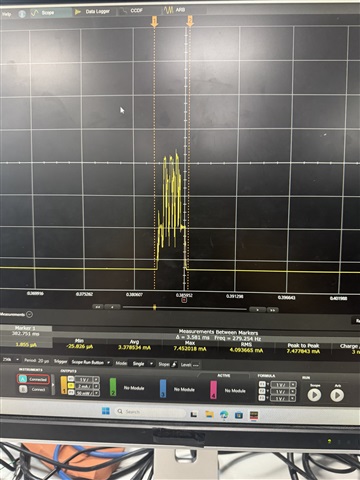
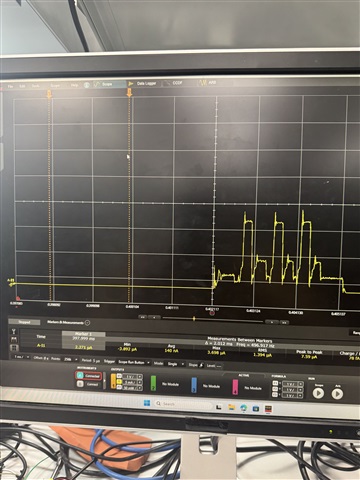
    This way, the only thing consuming power would be the actual advertisements of the device. When that happens, you should see the device go into standby, with 3 periodic spikes indicating advertising on the 3 advertisement channels.

    I will also say, EnergyTrace is not very accurate at measuring low currents, so you may want to use a power analyzer.

    I hope this helps.

    Best Regards,

    Tarek D 

  • I removed all of those items from syscfg. The current is still at 1.2ma. This is just basic_ble. Can you replicate this? I'm not sure where else I could find any information. 

  • Hey William,

    I will attempt this on my end and get back to you. In the meantime, how are you measuring the current?

    Best Regards,

    Tarek D

  • I stuck with Enerytrace. It is fine at a few milliamps I think. I'm looking for orders of magnitude change when I go to standby so I'm pretty sure it will show that. 

    Bill

  • Hi - Any further thoughts? Should I ask this again as just demonstrating standby in the stock basic_ble unmodified? 

  • Hey William,

    My sincerest apologies for the delay. I just ran some power measurements on the CC2340R5 running a slightly modified basic_ble example and I saw an average current consumption of 140 nA when the device is in standby and 3.37 mA when the device is advertising (at 0 dBm). 

    Here are the modifications I made:

    1. Go to RF Stacks Section -> BLE -> advanced settings -> Disable Display Module
    2. Delete Display instance found inside TI Drivers Section
    3. Delete all GPIO instances found inside TI Drivers Section
    4. [Optional] Go to RF Stacks Section -> BLE -> Radio and change the Tx power value to -8 dBm for the ultra low power (default is 0 dBm)
    5. [Optional] Go to RF Stacks Section -> BLE -> Broadcaster Configuration -> Advertisement Set 1 -> Advertisement Parameter 1 and modify the minimum and maximum interval values for less frequent advertisements (reducing the overall power consumption)

    I hope this helps.

    Best Regards,

    Tarek D