This thread has been locked.

If you have a related question, please click the "Ask a related question" button in the top right corner. The newly created question will be automatically linked to this question.

Current BLE OAD stack incompatible with BLE Device Monitor application

The Ble Device Monitor Application cannot OAD the latest 1.3.2 BLE stack.

The Ble Device Monitor Application can OAD the two images shipped with its installer.

I have rebuilt the SensorTag project using the IAR compiler and left the image header version at 2 to be the same as the as shipped images.

When the OAD starts the BLE device monitor display a large number of message boxes with Command Status 40 and some other hex numbers and length value. WerFault kicks in and the program is hung.


I have debugged the device firmware and it all appears to be working as expected. Log Breakpoints fire in

static bStatus_t oadImgIdentifyWrite( uint16 connHandle, uint8 *pValue )

static bStatus_t oadImgBlockWrite( uint16 connHandle, uint8 *pValue )

I have done many tests and combinations of firmware a/b bim and narrowed it down to an incompatibility between the current Image in the device (normally A) and the BLE Device Monitor program.

If I load the as shipped Image A I can OAD my Image B. Of course once that occurs I am done. My Image A and Image B are identical(for now).

We really need toe get some help on this one I have seen post requests for source code to Ble Device Monitor. So far TI has said no. That would be ideal. Second choice would be a fix to the application.


  • If you would like to use Windows to OAD, I think you can modify C# in HealthDemoGUI in

    http://processors.wiki.ti.com/index.php/Category:HealthDemo

    to build your own OAD application.


    Good luck,

    Jack

  • Thanks.

    C# and Windows is fine.

    Do you know what is involved with doing an OAD from PC side?

  • There are some code you may need to look at:

    1. Example of the project of OAD Manager (as Central device) in TI BLE stack

    2. Code in oad_target.c in Keyfob and Sensor Tag, as Peripheral

    3. Code in iPhone app of Sensor Tag as Central

    4. TI OAD document: http://processors.wiki.ti.com/images/8/82/OAD_for_CC254x.pdf

    Note that, the current TI OAD is an example and you may need to modify to get more sophisticate for you application. For example, now the TI OAD doesn't check the firmware version number, it just checks the type A or B.

    Good luck,

    Jack


  • Hi,

    It may be that the peripheral applications you are using request updated connection parameters with 1 second interval or something large like that. Set the #define DEFAULT_ENABLE_UPDATE_REQUEST   to FALSE. Device Monitor doesn't handle slow parameters well when it expects a fast connection.

    Also make sure that you, in the DevMon gap settings choose a suitably low connection interval like 10 or 20.

    Best regards,
    Aslak 

  • Thanks for all your suggestions. 

    The issue is simple. The Apple IOS application can ping pong our device FW from A->B->A->B etc.

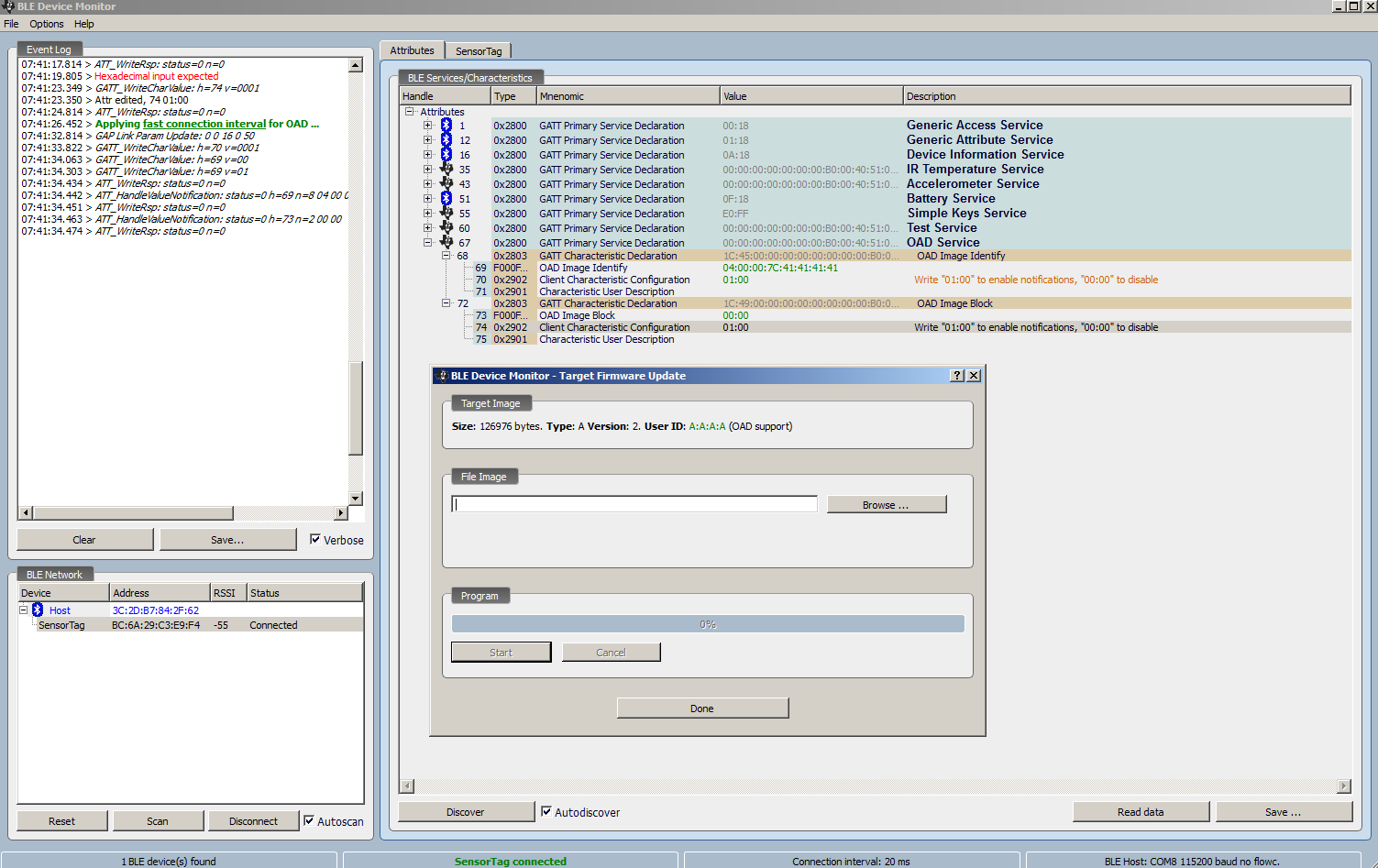
    The BLE Device Monitor cannot. It crashes. The first image shows the device monitor starting the OAD process as I select ImageB. We see the exact same information when running the IOS application.

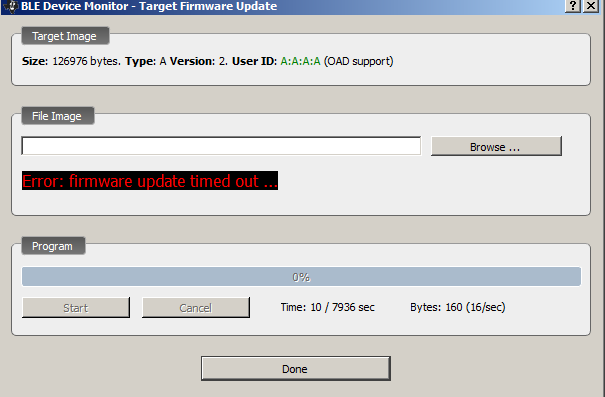
    The second image is the dialog that appears in BLE Device Monitor. The IOS application.does not display anything out of the ordinary.

     BLE Device Monitor shows hundred of these dialogs until WerFault.exe kills the process.

    Note: I can do this exact process with the ImageA/ImageB files that ship with BLE Device Monitor without error.

    I  several choices at this point. 

    1. Get TI to resolve this issue in BlE Device Monitor. 

    2. Get TI to issue source code to BlE Device Monitor and resolve the issue myself.

    3. Follow the suggestions above and waste huge amounts of time writing an OAD manager for Windows.

    It would be so much easier if the TI folks would resolve the issue with the BLE Device Monitor.

    Note: 0 updates from TI to this discussion. Is it time to call our TI Rep and force the issue????

  • Hi,

    Could you share a screenshot of the log window from device monitor?

    What are your GAP Settings within Device Monitor? Does your remote device send a parameter update request before or during the OAD?

    If the remote device consistently asks for a specific connection interval, try using this as default for Device Monitor.

    Best regards,
    Aslak 

  • It is impossible to capture the screen because it hangs so fast. I do recall a bunch of messages about event 26. I don't know what this means. I searched through the code but was unable to determine what event that is.

    FYI. The code I am using is the out of the box sensor tag image from  v1.3.2  Ble Stack.

    If you download the stack and BLE Device Monitor Application you should see the same thing.

  • Aslak N. said:

    Could you share a screenshot of the log window from device monitor?

    What are your GAP Settings within Device Monitor? Does your remote device send a parameter update request before or during the OAD?

    If the remote device consistently asks for a specific connection interval, try using this as default for Device Monitor.


    As I mentioned, please tell me what the Options->Gap settings are in device monitor.
    Also provide a screenshot of the log window after connecting and waiting ~10 seconds.

    Aslak 
  • I have attached the log file generated during the connection to the sensortag.

  • Technical issues. I tried attaching the screen capture and it got lost somehow.

    Thanks for your help.


  • Haven't heard any responses.

    Maybe another way to attack this is to get the version of the BLE Stack that was used to generate the two bin files that ship with BLE Device Monitor. I am assuming that it was prior to v1.3.2 We have v1.2 which does not have the OAD profile. Can someone determine what version was used with the BLE Device Monitor images and send me the zip with that version of the BLE Stack?

  • I had a similar issue, and found I could get the OAD to work in the Device Monitor if I manually enabled Notification to the OAD IMG write and OAD IMG Block characteristics. (So I wrote 01:00  to both , and then ran the OAD portion of the software).

    After doing this I could do the download, before I got the same 'error 40' message, and eventual crash you describe above.

  • I tried that and now it hung up trying the show the initial OAD dialog.I got a command error and the the tag stopped functioning. I had to reset the tag.

  • Hi,

    Looking at your log file,

    sensortag.txt said:

    (....)
    09:21:39.705 > ATT_WriteRsp: status=0 n=0
    09:21:39.925 > OAD support detected
    09:21:45.087 > GAP Link Param Update: 0 0 800 0 1000

    it looks like the SensorTag sends a parameter update request after 5 seconds where it asks for 1 sec interval and 10 sec timeout. This may as mentioned confuse Device Monitor. I'm currently on a business trip, so I'm unable to test it, but I suggest that you try either of two methods:

    (download the latest device monitor, it may have updated. not sure)

    1) Wait 5-10 seconds after connect before you go into the OAD item on the file menu
    2) Choose 800 as connection interval in the Device monitor's GAP settings.

    This way, device monitor will be more likely to be in sync with the SensorTag's connection parameters. Let me know how it goes.

    Best regards,
    Aslak

  • Getting closer. Now it times out rather than crashing.

    GAP settings below.

  • I believe I have the latest SW.

    here is the build number.

  • Hey John,


    Actually the current version is 1.1.3. Here is the download page: http://processors.wiki.ti.com/index.php/BLE_Device_Monitor_User_Guide

    I can't find a revision history to see what was changed between 1.1.1 and 1.1.3 but it's worth a try.


    Thanks,

    Ian

  • Same result with GAP normal settings.


  • Hi John,

    Do you have a log file from when it times out?

    Best regards,
    Aslak 

  • I must have done things in a different order this time because it works now but with some error dialogs,

    I tried changing the GAP settings before connecting and the connect failed. I then restored to default and was able to connect. I then modified only Max Connection Interval to 800 and the OAD worked. I do see two GAP Link Param update failed dialogs. You can see the two screen captures.

    I did not attach the log because the timeout did not occur.

  • So I have not updated where I am because it was kind of working. I was able to OAD by using the slow GAP settings. This is entirely unacceptable because it takes about 20 minutes to OAD. This will kill our battery. In the mean time I have been off working on other potions of the firmware.


    Yesterday I did nothing different other than start from scratch and started an OAD and noticed a new message in the Log window. It was a green message and said something about high speed OAD. I was able to OAD many times in a row back and forth between A and B. Today I am not seeing the message and the OAD fails as it always has. The GAP settings are at the default values.


    Maybe you can look into why I should see(or not see) the OAD high speed message in the application. This might be a hint to why things don't work properly in this application but dot work using the iOS version.

  • I was able to reproduce the high speed message.

    Yesterday I was poking around with the OAD Characteristics and changed the notification values to 01:00 for both

    OAD Image Identify and OAD Image Block.

    Apparently setting these support notifications is the magic.

    Can someone explain it this is required in our FW ?