This thread has been locked.

If you have a related question, please click the "Ask a related question" button in the top right corner. The newly created question will be automatically linked to this question.

linker error

hiii...

am working on cc2540dk-mini. i have opened a sample program of heart rate in iar environment. during make process it shows one error "error while running linker"...

how can i solve it... 

  • Hi,

    Can  you please post what is error that you are getting?

    Can you also mention how did you compile the project?

  • Building configuration: heartrate - CC2540DK-MINI Keyfob Slave
    Updating build tree...
    Linking
    Error[e16]: Segment ISTACK (size: 0xc0 align: 0) is too long for segment definition. At least 0xe more bytes needed. The problem occurred while processing the  
    segment placement command "-Z(IDATA)ISTACK+_IDATA_STACK_SIZE#08-_IDATA_END", where at the moment of placement the available memory ranges  
    were "IDATA:4e-ff"
       Reserved ranges relevant to this placement:
       IDATA:8-1f           VREG
       IDATA:21-40          VREG
       IDATA:41-42          XSP
       IDATA:43-43          DATA_I
       IDATA:44-4b          DATA_Z
       IDATA:4c-4d          IDATA_Z
       IDATA:4e-ff          ISTACK
       BIT:0-7              BREG
       BIT:80-97            SFR_AN
       BIT:a0-af            SFR_AN
       BIT:b8-c7            SFR_AN
    Error while running Linker
     
    Total number of errors: 1
    Total number of warnings: 0

    this is the error am getting...

    i hv just select the workspace name(CC2540DK-MINI keyfob slave) then project menu-> make

  • Hi,

    Got same error on my side.

    The issue is IDATA stack size. IDATA stack size is  more, so it's taking memory from other segments. 

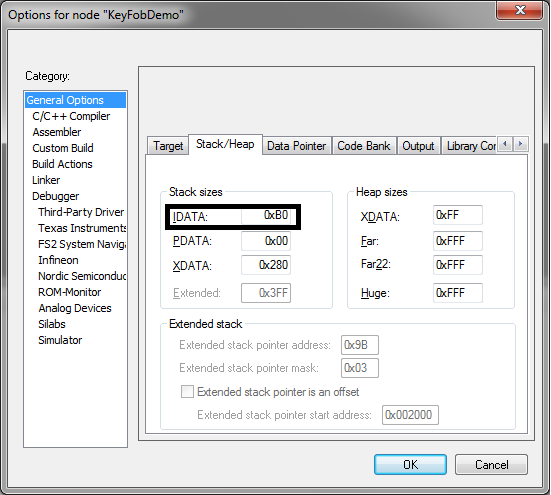
    To solve this, goto project->options->general options->Stack/Heap.

    change stack size of IDATA to 0xB0. 

    Look : 

    This should solve your problem. 

    -----------------------------------------------------------------------------

    Press "Verify" if your question is answered