This thread has been locked.

If you have a related question, please click the "Ask a related question" button in the top right corner. The newly created question will be automatically linked to this question.

Time synchronization between CC2540-based BLE sensors

Other Parts Discussed in Thread: CC2540, CC2640

Hello!

I am an embedded software developer, currently writing software for an international research project for wearable sensors-based monitoring of chronic disease patients. We use CC2540-based wearable sensors that need to gather some measurements, timestamp them and send to the host over BLE. The critical part here is the timestamping, as it needs to have 1...3 ms accuracy. Our plan is to use the BLE frequency hopping synchronization signals for these time stamps. Unfortunately the register map for CC2540 is not public, it is meant to be used only through the TI BLE (binary-format) library.

As the BLE stack needs to synchronize the frequency hopping between slaves anyway, is it possible to use this information for time stamps as well? Is there any specific register we should read, hardware timer used for the BLE frequency hopping time synchronization or any other information available that would help us to synchronize measurements from different slave devices? The idea would be that the slave devices create the timestamps, include them when sending to the host (which takes place by using our custom protocol over BLE stack) and as a result the host would be able to sort the measurements in the order they happened.

Any help on this topic would be greatly appreciated.

  • You can refer to TimeApp example in BLE stack.

  • Thank you for this answer YiKai Chen, but as I understand, the TimeApp only handles the clock with a precision of one second. Our goal is to have a precision of about 1 to 3 milliseconds. But different from the TimeApp, there is actually not so much need to use absolute time, a simple 16-bit overflowing counter would be sufficient, but this needs to be a synchronized between the BLE devices in our system.

    I looked at the code in OSAL_ClockBLE.c and seems it uses a 625-microsecond tick, which it reads by calling function ll_McuPrecisionCount(). If I understand correctly, this 625us tick itself is implemented in the closed (binary-only) part of the TI BLE library. In case I have for example three devices that use this 625us tick as a time stamp, I probably can't expect that they all have the same value at the same moment in time. But somehow the BLE stack can manage the frequency hopping, so I assume there is some kind of accurate synchronization between the devices. Would that be possible for the user application to query this synchronization information? In case I would somehow know for example that a value of 13986 on device 1's 625us timer means the same time moment as 64123 on the other would solve our problem.
  • Yes, TimeApp handles clock with a precision of one second. It sounds a little difficult to achieve 1~3 ms accuracy between your BLE devices. However, I think that depends on the accuracy of time stamp on your BLE central since all of the BLE devices should synchronize time stamp with BLE central. If you can revise the BLE central to provide time stamp with 1 ms accuracy, I think you can achieve 1~3 ms accuracy between your BLE devices.
  • Hello Jaanus,

    Using the frequency hopping technique would be a unique way of generating time stamps. I think though that this would change depending on the number of devices that were connected.

    The OSAL_ClockBLE.c can be modified by adding your own calculations to convert the number of micro seconds to milli/tenths/ hundredth seconds. However, the time is subject to considerable drift.

    If you are familiar with the SmartRF PacketSniffer, you can implement a similar type of time stamping. The app you are connecting to for getting the data from the CC2540 will allow you to get the time the peripheral was discovered and the time the information was received. These two values should allow you to create a time stamp without having to have the CC2540 generate one.

    Thanks,
  • Hi,

    There are some timing numbers you can get out from the link layer.

    #include "ll_timer2.h"
    #include "ll_sleep.h"
    
    ......
    
    static __root uint32 sleepTimer[4] = {0};   // Current sleep timer, in 32kHz ticks
    static __root uint32 timeToNextRf[4] = {0}; // Time to next scheduled RF event, in 32kHz ticks
    static __root uint32 coarseTime[4] = {0};   // 24-bit overflow capture of last RF event, in 625µs ticks
    static __root uint16 fineTime[4] = {0};     // 16-bit capture, in 31.25ns ticks
    static __root uint8 idx = 0;
    
    
    uint16 SimpleBLEPeripheral_ProcessEvent( uint8 task_id, uint16 events )
    {
    
    .......
    
      if ( events & 0x0100 )
      {
        LL_TimeToNextRfEvent(&sleepTimer[idx], &timeToNextRf[idx] );
        llGetTimer2Capture( &coarseTime[idx], &fineTime[idx] );
    
        idx++;
        if (idx == 4)
          idx = 0;
        
        return events ^ 0x0100;
      }
    
    
    ......
    
    static void peripheralStateNotificationCB( gaprole_States_t newState )
    {
    ......
        case GAPROLE_CONNECTED:
          {
            HCI_EXT_ConnEventNoticeCmd( simpleBLEPeripheral_TaskID, 0x0100 );

    The event will be triggered some small but jittery time after the RF event itself. The event method works only for Peripherals, but similar code can be executed if data is received by a Central, because this is also handled directly after the event.

    So this gives you event 0 happens at Timer 2 time coarseTime[0] * 0.625 + fineTime[0] * 31.25e-6 (ms), etc. When I tested just now, I get a delta of 25.0004687 ms for two events happening on a 25ms connection interval, so it should be decent enough.

    Alternatively, you know the current sleepTimer and the current time to next event (unless slave latency is in effect), which should also give you an anchor point.

    I can't guarantee that this works under all conditions, e.g. if there is additional load on the system which prevents your event from executing before the next RF event has happened/is happening. To counteract this, insert a task with priority just lower than LL.

    Best regards,
    Aslak

  • Thank you for this answer, Aslak! However, from this answer, I am still not sure if this helps me to get a timestamp for events occurring on different peripheral devices in one system, or if this just applies for events occurring in one device. Hope you could help to clarify this.

    1. I assume Timer 2 is not synchronized between peripherals, so when I call llGetTimer2Capture() on different devices, I can't compare the results. The precision, however is much more that would be sufficient for our project.
    2. The precision of 32kHz sleepTimer would also be absolutely sufficient for our project. In case the slave latency is not used, do I assume correctly that by calling LL_TimeToNextRfEvent() on different peripherals connected to the same central at the same moment in time, I get the same timeToNextRf value? Then, by using the sleepTimer and timeToNextRf values together, I could create a timestamp that would be comparable between BLE devices in the same system.
    3. What is the relevance of event 0x0100 in your example? Could I just call LL_TimeToNextRfEvent() from anywhere in my code or should this always be done from SimpleBLEPeripheral_ProcessEvent()? What exactly are the occasions SimpleBLEPeripheral_ProcessEvent() is called with 0x0100 bit set?

    Thank you in advance,

    Jaanus
  • Hi,

    1. Yes, the timers of various devices are completely independent of each other.
    2. No, the RF events are not happening at the same time, so this is not viable.
    3. It is merely an event flag that I chose. This event is subscribed to by calling HCI_EXT_ConnEvtNoticeCmd, and naturally is set after a connection event has taken place.

    To synchronize across a network, using the method provided merely gives you a way for the central to get the offset between the peripheral's timer and its own timer. This should then be sufficient to calculate system time from later local timestamps received from the peripheral.

    Best regards,
    Aslak
  • Thank you for the clarifications!

    There are two problems I see with the solution of using connection creation as reference point:

    1. Out central is not CC2540, but Android-based device and I am not sure if these different firmwares share exactly the same idea of when the status is considered as "connected", also I suspect that maybe it would not be possible to detect this moment with ~1 ms precision on Android, which is an operating system rather that firmware running on microcontroller.
    2. More importantly, I can't assume the peripheral clocks are that accurate that one reference point in time would solve our problem. We need some mechanism of resynchronization. For BlueTooth frequency hopping, some mechanism is implemented, so would there be a possibility to use this for resynchronizing my timings?
  • Hi,

    You are probably right that in Android you don't have access to this timing.

    You refer to the frequency hopping, and this is exactly the number you get via the methods provided. But, as you point out, it is only the synchronized anchor point between Central and Periperhal X.

    With that information, the Central application will know, based on the timestamps the peripheral applies to its later messages, the peripheral timing relative to the connection events in the channel hopping scheme.

    However, if the central does not know its own timing, you need to do some statistical calculations perhaps. Something NTP-like, I imagine.

    Your challenges will be that transmission and reception in the app is probably rather disconnected from reality, and the only thing you will know for sure is that the actual data transfer happens every ConnInterval, and that the peripheral will have its answer ready after the next connection interval.

    So, if you get a ping-pong up and running, you can time this in the app, and the internal timing that is closest to the actual connection interval (lowest overall) could perhaps be used for synchronization.

    The rest, as they say, is up to you. We don't have any examples for this.

    Best regards,
    Aslak
  • Hi Aslak N.

    After read this post, as for BLE multipe connection, there are some oponions that expect you to comfirm them.

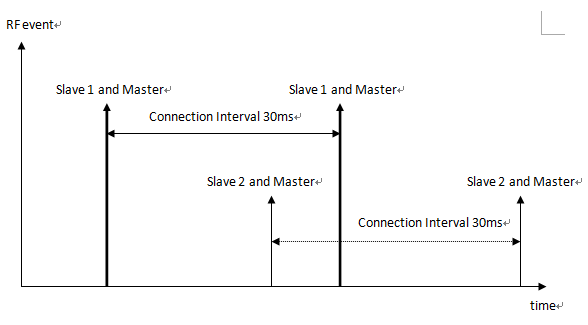
    The multipe connection relationship between master and slave was established one by one. there are two slave,they have same connection interval(30ms). when they have connected to a master, the time sequence of master will be like following.

    Am i right? if yes. according to this,I got a deduction.that is,based on above example,after a connection interval, the master had been gone through two RF event. if there are three slave, the RF event will be three. it is just apply to the situation that multipy slave have same connection interval.

    According to following:

    - The stack now supports up to 3 simultaneous connection as a central / master
    device, with a few constraints:

    - All connection intervals must be a multiple of the minimum connection
    interval (i.e. the minimum connection interval is the greatest common
    denominator of all connection intervals).

    - The minimum connection interval allowed is 25ms when using more than
    one connection.

    - When more than one connection is active, only one data packet per
    connection event will be allowed in each direction.

    If three connection interval is 30ms, 60ms, 90ms.then after a connection interval(the min 30ms), the number of RF event that master had been gone through will be different. the min number is one and the max number is three. what do you think of that? what is the real pupose of constraints?

    Thanks in advance.

  • Hi all,

    Does timeToNextRf[4] supports in CC2640/50 ?
    I didn't find any value like that in BLE stack project.