This thread has been locked.

If you have a related question, please click the "Ask a related question" button in the top right corner. The newly created question will be automatically linked to this question.

CC26xx sensor controller studio user guide

Other Parts Discussed in Thread: CC2640, CC2650

Hi,

Can you provide more detail document for sensor controller. Quick start guide only introduce light sensor on smartRF06 shortly, how do I test UART Emulator? LED Blinker? ADC Data logger? How to create new project for my application and integrate them into IAR/CCS?

please provide more information about sensor controller. thanks

  • Hello Kimi,

    If you press F1 (Help Menu) in Sensor Controller Studio (SCS) all the procedures used are documented. There is also a short description for the behavior in the task description. The source code (IAR/CCS projects) are also well documented. SCS is still under development and more features and possibly enhanced documentation will be published this summer. 

    For the project examples you mention her is the run down in short:

    • UART Emulator:

    If you sue the SmartRF06EB there is implemented a virtual COM port over USB so you can simply find out which port is enumerated on you PC by checking in device manager and then connect a UART emulator program (for example Tera Term) and then you will see that for every character you write (send to SmartRF06EB+CC2640) it will be echoed (replied) back from the example code.

    • ADC Data Logger:

    Will sample data from the selected DIO (you must connect something to measure on to the selected pin) and then the application processor (M3) will periodically wake up and retrieve this data and send it over UART.

    • LED Blinker:

    This examples also demonstrates starting and stopping the Sensor Controller task by using the SmartRF06EB push buttons. Read more details in the example project source code.

    We are working on making some training material, but it will take some time before it is ready. Details on the sensor controller domain is documented in the TRM - Chapter 17.

  • Hi Eirik,

    Where could we get the training material on Sensor Controller Engine(SCE).
    We need to understand how to use the interrupts, stack pointer related to the SCE.

    Best Regards
    kummi
  • There is a basic guide in the link given:
    e2e.ti.com/.../1608687

    We will create more training material based around CCS and the SensorTag which will be added as modules to SimpleLink Academy:
    e2e.ti.com/.../448001
  • Hi Eirik,

    Thank you so much for the documents.

    Currently we are trying to understand files(.prd) in the "proc_defs" folder.
    Are there any documents to help us to understand this format.

    We are not able to understand about passing the Array pointer(address).

    Best Regards
    Kummi
  • Hello,
    No we don't have specific documentation other than the general "CC26xx, CC13xx SimpleLink Wireless MCU Technical Reference Manual". You can simply look at how the implementation is done.

    What are you trying to achieve?
    If possible I would advice you to use Sensor Controller Studio to implement your program.

  • Hi Erik,

    Thank you.
    Actually these questions are from our customer,
    currently our customer is trying to understand the SCE usage and implement
    a low power module.

    Below are the questions related to .prd.

    - In PRD file it seems there are rules for input and return data of a function
       but we are not able to understand the rules for a stack pointer.

    - We need the information about passing the Array pointer(address).

    - What is the menaing of "reg/imm" "RG/RS/I" mentioned in adc_read_fifo.prd
       C:\Program Files (x86)\Texas Instruments\Sensor Controller Studio\proc_defs\adc_read_fifo.prd

    - In the SCS examples we find the sample is working on Cortex-M3's RTC.
      Is it possible to operate through Sensor input external interrupt?
      In that case please let us know if there are any sample codes.

    Best Regards
    Kummi

  • Hello Kummi,

    I told you a little lie (unintentionally) earlier,

    There is some documentation here:

    • C:\Program Files (x86)\Texas Instruments\Sensor Controller Studio\proc_defs\proc_def.dtd
    • C:\Program Files (x86)\Texas Instruments\Sensor Controller Studio\resource_defs\resource_def.dtd

    Template:

    • C:\Program Files (x86)\Texas Instruments\Sensor Controller Studio\resource_defs\resource_doc_template.html


    Q & A:

    1) In PRD file it seems there are rules for input and return data of a function but we are not able to understand the rules for a stack pointer.

    Could you give me a specific example?

    2)  We need the information about passing the Array pointer(address).
    Please give me an example. In the task code language this is shown in the Analog Light Sensor example. To create a pointer to a data structure member, use the # operator:
    S16* pThreshold = #cfg.pBinThresholds + bin;
    S16 min = *(pThreshold++) - cfg.hysteresis;
    S16 max = *(pThreshold++) + cfg.hysteresis;

    3) What is the meaning of "reg/imm" "RG/RS/I" mentioned in adc_read_fifo.prd
    This is described in proc_def.dtd:

    • RG and RS is access annotatations (documented in proc_def.dtd).
    • reg mean to load or read to/from a register, while Im is for immediate value where a fixed value is placed directly in the assembly code.

    4) In the SCS examples we find the sample is working on Cortex-M3's RTC. Is it possible to operate through Sensor input external interrupt? In that case please let us know if there are any sample codes.
    There is currently no support for this (v1.0.1). The next release (v1.1.0) is expected to be released within the next few weeks. In this version we have added support for Timer and GPIO Event Trigger.

  • TRM link above is dead and needs to be updated
  • Hello Matthew Vernon,
    The latest version of the Technical Reference Manual (TRM) is always available on the product page. I also updated the link.
    www.ti.com/.../CC2640
    www.ti.com/.../swcu117
  • Hello Eirik:
    Just out of curious , Sensor Control Studio 1.1 project : Analog light sensor 's code seem different from SCS ? I mean when I import Analog light sensor's to CCS , the code become to this :
    --------------Start---------------------------------
    #define BV(n) (1 << (n))
    #define DISABLE_LOW_POWER 0

    // Display error message if the SCIF driver has been generated with incorrect operating system setting
    #ifndef SCIF_OSAL_TIRTOS_H
    #error "Generated SCIF driver supports incorrect operating system. Please change to 'TI-RTOS' in the Sensor Controller Studio project panel and re-generate the driver."
    #endif

    // Task data
    Task_Struct myTask;
    Char myTaskStack[512];

    // Semaphore used to wait for Sensor Controller task ALERT event
    static Semaphore_Struct semScTaskAlert;

    void scCtrlReadyCallback(void) {

    } // scCtrlReadyCallback

    void scTaskAlertCallback(void) {

    // Wake up the OS task
    Semaphore_post(Semaphore_handle(&semScTaskAlert));

    } // scTaskAlertCallback

    PIN_Config pLedPinTable[] = {
    Board_LED1 | PIN_GPIO_OUTPUT_EN | PIN_GPIO_LOW | PIN_PUSHPULL | PIN_DRVSTR_MAX,
    Board_LED2 | PIN_GPIO_OUTPUT_EN | PIN_GPIO_LOW | PIN_PUSHPULL | PIN_DRVSTR_MAX,
    Board_LED3 | PIN_GPIO_OUTPUT_EN | PIN_GPIO_LOW | PIN_PUSHPULL | PIN_DRVSTR_MAX,
    Board_LED4 | PIN_GPIO_OUTPUT_EN | PIN_GPIO_LOW | PIN_PUSHPULL | PIN_DRVSTR_MAX,
    PIN_TERMINATE
    };
    PIN_State ledPinState;

    void taskFxn(UArg a0, UArg a1) {
    PIN_Handle hLedPins;

    // Enable LED pins
    hLedPins = PIN_open(&ledPinState, pLedPinTable);

    // Initialize the Sensor Controller
    scifOsalInit();
    scifOsalRegisterCtrlReadyCallback(scCtrlReadyCallback);
    scifOsalRegisterTaskAlertCallback(scTaskAlertCallback);
    scifInit(&scifDriverSetup);
    scifStartRtcTicksNow(0x00010000 / 8);

    // Configure and start the Sensor Controller's Analog Light Sensor task (not to be confused with OS tasks)
    scifTaskData.analogLightSensor.cfg.hysteresis = 16;
    scifTaskData.analogLightSensor.cfg.pBinThresholds[0] = 0;
    scifTaskData.analogLightSensor.cfg.pBinThresholds[1] = 400;
    scifTaskData.analogLightSensor.cfg.pBinThresholds[2] = 600;
    scifTaskData.analogLightSensor.cfg.pBinThresholds[3] = 800;
    scifTaskData.analogLightSensor.cfg.pBinThresholds[4] = 1000;
    scifTaskData.analogLightSensor.cfg.pBinThresholds[5] = 4095;
    scifStartTasksNbl(BV(SCIF_ANALOG_LIGHT_SENSOR_TASK_ID));

    // Main loop
    while (1) {

    // Wait for an ALERT callback
    Semaphore_pend(Semaphore_handle(&semScTaskAlert), BIOS_WAIT_FOREVER);

    // Clear the ALERT interrupt source
    scifClearAlertIntSource();

    // Find the ADC bin value (can access directly since it is a single, single-buffered value, and
    // we always want the latest value)
    uint16_t bin = scifTaskData.analogLightSensor.output.bin;

    // Disable all LEDs and then enable as many as indicated by the current bin
    PIN_setOutputValue(hLedPins, Board_LED1, (bin >= 1));
    PIN_setOutputValue(hLedPins, Board_LED2, (bin >= 2));
    PIN_setOutputValue(hLedPins, Board_LED3, (bin >= 3));
    PIN_setOutputValue(hLedPins, Board_LED4, (bin >= 4));

    // Acknowledge the alert event
    scifAckAlertEvents();
    }

    } // taskFxn

    int main(void) {
    Task_Params taskParams;

    // Optional: Prevent the system from entering standby to allow debugging
    #if DISABLE_LOW_POWER
    Power_setConstraint(Power_SB_DISALLOW);
    Power_setConstraint(Power_IDLE_PD_DISALLOW);
    #endif

    // Initialize the PIN driver
    PIN_init(BoardGpioInitTable);

    // Configure the OS task
    Task_Params_init(&taskParams);
    taskParams.stack = myTaskStack;
    taskParams.stackSize = sizeof(myTaskStack);
    taskParams.priority = 3;
    Task_construct(&myTask, taskFxn, &taskParams, NULL);

    // Create the semaphore used to wait for Sensor Controller ALERT events
    Semaphore_Params semParams;
    Semaphore_Params_init(&semParams);
    semParams.mode = Semaphore_Mode_BINARY;
    Semaphore_construct(&semScTaskAlert, 0, &semParams);

    // Start TI-RTOS
    BIOS_start();
    return 0;

    } // main
    --------------End---------------
    well , I even don't know which pin is ALS_POW or ALS_OUTPUT ?
    But when I cover light sensor , SmartRF06's LED will be turn off , what's going on?
    I don't find any code define LED On/off ?
    If I want to use another analog sensor , what you suggest ?
    Any sample code or similar documents?
  • Hello Tzuyu,

    1)

    The IO mapping is done by the scif framwork. You can see which DIO is selected in the "I/O Mapping" tab in SCS. When you port this into your project simply make sure not to assign the chosen pins to any other function and the scif driver framework will set up these pin configurations correctly.

    2)

    The following call (there are four in this code) toggles the LED pins:

    PIN_setOutputValue(hLedPins, Board_LED1, (bin >= 1));

    3)

    Which other sensor do you mean? There are more examples that cover the use of some of the other AUX peripherals as well as the bit-banged serial interfaces implemented for the sensor controller processor.

  • Hello Eirik :

    Can I use another light sensor instead of SmartRF06 EVM Board light sensor?

    For Example : 


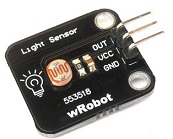
    There are three pin , only out will connect to CC2650 ,  I guess it's need to define pin , but I just not figured out yet.

    It's really a lot of sample code in E2E , but no one is easy to understand.

  • Hello,
    You will have to find the data sheet for your specific sensor to figure out how to use it correctly. There is not generic setup for all the different sensor in the world. This seems like a quite simple analog interface where you need to connect VDD and GND at the correct levels (you will find this in the data sheet) and then connect the OUT line to the ADC input. In that case you might be able to use the analog light sensor example code by simply disconnecting the jumpers on the SmartRF06EB from the on board light sensor and route the line to your specific sensor instead.
  • Hello Eirik :
    You are right , most of people are use I2C to connect sensors instead of ADC. But I still want to try ADC , it's common in Arduino .
  • Hello Tzuyu Lin,

    That is what I meant. The Analog Light Sensor example code use the ADC to sample the analog ambient light sensor (SFH 5711 ambient light sensor (ALS) from Osram ) mounted on the SmartRF06EB. I think you thought that I was thinking of the I2C light sensor example code for the SensorTag?

  • Hello Eirik:
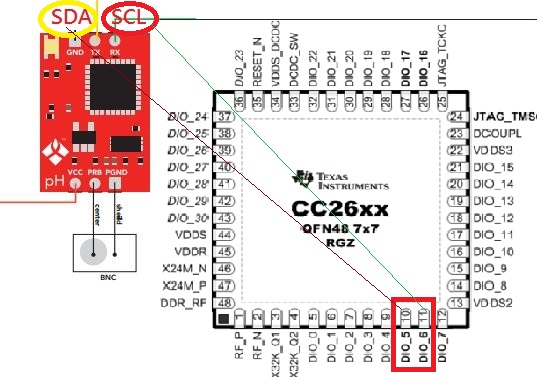
    In fact , I really want to know that I2C sensor how to connect CC2650 . A couple of days ago, I have bought a PH sensor , PH sensor is I2C , now I am looking for I2C sample code . If you have similar sample code , please help me. Thank you. It very different between Arduino and Cortex-M3. I'm learning , even I follow Software Developer's guide , it's still a lot of problems when I Compiling sample code. For example , Software Developer's guide chapter 6.3.4 I2C , I do it , but it's not working.
  • Hello,
    Look at the sensor controller studio example "I2C Light Sensor". It is very easy to understand and this code runs on the separate sensor controlelr processor (there are several processors inside CC2640, ARM coirtex M3 (32 bit) and custom low power sensor controller processor (16 bit)). Also check out the Sensortag project for how to interface to I2C sensors from the main application processor (CM3).
  • I don't have any SensorTag  can test ,   I have only one PH sensor run I2C :

    All I know is that PH's I2C address is 99.

  • No problem Tzuyu Lin,
    Simply connect the DIOs from the SmartRF06EB header pins to your sensor board. Look at the "I2C Light Sensor" project (sensorTag) for how to set up the I2C code on the sensor controller and check out "Analog Light sensor project" (SRF06EB+CC2650EM) too see how to set up your TI-RTOS project on the EB+EVM. I think you only need to change the board files to use the correct board files.
    C:\ti\tirtos_simplelink_2_14_02_22\packages\ti\boards\SRF06EB\CC2650EM_7ID
  • Can I use Flash Programmer 2 to burn SCS project "I2C Light Sensor" ? Because "I2C Light Sensor" code is easy to understand.

    I try to import "I2C Light Sensor" project to Code Composer Studio , but there are a lot of code that I don't understand.

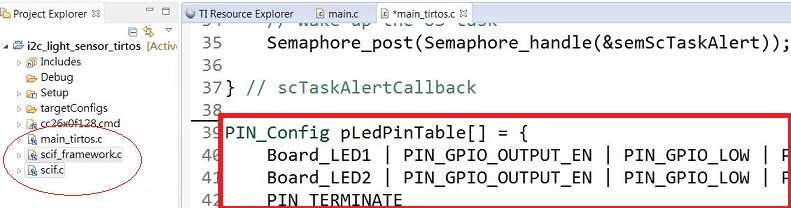
    for Example, I don't know which file is define DIO pin ? All I can see is like this:

    only LED1 and LED2 was define , I can't find DIO6(SCL) and DIO5(SDA) pin define ? I guess it's maybe hide somewhere that I can't find it ?

  • Hello,
    You can build and download the code through CCS (F11).
    The sensor controller framework will set up these two pins for you so you don't need to add them to any PinTable in your RTOS application. (this is done in scifTaskResourceInit which is automatically generated by SCS - do not modify).
  • Hello Eirik :
    I have already burn "i2c light sensor tirtos" project to SmartRF06 EVM Board. But what can I confirm that I2C interface is correct working ? In fact , I don't have any oscilloscope can test .

    By the way , I check D:\XXXX\Documents\Texas Instruments\Sensor Controller Studio\examples\i2c_light_sensor\source\scif.h file

    I find :

    uint16_t adcValue;

    If I want to see adcValue , where I can see ? I mean not in "Sensor Controller Studio"

  • Hey Erik,

    What is the process to stop and then restart a SCIF task? Seems like scifStopTaskNbl() puts it in a state that a subsequent scifStartTasksNbl() return SCIF_ILLEGAL_OPERATION.

    Thanks,
    Shaba
  • Hello Shaba,

    Please start a new thread for new questions. 

    Look at the led_blinker example code for reference on how to stop and start tasks.