This thread has been locked.

If you have a related question, please click the "Ask a related question" button in the top right corner. The newly created question will be automatically linked to this question.

Debug CC2650 with GCC/GDB

Other Parts Discussed in Thread: CC2650, UNIFLASH

Hi!

I am trying to debug simple blink project  (swra446.zip) in Eclipse with my CC2650EM (board rev. 1.2, chip rev. 2.2) and smartRF06EB board (rev. 1.2).

I set up debug configuration as described in the swra446 manual, but I can't stop at the main function and breakpoints don't work properly.

Programm always stops on the CPUdelay function from cpu.c:

__asm("subsr0, #1\n"
      "bne NOROM_CPUdelay\n"
      "bx lr");

XDS GDB log:

(C) Copyright 2012 by Texas Instruments Incorporated.

Please configure connection and start agent for a selected target.

CreateDriver() called

Creating GTI driver. Driver=C:\ti\ccsv6\ccs_base\common\uscif\..\..\\emulation\drivers\\tixds510cortexm.dvr,board=cc26xx_xds100v3c2, cpu=cortex_m3_0,connection=0

Successfully configured E:\cc2650\examples\blink_led\projects\gcc\CC26xx_XDS100v3c2.dat

cortex_m3_0 - GDB server agent successfully started.

cortex_m3_0          Waiting for client

cortex_m3_0          Client connected...Connecting to Target

cortex_m3_0 - Processor type =CORTEX_MXX (Little endian)

cortex_m3_0 - Target device is connected

cortex_m3_0 - Target device halted because of user request

Calling ctools Get cToolsManager

Calling ctools Get Job Mgr

Target connected...Starting server

ERROR: read_one_register() backend call returned 64

ERROR: read_one_register() backend call returned 64

ERROR: read_one_register() backend call returned 64

ERROR: read_one_register() backend call returned 64

ERROR: read_one_register() backend call returned 64

ERROR: read_one_register() backend call returned 64

ERROR: read_one_register() backend call returned 64

ERROR: read_one_register() backend call returned 64

ERROR: read_one_register() backend call returned 64

Thanks!

project

  • Hello,

    It has been an update of the GDB agent since the app note was written, which supports the monitor halt and monitor reset gdb commands.  If you are not already using version 5.1.642 you can get it from here:

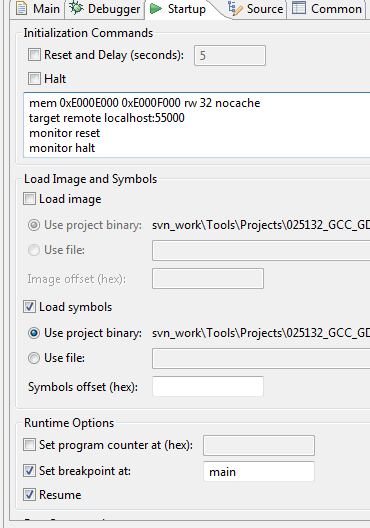
    Then, in the startup tab in Eclipse -> Debug Configurations, do the following modifications:

    add initalization commands:

    'monitor reset'

    'monitor halt'.

    Check the following checkboxes under Runtime options:

    Set breakpoint at: main

    Resume

    Regards,

    Ida

  • Hi, Ida

    It looks like I have the near issue. I tried to install ti_emupack_setup_6.0.14.0_linux_i386.bin, but I got Segmentation_fault. Yes, it may be caused by arch mismatch, I'm working on the Ubuntu 14.04 x86_64. 

    Now, i bumped into issue related libctools.so. Emulator can't load this library. Therefore, I do not have hardware break points.

    I'm using CCS UniFlash Version: 3.4.0.00002 

    Eclipse MARS

    GNU gdb (GNU Tools for ARM Embedded Processors) 7.8.0.20150604-cvs

    gcc version 4.9.3 20150529 (release) [ARM/embedded-4_9-branch revision 227977]

    I also tried emulator, that shipped with CCSv6. Unlikely, there was the same result.


    The emulator's output attached.

    ti/ccsv6/ccs_base/common/uscif$ ./gdb_agent_console [.....]/swra446_CC26xx_software_pkg/examples/blink_led/projects/gcc/CC26xx_XDS100v3c2_linux.dat 
    Successfully configured [.....]/swra446_CC26xx_software_pkg/examples/blink_led/projects/gcc/CC26xx_XDS100v3c2_linux.dat
    CPU Name             Port
    --------             ----
    cortex_m3_0         :55000
    
    Starting all cores
    CPU Name             Status
    --------             ------
    cortex_m3_0          Waiting for client
    cortex_m3_0          Client connected...Connecting to Target
    cortex_m3_0 - Processor type =CORTEX_MXX (Little endian)
        cortex_m3_0 - Target device is connected
        Unable to load libctools.so,  Hardware breakpoints not available.
        Target connected...Starting server
        Hardware breakpoints not supported.
        ERROR: set_breakpoint() backend call returned 65
        cortex_m3_0          Client disconnected...Stopping server
        Disconnecting from Target
        cortex_m3_0          Waiting for client
        cortex_m3_0          Client connected...Connecting to Target
        cortex_m3_0 - Processor type =CORTEX_MXX (Little endian)
        cortex_m3_0 - Target device is connected
        Unable to load libctools.so,  Hardware breakpoints not available.
        Target connected...Starting server
        cortex_m3_0          Client disconnected...Stopping server
        Disconnecting from Target
        cortex_m3_0          Waiting for client
        cortex_m3_0          Client connected...Connecting to Target
        cortex_m3_0 - Processor type =CORTEX_MXX (Little endian)
        cortex_m3_0 - Target device is connected
        Unable to load libctools.so,  Hardware breakpoints not available.
        Target connected...Starting server
        FAILED! GTI_RUN_EX(hpid=0x96a2308,runAttrFlag=0,count0)=-1
        (Error -2134 @ 0x0)
        Unable to control device execution state. Reset the device, and retry the operation. If error persists, confirm configuration, power-cycle the board, and/or try more reliable JTAG settings (e.g. lower TCLK).
        (Emulation package 6.0.14.5)
    
        cortex_m3_0          Client disconnected...Stopping server
        Disconnecting from Target


    I found this topic, but it does not help.

    Could you help me?

    Regards,

    Mikhail

  • Hi,

    Can you try do add the path to libctools.so to the LD_LIBRARY_PATH environment variable?

    Regards,
    Ida
  • Hi,

    Thank you for the reply.

    Yes, I added the lib to the LD_LIBRARY_PATH. It helped to load libctools.so into emulator. Unfortunately, I still have no hardware break points.

    The logs of emulator and GDB in the attachment.

    With kind regards,

    Mikhail

    me             Port
    --------             ----
    cortex_m3_0         :55000
    
    Starting all cores
    CPU Name             Status
    --------             ------
    cortex_m3_0          Waiting for client
    cortex_m3_0          Client connected...Connecting to Target
    cortex_m3_0 - Processor type =CORTEX_MXX (Little endian)
        cortex_m3_0 - Target device is connected
        Failed to create a ctools database manager
        Target connected...Starting server
        Hardware breakpoints not supported.
        ERROR: set_breakpoint() backend call returned 65
        cortex_m3_0          Client disconnected...Stopping server
        Disconnecting from Target
        cortex_m3_0          Waiting for client
        cortex_m3_0          Client connected...Connecting to Target
        cortex_m3_0 - Processor type =CORTEX_MXX (Little endian)
        cortex_m3_0 - Target device is connected
        Failed to create a ctools database manager
        Target connected...Starting server
        cortex_m3_0          Client disconnected...Stopping server
        Disconnecting from Target
        cortex_m3_0          Waiting for client
    
    
     arm-none-eabi-gdb cc26xx-demo.elf 
     GNU gdb (GNU Tools for ARM Embedded Processors) 7.8.0.20150604-cvs
     Copyright (C) 2014 Free Software Foundation, Inc.
     License GPLv3+: GNU GPL version 3 or later <http://gnu.org/licenses/gpl.html>
     This is free software: you are free to change and redistribute it.
     There is NO WARRANTY, to the extent permitted by law.  Type "show copying"
     and "show warranty" for details.
     This GDB was configured as "--host=i686-linux-gnu --target=arm-none-eabi".
     Type "show configuration" for configuration details.
     For bug reporting instructions, please see:
     <http://www.gnu.org/software/gdb/bugs/>.
     Find the GDB manual and other documentation resources online at:
     <http://www.gnu.org/software/gdb/documentation/>.
     For help, type "help".
     Type "apropos word" to search for commands related to "word"...
     Reading symbols from cc26xx-demo.elf...done.
     (gdb) mem 0x00 0x20000 ro 32 nocache
     (gdb) mem 0x10000000 0x10020000 ro 32 nocache
     (gdb) mem 0x20000000 0x20005000 rw 32 nocache
     (gdb) mem 0x40000000 0x400E1028 rw 32 nocache
     (gdb) mem 0xE000E000 0xE000F000 rw 32 nocache
     (gdb) target remote localhost:55000
     Remote debugging using localhost:55000
     0x10000486 in ?? ()
        (gdb) monitor reset
        CPU has been reset
        (gdb) break main
        Breakpoint 1 at 0x4ac: file ../../platform/srf06-cc26xx/./contiki-main.c, line 135.
        (gdb) monitor halt
        CPU has been halted
        (gdb) continue
        Continuing.
        Note: automatically using hardware breakpoints for read-only addresses.
        Warning:
        Cannot insert hardware breakpoint 1.
        Could not insert hardware breakpoints:
        You may have requested too many hardware breakpoints/watchpoints.
    
        (gdb) exit
        Undefined command: "exit".  Try "help".
        (gdb) quit


  •  

    Ok, so it fails to create a ctools database manager. I thought you didn't have to do this, but please try setting the environment variable ‘CTOOLS_XMLDB’ to the directory:

    <ccs installation>ccsv6/ccs_base/emulation/analysis/xmldb/aet_config.

    Regards,

    Ida

  • Hi,

    I set environment variable $CTOOLS_XMLDB with aet_config directory, but the emulator still can't load database.

    I also found, that libctools.so can't find libxerces-c.so.28 and added bin directory with the library to the LD_LIBRARY_PATH.

    It also has no effect. The emulator prompts "Failed to create a ctools database manager"

    I found one workaround in using CCSv6 native debugger. Hardware breakpoints working in there. So, there is some difference between CCSv6 and GNU/emulator to to be understand.

    Regards,

    Mikhail