This thread has been locked.

If you have a related question, please click the "Ask a related question" button in the top right corner. The newly created question will be automatically linked to this question.

CC2650 Programming only image

Other Parts Discussed in Thread: CC2650

Hey,

I am developing code for CC2650 using the CCS and I am programming the code both for stack and application using debugging from the CCS and via the DevPack debugger.

I need to integrate my FW BLE with other guy that his location is far away!

how can we make it easy to integrate my FW/Embedded with his android app?

He has a sensorTag and the DevPack debugger! can I send him the image files so he can program without the need to have the source code?

So where han I find these files? with utility we can use to let him program his sensor tag with my program?

Thanks.

  • OK I see for the stack project in the (My own project)SimpleBLEPeripheralStack\FlashROM... the file SimpleBLEPeripheralStack.hex with *.hex format.

    but for the application in (My own project)SimpleBLEPeripheral\FlashROM I dont find any *.hex file! but I have in both for the Stack and the application files with *.out format!

    OK my purpose is to send to the guy file or 2 files to let him program my code and run on the hardware!
    for that I ordered for him the DevPack debugger (I assume that he needs it), but I still dont know which files ( No hex file in FlashROM for the application)!
    so can he program it usind CCS? or another tool?

    Thanks.
  • Sorry for the confusion. I just did a quick try, by default it should be
    C:\Users\xxxxx\workspace_v6_2\SimpleBLEPeripheral\FlashROM\
    C:\Users\xxxxx\workspace_v6_2\SimpleBLEPeripheralStack\FlashROM

    He can program it with flash programmer 2, which can be downloaded here :
    www.ti.com/.../flash-programmer

    Let me know if you still have problem. BTW, you should enable output hex format by going into Properties-->ARM Hex utility(click on Enable ARM Hex Utility)-->Outout Format Option --> intel hex format
  • Thank you Christin for your patience,
    I am going step by step with you, I did as you mentiond for the application project "enable output hex format by going into Properties-->ARM Hex utility(click on Enable ARM Hex Utility)-->Outout Format Option --> intel hex format"...

    I got for the Application one *.hex file (was not found before enabling) and 3 files *..i1 *..i2 *..i3, I guess I need only the hex file right? to ignore the new 3 files?

    and for the Stack project, the output ARM Hex utility is disabled but producing a *.hex file, do I need also to enable it?

    I cleaned and rebuild the 2 projects and I saw that both *.hex files for the stack and the application were deleted and recreated after rebuild... it seems OK now right?

    OK I will try by my self to program using the "flash programmer 2" now.

    Thanks a lot.
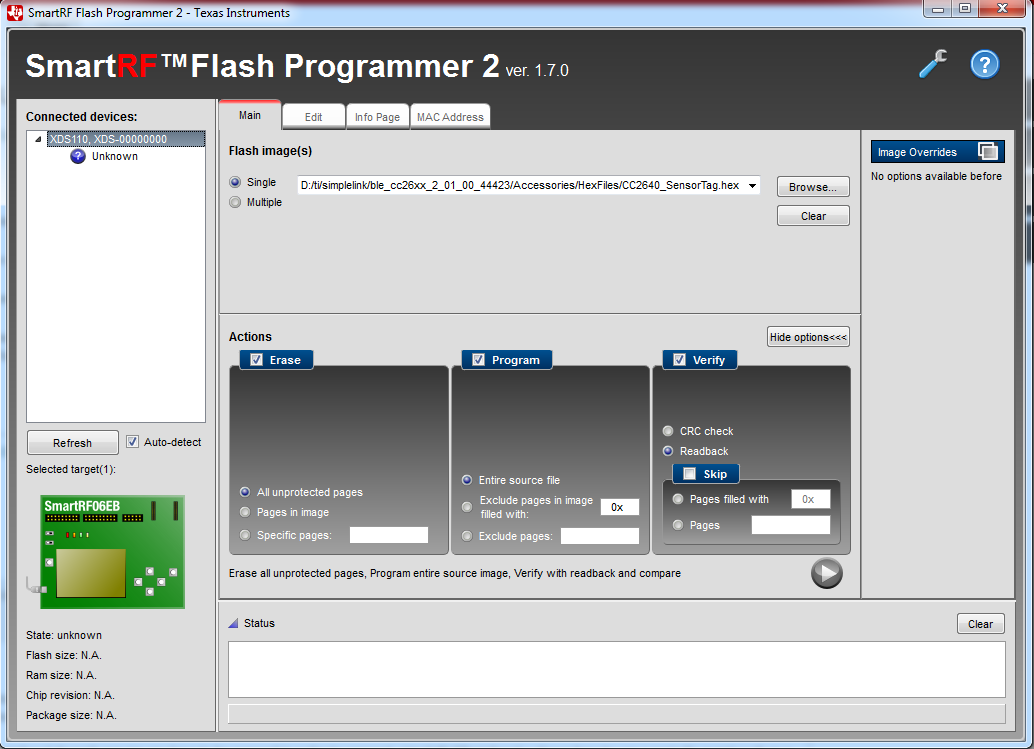
  • I am connected in the same way to the DevPack and to the board as I am used to debug & program using the CCS, I disconnected from the CCS so the DevPack is not used by it and I disconnected all the connections and reconnected again...

    as you see in the upper left corner it show "Unknown" device!

    again, can we program using the DevPack? or we need another board?!

    Thanks.

  • Yes, you only need the hex files. and if you did not change anything in the stack then you don't need to enable it, but it does not hurt to have it enable.

    Let me know how it goes with flash programmer 2, it should be fairly easy to use.
  • Great,
    I updated the flash programmer 2 on my Laptop and now I can select the hex files and to program them successfully!
    but it does not run! I am sure that these files should make the board advertise and I can see with the sniffer when I program them via the CCS, but there is something bad even I see that it erases then programs then verifies successfully every one of these 2 hex files!
    I see that it is not advertising!
    So I tried to deselect the "Erase" option because I thought that it erases the hex for the stack and so it does not work!

    I think I should select under the "Program" field a specific address with and to select the option "exclude pages..." maybe to program the stack and the application in 2 different addresses? so where can I fing these addresses if it right what I say or maybe I am not using the tool the right way!