This thread has been locked.

If you have a related question, please click the "Ask a related question" button in the top right corner. The newly created question will be automatically linked to this question.

How to make simpleBLE example project from Simplelink academy


Hi,


i wanted to setup a custom service from the service generator in the Simplelink Academy. I generated myService.h and myService.c but struggle to integrate those files in the SimpleBLEPeripheral project. Where do i put the c and h files? If i try to put it in the Application folder, CCS doesnt allow because its a virtual folder.


I checked the TI video on virtual folders and i get that they dont have a filesystem represantation, so i made a new folder in the SimpleBLEPeripheral project called "myService" and put the myService.c and myService.h there. I included the myService.h in the SimpleBLEPeripheral.c but it doesnt find it when i want to compile.


I found out that the include path always points to the SDK location but not to my project directory. Even if i import a project from the SDK to my Workspace with the option "Copy project to workspace", the actual source files are not in my workspace. When i check for example the SimpleBLEPeripheral.c in CCS with "properties", its still physically located in the SDK.


I think its not intended to change the example projects in the SDK folder but rather a copy of them in my workspace. What i want to achieve is building a test service in the SimpleBLEPeripheral demo project, but i cant figure out how to do it properly without changing the source of the demo project in the SDK folder.


How do i just change a example project to my needs with new .c and .h source files and run it on the SensorTag? What are the exact steps?


Thank you so much,


Markus

  • Are you using CCS cloud? can you try to use window version of CCS and see if you still have problem including files?
  • Hi,

    i am using CCS 6.1.2 Desktop and the BLE 2.1 SDK. It would be nice to have a tutorial in i.e. Simplelink Academy which shows how to actually handle a project in terms of location/organisation and where to put self written .c and .h files. I am sure many users of Sensor Tag are looking for a solution where they program maybe one new service and sensor on a basic project like SimpleBLEPeripheral and use it then as a custom IoT solution.

    Regards,

    Markus
  • I am using the same version and have no problem importing new files into the project.

    There are 2 options for you :

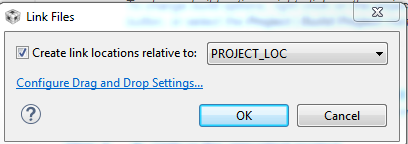
    1. Simply drag your files into the application folder and make sure you edit the properties of the files correctly. When you drag the files into the folder, you will get to pick create link relative to project_location, RTOS_location...etc, just choose accordingly.

    2. you can right-click in the application folder --> New File--> Advanced--> link to file in the file system--> and then find your files.

  • Thanks Christin,

    that worked for me. However i found that in the PROFILES directory where the BLE profiles are located for each project, multiple example projects link to the same file. For example devinfoservice.c is linked to from the SensorTag project as well TrainingTag project. That is because the PROFILES are not actually copied in my workspace and leads to the condition that when i change devinfoservice.c in the TrainingTag project, it changes also in the SensorTag project. Is this intended or should i handle my projects differently so they have disjunct file bases?

    Thanks,

    Markus
  • Since it's generic file, it makes sense to only create file for all. There is no "correct" way for handling this situation but if I were you, I would work from git to avoid messing up the originally projects.
  • Hi thanks for the info, seems like a clean way to operate. I will check it out.

    Regards,

    Markus