This thread has been locked.

If you have a related question, please click the "Ask a related question" button in the top right corner. The newly created question will be automatically linked to this question.

btool

Other Parts Discussed in Thread: CC2540

I read that  the cc2540 USB dongle is loaded with the necessary software to run the PC application BTool.. I also though I read

 that the BTool works with XP or higher and only on 32 bit operating systems. Is that true. Reason: I am running on 64bit operating system.

  • Hello,

    It works fine with Win7 on 64-bit systems.
    Note that you need to load the HostTest firmware to the CC2540USB dongle.

    Best wishes
  • Does it also work with Win 10 on 64 bit
  • It should.

    Best wishes
  • I use win 10 64 bits and Btool works without problem.
  • Looks like BTool works with Win 10 and 64-oper. Now trying to get BTool working with SMARTRF05EB using serial to USB connection> I get error.

    The report is as follows with error at end:

    [1] : <Info> - 08:23:58.622

    Port opened at 4/12/2016 8:23:58 PM

    --------------------------------------------------------------------

    [2] : <Tx> - 08:23:59.028

    -Type           : 0x01 (Command)

    -OpCode         : 0xFE00 (GAP_DeviceInit)

    -Data Length   : 0x26 (38) byte(s)

    ProfileRole   : 0x08 (8) (Central)

    MaxScanRsps   : 0x05 (5)

    IRK           : 00:00:00:00:00:00:00:00:00:00:00:00:00:00:00:00

    CSRK           : 00:00:00:00:00:00:00:00:00:00:00:00:00:00:00:00

    SignCounter   : 0x00000001 (1)

    Dump(Tx):

    0000:01 00 FE 26 08 05 00 00 00 00 00 00 00 00 00 00 ...&............

    0010:00 00 00 00 00 00 00 00 00 00 00 00 00 00 00 00 ................

    0020:00 00 00 00 00 00 01 00 00 00                   ..........

    --------------------------------------------------------------------

    [3] : <Warning> - 08:24:09.060

    GAP Device Initialization Timeout

    Device May Not Function Properly

    --------------------------------------------------------------------

    ++++++++++++++++++++++++++++++++++++++++++++++++++++++++++++++++++++++++++++++++++++++++

    I looked at some of the threads in E2E and the solution for the one I seen was to update the USB_cdc_driver. When doing so, message came back that I have the latest version.

     +++++++++++++++++++++++++++++++++++++++++++++++++++++++++++++++++++++++++++++++++++++++++

    My set up is

    usb to SMARTFR05 and powered up

    RS232 serial cable connected to SMARTFR05 and USB to PC.

    Tryed with RS232 switch enabled and disabled with same results.

    On BTool as per document

    PortCom3 –USB-Serial CH340

    Baud 57600

    Flow None (doc says CTS/RTS but PC port does not have that option)

    Parity None

    Stop Bits One

    Data Bits 8

    Device Manager on PC sees the usb-serial connection, error free

    Same as above (no Flow CTS/RTS on PC)

    Also, when looking to see if SMARTFR05EB firmware was latest, it was.


    Note:No Dongle involved in set up.


    What are some other things to look at to eliminate BTool error?

    Thanks

  • The Baudrate should set to 115200. By the way, do you mount CC2541EMK to SamrtRF05?
  • I have done what was suggested on both the SmartRF05EB (central and peripheral) . Also went set b step in the CC2540 user guide successfully sections 1 - 3.12. Using Com 3 for USB - Serial , that is has no errors on Device Manager. Tried different flow control settings booting PC after each time.  Used the serial switch in disable and enable. The Baud rate is set to 115200. I have the CC22541EK mounted (tried with and without). I have loaded the HostTest firmware. All resulting in same results when invoking Btool. Also, USB port for SmartRF05EB is Cebal controlled device and has no errors. --------- Any combinations, Still get [3] : <Warning> - 12:36:48.385
    GAP Device Initialization Timeout
    Device May Not Function Properly.----------------  I tried the cc debugger with the USB dongle and was able to get past the errors for BTool and BLE Device manager and see the Peripheral SartRF05 and Sensor Tag over the air.    What could I be missing using the SmartFB05 with BTool and BLE Device Manager.that produce errors.? Any other suggestions or documentation that outlines what to do to get BTool working with SmartRF 05 would be appriciated?

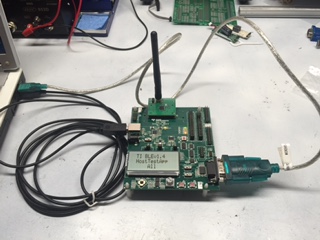
  • Can you take a picture show me how you connect all these SmartRF05 and USB to serial things?
  • Attached is the diagram requested of the connections between the SmartRF05EM and PC (serial - USB and USB - USB). I embedded in this post. Did not now how to send attachment. Hope it shows  up

    As mentioned, all the port configurations in PC Device Manager are the same as the Btool and BLE Device Manager even when trying different combinations The Central SmartRF has the HostTestApplicationAl load. and the Serial port switch enabled.  Please let me know what is missing or wrong with our configuration. --Alejandro

  • It does not look like it sent my picture in the post. How does one send pictures or attachments via this system.

    FYI: it looks like using the CCDebugger with te USB Dongle BTool and BLE Device manage works from what I can see. Seems like I a missing something using the SmartRF05E to run BTool and BLE Device Manager that causes the mentioned errors

  • There is a "Use rich formatting" link at right bottom of edit box. You can click on it and would see a new edit box which can let you drag and drop a JPG file into it directly.
  • Attached is the picture of cable connections.

    A recap of my set up is

    usb to SMARTFR05 and SMARTFB05EM powered up

    RS232 serial cable connected to SMARTFR05 and USB to PC.

    Tryed with RS232 switch enabled and disabled with same results.

    On BTool as per document

    PortCom3 –USB-Serial CH340

    Baud in document says 57600  used 115200 per suggestion (both same results)

    Flow None (doc says CTS/RTS but PC port does not have that option)

    Parity None

    Stop Bits One

    Data Bits 8

    Device Manager on PC

    sees the usb-serial connection, error free

    Same as above (no Flow CTS/RTS option on PC so using None)

  • Every thing looks correct. Can you download and install TI BLE device monitor from processors.wiki.ti.com/.../BLE_Device_Monitor_User_Guide and test with it instead of Btool?