This thread has been locked.

If you have a related question, please click the "Ask a related question" button in the top right corner. The newly created question will be automatically linked to this question.

HOGP demo problems on IOS

Hello!

In the past week i have been working on creating a BLE profile which will have both custom and official services, the application itself is supposed to connect and communicate with an android/IOS application as well as the operating system as well. I have started with the SPPLE demo, added some services and had success in communicating with android apps but could't connect to the OS itself (through Settings-> Bluetooth-> choosing the SPPLE demo).  The issue was explained to me 

I then switched to working on the HOGP demo (which contains all of my needed services besides the custom ones), i added the needed capabilities and now on android i have the ability to connect to both the service discovery applications (such as BLE scanner) and connection through the OS settings. 

The problem now is the fact that the same doesn't happen on IOS. I am able to connect to through the OS (Settings-> Bluetooth-> choosing the HOGP demo) but then when i try to send mouse notifications the OS doesn't respond the way i expect (the way it responds on android by showing the mouse cursor). Also, when i try to connect through one of the service discovery apps (light blue) i don't see the complete list of services (only some of them, this is disturbing since on the android apps i see all the configured services). 
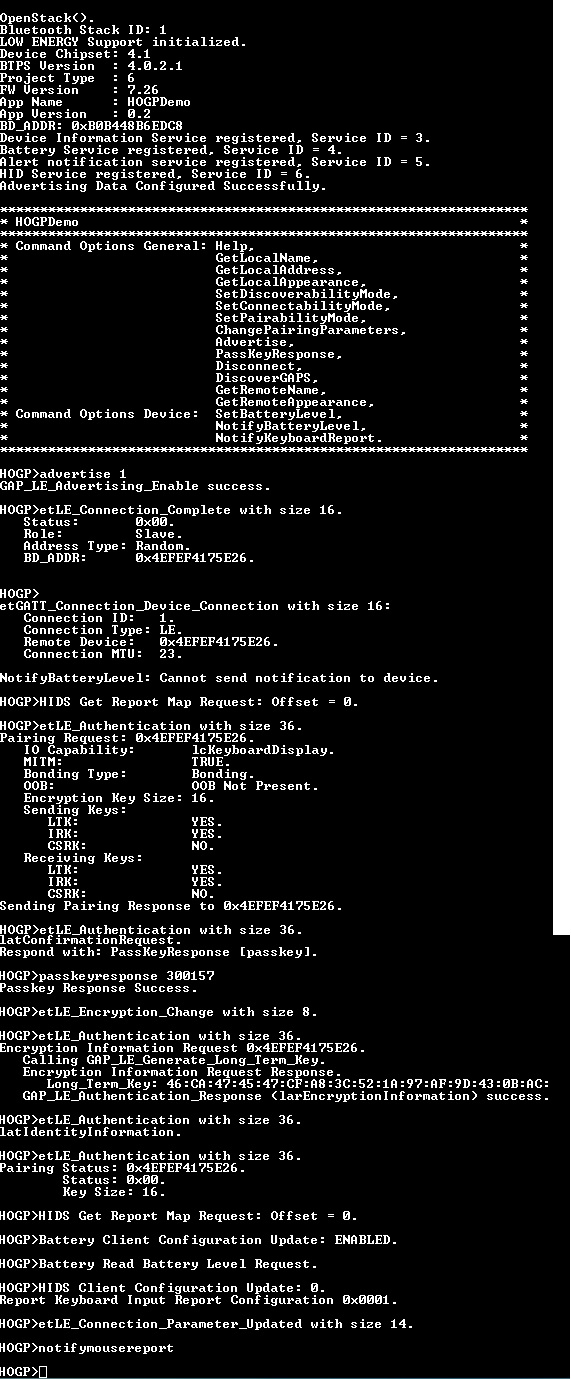
this is the connection sequence. mind that after the notifymouse report command i get a mouse corser on the screen of the android phone, but if i do it with an iphone i get nothing.

would love some help and advice,

Thank you in advance!

  • Hi,

    Please share the notifymousereport implementation. What mouse report are you sending? Can you also share the ReportDescriptor?
    It would help if you could share the sniffer/snoop logs. It might be a good idea to also check on some iOS forum on whether iOS ignores certain mouse reports.

    Regards,
    Gigi Joseph.
  • Here is the implemintation of the notifymousereport (which is bassiclly a modified version of the notifykeyboard report):

    int NotifyMouseReport(ParameterList_t *TempParam)
    {
    int Result = 0;
    //Byte_t UsageID = 0x04;
    DeviceInfo_t *DeviceInfo;
    HIDS_Report_Reference_Data_t ReportReferenceData;


    /* Make sure that there is a connection */
    if(ApplicationStateInfo.Flags & APPLICATION_STATE_INFO_FLAGS_LE_CONNECTED)
    {
    /* Set the current report. */
    ApplicationStateInfo.CurrentInputReport[0] = 0;
    ApplicationStateInfo.CurrentInputReport[1] = 25;
    ApplicationStateInfo.CurrentInputReport[2] = 0;

    /* Search for the device info structure for this device. */
    if((DeviceInfo = SearchDeviceInfoEntryByBD_ADDR(&DeviceInfoList, ApplicationStateInfo.LEConnectionInfo.AddressType, ApplicationStateInfo.LEConnectionInfo.BD_ADDR)) != NULL)
    {
    /* Verify that the connection has registered for the current*/
    /* notifications based on the operating mode and that the */
    /* link is currently encrypted. */
    if((ApplicationStateInfo.LEConnectionInfo.Flags & CONNECTION_INFO_FLAGS_CONNECTION_ENCRYPTED) && (((ApplicationStateInfo.HIDProtocolMode == pmBoot) && (DeviceInfo->BootKeyboardInputConfiguration & GATT_CLIENT_CONFIGURATION_CHARACTERISTIC_NOTIFY_ENABLE)) || ((ApplicationStateInfo.HIDProtocolMode == pmReport) && (DeviceInfo->ReportKeyboardInputConfiguration & GATT_CLIENT_CONFIGURATION_CHARACTERISTIC_NOTIFY_ENABLE))))
    {
    /* Check to see what characteristic should be notified */
    /* based on the operating mode. */
    if(ApplicationStateInfo.HIDProtocolMode == pmBoot)
    {
    /* Send the Boot Mouse Input Report notification. */
    Result = HIDS_Notify_Input_Report(ApplicationStateInfo.BluetoothStackID, ApplicationStateInfo.HIDSInstanceID, ApplicationStateInfo.LEConnectionInfo.ConnectionID, rtBootKeyboardInputReport, NULL, HID_MOUSE_INPUT_REPORT_SIZE, ApplicationStateInfo.CurrentInputReport);
    }
    else
    {
    /* Configure the Report Reference structures. Note */
    /* that since we have only 1 report of a type */
    /* (Input,Output,Feature) we do not need to have a */
    /* unique Reference ID and therefore we use a Report */
    /* ID of ZERO. */
    ReportReferenceData.ReportID = 0;
    ReportReferenceData.ReportType = HIDS_REPORT_REFERENCE_REPORT_TYPE_INPUT_REPORT;

    /* Send the Report Mode Input Report notification. */
    Result = HIDS_Notify_Input_Report(ApplicationStateInfo.BluetoothStackID, ApplicationStateInfo.HIDSInstanceID, ApplicationStateInfo.LEConnectionInfo.ConnectionID, rtReport, &ReportReferenceData, HID_MOUSE_INPUT_REPORT_SIZE, ApplicationStateInfo.CurrentInputReport);
    }

    /* Send an empty report so that only one character gets */
    /* sent. */
    ApplicationStateInfo.CurrentInputReport[0] = 0x00;
    ApplicationStateInfo.CurrentInputReport[2] = 0x00;

    /* Check to see what characteristic should be notified */
    /* based on the operating mode. */
    if(ApplicationStateInfo.HIDProtocolMode == pmBoot)
    {
    /* Send the Boot Keyboard Input Report notification. */
    Result = HIDS_Notify_Input_Report(ApplicationStateInfo.BluetoothStackID, ApplicationStateInfo.HIDSInstanceID, ApplicationStateInfo.LEConnectionInfo.ConnectionID, rtBootKeyboardInputReport, NULL, HID_MOUSE_INPUT_REPORT_SIZE, ApplicationStateInfo.CurrentInputReport);
    }
    else
    {
    /* Configure the Report Reference structures. Note */
    /* that since we have only 1 report of a type */
    /* (Input,Output,Feature) we do not need to have a */
    /* unique Reference ID and therefore we use a Report */
    /* ID of ZERO. */
    ReportReferenceData.ReportID = 0;
    ReportReferenceData.ReportType = HIDS_REPORT_REFERENCE_REPORT_TYPE_INPUT_REPORT;

    /* Send the Report Mode Input Report notification. */
    Result = HIDS_Notify_Input_Report(ApplicationStateInfo.BluetoothStackID, ApplicationStateInfo.HIDSInstanceID, ApplicationStateInfo.LEConnectionInfo.ConnectionID, rtReport, &ReportReferenceData, HID_MOUSE_INPUT_REPORT_SIZE, ApplicationStateInfo.CurrentInputReport);
    }

    /* Simply return success to the caller. */
    Result = 0;
    }
    else
    {
    /* Flag that an error occurred while submitting the */
    /* command. */
    Result = FUNCTION_ERROR;
    }
    }
    else
    {
    Result = INVALID_PARAMETERS_ERROR;
    }
    }
    else
    {
    /* Flag that an error occurred while submitting the command. */
    Result = FUNCTION_ERROR;
    }

    return Result;
    }


    Here is the mouse report descriptor (a standard version i found online which works for android):

    static Byte_t MouseReportDescriptor[] = // Mouse descriptor
    {
    0x05, 0x01, // USAGE_PAGE (Generic Desktop)
    0x09, 0x02, // USAGE (Mouse)
    0xA1, 0x01, // COLLECTION (Application)
    0x09, 0x01, // USAGE (Pointer)
    0xA1, 0x00, // COLLECTION (Physical)
    0x05, 0x09, // USAGE_PAGE (Button)
    0x19, 0x01, // USAGE_MINIMUM (Button 1)
    0x29, 0x03, // USAGE_MAXIMUM (Button 3)
    0x15, 0x00, // LOGICAL_MINIMUM (0)
    0x25, 0x01, // LOGICAL_MAXIMUM (1)
    0x95, 0x03, // REPORT_COUNT (3)
    0x75, 0x01, // REPORT_SIZE (1)
    0x81, 0x02, // INPUT (Data,Var,Abs)
    0x95, 0x01, // REPORT_COUNT (1)
    0x75, 0x05, // REPORT_SIZE (5)
    0x81, 0x01, // INPUT (Cnst,Var,Abs)
    0x05, 0x01, // USAGE_PAGE (Generic Desktop)
    0x09, 0x30, // USAGE (X)
    0x09, 0x31, // USAGE (Y)
    0x15, 0x81, // LOGICAL_MINIMUM (-127)
    0x25, 0x7F, // LOGICAL_MAXIMUM (127)
    0x75, 0x08, // REPORT_SIZE (8)
    0x95, 0x02, // REPORT_COUNT (2)
    0x81, 0x06, // INPUT (Data,Var,Rel)
    0xC0, // END_COLLECTION
    0xC0 // END_COLLECTION
    };

    i currentlly have a problam with getting the sniffer info, will try to get the log.
    The main issue that concerns me is that everything works on android, which indicates to the IOS as a problam.
  • Here is a log file where i Advertise the HOGP demo, connect to it using an iphone after enternig passkey response.

    afterwards, i give the "Notifymousereport" command.

    HOGP LOG 27-4.rar

  • something embarrassing.... :)
    I have just discovered that there is no mouse on IOS.... can you confirm?
  • Hi Yuri,

    I'm sorry, I am not aware of this - please check on iOS forum.
    Please confirm if I can close this thread.

    Regards,
    Gigi Joseph.