This thread has been locked.

If you have a related question, please click the "Ask a related question" button in the top right corner. The newly created question will be automatically linked to this question.

Closing the Bluetopia stack

Other Parts Discussed in Thread: CC2564MODN

Hi,

I am running Bluetopia 1.2 R2 with dual mode  chip CC2564modn

I need to close and reopen the stack. That's what I do:

int CloseStack(void)
{
int ret_val = 0;

/* First check to see if the Stack has been opened. */
if (BluetoothStackID)
{
/* Cleanup GAP Service Module. */
if (GAPSInstanceID) {
GAPS_Cleanup_Service(BluetoothStackID, GAPSInstanceID);
GAPSInstanceID = 0;
}

/* Un-registered SPP LE Service. */
if (GPSLEServiceID) {
GATT_Un_Register_Service(BluetoothStackID, GPSLEServiceID);
GPSLEServiceID = 0;
}

/* Cleanup GATT Module. */
GATT_Cleanup(BluetoothStackID);

/* Simply close the Stack */
BSC_Shutdown(BluetoothStackID);

/* Free BTPSKRNL allocated memory. */
BTPS_DeInit();

Display(("Stack Shutdown.\r\n"));

/* Free the Key List. */
FreeDeviceInfoList(&DeviceInfoList);

/* Flag that the Stack is no longer initialized. */
BluetoothStackID = 0;

/* Flag success to the caller. */
ret_val = 0;
}
else
{
/* A valid Stack ID does not exist, inform to user. */
ret_val = UNABLE_TO_INITIALIZE_STACK;
}

return (ret_val);
}

I have noticed that HCITR_COMClose(); is not called. 

So when I reopen the stack I got BTPS_ERROR_HCI_DRIVER_ERROR from BSC_Initialize

When I manually call  HCITR_COMClose() then It kind of works but Bluetopia is runnig ot of memory

mallock error.

What is the correct procedure to close and reopen the Bluetopia stack?

Regards

Rafal Witelus

  • Hi,

    Can you please advise why you need to close and open the stack?
    Can you not just do a BT Turn off?

    Regards,
    Gigi Joseph.
  • Hi,

    This is a good a question and I should have started form my original problem. I use it to recover from a inability to connect to another bluetooth
    device of the same kind. (CC2564modn)

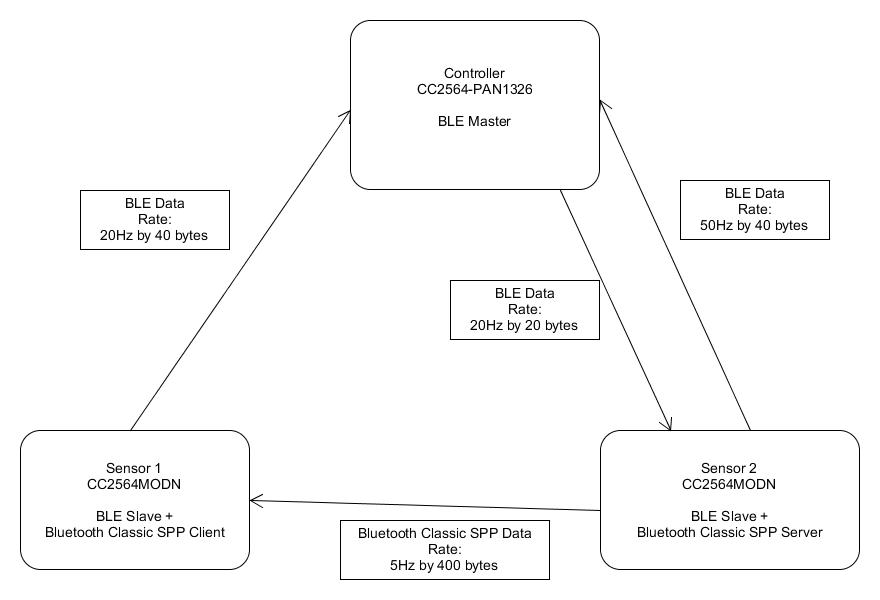
    Two sensors siting next to each other on my desk, the same hardware. I use blootooth classic SPP profile to open port
    SPP_Open_Server_Port on one sensor

    then on the other sensor I use:

    SPP_Open_Remote_Port

    Then I send some data.

    But sometimes the open remote port function times out without establishing any connection, does not matter how many times I try
    (in the loop: if it has timed out then try again and again........) (I do get a callback saying: timed out)
    I am not able to do anything to make it connect again except if I power cycle the connecting (open remote port) sensor,
    then It connects straight away. So I figured out that That I would need to reset the Bluetooth chip and reconnect.


    If you could help me with this one which is my real problem I probably would not have to reinitialize bluetopia.

    Thanks
    Rafal Witelus
  • Hi Rafal,

    Can you share the list of command you're executing on both sides?
    My first impression about your issue is that the device that you're trying to connect to is "not discoverable" or "not connectible".

    Regards,
    Gigi Joseph.
  • The sensor with that calls SPP_Open_Server_Port
    does not need to be restart to be able to connect to it.

    All I need to do is to restart (power cycle) my sensor that calls
    SPP_Open_Remote_Port


    What I exactly call is on one sensor:

    SPP_Open_Server_Port - I can connect to this Bluetooth from Android for example.


    I call SPP_Open_Remote_Port on the other device and I get a call back

    Snipset:

    case etPort_Open_Confirmation:
    /* A Client Port was opened. The Status indicates the */
    /* Status of the Open. */
    Display(("\r\n"));
    Display(("SPP Open Confirmation, ID: 0x%04X, Status 0x%04X.\r\n",
    SPP_Event_Data->Event_Data.SPP_Open_Port_Confirmation_Data->SerialPortID,
    SPP_Event_Data->Event_Data.SPP_Open_Port_Confirmation_Data->PortOpenStatus));


    Status is 0001 - which means time out.


    So after it times out I try again and again again in the loop...... no luck.

    But I can still connect to it from other clients (Phone or windows) to that specific port.


    After I power cycle the connecting sensor (the listening one is not changed) It all goes well and connects
  • Hi,

    Thanks for the detailed information.
    Can you please share some logs? Snoop/Air sniffer/Logger/etc?

    Regards,
    Gigi Joseph.
  • Scenario 1: BLE data OFF

    I have tested the scenario where data from Main Controller is not being sent at all.

    All I do is I connect and disconnect (every 3 seconds) from Sensor 1 to Sensor 2 using SPP Classic. I cannot see any problems with that establishing connection/s for 12 hours of testing.

    Scenario 2:  BLE data ON

    As soon as I start sending data over BLE between Controller and sensors I am not able to establish SPP connection between the Sensor 1 and Sensor 2 – it always time outs.  

    Could you advise what could be the reason for Bloetooth classic not being able to establish connection in this case?

    I can see some obvious ones like antenna time bandwidth time....... ?

    But I don't think that bandwidth has not been exhausted here.

    What sniffer can I use to gather some logs for bluetooth classic SPP?

    What could potentially be done to make it work?

    Thanks you

    Rafal Witelus 

  • What would be the best dual purpose chip in my case?
    Maybe two separate chips (BLE and Classic) would do a better job?
  • * But I don't think that bandwidth has been exhausted here.
  • Hi,

    Please sniff the sensor 1 & sensor 2 BT classic connection.
    Please also share a logger log at the sensor 1 side.

    What are the BLE connection parameters that you're using? Can you use the latest service pack and retest the scenario?
    The latest SP is available at: processors.wiki.ti.com/.../CC256x_Downloads

    Regards,
    Gigi Joseph.
  • Thanks for your help!

    I have applied the newest patches

    • initscripts-TIInit_6.7.16_bt_spec_4.1 - Main BT init script
    • initscripts-TIInit_6.7.16_ble_add-on - BLE init script

      But when I add this one the stack does not initialize at all.

    • initscripts-TIInit_6.7.16_avpr_add-on - AVPR init script - WBS support and Assisted A2DP add on

    What should be applied here 1 & 2 & 3 patch 

    or 1 & ( 2 || 3 ) ?

     I have applied the first two patches and started testing again. I will have some results tomorrow.

    Really appreciate your help!

  • my connection params for BLE are:

    21 and 25 mili seconds - for intervals.
    MTU 131
  • This is a part of the log that is captured when I am not able top connect: 

    Can you see anything that could help?

    65 08:00:45.600 +0:00:32.392 Enable Phy PM
    66 08:00:45.600 +0:00:32.392 Entered TX idle check loop
    67 08:00:45.600 +0:00:32.392 synch cmd abort instance, module WB_UNDIRECT_ADV_MODULE_ID, msi: 1
    68 08:00:45.600 +0:00:32.392 synch cmd return event ABORT_FINISH_WAIT,module WB_UNDIRECT_ADV_MODULE_ID
    69 08:00:45.600 +0:00:32.392 synch event ABORT_FINISH_SUSPENDED received, module WB_UNDIRECT_ADV_MODULE_ID, msi 1
    70 08:00:49.193 +0:00:35.985 FTP detected: lc_handle 0,A2DP bitmask 0x5dfb18, FTP bitmask 0x1, T_R_TP 0x5d8fe8
    71 08:00:49.193 +0:00:35.985 R98=0x005DFB18
    72 08:00:49.193 +0:00:35.985 Enable Phy PM
    73 08:00:49.193 +0:00:35.985 Entered TX idle check loop
    74 08:00:49.193 +0:00:35.985 synch cmd abort instance, module WB_UNDIRECT_ADV_MODULE_ID, msi: 1
    75 08:00:49.193 +0:00:35.985 synch cmd return event ABORT_FINISH_SUSPENDED,module WB_UNDIRECT_ADV_MODULE_ID
    76 08:00:49.193 +0:00:35.985 synch cmd start instance, module PAGE SCAN, msi: 1
    77 08:00:55.693 +0:00:42.485 Page Scan start, Window = 11 frames
    78 08:00:55.693 +0:00:42.485 R98=0x00000001
    79 08:00:55.693 +0:00:42.485 Enable Phy PM
    80 08:00:55.693 +0:00:42.485 Entered TX idle check loop
    81 08:00:55.693 +0:00:42.485 synch cmd abort instance, module WB_UNDIRECT_ADV_MODULE_ID, msi: 1
    82 08:00:55.693 +0:00:42.485 synch cmd return event ABORT_FINISH_SUSPENDED,module WB_UNDIRECT_ADV_MODULE_ID
    83 08:00:55.693 +0:00:42.485 synch cmd start instance, module PAGE SCAN, msi: 1
    84 08:00:59.638 +0:00:46.430 Page Scan start, Window = 13 frames
    85 08:00:59.638 +0:00:46.430 temperature (%d) and VBAT (%d) stable, periodic calibration ended.
    86 08:00:59.638 +0:00:46.430 synch cmd start instance, module PAGE, msi: 1
    87 08:00:59.638 +0:00:46.430 synch cmd return event STARTED,module PAGE
    88 08:00:59.638 +0:00:46.430 synch cmd abort instance, module PAGE, msi: 1
    89 08:00:59.638 +0:00:46.430 synch cmd return event ABORT_FINISH_WAIT,module PAGE
    90 08:00:59.638 +0:00:46.430 synch event ABORT_FINISH_SUSPENDED received, module PAGE, msi 1
    91 08:00:59.638 +0:00:46.430 synch cmd abort instance, module PAGE, msi: 1
    92 08:01:04.270 +0:00:51.062 synch cmd return event ABORT_FINISH_WAIT,module PAGE
    93 08:01:04.270 +0:00:51.062 synch event ABORT_FINISH_SUSPENDED received, module PAGE, msi 1
    94 08:01:04.270 +0:00:51.062 synch cmd start instance, module PAGE, msi: 1
    95 08:01:04.270 +0:00:51.062 synch cmd return event STARTED,module PAGE
    96 08:01:04.270 +0:00:51.062 synch cmd abort instance, module PAGE, msi: 1
    97 08:01:04.270 +0:00:51.062 synch cmd return event ABORT_FINISH_WAIT,module PAGE
    98 08:01:08.774 +0:00:55.566 synch event ABORT_FINISH_SUSPENDED received, module PAGE, msi 10
    99 08:01:08.774 +0:00:55.566 synch cmd return event STARTED,module PAGE
    100 08:01:08.774 +0:00:55.566 synch cmd abort instance, module PAGE, msi: 1
    101 08:01:08.774 +0:00:55.566 synch cmd return event ABORT_FINISH_WAIT,module PAGE
    102 08:01:08.774 +0:00:55.566 synch event ABORT_FINISH_SUSPENDED received, module PAGE, msi 1
    103 08:01:08.774 +0:00:55.566 synch cmd start instance, module PAGE, msi: 1
    104 08:01:13.470 +0:01:00.262 synch cmd return event [0x000d],module [0x001e]
    105 08:01:13.470 +0:01:00.262 LOC - FTD activate
    106 08:01:13.470 +0:01:00.262 synch cmd start instance, module PAGE, msi: 1
    107 08:01:13.470 +0:01:00.262 synch cmd return event STARTED,module PAGE
    108 08:01:13.470 +0:01:00.262 synch cmd abort instance, module PAGE, msi: 1
    109 08:01:13.470 +0:01:00.262 synch cmd return event ABORT_FINISH_WAIT,module PAGE
    110 08:01:13.470 +0:01:00.262 synch event ABORT_FINISH_SUSPENDED received, module PAGE, msi 1
    111 08:01:17.447 +0:01:04.239 Test data payload: index 1, data 0x401
    112 08:01:17.447 +0:01:04.239 BLE Slave store params: now 173236, next 173234, packet 1036, channel 8
    113 08:01:22.095 +0:01:08.887 synch event FINISH_REG received, module RF_CALIBRATION, msi 1E
    114 08:01:22.095 +0:01:08.887 LOC - FTD activate
    115 08:01:22.095 +0:01:08.887 synch cmd start instance, module PAGE, msi: 1
    116 08:01:22.095 +0:01:08.887 synch cmd return event STARTED,module PAGE
    117 08:01:22.095 +0:01:08.887 synch cmd abort instance, module PAGE, msi: 1
    118 08:01:22.095 +0:01:08.887 synch cmd return event ABORT_FINISH_WAIT,module PAGE
    119 08:01:22.095 +0:01:08.887 synch event ABORT_FINISH_SUSPENDED received, module PAGE, msi 1
    120 08:01:26.423 +0:01:13.215 Test data payload: index 1, data 0x401
    121 08:01:26.423 +0:01:13.215 BLE Slave store params: now 180138, next 180136, packet 1442, channel 0
    122 08:01:31.055 +0:01:17.847 synch event FINISH_REG received, module [0x0026], msi E1
    123 08:01:31.055 +0:01:17.847 BLE Slave store params: now 183606, next 183604, packet 1646, channel 4
    124 08:01:35.734 +0:01:22.526 synch event FINISH_REG received, module RF_CALIBRATION, msi 19
    125 08:01:35.734 +0:01:22.526 Assert - DMA Master OCP error!
    126 08:01:35.734 +0:01:22.526 synch cmd return event STARTED,module BLE_CONNECTION_MODULE_ID
    127 08:01:35.734 +0:01:22.526 Test data payload: index 1, data 0x401
    128 08:01:39.535 +0:01:26.327 BLE Slave store params: now 187329, next 187327, packet 420284233, channel 218174480
    129 08:01:39.535 +0:01:26.327 llr fbf initiator: scheduling algorithm, no available frames
    130 08:01:39.535 +0:01:26.327 *** WARNING *** FBF not enough available slots for the next scheduling of (E)SCO instance
    131 08:01:44.231 +0:01:31.023 BLE Slave store params: now 191069, next 191067, packet 504170533, channel 17040664
    132 08:01:44.231 +0:01:31.023 synch cmd start instance, module PAGE, msi: 1
    133 08:01:44.231 +0:01:31.023 synch cmd return event STARTED,module PAGE
    134 08:01:44.231 +0:01:31.023 synch cmd abort instance, module PAGE, msi: 1
    135 08:01:44.231 +0:01:31.023 synch cmd return event ABORT_FINISH_WAIT,module PAGE
    136 08:01:44.231 +0:01:31.023 synch event ABORT_FINISH_SUSPENDED received, module PAGE, msi 1
    137 08:01:48.927 +0:01:35.719 Trace #3078
    138 08:01:48.927 +0:01:35.719 synch event ABORT_FINISH_SUSPENDED received, module PAGE, msi 1
    139 08:01:48.927 +0:01:35.719 synch cmd start instance, module PAGE, msi: 1
    140 08:01:48.927 +0:01:35.719 synch cmd return event STARTED,module PAGE
    141 08:01:48.927 +0:01:35.719 synch cmd abort instance, module PAGE, msi: 1
    142 08:01:48.927 +0:01:35.719 synch cmd return event ABORT_FINISH_WAIT,module PAGE
    143 08:01:53.575 +0:01:40.367 synch event [0x000d] received, module [0x001e], msi 18
    144 08:01:53.575 +0:01:40.367 synch cmd start instance, module PAGE, msi: 1
    145 08:01:53.575 +0:01:40.367 synch cmd return event STARTED,module PAGE
    146 08:01:53.575 +0:01:40.367 synch cmd abort instance, module PAGE, msi: 1
    147 08:01:53.575 +0:01:40.367 synch cmd return event ABORT_FINISH_WAIT,module PAGE
    148 08:01:53.575 +0:01:40.367 synch event ABORT_FINISH_SUSPENDED received, module PAGE, msi 1

    149 08:01:57.376 +0:01:44.168 synch event ABORT_FINISH_SUSPENDED received, module PAGE, msi 1
    150 08:01:57.376 +0:01:44.168 synch cmd start instance, module PAGE, msi: 1
    151 08:01:57.376 +0:01:44.168 synch cmd return event STARTED,module PAGE
    152 08:01:57.376 +0:01:44.168 synch cmd abort instance, module PAGE, msi: 1
    153 08:01:57.376 +0:01:44.168 synch cmd return event ABORT_FINISH_WAIT,module PAGE
    154 08:01:57.376 +0:01:44.168 synch event ABORT_FINISH_SUSPENDED received, module PAGE, msi 1
    155 08:02:01.880 +0:01:48.672 synch cmd abort instance, module PAGE, msi: 1
    156 08:02:01.880 +0:01:48.672 synch cmd return event ABORT_FINISH_WAIT,module PAGE
    157 08:02:01.880 +0:01:48.672 synch event ABORT_FINISH_SUSPENDED received, module PAGE, msi 1
    158 08:02:01.880 +0:01:48.672 synch cmd start instance, module PAGE, msi: 1
    159 08:02:01.880 +0:01:48.672 synch cmd return event STARTED,module PAGE
    160 08:02:01.880 +0:01:48.672 synch cmd abort instance, module PAGE, msi: 1
    161 08:02:06.528 +0:01:53.320 I2C codec message handler:
    162 08:02:11.176 +0:01:57.968 Enable Phy PM succeeded
    163 08:02:11.176 +0:01:57.968 synch cmd start instance, module PAGE, msi: 1
    164 08:02:11.176 +0:01:57.968 synch cmd return event STARTED,module PAGE
    165 08:02:11.176 +0:01:57.968 synch cmd abort instance, module PAGE, msi: 1
    166 08:02:11.176 +0:01:57.968 synch cmd return event ABORT_FINISH_WAIT,module PAGE
    167 08:02:11.176 +0:01:57.968 synch event ABORT_FINISH_SUSPENDED received, module PAGE, msi 1
    168 08:02:15.648 +0:02:02.440 synch event ABORT_FINISH_SUSPENDED received, module PAGE, msi 1
    169 08:02:15.648 +0:02:02.440 synch cmd start instance, module PAGE, msi: 1
    170 08:02:15.648 +0:02:02.440 synch cmd return event STARTED,module PAGE
    171 08:02:15.648 +0:02:02.440 synch cmd abort instance, module PAGE, msi: 1
    172 08:02:15.648 +0:02:02.440 synch cmd return event ABORT_FINISH_WAIT,module PAGE
    173 08:02:15.648 +0:02:02.440 synch event ABORT_FINISH_SUSPENDED received, module PAGE, msi 1
    174 08:02:19.417 +0:02:06.209 HCILL send command: HCILL_WAKE_UP_IND_MSG
    175 08:02:19.417 +0:02:06.209 HCILL state machine is: WAITING FOR WAKE UP ACK
    176 08:02:19.417 +0:02:06.209 HCILL received command: HCILL_WAKE_UP_ACK_MSG
    177 08:02:19.417 +0:02:06.209 HCILL release_transmit_queue
    178 08:02:19.417 +0:02:06.209 HCILL state machine is: AWAKE
    179 08:02:19.417 +0:02:06.209 synch cmd start instance, module BLE_CONNECTION_MODULE_ID, msi: 1
    180 08:02:19.417 +0:02:06.209 synch cmd return event STARTED,module BLE_CONNECTION_MODULE_ID
    181 08:02:23.745 +0:02:10.537 Test data payload: index 7693, data 0x518
    182 08:02:23.745 +0:02:10.537 synch cmd start instance, module PAGE, msi: 1
    183 08:02:23.745 +0:02:10.537 synch cmd return event STARTED,module PAGE
    184 08:02:23.745 +0:02:10.537 synch cmd abort instance, module PAGE, msi: 1
    185 08:02:23.745 +0:02:10.537 synch cmd return event ABORT_FINISH_WAIT,module PAGE
    186 08:02:23.745 +0:02:10.537 synch event ABORT_FINISH_SUSPENDED received, module PAGE, msi 1
    187 08:02:28.265 +0:02:15.057 synch event ABORT_FINISH_SUSPENDED received, module PAGE, msi 1
    188 08:02:28.265 +0:02:15.057 synch cmd start instance, module PAGE, msi: 1
    189 08:02:28.265 +0:02:15.057 synch cmd return event STARTED,module PAGE
    190 08:02:28.265 +0:02:15.057 synch cmd abort instance, module PAGE, msi: 1
    191 08:02:28.265 +0:02:15.057 synch cmd return event ABORT_FINISH_WAIT,module PAGE
    192 08:02:28.265 +0:02:15.057 synch event ABORT_FINISH_SUSPENDED received, module PAGE, msi 1
    193 08:02:32.769 +0:02:19.561 synch cmd abort instance, module PAGE, msi: 1
    194 08:02:32.769 +0:02:19.561 synch cmd return event ABORT_FINISH_WAIT,module PAGE
    195 08:02:32.769 +0:02:19.561 synch event ABORT_FINISH_SUSPENDED received, module PAGE, msi 1
    196 08:02:32.770 +0:02:19.562 synch cmd start instance, module PAGE, msi: 1
    197 08:02:32.770 +0:02:19.562 synch cmd return event STARTED,module PAGE
    198 08:02:32.770 +0:02:19.562 synch cmd abort instance, module PAGE, msi: 1
    199 08:02:36.715 +0:02:23.507 a2dp_recognition: To many seps [24] fail to recognize a2dp
    200 08:02:36.715 +0:02:23.507 synch cmd start instance, module PAGE, msi: 1

  • Could you please advise which BT sniffer should I use to analyze the problems?

    Would this one be ok?
    www.fte.com/.../BPA600.aspx


    Regards
    Rafal Witelus