This thread has been locked.

If you have a related question, please click the "Ask a related question" button in the top right corner. The newly created question will be automatically linked to this question.

CC2650STK compilation errors

Other Parts Discussed in Thread: CC2650, SYSBIOS, CC2640

I am getting following errors when I am trying to build a new hello world project for CC2650 STK SesorTag. Please give me solution how should I fix this.

I have added my project in a zip file.CC2650_Project1.zip

gmake: *** No rule to make target 'configPkg/linker.cmd', needed by 'configPkg/compiler.opt'. CC2650_Project1 Unknown C/C++ Problem
gmake: *** No rule to make target `F:/Northeastern'. Stop. CC2650_Project1 Unknown C/C++ Problem
gmake: Target 'all' not remade because of errors. CC2650_Project1 C/C++ Problem
gmake.exe: *** [package/cfg/empty_min_pem3.xdl] Deleting file `package/cfg/empty_min_pem3.c' CC2650_Project1 C/C++ Problem
gmake.exe: *** [package/cfg/empty_min_pem3.xdl] Deleting file `package/cfg/empty_min_pem3.h' CC2650_Project1 C/C++ Problem
gmake.exe: *** Deleting file `package/cfg/empty_min_pem3.xdl' CC2650_Project1 C/C++ Problem
xdc.cfg.SourceDir : Build of generated source libraries failed: exit status = 2: .xdchelp /CC2650_Project1 line 209 C/C++ Problem

  • I would recommend starting with one of the sample projects, i.e. simpleBLEPeripheral.
  • I tried that example as well, but it gives errors.

    That's why I tried with this project.

    Regards,

    Jayesh

  • Try to clone a SimpleBLEPeripheral project such as SimpleBLEPeripheral_test and put it under the same folder of SimpleBLEPeripheral which is C:\ti\simplelink\ble_cc26xx_2_01_01_44627\Projects\ble\SimpleBLEPeripheral_test . Then, build it first to see if you can build successfully.
  • I am able to build SimpleBLEPeripheralStack, but when I am building SimpleBLEPeripheral it is failing with following console.

    Buildfile generation error occurred..
    Product 'com.ti.rtsc.TIRTOSsimplelink' v2.13.0.06 is not currently installed and no compatible version is available. Please install this product or a compatible version.
    Build stopped..
  • When you install BLE Stack 2.1.1, it should install TI RTOS v2.13.0.06 at the same time. I would suggest you to reinstall it again and make sure you click yes or ok in every installation step.
  • I have installed tirtos_simplelink_2_13_00_06. I can see in C:/ti directory.
  • I am not sure where your problem is. I can only suggest you to remove and install BLE Stack v2.1.1 to test again.
  • Hi, I have done that step and that error has been resolved. I can see Ti_RTOS in preferences of Code Composer Studio.

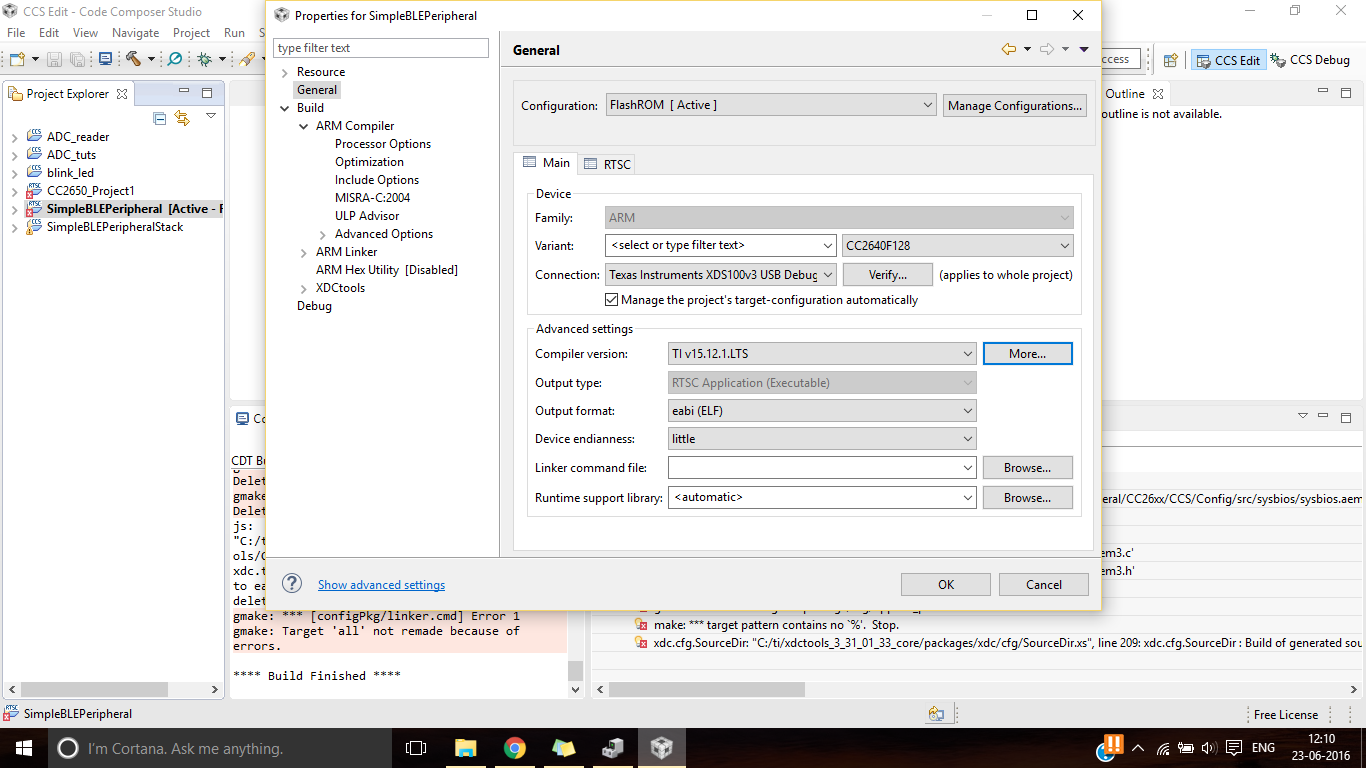
    See a snapshot of settings with which we are building project


    Now I am getting following errors when I am trying to build SimpleBlePeripheral project

    Description Resource Path Location Type
    gmake: *** [C:/ti/simplelink/ble_cc26xx_2_01_01_44627/Projects/ble/SimpleBLEPeripheral/CC26xx/CCS/Config/src/sysbios/sysbios.aem3] Error 2 SimpleBLEPeripheral C/C++ Problem
    gmake: *** [configPkg/linker.cmd] Error 1 SimpleBLEPeripheral C/C++ Problem
    gmake: Target 'all' not remade because of errors. SimpleBLEPeripheral C/C++ Problem
    gmake.exe: *** [package/cfg/appBLE_pem3.xdl] Deleting file `package/cfg/appBLE_pem3.c' SimpleBLEPeripheral C/C++ Problem
    gmake.exe: *** [package/cfg/appBLE_pem3.xdl] Deleting file `package/cfg/appBLE_pem3.h' SimpleBLEPeripheral C/C++ Problem
    gmake.exe: *** [package/cfg/appBLE_pem3.xdl] Error 1 SimpleBLEPeripheral C/C++ Problem
    gmake.exe: *** Deleting file `package/cfg/appBLE_pem3.xdl' SimpleBLEPeripheral C/C++ Problem
    make: *** target pattern contains no `%'. Stop. makefile /SimpleBLEPeripheral/FlashROM line 77 C/C++ Problem
    xdc.cfg.SourceDir: "C:/ti/xdctools_3_31_01_33_core/packages/xdc/cfg/SourceDir.xs", line 209: xdc.cfg.SourceDir : Build of generated source libraries failed: exit status = 2: appBLE.cfg /SimpleBLEPeripheral/TOOLS C/C++ Problem
    This project was created using a version of compiler that is not currently installed: 5.2.4 [ARM]. Another version of the compiler will be used during build: 15.12.1.LTS. Go to 'Help > Check for Updates' page to check for updates and visit <a href="liveaction:OpenAppCenter">CCS App Center</a> to get the latest compilers. Go to 'Help > Install New Software...' to install older compilers. Alternatively, migrate the project to one of the available compiler versions by adjusting project properties. SimpleBLEPeripheral properties Problems

  • What's your CCS version? Maybe try to remove your CCS and install the latest CCS version which is 6.1.3 now.

  • I am using CCS latest version 6.1.3.

    I think problem is this following error. Please suggestsolution  if you can

    make: *** target pattern contains no `%'. Stop. makefile /SensorTag/FlashOnlyOAD line 77 C/C++ Problem

    I am an intermediate level of programmer in CCS, I have taken care of all trivial things.

  • Do you follow section 2.6.3.1 Configure CCS in CC2640 Develop's guide ( www.ti.com.cn/.../swru393c.pdf )
  • Please somebody raise this errors, I have not been able to figure out this errors.
    Our development process has been stagnated from past 3 days.
    Please raise this issue.
  • Which BLE Stack version do you use? Is it latest BLE Stack V.2.2?
  • Hello Jayesh,

    Please install the SDK to the default C:\ti location and confirm the projects build as prescribed in the CC2640 SW Developer's Guide (SWRU393). If you still encounter failures, please attach your complete build log file (do not copy/paste).

    Best wishes