This thread has been locked.

If you have a related question, please click the "Ask a related question" button in the top right corner. The newly created question will be automatically linked to this question.

pairing again is always failed with a peripheral device, which lost the key(LTK).

Other Parts Discussed in Thread: CC2640, BLE-STACK

Hi,

Now, I am trying to initiate the pairing process where slave device doesn’t have the key, that is, key missing case.

I know that terminating the connection(GAPBOND_FAIL_TERMINATE_LINK) is being used as default.

However, I changed the default operation to initiating pairing again(GAPBOND_FAIL_INITIATE_PAIRING).

But, still an error(0x3A: controller busy, I guess) happens.

Actually, I don’t want to erase a bonding information, just update the bonding information, if key missing error happens.

This case was generated after bonded successfully with an iPhone(as a peripheral device), while TI board is a central device(initiating the pairing process, not waiting mode).

After user deleted the paired and bonded information from the setting menu, when pairing begins again, this case is not solved with new SDK(supporting v4.2).

Let me know what I missed.

BR,

Ji Won

  • This issue also happens when using TI SBP device. that is, it is not related to address type(random resolvable address or public address).

  • Hello Ji Won,

    Do you have a sniffer trace of this behaviour?

    Best wishes
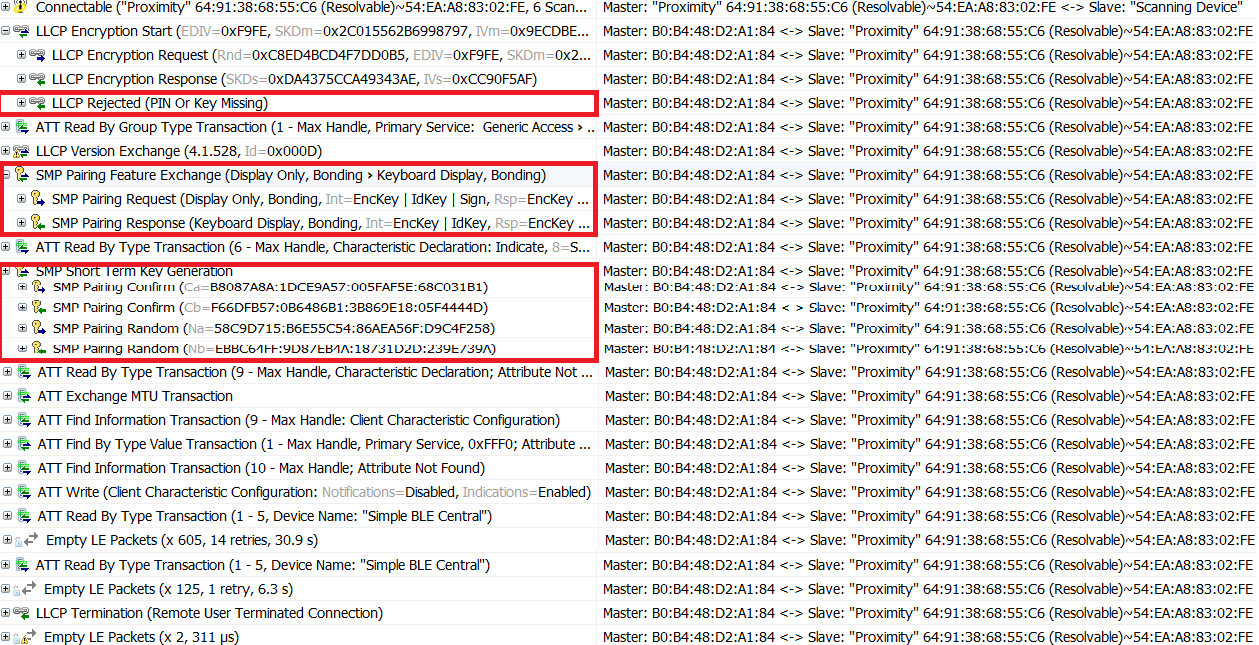
  • Yes, I have. please refer to the attached image.

    Strange things are data transferring seems to be OK.

    just the return value of pairing is failed. So, no bonding information is on iPhone Bluetooth setting.

    Devices Found 4
    <- To Select
    Device 1
    0xB0B448D0B803
    Device 2
    0x7D45CBFAD2BF
    Connecting
    0x7D45CBFAD2BF
    Connected
    0x7D45CBFAD2BF
    MTU Size: 23
    Pairing fail: 0x3a
    Disconnected
    Reason: 0x13

    And, I tried to use 'just works' and 'passkey' mode, the same situation happens when user deleted the paired and bonded information from the iPhone.

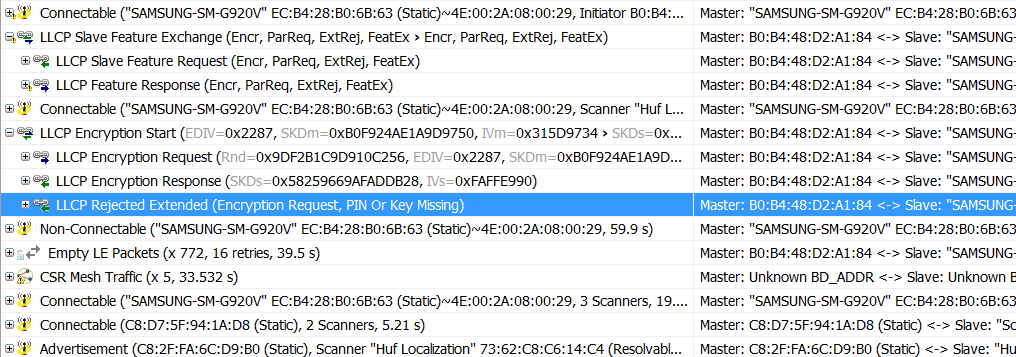
  • As you can see on the below image, no more process when encrypt start is rejected.

    This case is generated by using Android phone using static random address along with 'just works' mode.

    No information with related to pairing OK or not through the below logs. I cannot see any bonded information from the Bluetooth setting menu of Android Phone.

    Connecting
    0xECB428B06B63
    Connected
    0xECB428B06B63
    MTU Size: 23
    Disconnected
    Reason: 0x22

  • I tried to find out the reason why key missing and re-pairing issue.

    It still has the same situation under the BLE v4.2 Features in '‘build_conf.opt’ file.

    And I came to see another issue with privacy policy.

    /* BLE v4.1 Features */
    /* -DBLE_V41_FEATURES=L2CAP_COC_CFG+V41_CTRL_CFG */
    /* -DBLE_V41_FEATURES=L2CAP_COC_CFG */
    /* -DBLE_V41_FEATURES=V41_CTRL_CFG */ /* default */

    /* BLE v4.2 Features */
    /* -DBLE_V42_FEATURES=SECURE_CONNS_CFG+PRIVACY_1_2_CFG+EXT_DATA_LEN_CFG */
    -DBLE_V42_FEATURES=SECURE_CONNS_CFG+PRIVACY_1_2_CFG

    After disconnecting, just where erasing the bonding information from iPhone, and when discovering to reconnect the same iPhone, listed device address is not resolvable address, but public address of iPhone device. my understanding is that this is not totally proper for privacy policy.

    the key missing is again indicated, finally returns 'Pairing fail:0x0b' .

    What should I do ?

    Please refer to the below log.


    Discovering...

    Devices Found 5

    <- To Select

    Device 1

    0x4CFFB9B47E97  : resolvable address of iPhone device

    Connecting

    0x4CFFB9B47E97

    Pairing started

    Connected

    0x4CFFB9B47E97

    MTU Size: 23

    MTU Size: 65

    Pairing success

    Bond save success

    Disconnecting

    Disconnected

    Reason: 0x16

    Up to here, no problem. Resolvable address is displayed on the scanned device list. And I paired with iPhone successfully. And I confirmed that TI board is bonded in iPhone Bluetooth menu.

    And, I deleted it just to test the key missing error case.

    And repairing was OK and bonding information successfully saved on iPhone device. But,,, after discovery

    ------------------------------------------------------------------------------------------------------------------------------------------------------------------------


    Discovering...

    Devices Found 5

    <- To Select

    Device 1

    0x54EAA88302FE  : the public identity address(with address type 2) of the iPhone.

    Discovering...

    Devices Found 5

    <- To Select

    Device 1

    0xC82FFA6CD9B0

    Device 2

    0x54EAA88302FE

    Connecting

    0x54EAA88302FE

    Connected

    0x54EAA88302FE

    Bonding success

    MTU Size: 23

    MTU Size: 65

    Disconnecting

    Disconnected

    Reason: 0x16


    Connecting

    0x54EAA88302FE

    Connected

    0x54EAA88302FE

    Disconnected

    Reason: 0x3d

    Connecting

    0x54EAA88302FE

    Connected

    0x54EAA88302FE

    MTU Size: 23

    MTU Size: 65

    Pairing fail: 0xb

    Disconnecting

    Disconnected

    Reason: 0x16


    Anyway, when pairing with it, key missing error happens, and pairing fail returns 0x0b.

    Let me know what should I do?

    Ji Won

  • Hi Ji Won,

    Thank you for the logs. I would like to reproduce this on my side. May I know which app you are running on the iOS side to make it act as a peripheral?

    Best wishes
  • LightBlue was used for it.
    And key missing issue always happens with any options even including your TI SBP evaluation board.
  • Hello. Thank you for the detailed information. I'm debugging this now and will keep you updated with progress.
  • Hello.  Are you saying this occurs with the default 2.2.0 SBP (simpleBLEPeriphreal) project?  If so, what is the central device you used in this case? Are you able to replicate with the 2.2.0 simpleBLECentral project?

  • Please refer to the below combinations.

    after changed the default operation to initiating pairing again(GAPBOND_FAIL_INITIATE_PAIRING)

    * key missing and the fairing failed(0x0b)

    TI Central application v2.1.1 + iPhone LightBlue(as a peripheral device) : occurred.

    TI Central application v2.2 + iPhone LightBlue(as a peripheral device) : occurred

    TI Central application v2.1.1 + TI SBP v2.1.1  : occurred.

    TI Central application v2.2 +  TI SBP v2.1.1  : I don't know as it is not checked yet.

    TI Central application v2.2 + TI SBP v2.2  : I don't know as it is not checked yet.

    * device identity address(public address type) displays after bonded and when discovering

    TI Central application v2.1.1 + iPhone LightBlue(as a peripheral device) : I don't know as it is not checked yet. 

    TI Central application v2.2 + iPhone LightBlue(as a peripheral device) : occurred

  • Hello. I was able to replicate with the v2.2.0 release with the following steps:
    1. Set SBC to initiate pairing.
    2. Pair SBC and SBP
    3. Reprogram the SBP stack, thus erasing the NV
    4. Reconnect

    At this point I see the pairing fail with status 0x3A.

    I need to debug some more but will provide an update tomorrow.
  • Hello. Unfortunately, this looks like a bug in the stack. I've filed a bug and will update the thread as it is resolved.
  • Thanks a lot, I hope to get a resolved stack as soon as possible.
  • To clarify, the bug relates to the pairing issue. It will likely require a library modification and therefore the fix won't be available until the next stack release.

    Regarding the other issue mentioned, this is the only information I have seen: 

    "After disconnecting, just where erasing the bonding information from iPhone, and when discovering to reconnect the same iPhone, listed device address is not resolvable address, but public address of iPhone device. my understanding is that this is not totally proper for privacy policy."

    Where is the "listed device address" that  you are referring to? And why is this a problem?

  • deleted what I posted at this point as I understood that the resolved address is not public device address(with address type 1) but public identity address(corresponds to Resolved Private Address)

  • Thanks for the patch. but doesn't work. the same situation.

    1st pairing and bonding are done successfully.

    And then, I deleted the paired and bonded information from iPhone’s Bluetooth menu.

    And again, discovering and pairing are done by central device.

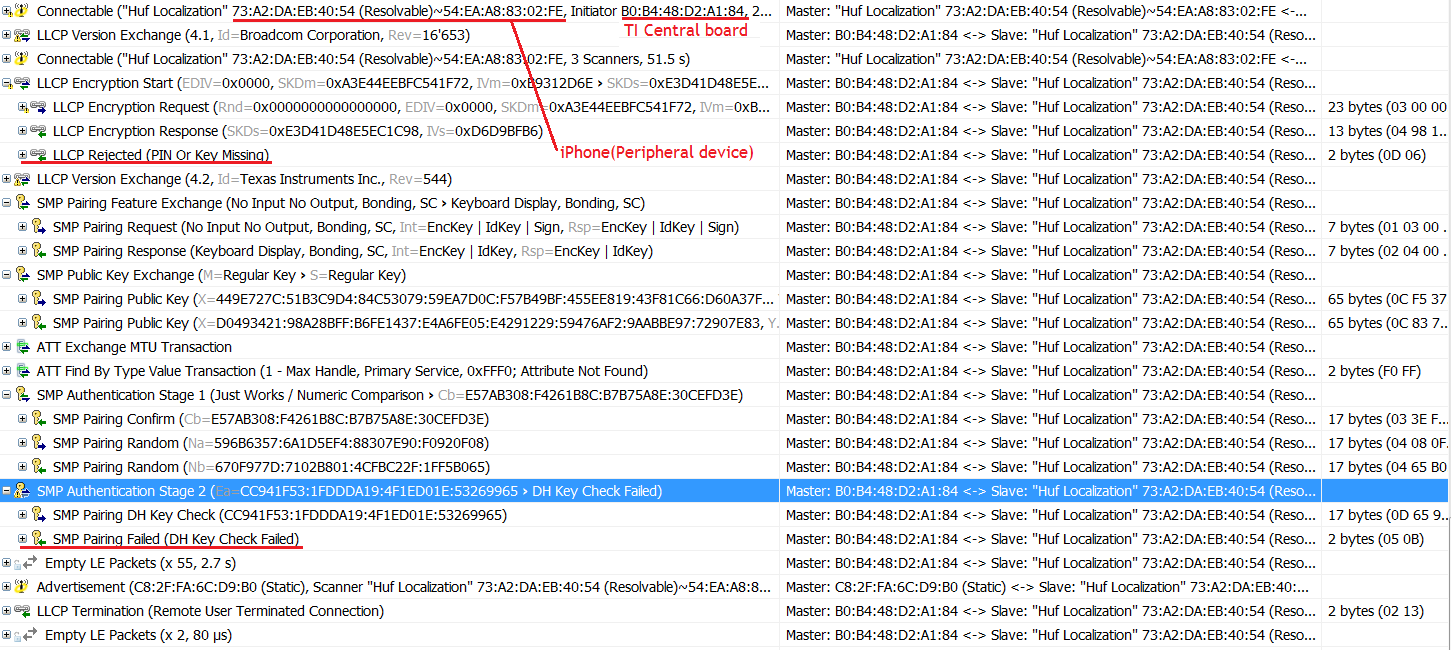
     Please see the below log data and analyzer data.

    Connecting

    0x54EAA88302FE

    Connected

    0x54EAA88302FE

    MTU Size: 23

    MTU Size: 65

    Pairing fail: 0xb

    Disconnected

    Reason: 0x13

  • Hello Ji Won,

    Thank you for the feedback. I did confirm legacy pairing does work, but we will check Secure Connections as that is what your latest trace shows.

    Best wishes
  • I just followed the below conditions.

    This patch may only be used for evaluation purposes only & applies to a build_config.opt configuration of:
    -DHOST_CONFIG=CENTRAL_CFG
    -DGAP_BOND_MGR
    -DBLE_V42_FEATURES=SECURE_CONNS_CFG+PRIVACY_1_2_CFG
    -DHCI_TL_NONE

    Library Update Procedure
    ========================

    Copy and replace the included files (MD5sum listed):
    a029988fa03bd89cf7638290aabce453 *cc2640_ctrl_xcxx_sc_ep.a
    d4b34b2b618da172b47ebbe681034f63 *cc2640_ctrl_xcxx_sc_ep.opt

    to the following path:
    $SDK_INSTALL$\blelib\ctrl\cc2640

    Where $SDK_INSTALL$ is the BLE-Stack v2.2.0 SDK install path.

    Perform a Rebuild-All in the IDE to force the simple_peripheral Stack project to link to the updated library.
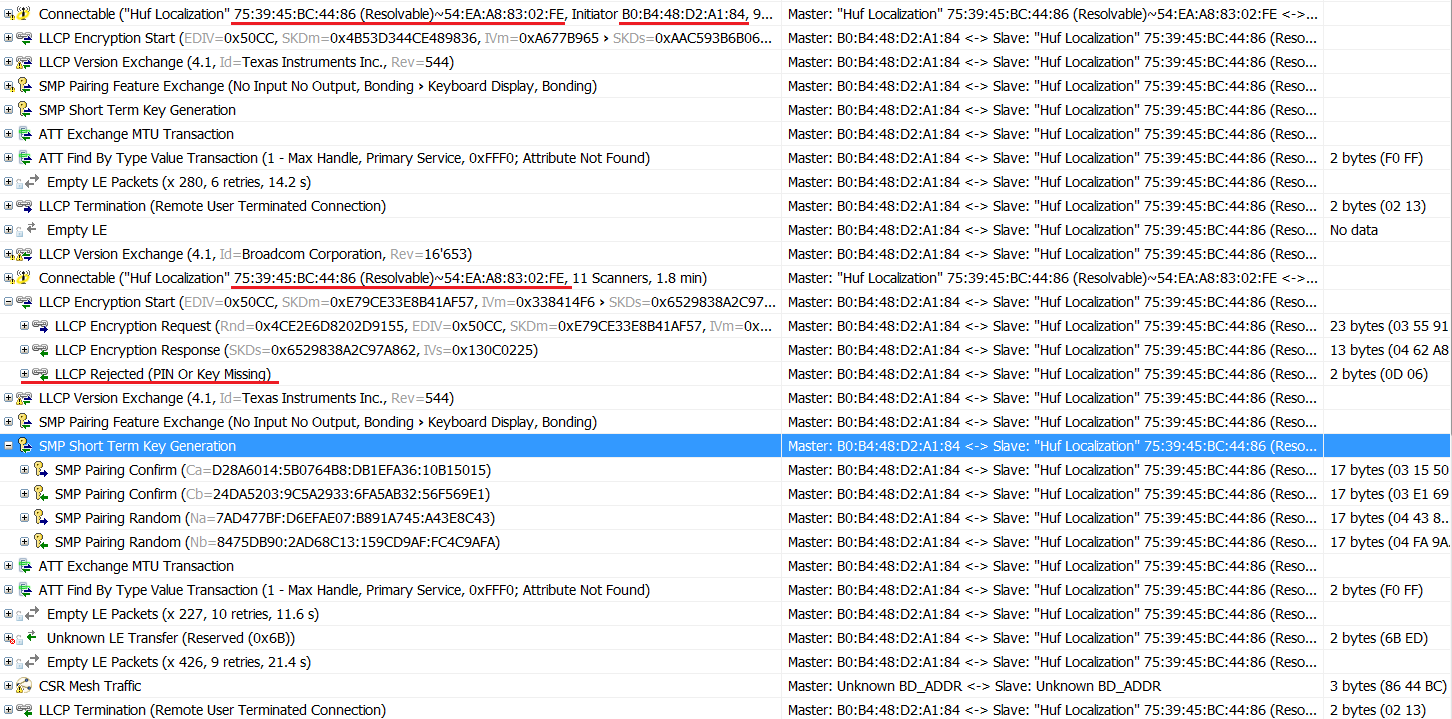
  • I don't think so that legacy pairing does work.

    Using legacy pairing method,

    1st pairing and bonding with PRA are done successfully.

    Discovering...

    Devices Found 4

    <- To Select

    Device 1

    0x4F2393EB804C

    Connecting

    0x4F2393EB804C

    Pairing started

    Connected

    0x4F2393EB804C

    MTU Size: 23

    Pairing success

    Bond save success

    Device 2

    0x49F4EA8DAD23

    Disconnected

    Reason: 0x13

    I deleted the bonded information from iPhone menu.

    At this point, the PRA is changed to new PRA 0x753945BC4486.

    Discovering...

    Devices Found 4

    <- To Select

    Device 1

    0x753945BC4486

    Device 2

    0x49F4EA8DAD23

    Device 3

    0xC82FFA6CD9B0

    Device 4

    0x08DF1F9A671A

    Device 1

    0x753945BC4486

    Discovering...

    Devices Found 4

    <- To Select

    Device 1

    0x753945BC4486

    Device 2

    0x49F4EA8DAD23

    Device 3

    0x08DF1F9A671A

    Device 4

    0xC82FFA6CD9B0

    Device 1

    0x753945BC4486

    Connecting

    0x753945BC4486

    Connected

    0x753945BC4486

    MTU Size: 23

    Pairing fail: 0x3a

    Disconnecting

    Disconnected

    Reason: 0x16

    Connecting

    0x753945BC4486

    Connected

    0x753945BC4486

    MTU Size: 23

    Pairing fail: 0x3a

    Device 2

    0x49F4EA8DAD23

    Disconnected

    Reason: 0x13

    Pairing is failed.

  • Hello. Something is wrong if you are still seeing issues with legacy pairing. I just tested with the patch provided to you, with the controller configured to support secure connections, but actually implementing legacy pairing, and I am not seeing the problem. I'm not sure what hardware you are running with. Is this a TI reference platform? If so, I can provide a hex file that you can test to verify your setup and to see if maybe the patch was not implemented somehow.
  • Hi Tim,

    I am using the SmartRF06 Evaluation Board + CC2650EM-7ID v1.2 combination for central device role and iPhone5 or 6(using LightBlue App) for peripheral device role.

    According to your 'readme.txt', I configured the secure connection is getting used, not using legacy pairing.

    Also, when being back to the legacy pairing configuration, the key missing error isn't solved as you can see all log data I attached on here.

    actually, I really want to use the secure connection and privacy v1.2 features and resolving listing feature..

    I hope you to check all combinations with the same environments and the same sequence I have mentioned.

    And regarding "with the controller configured to support secure connections, but actually implementing legacy pairing", how to set up for this?

    Are you using your central platform and peripheral platform for your testing? If yes, actually, this is not what I want.

    Thanks a lot in advance,

    Ji Won

  • Hello. I am using our central. We have tested with both our peripheral and an iPhone as a peripheral. With the patch, there are no problems in either case.

    It looks like there was either an error implementing the patch or there is some other variable we are not considering. I'm working with our team to get you the hex file for the central that I used. This should verify whether or not your patch was implemented correctly. The idea is that if you see this hex file work successfully, there was a problem implementing the patch. If the hex file fails, there is some other variable in your setup that we are not currently considering.

    In the meantime, can you attach the your application and stack .map files for the project you are using for your central? I'll compare these to mine to see if you are using the correct library.
  • after bonded with the peripheral device, and then deleted the bonded information from the Bluetooth menu of iPhone, and then, did you push the button to discover again advertising devices?
    in my previous testing with the original SDK, not patch, without the discovery operation, the pairing and bonding operation will be OK even though key missing situation happened.
    If you did the discovery operation again, it looks like there are some different configuration or modification on my side.
    so, I will send out my things. And I will check for your hex file.

    Thanks a lot for your activities for this.
    Ji Won
  • I modified the below variables in gapbondmgr.c

    static uint8 gapBond_PairingMode = GAPBOND_PAIRING_MODE_INITIATE; // GAPBOND_PAIRING_MODE_WAIT_FOR_REQ;

    static uint8 gapBond_IOCap = GAPBOND_IO_CAP_NO_INPUT_NO_OUTPUT; // GAPBOND_IO_CAP_DISPLAY_ONLY;

    static uint8 gapBond_Bonding = TRUE; // FALSE;

    And please find the attached hex files for application and stack side.

    And screen display will be on your PC terminal using comm port

    1362.simple_central_cc2650em_stack.zip6253.simple_central_cc2650em_app.zip

  • this problem happens regardless of legacy or secure connection configuration.

    0. the application and stack images are programmed to make it possible for 1st perfect pairing and bonding operation.
    1. discovery the advertising devices
    2. select iPhone device with PRA,
    3. after 1st pairing and bonding process successfully with iPhone, the bonding information is stored on both of devices(TI central board and iPhone) for the next future connection.
    4. still no discovery again, still using the existing discovered device lists,
    5. two problems are showing with your pairing and bonding operation.
    A. why your pairing operation always brings up the pairing request window for user to push 'pair' button even though the same address stored as a bonded information.
    => my guess is because your pairing and bonding process are operated based on still the PRA as advertising address is being used at this point.
    => when and after discovery again by pushing the 'up' button, the advertising device list is updated to the public identity address, not PRA. From this point, no more the window for user.
    B. As you know, after bonded, no more phase 1 and phase 2. only phase 3 should be used. But, why your process makes user push the 'pair' allowing button. It seems to be related with phase 1 and 2.
    6. disconnected.
    7. discovery again.
    8. public identity address is scanned and listed on the scanned device list.
    9. select the iPhone device with the public identity address
    10. pairing and bonding process are OK and no more the window for user.
    11. deleted the bonded information from the Bluetooth menu of iPhone.
    12. always pairing failed.

    But, if the is no discovery again by pushing the 'up' button, and even though the bonded information is deleted from the Bluetooth menu of iPhone, when you tried to pair with iPhone, which still shows the PRA, not public identity address, it will be paired and bonded again without skipping the phase 1 & 2.

    Ji Won

  • Yes, I am always performing discovery again with my central device to find the iPhone. And I'm never seeing the pairing issue as stated in previous posts.

    Regarding your point A from above...your guess sounds correct. If you don't want to see the pairing window, I would recommend always performing discovery again before reconnecting.  If you don't want to do this, you can modify the code to, after a bond occurs,change the PRA in the device list to the resolved public address.

  • Thanks Tim,

    Anyway, as pairing always failed after key miss error happened on my side, can I have your testing hex files?

    And regarding B, let me know how to modify to avoid the phase 1 and phase 2 sequence with the pairing window as the paired device is already bonded. Stack side or Application side? Just I think that discovering again is not so good approach to solve this problem basically.

    Thanks in advance,

    Ji Won

  • Regarding "Where is the "listed device address" that you are referring to? And why is this a problem?" you mentioned,
    I understood why it is not a problem.

    when -DBLE_V42_FEATURES=SECURE_CONNS_CFG+PRIVACY_1_2_CFG option is used, after bonded, the devList automatically changed to the resolved address for the RPA used as an advertiser address(AdvA). So, the address type is not '0'(Public device address) but '2', which indicates Public Identity Address corresponding to Resolved Private Address and Sub Address type is indicating still RPA.

    If I don't want this above one, PRIVACY_1_2_CFG shouldn't be used.

    If -DBLE_V42_FEATURES=SECURE_CONNS_CFG+PRIVACY_1_2_CFG should be used, when disconnected after 1st pairing process, I added the discovery operation. Through this approach, the 2nd pairing won't have the phase 1 & 2 again as public identity address(corresponds to resolved private address) of iPhone 5 device is being used. Let me know if there is more better approach to skip the phase 1 & 2 after 1st paired and bonded.


    Still, the key missing problem is not solved with your patch library.


    BR,

    Ji Won

  • v2.2.1.18 SDK solved this key missing error case. so, I will close this question.
    Thanks a lot.
    Ji Won