This thread has been locked.

If you have a related question, please click the "Ask a related question" button in the top right corner. The newly created question will be automatically linked to this question.

How to check TI BLE stack version?

Other Parts Discussed in Thread: BLE-STACK

Hi,

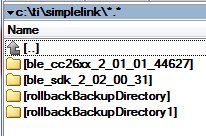
First I had installed BLE Stack 2.1. Later I installed BLE Stack 2.2. Now it seems I have both stacks in parallel on my disk.
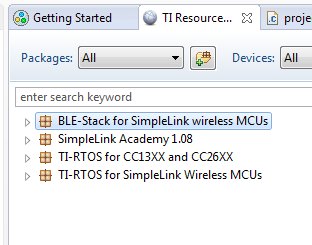
In CCS Resource Explorer it shows a package saying BLE-Stack... without a version name.

How do I find out what Version it is?
How do I find out the path behind a Package?
How do I import / delete a package?

Sorry about these stupid questions. But I don't get it. See pictures below.
  • Hi Ben,

    When projects are imported into your workspace you can aways right-clock on them to display Properties. Under Resource, the file location is displayed. This will show you what BLE stack version your project belongs to.

    To be sure of what version you are importing, go to Project/Import CCS Project on the top of your screen (in CCS Edit view). Deleting projects from a workspace is done by right-clicking them and selecting delete. If you want to clear the files from your disk you should do this in Explorer.

    I advise you to read chapter 2.6.3.3, Using CCS of the Software Developer's Guide. :) ( www.ti.com/.../swru393c.pdf )

    Cheers,
    Marie H.
  • Hi Marie,
    thank you for your response.
    When I imported the project I can view properties>Resource>Linked Resources ORIGINAL_PROJECT_ROOT to see where it comes from.
    But before importing from TI Resource Explorer I can not see what exactely I import. :(
    May be it is the best way to do it your way and not use the TI Resource Explorer.

    My deleting question was also towards the TI RE not towards the imported projects. Anyway I will just ignore the RE.
  • Hi Ben,

    I don't think you can delete what's displayed in TI Resource Explorer, so if it were me I would just ignore it in order to not be confused.

    Cheers,
    Marie H.