This thread has been locked.

If you have a related question, please click the "Ask a related question" button in the top right corner. The newly created question will be automatically linked to this question.

CC2650MODA: Master/Slave Dual Mode

Part Number: CC2650MODA
Other Parts Discussed in Thread: CC2650, , CC2540

Hi everyone,

I need to make the BLE screenless device which works as master for connecting other subdevices connected as the slaves. But this device must have the option to be connected to the mobile phone.

If I need to connect this device to the Mobile phone as the slave, can CC2650 work in dualmode: to be the slave for mobile phone and the master to other subdevices?

And if dual mode is not supported can I connect the mobile phone to CC2650 as the slave too?

  • Hi Boris,

    Yes, the CC2650 can be both a BLE slave and a master at the same time.

    We have an example project tht shows this functionality, it's called multi_role and is found on github ( github.com/.../ble_examples ).

    The example project is made for the CC2650Launchpad. In order to run it on the CC2650MODA, you have to go to the project compiler predefines and replace the CC2650_LAUNCHXL define with BOOSTXL_CC2650MA.

    In addition, you have to figure out what you want to do with the fact that the project is written for a launchpad which has two buttons.
  • Hi, Marie H,
    Thanks for your answer.
    I have also the CC2650 Launchpad so I can check the example without any modifications at the first time.
    I have checked the example and I saw that it requires the paring key.
    Also what must it do?
    where is the manual for this example?

    Best regards
    Boris Fridman.
  • Hi Boris,

    The example implements paring, but you don't need to provide a key. The documtention is here: github.com/.../multi_role.md
  • Hi Marie H

    I have loocked the documents and I had checked the example you had given.
    But I cannot understand with which devices it is compatible.
    In the beginning I tried to take as the slave device the project Zero. Of cose I changed the "#define DEFAULT_DEV_DISC_BY_SVC_UUID" from "TRUE" to "FALSE" to enable recognition of the slave device (The Zero project othervise is not recognized).
    But when I tried to connect to the slave device "Zero project" from this "Multi_role_CC2650" project it connects and after a half second disconnects.

    Than I tried to use as the zero project the "simple_peripheral_2650". It could be connnected for a half minute, but this project example had another problem: If I compile it and start debugging it works perfectely, it also continues to work after I quit the debugging. But when I make the reset or disconnect and reconnect the power it doesn't start to work.

    So my questions are:
    1. Whith which slave the "multi_role_2650" works and does it work with "Zero project" too?
    2. How to make the "simple_peripheral" working whithout enetering to debug mode. because I have only one programmer.

    Thank you for paying attention.
    Best regards
    Boris Fridman

  • Post Scriptum
    When I try to connect to the "zero_project" from the "multi_role_2650" project the terminal is seen so:

    Connect ->
    -> Select
    <- Browse Devices
    Device 1
    0xA0E6F8C42106
    Connecting
    0xA0E6F8C42106
    Connect ->
    <- Next Option
    Cxn 0 pairing started
    Connected!
    Connected to 1

    0xA0E6F8C42106
    Connected to 0
    Disconnected!
  • Hi Boris,

    1. Multi_role works with simple_peripheral per default, but by setting #define DEFAULT_DEV_DISC_BY_SVC_UUID FALSE, it works with any BLE slave. Since you have done this, it should work with Project Zero as well.
    2. Please make sure that you're terminating the debug session properly (by pressing the red quare stop button in CCS).
  • But what maybe the possible risons which couse the modules to be disconnected immediately?

    Do you have the manual about all the bluetooth commands used in these projects?

    Best regards

    Boris Fridman

  • And what is reffered to the debugging, I quit from debugging exactly by the stop button exactely as in other projects. But in other projects the problem doesnlt hapen while in peripheral hampes.

    Also when I try to test connection it gives me error -230.

    The test connection results when I quit the debugging and the project works:

    [Start: Texas Instruments XDS110 USB Debug Probe_0]

    Execute the command:

    %ccs_base%/common/uscif/dbgjtag -f %boarddatafile% -rv -o -S integrity

    [Result]


    -----[Print the board config pathname(s)]------------------------------------

    C:\Users\MeirR\AppData\Local\TEXASI~1\CCS\
    ti\2\0\BrdDat\testBoard.dat

    -----[Print the reset-command software log-file]-----------------------------

    This utility has selected a 100- or 510-class product.
    This utility will load the adapter 'jioxds110.dll'.
    The library build date was 'Feb 22 2017'.
    The library build time was '17:13:34'.
    The library package version is '6.0.579.0'.
    The library component version is '35.35.0.0'.
    The controller does not use a programmable FPGA.
    The controller has a version number of '5' (0x00000005).
    The controller has an insertion length of '0' (0x00000000).
    This utility will attempt to reset the controller.
    This utility has successfully reset the controller.

    -----[Print the reset-command hardware log-file]-----------------------------

    The scan-path will be reset by toggling the JTAG TRST signal.
    The controller is the XDS110 with USB interface.
    The link from controller to target is direct (without cable).
    The software is configured for XDS110 features.
    The controller cannot monitor the value on the EMU[0] pin.
    The controller cannot monitor the value on the EMU[1] pin.
    The controller cannot control the timing on output pins.
    The controller cannot control the timing on input pins.
    The scan-path link-delay has been set to exactly '0' (0x0000).

    -----[Perform the Integrity scan-test on the JTAG IR]------------------------

    This test will use blocks of 64 32-bit words.
    This test will be applied just once.

    Do a test using 0xFFFFFFFF.
    Scan tests: 1, skipped: 0, failed: 0
    Do a test using 0x00000000.
    Scan tests: 2, skipped: 0, failed: 0
    Do a test using 0xFE03E0E2.
    Scan tests: 3, skipped: 0, failed: 0
    Do a test using 0x01FC1F1D.
    Scan tests: 4, skipped: 0, failed: 0
    Do a test using 0x5533CCAA.
    Scan tests: 5, skipped: 0, failed: 0
    Do a test using 0xAACC3355.
    Scan tests: 6, skipped: 0, failed: 0
    All of the values were scanned correctly.

    The JTAG IR Integrity scan-test has succeeded.

    -----[Perform the Integrity scan-test on the JTAG DR]------------------------

    This test will use blocks of 64 32-bit words.
    This test will be applied just once.

    Do a test using 0xFFFFFFFF.
    Scan tests: 1, skipped: 0, failed: 0
    Do a test using 0x00000000.
    Scan tests: 2, skipped: 0, failed: 0
    Do a test using 0xFE03E0E2.
    Scan tests: 3, skipped: 0, failed: 0
    Do a test using 0x01FC1F1D.
    Scan tests: 4, skipped: 0, failed: 0
    Do a test using 0x5533CCAA.
    Scan tests: 5, skipped: 0, failed: 0
    Do a test using 0xAACC3355.
    Scan tests: 6, skipped: 0, failed: 0
    All of the values were scanned correctly.

    The JTAG DR Integrity scan-test has succeeded.

    [End: Texas Instruments XDS110 USB Debug Probe_0]

    The test connection results when I pressed the reset button and project doesn't start:


    [Start: Texas Instruments XDS110 USB Debug Probe_0]

    Execute the command:

    %ccs_base%/common/uscif/dbgjtag -f %boarddatafile% -rv -o -S integrity

    [Result]


    -----[Print the board config pathname(s)]------------------------------------

    C:\Users\MeirR\AppData\Local\TEXASI~1\CCS\
    ti\2\0\BrdDat\testBoard.dat

    -----[Print the reset-command software log-file]-----------------------------

    This utility has selected a 100- or 510-class product.
    This utility will load the adapter 'jioxds110.dll'.
    The library build date was 'Feb 22 2017'.
    The library build time was '17:13:34'.
    The library package version is '6.0.579.0'.
    The library component version is '35.35.0.0'.
    The controller does not use a programmable FPGA.
    The controller has a version number of '5' (0x00000005).
    The controller has an insertion length of '0' (0x00000000).
    This utility will attempt to reset the controller.
    This utility has successfully reset the controller.

    -----[Print the reset-command hardware log-file]-----------------------------

    The scan-path will be reset by toggling the JTAG TRST signal.
    The controller is the XDS110 with USB interface.
    The link from controller to target is direct (without cable).
    The software is configured for XDS110 features.
    The controller cannot monitor the value on the EMU[0] pin.
    The controller cannot monitor the value on the EMU[1] pin.
    The controller cannot control the timing on output pins.
    The controller cannot control the timing on input pins.
    The scan-path link-delay has been set to exactly '0' (0x0000).

    -----[An error has occurred and this utility has aborted]--------------------

    This error is generated by TI's USCIF driver or utilities.

    The value is '-230' (0xffffff1a).
    The title is 'SC_ERR_PATH_MEASURE'.

    The explanation is:
    The measured lengths of the JTAG IR and DR scan-paths are invalid.
    This indicates that an error exists in the link-delay or scan-path.

    [End: Texas Instruments XDS110 USB Debug Probe_0]

  • Hi Boris,

    When it looks like the multirole connects and disconnects immediately, it probably hasn't connected at all and the connection request times out.

    Did you make any changes (except DEFAULT_DEV_DISC_BY_SVC_UUID) to the project?
  • Yes I took these changes. otherwise the device wouldn't be found at all.
  • Hi Boris,

    Did you make any other changes to the multi_role?
  • Hi, Marie

    Other modification weren't made. I had compiled this project exactly as-is. Only the option  "DEFAULT_DEV_DISC_BY_SVC_UUID" was modified.

  • Hi Boris,
    did you solve the problem with multi-role example? Beacause I've got same problems as yours!

    cheers,
    moni
  • Unfortunedly no.

    But what is most interesting that the Zero Project works perfect with other manufactured devices as mobile phone, but not with their example(s).

  • Hi Boris,

    I'm not able to reproduce your issue.

    1) Load a device with project zero (check that it advrtises and is connectable with phone)

    2) Download BLE extra examples from

    3) Import the multirole project

    4) Change;

    // TRUE to filter discovery results on desired service UUID
    #define DEFAULT_DEV_DISC_BY_SVC_UUID          FALSE//TRUE

    5) Build and flash the multirole stack project to the CC2650LaunchPad

    6) Build and flash the multirole app project to the CC2650 LP

    7) Run the project; discover devices (the PZ is discovered), connect to the PZ (succes, and pairing and bonding succeeds.)

  • Hi, Marie H

    I tried all these steps.
    The first I must "say" or more exactly write that I have only one LaunchPad CC2650 which I have programed as the multirole device. Instead of the other LaunchPad CC2650 I have the CC2650MODA Modules soldered to the electronic circuits. Them I have programmed as the devices with the Project Zero. I have checked averyone of them and saw the next interesting problems:

    1. Some of these Zero Project modules worked perfectly with the Multirole Board but with some limmitations while the others didn't want to work with multirole at all while worked perfectly with telephone.

    2. The ZP-Modules (Zero Project Modules) which worked with MR-Device (Multirole Device) until I tried to reprogramed them with the same Zero Project. Althouugh any modifications weren't done to the program only recompilation, the MR-Device rejected them while the mobile phone accepted them. To make the ZP-Devieces working again with MR-Device it was possible if to clear and reprogramm the MR-Device-memory.


    The output of the MR-Device to which we try to connect the ZP-Device with MAC-Address 0xA0E6F8C41B02.
    ------------------------
    First connection - (THe MR-Dev. was programmed at the first time)
    ------------------------
    Scan ->
    <- Next Option
    Connected to 0
    0x247189082685
    Initialized
    Advertising
    Discovering...

    Devices Found 3
    <- Next Option


    Connect ->
    -> Select
    <- Browse Devices
    Device 1
    0xA0E6F8C41B02
    Connecting
    0xA0E6F8C41B02
    Connect ->
    <- Next Option
    Cxn 0 pairing started
    Connected!
    Connected to 1

    0xA0E6F8C41B02
    Cxn 0 pairing success
    Cxn 0 bond save success


    ----------------------------
    Second connection - (The ZP-Dev was connected previousely and now is connecting again)
    ----------------------------
    Scan ->
    Discovering...

    Devices Found 1
    <- Next Option


    Connect ->
    -> Select
    <- Browse Devices
    Device 1
    0xA0E6F8C41B02
    Connecting
    0xA0E6F8C41B02
    Connect ->
    <- Next Option
    Connected!
    Connected to 1

    0xA0E6F8C41B02
    Cxn 0 bonding success


    ---------------------------
    Connection after reprogramming the recompiled zero project without modifications - (Trying to connect the ZP-Dev after it was reprogrammed)
    ---------------------------
    Discovering...

    Devices Found 1
    <- Next Option


    Connect ->
    -> Select
    <- Browse Devices
    Device 1
    0xA0E6F8C41B02
    Connecting
    0xA0E6F8C41B02
    Connect ->
    <- Next Option
    Connected!
    Connected to 1

    0xA0E6F8C41B02
    Connected to 0
    Disconnected!
    -> Select
    <- Browse Devices
    Cancel

    Device 1
    0xA0E6F8C41B02
    Connecting
    0xA0E6F8C41B02
    Connect ->
    <- Next Option
    Connected!
    Connected to 1

    0xA0E6F8C41B02
    Connected to 0
    Disconnected!
    -> Select
    <- Browse Devices
    Cancel

    Device 1
    0xA0E6F8C41B02
    Connecting
    0xA0E6F8C41B02
    Connect ->
    <- Next Option
    Connected!
    Connected to 1

    0xA0E6F8C41B02
    Connected to 0
    Disconnected!


    -----------------------------
    Connection after clearing and reprogramming the MR-Dev. - (The memory of the MR-dev. was cleared and programmed again)
    -----------------------------
    Scan ->
    <- Next Option
    Connected to 0
    0x247189082685
    Initialized
    Advertising
    Discovering...

    Devices Found 2
    <- Next Option


    Connect ->
    -> Select
    <- Browse Devices
    Device 1
    0x74D2FE5B834A
    Device 2
    0xA0E6F8C41B02
    Connecting
    0xA0E6F8C41B02
    Connect ->
    <- Next Option
    Cxn 0 pairing started
    Connected!
    Connected to 1

    0xA0E6F8C41B02
    Cxn 0 pairing success
    Cxn 0 bond save success


    ---------------------------------------
    Due to these reasons I must ask the next questions:
    1. When I program the similar modules with the same algorythm what is the difference between the that are sent during the paring? One of tham is MAC address. But which are the others?
    2. Where are these parametres are checked - in the stack part or in the App part and in the which files and functions?
    3. Does the multiproject store any of these parameters in the flash memory and if yes where?
    4. Some of the ZP-modules (Modules with the Zero Project) didn't want to work with the multirole at all while with the PT telephone worked perfectly. What maybe the reason?
    5. Does the compiled code have any information depending on the time of the compilation that is used in BT communicatio?

    Best Regards
    Boris Fridman
  • Hi Boris,

    Could you provide a sniffer log of your fail cases?

    Project Zero uses undirected advertisements, which means that all connections should be accepted. (This is true for all of your Project Zero devices.) This means that there are no parameters checked in the PZ app or stack.

    I don't know why connection to a phone works better than connecting to multi_role. Again, a sniffer log would tell us more about what's going on.

    The code compilation does not use a time stamp to generate Bluetooth variables or anything like that. (The MAC address is calculated from the serial number unless you give a specific MAC address.)
  • Hi Marie,

    This is the sniffer of the log taken from ZeroProject on the device that doesn't want to be paired/bonded to Multi_role Project.

    --------------------------------------------------------------------------------------------------------------------------------------------------------------

    #000001 [ 0.009 ] INFO: (ProjectZero.c:371) Initializing the user task, hardware, BLE stack and services.
    #000002 [ 0.009 ] INFO: (ProjectZero.c:447) Name in advertData array: Project Zero
    #000003 [ 0.014 ] INFO: (LED_Service.c:218) Registered service, 5 attributes
    #000004 [ 0.015 ] INFO: (Button_Service.c:257) Registered service, 7 attributes
    #000005 [ 0.015 ] INFO: (Data_Service.c:238) Registered service, 6 attributes
    #000006 [ 0.015 ] INFO: (LED_Service.c:233) Registered callbacks to application. Struct @20001ed8
    #000007 [ 0.015 ] INFO: (Button_Service.c:274) Registered callbacks to application. Struct @20001ee0
    #000008 [ 0.015 ] INFO: (Data_Service.c:255) Registered callbacks to application. Struct @20001ee8
    #000009 [ 0.015 ] INFO: (LED_Service.c:268) SetParameter : LED0 len: 1
    #000010 [ 0.015 ] INFO: (LED_Service.c:276) SetParameter : LED1 len: 1
    #000011 [ 0.015 ] INFO: (Button_Service.c:315) SetParameter : BUTTON0 len: 1
    #000012 [ 0.015 ] INFO: (Button_Service.c:346) Trying to send noti/ind: connHandle ffff, Noti/ind disabled
    #000013 [ 0.015 ] INFO: (Button_Service.c:326) SetParameter : BUTTON1 len: 1
    #000014 [ 0.015 ] INFO: (Button_Service.c:346) Trying to send noti/ind: connHandle ffff, Noti/ind disabled
    #000015 [ 0.015 ] INFO: (Data_Service.c:293) SetParameter : String len: 40
    #000016 [ 0.015 ] INFO: (Data_Service.c:304) SetParameter : Stream len: 20
    #000017 [ 0.015 ] INFO: (Data_Service.c:324) Trying to send noti/ind: connHandle ffff, Noti/ind disabled
    #000018 [ 0.017 ] INFO: (ProjectZero.c:1229) (CB) GAP State change: 1, Sending msg to app.
    #000019 [ 0.019 ] INFO: (ProjectZero.c:1229) (CB) GAP State change: 2, Sending msg to app.
    #000020 [ 0.019 ] INFO: (ProjectZero.c:738) GAP is started. Our address: 0xA0E6F8C42386
    #000021 [ 0.019 ] INFO: (ProjectZero.c:743) Advertising
    #000022 [ 49.498 ] INFO: (ProjectZero.c:1229) (CB) GAP State change: 6, Sending msg to app.
    #000023 [ 49.498 ] INFO: (ProjectZero.c:753) Connected. Peer address: 0x247189082685
    #000024 [ 50.910 ] INFO: (ProjectZero.c:1229) (CB) GAP State change: 4, Sending msg to app.
    #000025 [ 50.911 ] INFO: (ProjectZero.c:1229) (CB) GAP State change: 2, Sending msg to app.
    #000026 [ 50.911 ] INFO: (ProjectZero.c:762) Disconnected / Idle
    #000027 [ 50.911 ] INFO: (ProjectZero.c:743) Advertising

    ---------------------------------------------------------------------------------------------------------------------------------------------------------------

    The lines marked with the black are reffered to the period of connecting and disconnecting.

    The Project Zero accepts the connection, but disconnects immideately, maybe the pairing or bonding fails.

    About the TimeStamp. 

    If I understand correctely during the pairing the devices generate the longtime key for future bonding.

    But which parameters are taken in account to generate the long-time-key?

    The timestamp is not taken in account but does the programmer write the current date and time to the flash memory during the burning the program in it? If yes does the BLE program read this burning date&time for generating the long-time-key?

  • Hi Boris,

    Even if paring/bonding fails, the connection should not be broken.

    Could you provide a packet sniffer log (like this: processors.wiki.ti.com/.../BLE_sniffer_guide )?

    The long term key is generated on the basis of a true random number generator, not on a time stamp.
  • Hi, Marie,

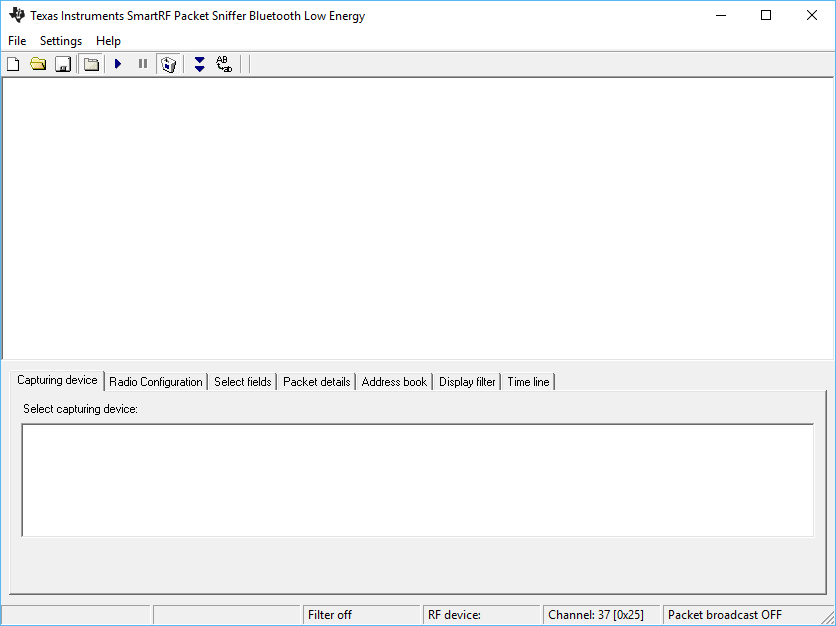
    Unfortunedly I couldn't make the sniffer working. According to it's manual it, the sniffer supports CC2540 while I have 2650. 

    I tried to download the sniffer and to program the module with required hex file ("sniffer_fw_cc2540_usb.hex"), but the sniffer program didn't recognize the connected module at all. The bottom window was empty.

    Did I make anything incorrect? Does the sniffer support the CC2650 module or it is required to purchase the CC2540?

    If it support the CC2650 module how must I configure it?

  • Hi Boris,

    For the TI packet sniffer software you need a CC2540 USB dongle. Alternatively you can buy a BLE sniffer from a different vendor. I think it's a good investment. It simplifies BLE debugging since it will tell you what packets are actually sent over the air.