This thread has been locked.

If you have a related question, please click the "Ask a related question" button in the top right corner. The newly created question will be automatically linked to this question.

CC2640: Serial ROM Bootloader - problem with programming image to Launchpad

Part Number: CC2640


Hello TI community. What I am trying to achieve is to program CC2640 on launch-pad via serial bootloader interface (see this for reference: http://www.ti.com/lit/an/swra466a/swra466a.pdf).
 

I download an example, where everything is included (source and binaries), anyway when I try to write a hex image with the provided binaries to the launch pad it fails while erasing flash with "eraseFlashRange" function. This is the source from the example:

//
// Erasing as much flash needed to program firmware.
//
cout << "Erasing flash ...\n";
getTime();
if(pDevice->eraseFlashRange(devFlashBase, byteCount) != SBL_SUCCESS)
{
    goto error;
}

I get this error in the output:

66% Flash erase failed. (Status 0x43 = 'INVALID_ADR'). Flash pages may be locked.


I also build my own project with the provided source and updated everything up and I still get the same error. Parameters are: devFlashBase = 0x00000000 and byteCount = size of my hex file.

I am able to program my image to the launch-pad just fine using the SmartFlashProgrammer 2 (version 1.7.5)

Is there anything I should be aware of or anything that I missed?

Thanks for all the answers!

PS: If you need a full code, let me know.

Best regards.

  • Hi Jan,

    Not sure what the issue is, the full code could be useful here.

    You're only trying to erase specific pages right? Which pages in particular? (or everything?)

    Regards,
    Rebel
  • Hello Rebel,

    Thanks for the reply.  I am doing exactly the same like in the example provided by TI. I only erase flash, that is needed for my image. If I use "eraseFlashBank" instead it works, but then again the problem is with "writeFlashRange" when I want to write my image to the flash. 

    Below this you can see my code, it is almost the same as in the example provided by TI (C++):

    // SBL - Proof of concept.cpp : Defines the entry point for the console application.
    //
    #define _CRT_SECURE_NO_WARNINGS
    
    /* Windows API Includes */
    #include <Windows.h>
    #include <stdio.h>
    #include <cstdio>
    #include <stdint.h>
    #include <iostream>
    #include <fstream>
    
    
    /* SBL Includes */
    #include "..\..\SBL - Library\sbllib.h"
    #pragma comment( lib, "SBL - Library.lib" )
    
    #include "..\..\SBL - Library\ComPortElement.h"
    #include <vector>
    
    #define MAX_COM 10 /* Number of COM, which will be discovered */
    #define CC2538_FLASH_BASE			0x00200000
    #define CC26XX_FLASH_BASE			0x00000000
    
    /* Prototypes */
    int calcCrcLikeChip(const unsigned char *pData, unsigned long ulByteCount);
    void appStatus(char *pcText, bool bError);
    void appProgress(uint32_t progress);
    
    enum CCFGField
    {
    	ID_SECTOR_PROT = 0,
    	ID_IMAGE_VALID = 1,
    	ID_TEST_TAP_LCK = 2,
    	ID_PRCM_TAP_LCK = 3,
    	ID_CPU_DAP_LCK = 4,
    	ID_WUC_TAP_LCK = 5,
    	ID_PBIST1_TAP_LCK = 6,
    	ID_PBIST2_TAP_LCK = 7,
    	ID_BANK_ERASE_DIS = 8,
    	ID_CHIP_ERASE_DIS = 9,
    	ID_TI_FA_ENABLE = 10,
    	ID_BL_BACKDOOR_EN = 11,
    	ID_BL_BACKDOOR_PIN = 12,
    	ID_BL_BACKDOOR_LEVEL = 13,
    	ID_BL_ENABLE = 14,
    };
    
    int main()
    {
    	/* An array for the COM ports that will be found by enumeration. */
    	ComPortElement elements[MAX_COM];
    
    	SblDevice::setCallBackStatusFunction(&appStatus);
    	SblDevice::setCallBackProgressFunction(&appProgress);
    
    	printf("+-------------------------------------------------------------\n");
    	printf("| COM ports:\n");
    	printf("+-------------------------------------------------------------\n");
    	printf("|Id\t| Description\n");
    	printf("+-------------------------------------------------------------\n");
    
    	int comCount = MAX_COM;
    	SblDevice::enumerate(elements, comCount);
    	if(comCount == 0)
    	{
    		printf("No COM ports detected.\n");
    		getchar();
    		return 1;
    	}
    	for (int32_t i = 0; i < comCount; i++)
    	{
    		printf("|%2d\t| %s\n", i, elements[i].description);
    	}
    	printf("+-------------------------------------------------------------\n");
    	printf("Choose COM: ");
    	int index;
    	scanf("%d", &index);
    
    	if(index >= comCount || index < 0)
    	{
    		printf("Invalid COM index.\n");
    		system("pause");
    		return 1;
    	}
    
    	ComPortElement choosedCom = elements[index];
    
    	/* Device type e.g. 0x2538 for CC2538 and 0x2650 for CC2650 */
    	uint32_t deviceType = 0x2640;
    	uint32_t baudRate = 230400;
    	/* Should SBL try to enable XOSC? (Not possible for CC26xx) */
    	bool enableXOSC = false;
    
    	SblDevice* pDevice = SblDevice::Create(deviceType);
    	if(!pDevice)
    	{
    		printf("Could not create SBL device object.\n");
    		system("pause");
    		return 1;
    	}
    
    	printf("Connecting to: %s (%s @ %d baud)\n", elements[index].description, elements[index].portNumber, baudRate);
    
    	auto connResult = pDevice->connect(choosedCom.portNumber, baudRate, enableXOSC);
    	if(connResult != SBL_SUCCESS)
    	{
    		printf("Could not establish connection to the device. %s\n", pDevice->getLastError().c_str());
    		system("pause");
    		return 1;
    	}
    
    	const char* fileName = "firmwareTest.hex";
    	uint32_t byteCount = 0;
    	static std::ifstream file;
    	std::vector<char> pvWrite(1);// Vector to application firmware in.
    
    	file.open(fileName, std::ios::binary);
    	if (file.is_open())
    	{
    		file.seekg(0, std::ios::end);
    		byteCount = static_cast<uint32_t>(file.tellg());
    		file.seekg(0, std::ios::beg);
    
    		pvWrite.resize(byteCount);
    		file.read(static_cast<char*>(&pvWrite[0]), byteCount);
    	}
    	else
    	{
    		printf("Could not open file.\n");
    		system("pause");
    		return 1;
    	}
    
    	auto fileCRC = calcCrcLikeChip(reinterpret_cast<unsigned char*>(&pvWrite[0]), byteCount);
    
    	//auto eraseStatus = pDevice->eraseFlashBank();
    	auto eraseStatus = pDevice->eraseFlashRange(CC26XX_FLASH_BASE, byteCount);
    	if(eraseStatus != SBL_SUCCESS)
    	{
    		printf("Could not erase the flash. %s\n", pDevice->getLastError().c_str());
    		system("pause");
    		return 1;
    	}
    
    	auto writeStatus = pDevice->writeFlashRange(CC26XX_FLASH_BASE, byteCount, &pvWrite[0]);
    	if(writeStatus != SBL_SUCCESS)
    	{
    		printf("Could not write the flash. %s\n", pDevice->getLastError().c_str());
    		system("pause");
    		return 1;
    	}
    
    	printf("Calculating CRC on the device.");
    	uint32_t deviceCRC;
    	auto crcStatus = pDevice->calculateCrc32(CC26XX_FLASH_BASE, byteCount, &deviceCRC);
    	if(crcStatus != SBL_SUCCESS)
    	{
    		printf("Could not calculate CRC for the image. %s\n", pDevice->getLastError().c_str());
    		system("pause");
    		return 1;
    	}
    
    	printf("Comparing CRC from both images.\n");
    	if(fileCRC == deviceCRC)
    	{
    		printf("CRC OK.\n");
    	}else
    	{
    		printf("CRC NOK.\n");
    	}
    
    	system("pause");
        return 0;
    }
    
    
    // Calculate crc32 checksum the way CC2538 and CC2650 does it.
    int calcCrcLikeChip(const unsigned char *pData, unsigned long ulByteCount)
    {
    	unsigned long d, ind;
    	unsigned long acc = 0xFFFFFFFF;
    	const unsigned long ulCrcRand32Lut[] =
    	{
    		0x00000000, 0x1DB71064, 0x3B6E20C8, 0x26D930AC,
    		0x76DC4190, 0x6B6B51F4, 0x4DB26158, 0x5005713C,
    		0xEDB88320, 0xF00F9344, 0xD6D6A3E8, 0xCB61B38C,
    		0x9B64C2B0, 0x86D3D2D4, 0xA00AE278, 0xBDBDF21C
    	};
    
    	while (ulByteCount--)
    	{
    		d = *pData++;
    		ind = (acc & 0x0F) ^ (d & 0x0F);
    		acc = (acc >> 4) ^ ulCrcRand32Lut[ind];
    		ind = (acc & 0x0F) ^ (d >> 4);
    		acc = (acc >> 4) ^ ulCrcRand32Lut[ind];
    	}
    
    	return (acc ^ 0xFFFFFFFF);
    }
    
    void appStatus(char *pcText, bool bError)
    {
    	printf("%s\n", pcText);
    }
    
    void appProgress(uint32_t progress)
    {
    	fprintf(stdout, "\r%d%% ", progress);
    	fflush(stdout);
    }


    Best regards,
    Jan

  • @ I have new information for you. I resolved the flash problem (erasing). The problem was that my file was .hex type (http://hex2bin.sourceforge.net) and obviously, it was too large. My .hex file was 194 kB large, which means 66% ( a percentage I was failing on) of it is exactly 128kB (that is how much flash is available on cc2640). Anyways, I managed to convert hex file to .bin file with the tool provided by Texas Instruments (one of the engineers): Hex2bin download from here ( http://hex2bin.sourceforge.net/ ). Now the file size is 128 KB (131.072 bytes). After that, I was able to erase the flash, but when I wanted to write to it using "writeflashrange" I got this error:

    99% Timed out waiting for ACK/NAK. No response from device.
    
    Error during flash download. Failed to read device status.
    - Start address 0x0001FEE4 (page 31).
    - Tried to transfer 252 bytes.
    - This was transfer 520 in chunk 0.
    
    Could not write the flash. Error during flash download. Failed to read device status.
    - Start address 0x0001FEE4 (page 31).
    - Tried to transfer 252 bytes.
    - This was transfer 520 in chunk 0.

    For additional information: when I was converting HEX file to BIN file, I used the tool I mentioned above. This was the output: 

    hex2bin v2.5, Copyright (C) 2017 Jacques Pelletier & contributors
    
    Allocate_Memory_and_Rewind:
    Lowest address:   00000000
    Highest address:  0001FFFF
    Starting address: 00000000
    Max Length:       131072
    
    Binary file start = 00000000
    Records start     = 00000000
    Highest address   = 0001FFFF
    Pad Byte          = FF


    Questions are now:
    1. What am I doing wrong here? Perhaps the .bin file is still too large? (please keep in mind that with TI Flash Programmer 2 I am able to download the firmware to the board)
    2. Should I use any other tool to convert from .hex to .bin? Is this supported out of the box within CCS studio?
    3. Please read my outputs and share your thoughts!


    Thanks.

  • Hi Jan,

    Awesome news on the erasing part! Yeah, when using SmartRF Programmer 2, I believe it does exactly what hex2bin does when programming a device; this allows users to input hex files.

    Regarding your update: using the tool is a good way to get that binary. I went ahead and converted a host_test hex file to a binary, and programmed it using the ROM bootloader in Flash Programmer 2. (You use the Second Com port, just make sure you've done a mass erase and selected the right device) 

    You will get a verification error/device stops responding. However, simply resetting the device allowed the ROM bootloader to load the new firmware. (I read back flash as well to verify, everything looked good)

    I'm assuming this error is what you're seeing when you do it in your program - and if that's the case, try resetting your device (power cycle) and see if it loads your firmware.

    I suggest trying it with host_test or a simple_peripheral hexfile so you know the hex is good and verify that your firmware loader application works as expected.

    Regards,

    Rebel

  • Hello, @

    Thanks for fast reply and useful information. Still, I am not able to program my device right... Let me explain my situation more briefly:
    First things first, how do I generate .bin file? (the project I am using is official project from TI: project_zero_cc2640r2lp_app)
    Well I have two ways of doing it:

    1. CCS studio supports this out of the box with the post build command: 

    "${CCS_INSTALL_ROOT}/utils/tiobj2bin/tiobj2bin" "${BuildArtifactFileName}" "${BuildArtifactFileBaseName}.bin" "${CG_TOOL_ROOT}/bin/armofd" "${CG_TOOL_ROOT}/bin/armhex" "${CCS_INSTALL_ROOT}/utils/tiobj2bin/mkhex4bin"

    2. With the hex2bin.exe tool.

    Both files are successfully generated, but are different (wow - see the HASH below).

    The first .bin file, generated via CCS studio - base64: /0bHwLfyi12Mt6dkY2i6NIxbP25CoKFLfUxU80whFf4=

    The second .bin file, generated via hex2bin - base64: waC0ia/PxZPvvxHmWXRgekhKrBir/OV/xSE8Z6PQ1zQ=


    At first look, there are two differences:
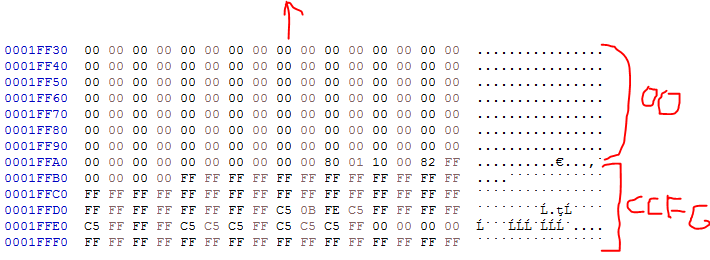
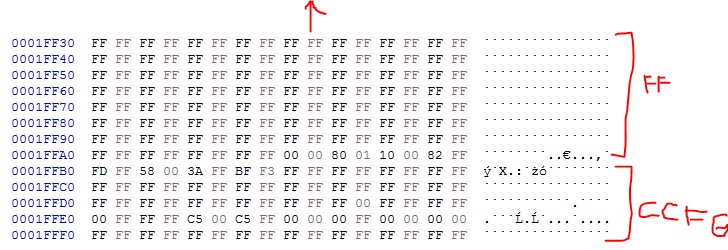
    1. First is the padding: hex2bin file pads the .bin file with 0xFF, the CCS converter pads it with 0x00. 
    2. Second is the last sector data (or where the CCFG register lies - Sector31 on cc2640): different data

    Let me show you some pictures:

    1. First image is CCS .bin file:

    2. The second image is a hex2bin file:

    Please note the differences, I marked them with the red colour. So they are different indeed. What you might be interested in is that if I put CCS .bin file to Flash Programmer 2, programming DOES NOT WORK! If I put .bin file from hex2bin.exe programming WORK!

    This is really interesting now. If I use my program (the source code is provided in the third post, where you asked for it) to program via serial boot manager with SBL I get an error if I use hex2bin file (same as before):

    99% Timed out waiting for ACK/NAK. No response from device.
    
    Error during flash download. Failed to read device status.
    - Start address 0x0001FEE4 (page 31).
    - Tried to transfer 252 bytes.
    - This was transfer 520 in chunk 0.
    
    Could not write the flash. Error during flash download. Failed to read device status.
    - Start address 0x0001FEE4 (page 31).
    - Tried to transfer 252 bytes.
    - This was transfer 520 in chunk 0.

    If I use CCS .bin file it seems like programming worked:

    100% Comparing CRC from both images.
    CRC OK.

    but in fact, the image is never executed when I reset the board after.

    So to summarize everything up:

    1. hex2bin generates different .bin file than CCS
    2. hex2bin .bin file works with Flash Programmer 2 other does not
    3. CCS .bin file works with my SBL lib (my code) but firmware never starts.

    Thoughts? Also for reference, here you can find the CCFG register ( www.ti.com/.../swra466a.pdf )


    Thanks again for your answer Rebel!

    Best Regards,
    Jan