This thread has been locked.

If you have a related question, please click the "Ask a related question" button in the top right corner. The newly created question will be automatically linked to this question.

CC2650STK: Could not initialize the sensor

Part Number: CC2650STK
Other Parts Discussed in Thread: ENERGIA, CC2650

Hello,

I am working on CC2650 sensortag. I am trying to read the data from magnetometer sensor. I am calling functions from main.c to initialize the sensor and to read the data from the sensor. I am not able read the data from sensor. I am calling the "sensorMpu9250Init" function from my main.c but I am not getting any return value from that function. 

Also I am trying to increase the advertising time of the sensortag by using 


But not able to see the sensortag in my android(TI's Application) application.

Since I am new to BLE, could you kindly let me know how to initialize and read the data from sensors.

Thanks,

Sushrut

  • Please refer to the file sensortag_mov.c in the BLE SDK for an example of how to use the MPU9250. It is not enough to call the init function: you must also power on the device, and then enable the axis that you want data from. See the function appStateSet() for an example.

    Please note that MPU functions should NOT be called from main.c, they MUST be called from within the context of a TI RTOS task. mai.c should be used only to initialize TI-RTOS and you should not have any need to change it.
  • Hello Jomar Honsi,

    Thank you for your reply.
    I manged to get the output from the sensortag.
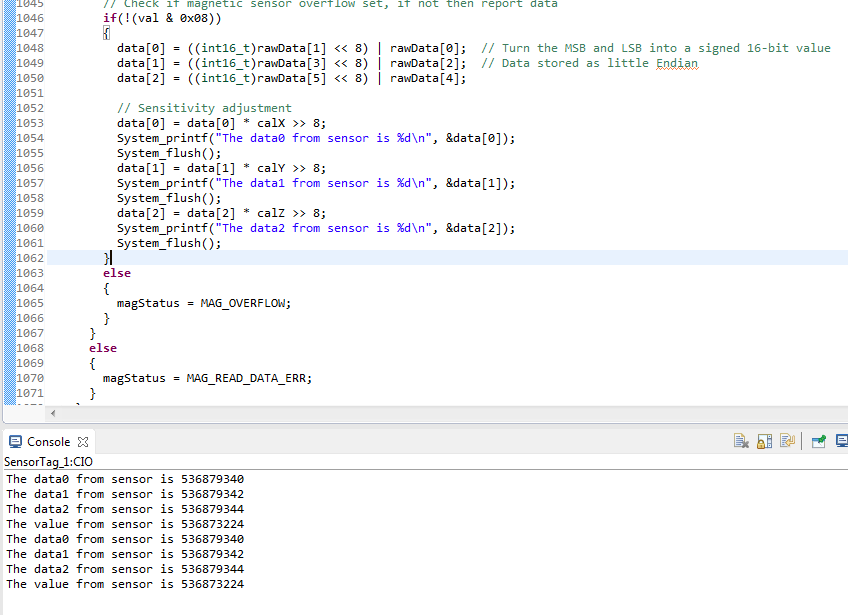
    But I am getting 9 digit number as output from sensor.
    After going through the wiki page I got to know that the data from the sensor is of 9 16 bit data. Also accelerometer, gyroscope and magnetometer each have 6 bytes of data for x,y, z-axes respectively.
    Then is it means to say that last 3 digits are data from magnetometer sensor? If yes, how to take out only magnetometer data from that 9 digits of data?

    Also on the wiki page, it is mentioned that Gyroscope raw data make up 0-5 of the data, Accelerometer raw data make up bytes 6-11 and Magnetometer raw data make up bytes 7-12.

    Is it means to say that from 6-12 bytes of data is both from accelerometer and magnetometer? I am confused, could kindly explain this how to read the data from the sensor.


    Thanks,
    Sushrut
  • Hi Sushrut,

    You actually discovered an error on the Wiki-page: the magnetometer data have offsets 12-17, not 7.12. Thank you!

    Then you can calculate the value of each axis like this:

    uint16_t movementData[9];
    
    float sensorMpu9250MagConvert(int16_t data)
    {
      //-- calculate magnetism, unit uT, range +-4900
      return 1.0 * data;
    }
    
    // Read data from the sensor into movementData
    // ..... 
    
    // Calculate magnetometer x-axis:
    float magX = sensorMpu9250MagConvert(movementData[6]);
    float magY = sensorMpu9250MagConvert(movementData[7]);
    float magZ = sensorMpu9250MagConvert(movementData[8]);


  • Hi Joman,

    Thank you for your reply.

    But I have one more question.

    In the sensorMpu9250MagRead(int16_t *data) function of sensor_mpu9250.c i am reading the magnetometer data.

    As per the above code what are data[0], data[1] and data[2]. 

    I am getting same values all the time. Do i need to take the last 3 digits from all the 3 data ?

    Or those 3 data are from x,y,z axes?

    Could you please explain this?

  • Try this code, it has been tested and verified.

    /*******************************************************************************
    * @fn      magMeasure
    *
    * @brief   Read and display magnetometer values from the Invensense MPU9250
    *          movement processing unit. Assumes that the MPU has been turned on
    *          and that the data ready interrupt is used to trigger the readout.
    */
    static bool magMeasure(void)
    {
        bool success;
        uint8_t status;
        int16_t data[3];
        char buf[64];
    
        // Read data
        status = SensorMpu9250_magRead(data);
        success = status == MAG_STATUS_OK;
        if (success)
        {
            // Display data
            sprintf(buf,"MAG: %04X %04X %04X  x=%d y=%d z=%d (uT)\n",
                    (uint16_t)data[0], (uint16_t)data[1], (uint16_t)data[2],
                    data[0], data[1], data[2]);
        }
        else
        {
            if (status == MAG_BYPASS_FAIL)
            {
                SensorMpu9250_magReset();
            }
            sprintf(buf, "M error: %02X", status);
        }
        printLog(buf);
    
        return success;
    }
    

  • Hello,

    I tried the above code, but I am getting some weird output.

    I am not understanding why i am getting 'h' all the time.

    Could you kindly look into it.

    Thanks,

    Sushrut

  • Hello Jomar,

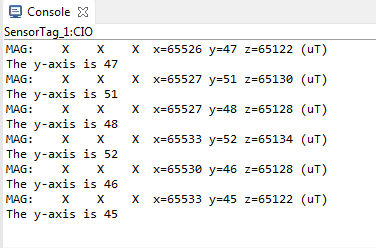
    Now I am able to read the data from the magnetometer. I have disabled all other sensors from sensor tag.

    I want to send the value of any one of the axes to the receiver.

    For example, as shown in the above picture, I want to send only Y-axis data to the receiver.

    Is it possible to mask other two axes data? 

    Could you kindly let me know how to mask other 2 axes data and send only one axis value to the receiver through Bluetooth?

    Also is this possible to disable accelerometer and gyroscope from the sensor tag? I tried it but could not find any code to disable those sensors.

    Thanks,

    Sushrut

  • The magnetometer reports data from all 3 axes, you can't disable them individually. But its is up to your application what data you send to the receiver. In the BLE application the convention is that you fill in with 0 for all the disabled axes. But if the receiving end knows what data to expect it is enough to send, say, the magetornmeter Y-axis. The function that sends data over a BLE link is Movement_setParameter(), invoked in sensortag_mov.c. Here you can pick and chose what to send.

  • Hello Jomar,

    Thank you for your reply.
    For receiver part i am using MSP432+CC2650 Module Boosterpack to recieve magnetometer's data. I am trying to use whitelist to establish connection between the receiver and the sensor tag. Could you kinly recommand any exmaple code that i can use. Do we have any example code in CCS or energia?

    Thank you,
    Sushrut