This thread has been locked.

If you have a related question, please click the "Ask a related question" button in the top right corner. The newly created question will be automatically linked to this question.

RTOS/CC2650STK: How to change the I2S PDM data sampling rate?

Part Number: CC2650STK
Other Parts Discussed in Thread: BLE-STACK

Tool/software: TI-RTOS

Hi, 

In the ref file for PDMCC26xx.h, there is "This driver is configured to process 256 bytes of PDM data provided by the I2S hardware module at a time, sampled at 1.024 Mbps" and "The application must allow for the PDM driver task to run often enough to process the data received from I2S driver approximately every 2ms".

Now I would like to receive PDM data approximately every 5ms or more because I want the program to do more while waiting for a new PDM buffer.

I found the following code in PDMCC26xx_util.c, I think they are related to I2S sampling rate.

/* The following are constants that apply to PDM */
object->i32SampleRate = -1;                                   /* If negative then use user configured clock division */
object->audioClkCfg.wclkDiv = 16;                                             /* I2S Word Clock divider override*/
object->audioClkCfg.sampleOnPositiveEdge = PDMCC26XX_I2S_SampleEdge_Postive; /* I2S Sample Edge */
object->audioClkCfg.wclkPhase = PDMCC26XX_I2S_WordClockPhase_Dual;           /* I2S Word Clock Phase */
object->audioClkCfg.wclkInverted = PDMCC26XX_I2S_ClockSource_Normal;         /* I2S Invert Word Clock */
object->audioClkCfg.wclkSource = PDMCC26XX_I2S_WordClockSource_Int;          /* I2S Word Clock source */
object->audioClkCfg.bclkDiv = 15;                                            /* I2S Bit Clock divider override */
object->audioClkCfg.reserved = 0;
object->audioClkCfg.bclkSource = PDMCC26XX_I2S_BitClockSource_Int;           /* I2S Bit Clock source */
object->audioClkCfg.mclkDiv = 6;                                             /* I2S Master Clock divider override */

In the past I have already changed the audioClkCfg.bclkDiv in order to increase the PCM data sampling rate, if I want to decrease the 1.024 Mbps in order to receiver a PDM data buffer for longer time, which parameter should I change? (are there any side effects of doing this?)

Thank you in advance

  • Or is it feasible to change the following parameter since I can't consume the sampled PDM data in a timely manner

    #define PDM_BUFFER_SIZE_IN_BLOCKS       3


  • Hi Jason,

    In general it is possible to tweak the sample rate by changing the BCLK frequency, but since the decimation and filtering stages are optimized for a 16kHz sample rate it is not recommended/supported.

    A better way to increase latency and give your application more time to process data is to increase the number of buffers that the PDM driver will Queue up.

    See this section in the BLE-Stack user's guide
    software-dl.ti.com/.../ble_voice.html
  • Thank you for your kind help, and I think the PDM_BUFFER_SIZE_IN_BLOCKS is one you are talking about(I can't find MINIMUM_PDM_BUFFER_QUEUE_DEPTH in RTOS 2.21 PDM PDMCC26XX.h maybe because of the version difference).

    If I want to modify the PDM_BUFFER_SIZE_IN_BLOCKS in PDMCC26XX.h,(i.e. I modify the RTOS driver library), what should I do? Should I change the driver file in RTOS driver folder, then rebuild the library through gmake -f tirtos.mak? Do u have a tutorial regarding this issue?

    By the way, is it possible to find the pdm2pcm16k(decimation filter) function definition and modify it?

    Thank you in advance

  • Hi Jason,

    You are correct, the define you are looking for is PDM_BUFFER_SIZE_IN_BLOCKS. This has since changed since BLE-Stack 2.2.1, my apologies for any confusion.

    You can resolve this in one of two ways

    1. Include the driver header file and the driver .c files in your project. Place their Include search path for linker and compiler higher than any others in the path.

    2. Re-build the entire driver library. In this case you would be using the gmake included in the related XDC Tools install and modifying the drivers.mak to include all the proper tool chains needed.

    I would recommend against #2 unless you absolutely need a new library, there is a bit of overhead to the XDC build system.

    Edit: the pdm2pcm16k() file is closed source ASM code, unfortunately we cannot provide it in source at this time.

  • Thank you, I think I have tried the solution #1, the problem was that CCS couldn't only link the driver header file in my project tree, it seems CCS also linked driver header file in RTOS driver folder, which caused errors. So "Place their Include search path for linker and compiler higher than any others in the path" you mentioned is the way of solving this problem? Could you please explain more about this sentence since I have never done such things before.

    Thank you again for your help.
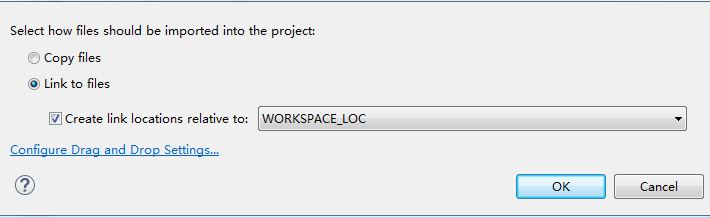
  • When you are dragging the driver header and C files into your workspace, I recommend selecting the "copy to workspace" option. Then you can add the workspace path to the top of your include list. Then the proper header will be referenced.
  • Do you actually mean " link file to workspace location"? since I can only find "link to workspace location option"

    And I configured the include options as following:

  • Hi Jason,

    I actually mean to use the copy files option. Then setup the link order so files in the workspace take higher priority than those outside the workspace.
    This is done by the HID Advanced Remote project which overrides the number of buffers to 4, you can reference that project for more information.
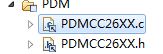
  • Thank you, and sorry I am not familiar with CCS, but I found that PDMCC26XX source and header files in HID Remote BLE project are both linked files

    So by referring to your suggestion, I linked the driver files relative to workspace location, set the build variable(WORKSPACE_LOC) as the highest order in Include Options(should I also put in ARM linker search path?), now it seems the whole project works fine.

    by the way, does the default #define PDM_BUFFER_SIZE_IN_BLOCKS 3 have the 10ms capabilty for latency?( from driver file I think that should be 6ms)

    Thank u again for ur patience to a CCS beginner

  • You can either link or copy, either way is acceptable so long as your search path is the correct order

    The reason I suggested workspace is because it easy to delineate from the one in the SDK. (and you can modify the workspace version without corrupting the SDK)

    Again, it is up to you, so long as you are consistent, you will be fine.

    To be sure you are loading the right code you can flash the device and debug to see the value of this define. 

    Each buffer gives the application an additional 2ms of latency (at the cost of more RAM usage ).