This thread has been locked.

If you have a related question, please click the "Ask a related question" button in the top right corner. The newly created question will be automatically linked to this question.

CC2564MODA Service Pack with HCITester

Other Parts Discussed in Thread: CC2564MODA, CC2564MODAEM

Hello,

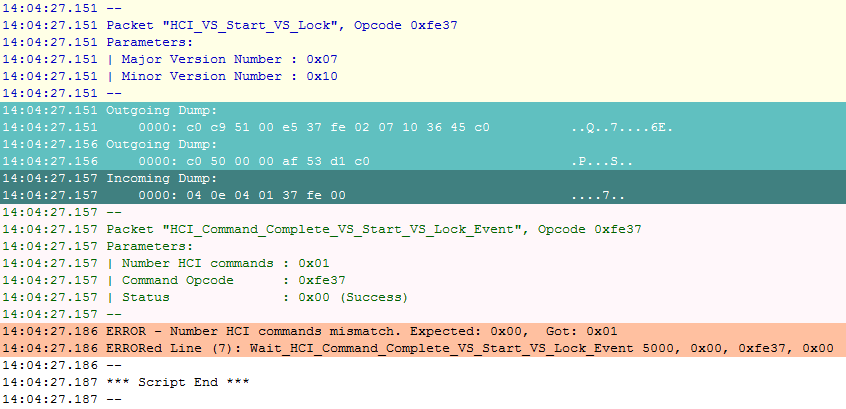
we are trying to update the service pack of the CC2564MODA using the HCITester program. The service pack version we want to download is the cc256xb_bt_sp_v1.6 explicitly the "initscripts-TIInit_6.7.16_bt_spec_4.1.bts" file.

The device is connected using a 3 wire UART interface.

When executing the script it always fails with a "Number HCI commands mismatch" (see attached image below). I have not found the vendor specific command (HCI_VS_Start_VS_Lock) on the wiki page(http://processors.wiki.ti.com/index.php/CC256x_VS_HCI_Commands#Command_Packet

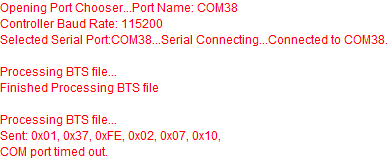
We also tried the CC256X Bluetooth Hardware Evaluation Tool to download the service pack but the first command always times out (I guess hardware flow control is required when using this tool?).
Greetings

  • Hello,

    Please make sure when you are using the HCI Tester tool that you are using the correct .xml file to parse the script.

    When you open the HCITester tool you will have a command library window in the bottom left.
    There are three icons there: When you point the mouse at the middle one you should see a tip saying: Change HCI libraries.
    Click it and make sure you use the correct .xml file.

    BR,
    Chen Loewy
  • Hello,

    thank you for the fast response!

    I'm using the xml file provided in the service pack called "TIInit_6.7.16.xml". Is this the correct one?

    There is another file on the wiki page but that one is missing many commands.

    Cheers,

    Thomas

  • Hello Thomas,

    yes the attached .xml file should have worked well.

    When you say it's connected with 3 UART lines - does that meansyou don't have RTS and CTS connected?

    Chen
  • Hello,

    indeed, we have connected the Rx Tx GND and 3V3 signal and the HCITester software is configured to use the 3-wire UART which also seems to work since the sync, sync response initialization runs successfully and I am able to send HCI commands manually and get plausible events in return.

    Our hardware-setup is as follows:

    The CC2564MODAEM on the CC256XEM-STADAPT board which is connected to a third party processor / usb serial converter via the DISCOVERY Connectors.

    If we modify the script so the events accept any number of HCI commands, the script runs successfully. The version number also changes after the script has run but I am not sure if the patch is applied correctly, I assume the "Number of HCI Commands" field in the events is set to 0 instead of any for a reason.

    What we know is that the patch is at least applied partly since the LE advertising does not work at all if the patch is not applied.
    After the patch the device is discoverable by other devices although the name does not show and I am unable to connect, but this might be because my script is faulty ... Are there any premade scripts to test the basic BLE functionality?
    Although the HCI commands itself seem to be well documented the order in which they need to be sent and which ones are mandatory to create a basic connection is still unclear to me.

    Cheers,
    Thomas

  • Hello Thomas,

    it sounds like everything is working properly from HCI Tester perspective.

    However if you don't have CTS and RTS connected you might have a problem because you have no flow control mechanism.
    So the communication might have issues which you are no aware of.

    I suggest to connect CTS and RTS and retry.

    BR,
    Chen