This thread has been locked.

If you have a related question, please click the "Ask a related question" button in the top right corner. The newly created question will be automatically linked to this question.

RTOS/CC2540: Cannot get debug output from simple_peripheral. EDIT: ** CC2640 **

Part Number: CC2540
Other Parts Discussed in Thread: CC2650, CC2640

Tool/software: TI-RTOS

I have not been able to get the simple_peripheral_CC2650_lp project to display anything on the debug channel:

I removed the following project predefines:

BOARD_DISPLAY_EXCLUDE_UART
Display_DISABLE_ALL
xdc_runtime_Assert_DISABLE_ALL
xdc_runtime_Log_DISABLE_ALL

The board type was changed to: CC2650DK_4XS

Anything else I need to do? (I was unsuccessful with the Launchpad CC2650 as well).


Windows 10 Settings (VM)
------------------------
Device Manager shows: XDS100V3 Class USB Serial Port (COM14)

Putty Setup: Serial-115200, 8N1, COM14

The putty port does disconnect when I unpower the board, so it seems to detect something. Bit nothing ever displays (not even garbage chars).


Here is what main() looks like:

int main()
{

/* Register Application callback to trap asserts raised in the Stack */
RegisterAssertCback(AssertHandler);

PIN_init(BoardGpioInitTable);

//dispHandle = Display_open(Display_Type_UART, NULL);
//Display_print0(dispHandle, 0, 0, ">>>TEST");

// Enable iCache prefetching
VIMSConfigure(VIMS_BASE, TRUE, TRUE);

// Enable cache
VIMSModeSet(VIMS_BASE, VIMS_MODE_ENABLED);

/* Initialize ICall module */
ICall_init();

/* Start tasks of external images - Priority 5 */
ICall_createRemoteTasks();

/* Kick off profile - Priority 3 */
GAPRole_createTask();

SimpleBLEPeripheral_createTask();

/* enable interrupts and start SYS/BIOS */
BIOS_start();

return 0;
}


  • EDIT - **** CC2640 ****
  • Hi Mark,

    These are the defines for simple_peripheral that I have in order to have a debug output over UART. No other modifications are needed when running it on the LaunchPad:

    BOARD_DISPLAY_EXCLUDE_LCD
    xBOARD_DISPLAY_EXCLUDE_UART
    CC2650_LAUNCHXL
    CC26XX
    xDisplay_DISABLE_ALL
    HEAPMGR_SIZE=0
    ICALL_MAX_NUM_ENTITIES=6
    ICALL_MAX_NUM_TASKS=3
    POWER_MEASURE
    POWER_SAVING
    USE_ICALL
    xdc_runtime_Assert_DISABLE_ALL
    xdc_runtime_Log_DISABLE_ALL

    You need to keep the relevant display driver function calls (Display_open, Display_print0, etc.) in order to have debug messages.

    Also the cc2650lp example projects for the LaunchPad are setup for the 7x7 mm package. You'll want to make sure "CC2650DK_4XS" is defined and NOT "CC2650_LAUNCHXL" if you're using the project on a custom board based on the CC2650DK_4XS.

    -Sy Su

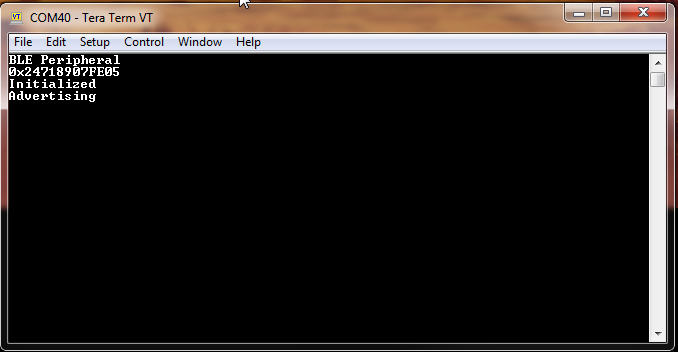
  • You should have a similar output to this:

  • OK I tried on the LP with the exact same predefs and simplelink_peripheral_CC2650_lp does not build:

    > Compilation failure
    Startup/subdir_rules.mk:23: recipe for target 'Startup/main.obj' failed
    "C:/Users/Dropbox/Phyn/BLE/ti/simplelink/ble_sdk_2_02_01_18/src/target/board.h", line 78: fatal error #35: #error directive: "Must define either 'CC2650DK_7ID', 'CC2650DK_5XD', or 'CC2650DK_4XS'. Please set include path to point to appropriate device."
    1 catastrophic error detected in the compilation of "C:/Users/Dropbox/Phyn/BLE/ti/simplelink/ble_sdk_2_02_01_18/src/examples/simple_peripheral/cc26xx/app/main.c".
    Compilation terminated.
    gmake: *** [Startup/main.obj] Error 1
    gmake: Target 'all' not remade because of errors.

    So I also added: CC2650DK_7ID.

    Then it builds but still no data out to putty at 115200, 8N1.  I tried both ports:

    XDS110 Class Application/User UART (COM11)
    XDS110 Class Auxiliary Data Port (COM12)

    i assume its the UART port but I tried both.   I get zero output.

    Are these correct:   RTOS = 2.20.1.08   XDCTools = 3.32.0.06_core   BLE Stack: 2.02.01.18 ?

    Also, this is on a Windows VM but since the ports appear on the Device Manager I assume that they are accessible.

  • Those versions and your putty settings are all correct.

    Are you running this on a LaunchPad or your custom board?

  • This is on the Launchpad. The BLE connects and discovers so the program/stack is running fine. So I am wondering about:

    1) Is my VM somehow interfering (no idea how to address that one)
    2) Is it a version issue (RTOS, Stack, etc.)
  • I found the problem:

    In SimpleBLEPeripheral_init() the device is HARDCODED:

       dispHandle = Display_open(Display_Type_LCD, NULL);

    this has to be changed to:

      dispHandle = Display_open(Display_Type_UART, NULL);


    It really sucks that on one hand they over design and abstract the hell out of embedded code because people don't want to have to understand whats going on under the hood; and on the other they do crap like this.


  • Mark,

    Yes we do provide the choice of display type as it is up to the developer what their application is.
    Setting it to Display_Type_ANY provides a more abstract option if desired by opening the first available display.
    If the developer wants more control then there are options to be more specific as you have found (Display_Type_LCD , Display_Type_UART, etc.).

    Additional info about this can be found in the driver documentation: software-dl.ti.com/.../_display_8h.html