This thread has been locked.

If you have a related question, please click the "Ask a related question" button in the top right corner. The newly created question will be automatically linked to this question.

CC2642R: ECDSA Linker Error

Part Number: CC2642R
Other Parts Discussed in Thread: LAUNCHXL-CC26X2R1

Customers is trying to use the TI driver for the Elliptic Curve Digital Signature Algorithm (ECDSA) on the LAUNCHXL-CC26X2R1  The definition along with example code can be found in <sdk path>\source\ti\drivers\ECDSA.h. 

I was able to compile and run the example code in ECDSA.h after adding it to the “empty’ Launchpad example project. 

After adding the same code to the ble5_simple_peripheral_cc26x2r1_app (or reduce it to one method call, ECDSA_init()), the following Linker error occurs:

Any ideas on how to get past this linker error?

Thanks,

Mark

  • Hi Mark,

    After discussing this internally, it looks like there is a conflict between the ECDSA (ECC) TI driver and the ECC ROM. The next version of the SDK will use the ECC driver exclusively and will not use ECC ROM.

    In the meantime, I'm trying to find a workaround for this. I'll keep you posted with my findings.

    Best regards,

    David
  • Hi Mark,

     Please try the following:

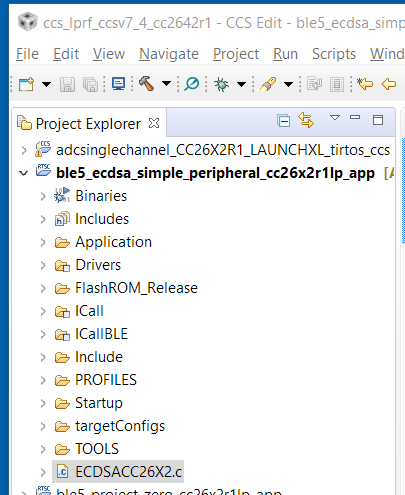
    1. Copy the file ECDSACC26X2.c from C:\ti\simplelink_cc26x2_sdk_1_60_00_43\source\ti\drivers\ecdsa into your simple peripheral project.

    2. Find the API ECDSA_sign (line 736) and rename it. For example ECDSA_sign_mod.

    /*
     *  ======== ECDSA_sign ========
     */
    int_fast16_t ECDSA_sign_mod(ECDSA_Handle handle, ECDSA_OperationSign *operation) {

    3. Build your project

      As I mentioned before, this should be fixed in the next SDK version.

       Best regards,

        David