This thread has been locked.

If you have a related question, please click the "Ask a related question" button in the top right corner. The newly created question will be automatically linked to this question.

CC2640R2F: Customized BIM issue (about OAD)

Part Number: CC2640R2F


Hi,all

We plan to use our own OAD service and BIM .

Our app is based on  "simple_peripheral" example,the one without oad feature.

Now we need to add oad feature to this app.

We can not just use the  "simple_peripheral_oad_offchip"  example ,cause when adding our own code to the project, the total flash size seems  exceed  of the limit.

I know the BIM is at flash offset=0x1F000,and it is executed by ROM-Bootloader.

My BIM is ported from "simple_peripheral_oad_offchip"  example ,and I can get my BIM executed correctly.

But it cannot jump to the app code.

As I mentioned before,our app is based on "simple_peripheral" example,

so the FLASH_START is  FLASH_BASE(0x00000000)  in cc26xx_app_and_stack.icf .

I use the following code to jump to the app in the BIM:

/*******************/

//The function jumpToPrgEntry is from bim_util.c

jumpToPrgEntry(0x00000000);

/*******************/

It does not work as expected.

Does the address of application entry not correct?

Or should I modify the " cc26xx_app_and_stack.icf " file and what should I do with that ?

Best regards,

Kaifeng.He

  • Hello Kaifeng,

    What do you expect after calling jumptoPrgEntry, and what actually happens?
    Can you put a break point at the moment when this line is executed and see if PC(program counter Register) is updated to 0x0000000 after its executed (Step Over).

    Regards,
    AB
  • Hello,

    I recommend using the guide here on adding OAD to an existing project
    software-dl.ti.com/.../oad_offchip.html

    Note that even if you are using SDK 1.50.00.58, the steps still apply. For some reason this guide is not appearing the 1.50 SDK docs.

    Adding OAD to your project costs more than 8kB of flash memory including profile logic and the bootloader (BIM). If you do not have this space available in your application you can consider attempting to use the legacy OAD profile which is a bit lighter weight in terms of flash usage.

    If you do not have 4-5kb of free space in your application, you cannot add OAD to your project.
  • Hi,

    I'm using sdk_1_50_00_58,the chapter "Add Off-chip OAD to an existing project" is not exist.
    I'm going to read this chapter in sdk_1.4, and I will give more detail message later.

    Thanks.
  • Hi,

    By reading "Add Off-chip OAD to an existing project" chapter in sdk_1.4,
    I did the following changes in my origin project(which is based on "simple_peripheral" example, FlashROM_StackLibray ).

    1, Change the icf file from "cc26xx_app_and_stack.icf" to "cc26xx_app_oad.icf" in project window Tools group.
    -
    2, Change the icf file from "cc26xx_app_and_stack.icf" to "cc26xx_app_oad.icf" in project setting ->Linker (Linker configuration file)
    -
    3, Add "OAD_IMG_E=1" to project setting ->Linker (Linker configuration file symbol definitions)
    -
    4, Change Pre-build commanf line in Build Actions:
    "$XDCROOT$\xs" --xdcpath="$XDCPATH$" iar.tools.configuro -c "$TOOLKIT_DIR$" --cc "$COMPILER_PATH$" --device "$DEVICE$" --compileOptions $COMPILER_ARGS_ROOT_QUOTED$ --linkOptions $LINKER_ARGS_QUOTED$ --profile release --projFile "$PROJ_PATH$" --cfgArgs "{NO_ROM:0, OAD_IMG_E:1}" -o $PROJ_DIR$\..\config\configPkg $EXAMPLE_BLE_ROOT$\tirtos\app_ble.cfg
    -
    It is copied from "simple_peripheral_oad_offchip" example. Only the cfgArgs is changed.
    -
    5, I'm not going to use the OAD profile TI provided, so the OAD profile adding steps are not performed.
    -
    By these steps, I'm expecting my app could be executed by BIM.
    It is not necessary whether it can support the TI provide OAD service.

    However,when I'm did the re-build, a linking error occurred:
    Error[Lc009]: "RAM_RESERVED_START" E:\ti\simplelink_cc2640r2_sdk_1_50_00_58\examples\rtos\CC2640R2_LAUNCHXL\blestack\simple_peripheral\tirtos\iar\app\..\..\..\..\..\..\..\..\source\ti\blestack\common\cc26xx\iar\cc26xx_app_oad.icf 111
    -
    It says that RAM_RESERVED_START is no defined. what's that and what should I do?
    Are all the steps above correctly?


    Regards,
  • Hi ,AB

    Thanks for your reply.
    I'm expecting my app executed by BIM.
    From Sean2, I think maybe it is because of the Reset Vector Address.
    So I did the change above.

    Before I did the above change ,I traced in BIM.
    When the following code in jumptoPrgEntry executed, an error occurred:
    "A precise data access error has occurred at data address 0xc9011001.
    Exception occured at: 0x1f812 "
    /**************************************/
    // Reset the stack pointer,
    asm(" LDR SP, [R0, #0x0] ");
    /**************************************/

    I program my app first via SmartRF Flash V2, at offset=0.
    It can be executed,cause it self contain the ccfg. (the app size is 128KB) .
    Then I use the IDE(IAR ) to download the BIM, i think it will replace the flash page31.

    Regards,
  • Hi,all

    Finally I use "simple_peripheral_oad_offchip" example 's project config as base .

    And my app can be excuted from BIM.

    Here what I did:

    1, remove all the OAD related files except "oad_image_header_app.c" and "oad_image_header_app.h" in project file.

    2, change preprocessor as below to save flash:

    BOARD_DISPLAY_USE_LCD=0
    BOARD_DISPLAY_USE_UART=0
    xFEATURE_OAD

    3, add my modified "simple_peripheral.c"  from original project. "simple_peripheral_oad_offchip.c" is excluded.

    4,no change performed  in BIM project.

    Above these step,my app can be executed from BIM.

    However it is not perfect:

    I download the BIM and APP from Smart RF flash V2 .

    I cannot use IAR to debug with download or debug without download. It seems the BIM must be excuted first.

    In my app, I cannot do software reset(system seems halt)  after  power on.

    But once a hardware reset performed, software reset can be done any times without problem .

    Don't know why.

    I am keeping figure these out.

  • Hi,

        I had a similar problem many months ago. I was trying to convert the stack library project to split type using the guide as doc. But I found out that the document guide is not updated to the SDK so that did not work out. What I did is just use the simple peripheral off-chip oad example program as base. If your application takes up a lot of flash space. I suggest you use the non ble5 simple peripheral off-chip oad example program as base.

       Using LM Flash Programmer 2 flash the hex or bin files in this order, BIM, Stack, and APP. After that you can debug your code using IAR. Take note you need to use the IAR version that is recommended for that SDK release.

    -kel

  • Hi Markel,
    -
    Thanks for your advice.
    -
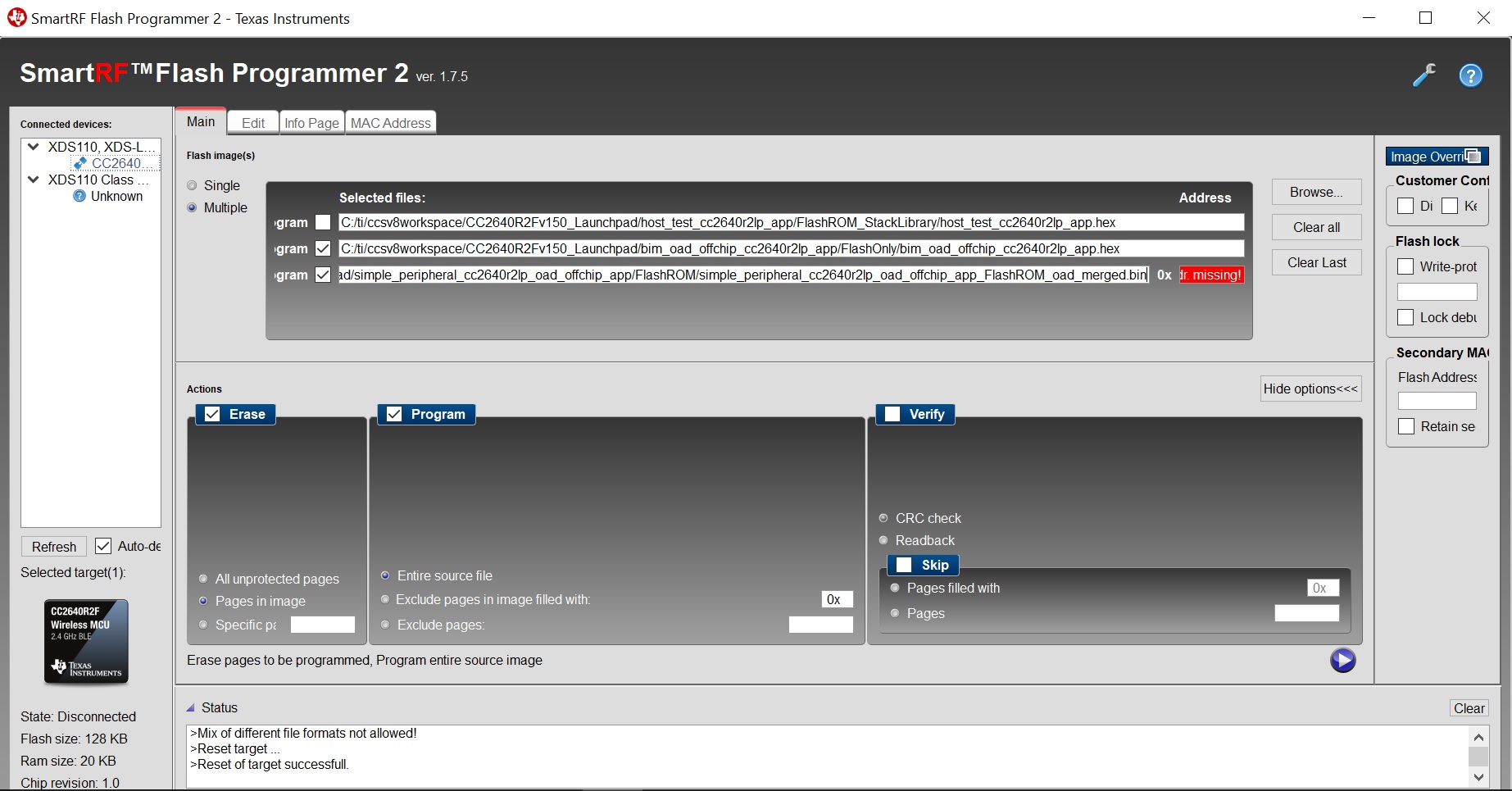
    In fact, the order of the my image downloading is BIM, APP_Stack_Merged.
    -
    And another strange problem is, if I use the hex file in SmartRF flash V2, the code does not work after programmed(with or without a hradware reset or power on/off).
    I have to use bin files,and specify the address(BIM is 0x1F000,app+stack is 0), then the code can work after programmed.
    This problem not only occurs in my modified application, also in the default SDK example (simple_peripheral_oad_offchip).
    -
    As your advice using BIM, Stack, and APP order to download, I cannot perform this cause I don't know the address of the Stack .
    I think it may not work in my situation as I mentioned above.
    -
    Regards,
  • Hi Kaifeng,

         I have already tried and tested the simple peripheral off-chip oad example program from SDK v1.50 and it works. I flash the bim hex file and oad merged bin file in this order below. Since this works use it as base and add or append your code.

    -kel

  • Hi Markel,

    I do exactly what you did.

    But it only works when it is bin files.

  • I think there was an error occur when converting from bin to hex.
    But the IDE(IAR 8.22.2) did not show any error message when doing building.
  • Hi Kaifen,

    I am using CCS so the procedure is different from IAR. Can you follow the instructions at "Using IAR" "C:/ti/simplelink_cc2640r2_sdk_1_50_00_58/docs/blestack/ble_user_guide/html/oad-ble-stack-3.x/oad_offchip.html"

    From what I understand from the document procedure "Using IAR Off-Chip OAD", you need to flash in this order BIM hex file, app oad merged.bin.

    -kel
  • Hi Markel,

    The procedure guide ("Using IAR")  you mentioned was what I referred from.

    -

    Besides, I have read the post-build action,and run the script directly in command line.

    It generate the same xxx_merged.hex (I have compared them by hash tool).

    Here is one of the command window result screen shot.

    All the input hex files are generated from output_converter.

  • Hi Markel,

    I think I have misunderstood the doc.
    It clearly says that we should use the bin format. >_-
    Not mentioned anything about the hex files. So the hex files cannot work ?May be....

    Okay, I'm going through this issue.
    Besides, after program BIM and stack one by one, I can debug the app with IDE.

    The only problem here is the power on reset issue.
    Until now,it still needs a hard reset after power on,then the software reset can perform correctly.

    Thanks for your kindly help.

    Regards,
  • Hi Kaifeng,

    From what I remember there is an issue with IAR hex generation utility that's why there is post build step to convert it to bin file. Anyway, maybe a TI Engineer will reply to clarify all this further.

    -kel
  • Hello Kaifeng.He,

    Was Markel able to help you resolve your issue? do you need additional help?

    Regards,
    AB
  • Hi, AB

    Yes,I need additional help.

    The problem is the power on reset issue as mentioned above.
    After BIM jumped to APP, It needs a hard reset after power on,then the software reset can perform correctly.

    Regards,
  • Hi AB,

    This is the problem detail:

    In my app, I cannot do software reset(system seems halt) or watchdog reset after power on.
    But once a hardware reset performed (via reset pin), software reset can be done any times without problem .
    Don't know why.

    This issue does not exist when no BIM is used.

    Regards,
  • Hi Kaifeng,

    I have tried and tested simple peripheral off-chip oad example program at SDK v1.40 and SDK v1.50 without problems. Both example programs uses BIM.

    Do you encounter the software reset problem with the above unmodified example programs?

    -kel
  • Hello Kaifeng,

    Did you try Markel 's solution? I gave a try to our BIM examples and they also work.

    Regards,
    AB
  • Hello,

    I will be closing this thread due to inactivity. Feel free to reopen it by posting an additional comment to it.

    Regards,
    AB