This thread has been locked.

If you have a related question, please click the "Ask a related question" button in the top right corner. The newly created question will be automatically linked to this question.

BOOSTXL-CC2650MA: Using HFXT with SAP

Part Number: BOOSTXL-CC2650MA
Other Parts Discussed in Thread: CC2650MODA, , CC2650

Hi,

I am using the Simple Application Processor project from the SimpleLink SDK BLE plugin version 1.40.00.42. I am trying to make it work with a 48MHz crystal. The application is hanging up in the AP_RESET state when I enable the crystal. It is not getting pass this line of code: 

mq_timedreceive(apQueueRec, (void*) &curEvent, sizeof(uint32_t), &prio, &ts);

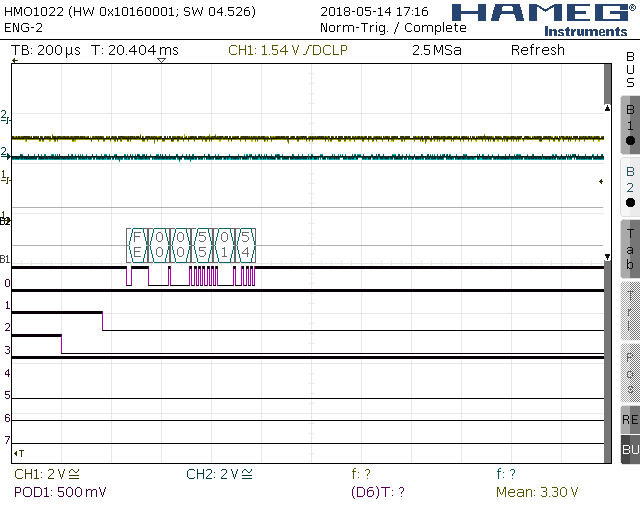
Attached are scope captures of a good (HFXT crystal disabled) and bad (HFXT crystal enabled) sequences.

What am I missing here?

Thanks,

Jeffrey

D0: BLE TX, D1: BLE_RX, D2: MRDY, D3: SRDY, D4: NRESET

  • Hello Jefferey,

    We recommend to use 24MHz Crystal. CC2650MODA uses 24MHz Crystal. 48MHz crystal should not be used.

    Regards,
    Prashanth
  • Hi Prashanth,

    The example SAP project that uses MSP-EXP432P401R dev board with BOOSTXL-CC2650MA runs using DCO at 48 MHz. It hangs up when I switch to a crystal. I think there is a problem with the SAP library. Can you try using a crystal with any of the example projects in simplelink_sdk_ble_plugin_1_40_00_42?

    Thanks,

    Jeffrey

  • Hi Prashanth,
    Just to clarify, are you recommending to use 24MHz for the application MSP432P401R processor? I am using the CC2650MODA as a SNP.
    Thanks,
    Jeffrey
  • Hello Jeffrey,
    The CC2650 internally doubles the crystal frequency from 24MHz to 48MHz. So the crystal should be 24MHz and not 48MHz.

    Please refer to section 6.9 Clock Systems of the data sheet for more information.


    Regards,
    Prashanth

  • Hi Prashanth,
    Are you saying that the CC2650MODA module in the BOOSTXL-CC2650MA dev board uses the crystal from the MSP-EXP432P401R dev board?
    Thanks,
    Jeffrey
  • The software that I am changing is the simple_application_processor_MSP_EXP432P401R_tirtos_ccs project running on the MSP432P401R CPU.
  • Hello Jeffery,
    Since this is a SAP project and clocks are related to MSP. Our MSP team may be able to help better. I will move this to thread accordingly.
    Regards,
    Prashanth
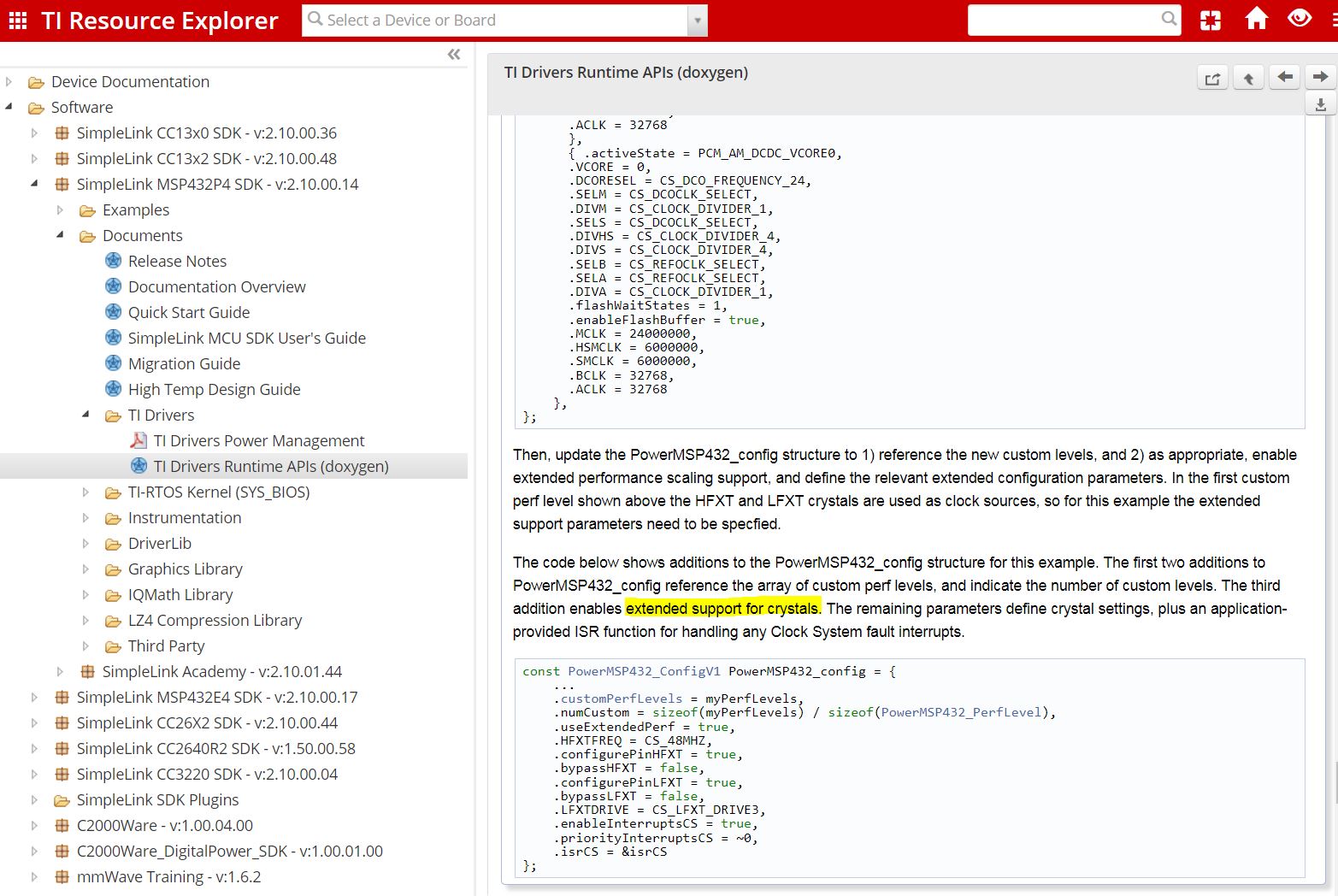
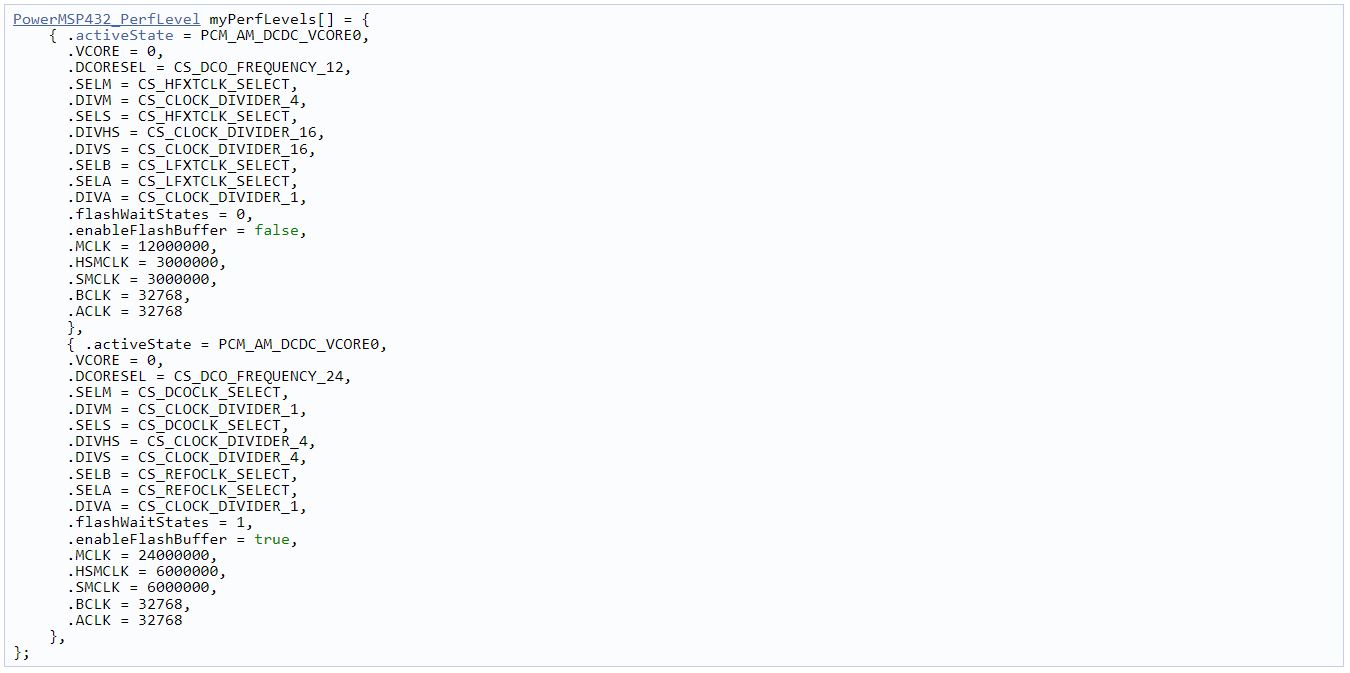
  • You can find a description of the customer power levels here:

    Regards,

    Chris

  • Hi Chris,
    How do I get to that section that you have in the picture? I did not see it in either Power.h or PowerMSP432.h.
    Thanks,
    Jeffrey
  • I captured that from the doxygen output. If you navigate TI Drivers Runtime APIs (doxygen) and then select the PowerMSP432.h you will be taken to that section. It is close to the bottom. Which version of the SDK are you using? This was implemented in 1.60.00.12. dev.ti.com/.../

    Chris
  • Hi Chris,
    I am using MSP432P4 SDK version 2.10.00.14.
    I found that section.
    The example SAP defines the PowerMSP432_config as follows:
    /*
    * =============================== Power ===============================
    */
    const PowerMSP432_ConfigV1 PowerMSP432_config = {
    .policyInitFxn = &PowerMSP432_initPolicy,
    .policyFxn = &PowerMSP432_sleepPolicy,
    .initialPerfLevel = 2,
    .enablePolicy = true,
    .enablePerf = true,
    .enableParking = true,
    };

    I just want to be able to run the example program using an external 48MHz crystal.
    Do I need to create custom performance levels to use an external HFXT crystal? Or do I just add the following lines to the configuration:
    .HFXTFREQ = CS_48MHZ,
    .configurePinHFXT = true,
    .bypassHFXT = false,

    Thanks,
    Jeffrey
  • Hi Chris,
    For now, I just want to make the example SAP project work with the HFXT crystal driving MCLK, HSMCLK, and SMCLK.
    The SAP project defines the PowerMSP432_config as follows:
    /*
    * =============================== Power ===============================
    */
    const PowerMSP432_ConfigV1 PowerMSP432_config = {
    .policyInitFxn = &PowerMSP432_initPolicy,
    .policyFxn = &PowerMSP432_sleepPolicy,
    .initialPerfLevel = 2,
    .enablePolicy = true,
    .enablePerf = true,
    .enableParking = true
    };

    Adding the following lines to the configuration does not fix the problem:
    .HFXTFREQ = CS_48MHZ,
    .configurePinHFXT = true,
    .bypassHFXT = false,

    Do I need to create custom power profiles?

    I am only the following code to the initialization sequence:
    // Configure HFXTCLK pins for peripheral/crystal usage.
    MAP_GPIO_setAsPeripheralModuleFunctionOutputPin(GPIO_PORT_PJ,
    GPIO_PIN2 | GPIO_PIN3, GPIO_PRIMARY_MODULE_FUNCTION);

    // Set crystal frequencies
    CS_setExternalClockSourceFrequency(REFO_CLK_FREQ, HFXTCLK_FREQ);

    // Start HFXT in non-bypass mode without a timeout.
    CS_startHFXT(false);

    /* Initialize the clock source to match predefined performance level 2:
    * MCLK = HFXT/1 = 48 MHz
    * HSMCLK = HFXT/2 = 24 MHz
    * SMCLK = HFXT/4 = 12 MHz
    * ACLK = REFO/1 = 32.768 kHz
    * BCLK = REFO/1 = 32.768 kHz
    */
    MAP_CS_initClockSignal(CS_MCLK, CS_HFXTCLK_SELECT, CS_CLOCK_DIVIDER_1);
    MAP_CS_initClockSignal(CS_HSMCLK, CS_HFXTCLK_SELECT, CS_CLOCK_DIVIDER_2);
    MAP_CS_initClockSignal(CS_SMCLK, CS_HFXTCLK_SELECT, CS_CLOCK_DIVIDER_4);
    MAP_CS_initClockSignal(CS_ACLK, CS_REFOCLK_SELECT, CS_CLOCK_DIVIDER_1);
    MAP_CS_initClockSignal(CS_BCLK, CS_REFOCLK_SELECT, CS_CLOCK_DIVIDER_1);

    The BLE application gets stuck at AP_RESET with these added.

    Thanks,
    Jeffrey
  • Hi,
    I am still stuck on this problem. Would it be possible for you to try to reproduce it? I am using MSP432P401R connected to BOOSTXL-CC2650MA dev boards. I am running the C:\ti\simplelink_sdk_ble_plugin_1_40_00_42\examples\rtos\MSP_EXP432P401R\bluetooth\simple_application_processor project with CCS and TIRTOS on the MSP432 board.
    I have loaded the BOOSTXL-CC2650MA board with C:\ti\simplelink_sdk_ble_plugin_1_40_00_42\source\ti\snp\cc2650\simple_np_cc2650bp_uart_pm_sbl_2_02_01_18a_merge.hex file.

    I have only added the following code to the SAP project:
    // Configure HFXTCLK pins for peripheral/crystal usage.
    MAP_GPIO_setAsPeripheralModuleFunctionOutputPin(GPIO_PORT_PJ,
    GPIO_PIN2 | GPIO_PIN3, GPIO_PRIMARY_MODULE_FUNCTION);

    // Set crystal frequencies
    CS_setExternalClockSourceFrequency(REFOCLK_FREQ, HFXTCLK_FREQ);

    // Start HFXT in non-bypass mode without a timeout.
    CS_startHFXT(false);

    /* Initialize the clock source to match predefined performance level 3:
    * see PowerMSP432_perfLevels
    * MCLK = HFXT/1 = 48 MHz
    * HSMCLK = HFXT/1 = 48 MHz
    * SMCLK = HFXT/2 = 24 MHz
    * ACLK = REFO/1 = 32.768 kHz
    * BCLK = REFO/1 = 32.768 kHz
    */
    MAP_CS_initClockSignal(CS_MCLK, CS_HFXTCLK_SELECT, CS_CLOCK_DIVIDER_1);
    MAP_CS_initClockSignal(CS_HSMCLK, CS_HFXTCLK_SELECT, CS_CLOCK_DIVIDER_1);
    MAP_CS_initClockSignal(CS_SMCLK, CS_HFXTCLK_SELECT, CS_CLOCK_DIVIDER_2);
    MAP_CS_initClockSignal(CS_ACLK, CS_REFOCLK_SELECT, CS_CLOCK_DIVIDER_1);
    MAP_CS_initClockSignal(CS_BCLK, CS_REFOCLK_SELECT, CS_CLOCK_DIVIDER_1);

    Thanks,
    Jeffrey
  • Jeffrey,

       Please follow the instructions found in the link above:

    First, if not already included in the board file, add the includes of cs.h and pcm.h.

    Next, add an array with your new performance levels.

    Then, update the PowerMSP432_config structure to 1) reference the new custom levels, and 2) as appropriate, enable extended performance scaling support, and define the relevant extended configuration parameters. In the first custom perf level shown above the HFXT and LFXT crystals are used as clock sources, so for this example the extended support parameters need to be specfied.

    The code below shows additions to the PowerMSP432_config structure for this example. The first two additions to PowerMSP432_config reference the array of custom perf levels, and indicate the number of custom levels. The third addition enables extended support for crystals. The remaining parameters define crystal settings, plus an application-provided ISR function for handling any Clock System fault interrupts.

    If you insist on using driverlib calls for this, then please refer to this link:

    Regards,

    Chris