This thread has been locked.

If you have a related question, please click the "Ask a related question" button in the top right corner. The newly created question will be automatically linked to this question.

CC2640R2F: Understanding Long Packets using a Sniffer

Part Number: CC2640R2F

Hello,

I have a CC2640R2F running a modified version of simple_peripheral, which continuously sends 100-byte notifications to its connection -, and another CC2640R2F running the host_test example, both using BLE 5 Stack of SDK 1.40.00.45.

After connecting the host_test to the simple_peripheral* board, I set the connection parameters (not sure if it is relevant) to:

  • Connection Interval: 6
  • Latency: 6
  • Timeout: 300

Then, I set the MTU to 103 and enable notifications.

Using

I get the following:
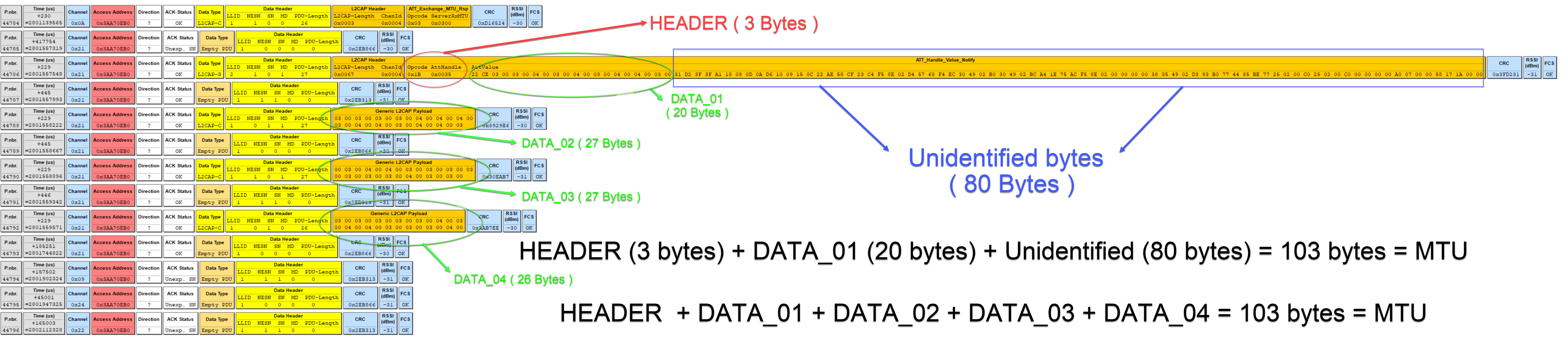
As I understand, an MTU of 103 bytes allows me to send 3 bytes of Bluetooth header plus 100 bytes of my own data. Indeed, according to the image above, we can see that

HEADER + DATA_01 + DATA_02 + DATA_03 + DATA_04 = 103 bytes

What I don't understand, though, is that first packet - the one containing HEADER, DATA_01 and another 80 bytes (which I cannot identify), summing up exactly 103 bytes (the MTU).

Questions:

  1. What are those 80 bytes?
  2. Is my packet being split into 4 and I'm not filling those 80 bytes?

Thanks in advance.

  • Hi,

    Can you elaborate more on the way that you modified simple_peripheral to send the 100-byte notifications?

    Did you use the SimpleLink Academy Custom Profile lab Example service generator? I went to try this and I noticed,  that in the example service generator, in the Application Usage snippets, it seems to default to having this no matter what length you set for your  characteristic value length:

      // Placeholder variable for characteristic intialization
      uint8_t someVal[20] = {0};

    If this was unaltered, I suspect you would see something like your first packet, where the first 20 bytes were correct, but the last 80 are likely filled with random RAM data from off the end of that someVal[] array. You can probably see this by looking in the memory view for the project and seeing what is found in RAM right after someVal and if the data matches what you see in that packet. 

    I'd recommend simply modifying this to be an array of size 100 to match the size of data that you want to send for your notifications. 

    Regards,

    Katie

  • In the code I have, someVal is only used to initialize Bluetooth Characteristic Values. I have tested increasing its size and nothing changes.

    If you believe those 80 bytes have "uninitialized memory", why wouldn't the packets containing DATA_02, DATA_03 and DATA_04 have the same 80 bytes of "uninitialized memory"?
  • Hi,

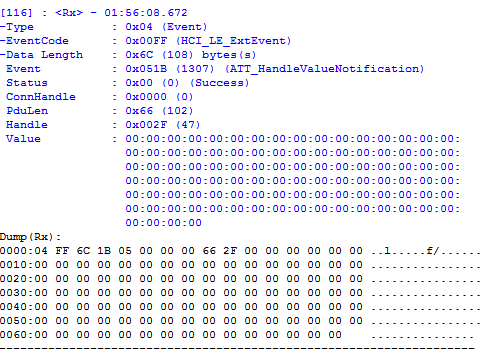
    I dug into this some more and I can reproduce your issue, and I believe I have a solution. What you are seeing is that while you may have set a larger MAX_PDU_SIZE, that is for the L2CAP layer, not counting link layer data length extension feature. So what is happening right now is that your notification is getting split up to meet the max LL PDU size default 27, which is why you are seeing the rest of the data as 3 additional packets as continuation PDUs. As a note, that first packet you receive is actually not that long - this is the sniffer not doing a good job handling this feature and packet size and it's not parsing it right hence the garbage. A better place to observe would be inside Btool which you are using with host_test - the main btool window should show the packets that come in. You'll see something like this, and this is what's really being received on the central:

    Now, a central should be able to handle this notification and reassemble it even if it is received in multiple LL PDUs. Indeed, looking in the main btool window, you should see your whole correct notification data reassembled in a ATT_HandleValueNotification - do you?

    But you may also want to change so that it all gets sent in one go because this can have better throughput. If you'd like to do this, here is how:

    1. In ble_user_config.h set a large MAX_PDU_SIZE to accomodate your long notification

    2. In simple_peripheral.c, in SimpleBLEPeripheral_init(), go find this section and uncomment the highlighted line for HCI_LE_WriteSuggestedDefaultDataLenCmd:

      //Set default values for Data Length Extension
      {
        //Set initial values to maximum, RX is set to max. by default(251 octets, 2120us)
        #define APP_SUGGESTED_PDU_SIZE 251 //default is 27 octets(TX)
        #define APP_SUGGESTED_TX_TIME 2120 //default is 328us(TX)
    
        //This API is documented in hci.h
        //See the LE Data Length Extension section in the BLE-Stack User's Guide for information on using this command:
        //software-dl.ti.com/.../index.html 
        HCI_LE_WriteSuggestedDefaultDataLenCmd(APP_SUGGESTED_PDU_SIZE, APP_SUGGESTED_TX_TIME);
      }

    With this uncommented, now the peripheral will be initialized to try to negotiate a large LL size when it connects. http://dev.ti.com/tirex/content/simplelink_cc2640r2_sdk_1_35_00_33/docs/ble5stack/ble_user_guide/html/ble-stack/data-length-extensions.html#sec-utilizing-data-length-ext-at-run-time

    Regards,

    Katie

    Regards,

    Katie

  • Awesome! Nice catch, Katie!

    Thank you very much for your time and effort on reproducing and solving this issue.