This thread has been locked.

If you have a related question, please click the "Ask a related question" button in the top right corner. The newly created question will be automatically linked to this question.

RTOS/CC2640: Using SPI for basic byte transfers

Part Number: CC2640

Tool/software: TI-RTOS

Hello, I was totally unsure as to which forum to post this into, so hopefully this works.

I'm using a CC2640 to communicate with an accelerometer (ADXL362) over SPI. The communication with the ADXL is very simple, consisting of writing 2 bytes and then reading back a number of bytes or writing 3 bytes. I'm looking in the SPI.h driver, but don't really understand how SPI works on the cc2640. I am thinking I call SPI_transfer(), passing it SPI_Transaction - where transaction.txBuf is set equal to an array of unint_8 where each array member is one byte I am writing? Then does transaction.rxBuf (initialized to an empty unint_8[]) automatically read in the bytes transferred back?

Separately, where do I define the PINs for MOSI, MISO, clck...?

Thanks!

http://www.analog.com/media/en/technical-documentation/data-sheets/ADXL362.pdf

http://dev.ti.com/tirex/content/simplelink_cc2640r2_sdk_1_40_00_45/docs/tidrivers/doxygen/html/_s_p_i_8h_source.html

  • Hello Reed,

    To configure the pins you go into board and LAUNCHXL files.

    As far as the SPI, you are correct, but you will need to assign the write count (in this case 2) and the data size (in this case 8).

    Here is a short description on how SPI transfer works(more information can be found on SPI.h):

    * SPI_transfer() always performs full-duplex SPI transactions. This means
    * the SPI simultaneously receives data as it transmits data. The application
    * is responsible for formatting the data to be transmitted as well as
    * determining whether the data received is meaningful.
    * Specifics about SPI frame formatting and data sizes are provided in
    * device-specific data sheets and technical reference manuals.

    Regards,
    AB
  • Thanks so much, I believe I have it working now. Two follow up questions:

    1) Currently in CC240R2_LAUNCHXL.h I have:

    #define CC2640R2_LAUNCHXL_SPIO_MISO            IOID_8
    #define CC2640R2_LAUNCHXL_SPIO_MOSI            IOID_9
    #define CC2640R2_LAUNCHXL_SPIO_CLK              IOID_10
    #define CC2640R2_LAUNCHXL_SPIO_CSN             PIN_UNASSIGNED


    When I try to change MISO to IOID_14, MOSI to IOID_15, CLK to IOID_16 and CSN to IOID_26, the SPI fails. Is there a reason one has to use specific pins (or couldn't use the pins I want to)?

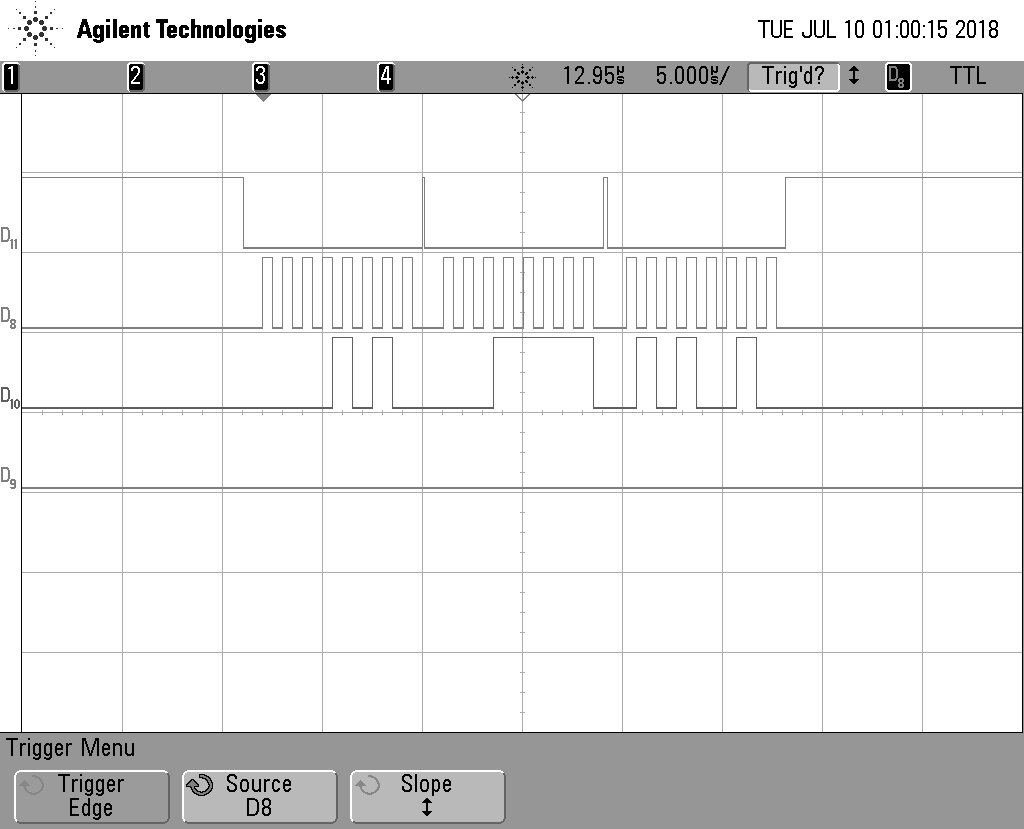
    2) I've written a short script to send the bytes 0x0B and 0x0E which appears to work, but almost every time I run it, the 7th clock cycle on the 2nd byte is distorted. Is that something to worry about? Normally I would assume just a poor connection or trigger or something, but it's always the same part that seems to be truncated early. I've attached a scope readout for reference:

    Thanks!

  • Hello,

    1. It could be because IOID_14 is being used by the PIN init table for BTN1. Try commenting out this line and adding the SPI0_CSN line to the table.

    2. This could be caused by a poor connection or maybe the scope. Is the behavior of the sesnor still good or are you having problems when trying to send commands?

    Regards,
    AB
  • Hi AB,

    1. This issue is definitely with IOID_14 as the other PINS I can change and still succesfully transmit. I made the changes above (see blow) but am still having problems. Could it be something with how that PIN is directly wired to the Button on the launchpad?


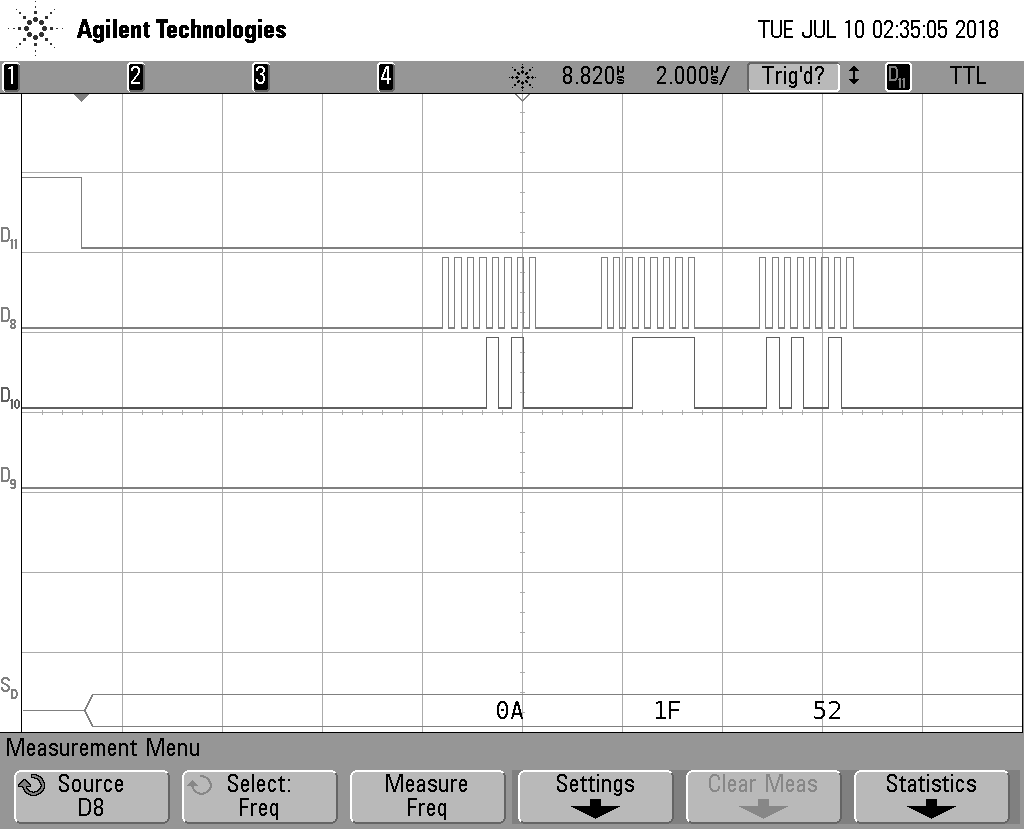
    2. I'm having trouble connecting with the sensor, but I'm not sure the issue is with the launchpad. The goal of my script (for now) is to send three bytes (0x0A, 0x1F, 0x52), and then send two more bytes (0x0B, 0x2D) and read in one byte. According to my oscilloscope that's exactly what is sent, but MISO line stay low the whole time which makes me think its an issue with the chip (or what I'm saying to it) rather than the script itself.

    Thanks
    Reed


    /* SPI Board */
    #define CC2640R2_LAUNCHXL_SPI0_MISO IOID_14 //8 /* RF1.20 */
    #define CC2640R2_LAUNCHXL_SPI0_MOSI IOID_15 //9 /* RF1.18 */
    #define CC2640R2_LAUNCHXL_SPI0_CLK IOID_16 //10 /* RF1.16 */
    #define CC2640R2_LAUNCHXL_SPI0_CSN IOID_26 //PIN_UNASSIGNED

    /* Discrete Inputs */
    #define CC2640R2_LAUNCHXL_PIN_BTN1 IOID_13
    //#define CC2640R2_LAUNCHXL_PIN_BTN2 IOID_14

    const PIN_Config BoardGpioInitTable[] = {

    CC2640R2_LAUNCHXL_PIN_RLED | PIN_GPIO_OUTPUT_EN | PIN_GPIO_LOW | PIN_PUSHPULL | PIN_DRVSTR_MAX, /* LED initially off */
    CC2640R2_LAUNCHXL_PIN_GLED | PIN_GPIO_OUTPUT_EN | PIN_GPIO_LOW | PIN_PUSHPULL | PIN_DRVSTR_MAX, /* LED initially off */
    CC2640R2_LAUNCHXL_PIN_BTN1 | PIN_INPUT_EN | PIN_PULLUP | PIN_IRQ_BOTHEDGES | PIN_HYSTERESIS, /* Button is active low */
    CC2640R2_LAUNCHXL_SPI0_MISO | PIN_INPUT_EN | PIN_PULLUP | PIN_IRQ_BOTHEDGES | PIN_HYSTERESIS, /* Button is active low */
    CC2640R2_LAUNCHXL_SPI_FLASH_CS | PIN_GPIO_OUTPUT_EN | PIN_GPIO_HIGH | PIN_PUSHPULL | PIN_DRVSTR_MIN, /* External select */
    CC2640R2_LAUNCHXL_UART_RX | PIN_INPUT_EN | PIN_PULLDOWN, /* UART RX via debugger back channel */
    CC2640R2_LAUNCHXL_UART_TX | PIN_GPIO_OUTPUT_EN | PIN_GPIO_HIGH | PIN_PUSHPULL, /*
    CC2640R2_LAUNCHXL_SPI0_MOSI | PIN_INPUT_EN | PIN_PULLDOWN, /* SPI master out - slave in */
    CC2640R2_LAUNCHXL_SPI0_MISO | PIN_INPUT_EN | PIN_PULLDOWN, /* SPI master in - slave out */
    CC2640R2_LAUNCHXL_SPI0_CLK | PIN_INPUT_EN | PIN_PULLDOWN, /* SPI clock */

    PIN_TERMINATE
    };
  • Hello,

    Did change the CC2640R2_LAUNCHXL_PIN_BTN1 definition to PIN_UNASSIGNED?

    According to the schematic it looks like the pin is left floating, so it should not cause any problems. Have you tried changing from IOID_14 to another pin just for testing purposes?

    Also another good test might be not plugging in IOID 14 to the sensor and reading he MISO straight from the sensor and see if you can atleast see some data flowing out when you write to it.

    Regards,
    AB
  • Hi AB,

    Changing to PIN_UNASSIGNED seems to fix the problem. I am still very stumped by no data from MISO.

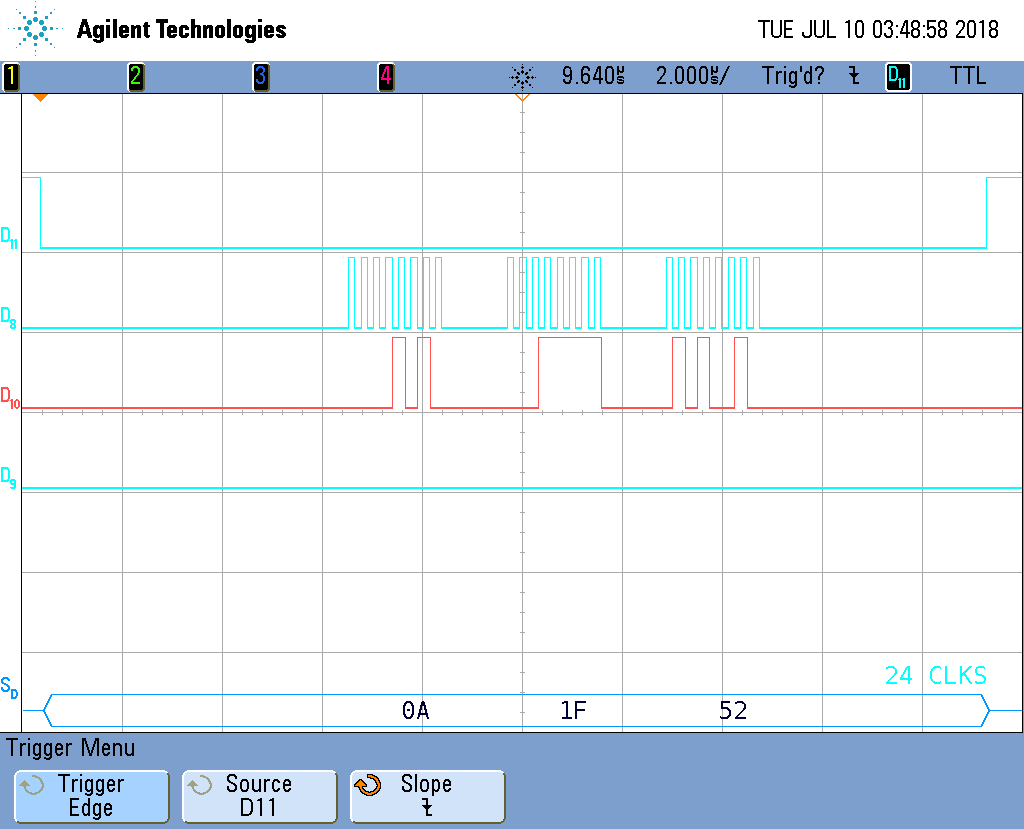
    I've connected the ADXL sensor to an arduino and run sample code which shows the sensor works and has fine connections. Comparing the Oscilloscope readings from the Arduino to the Launchpad show a couple basic differences. The first Difference is the Chip Select in the arduino goes low earlier than the launchpad and stay low for the length of the transfer (compared to going high between bytes). The second difference is for the arduino, MOSI is default high.

    I suspect the issue is with Chip Select rather than MOSI, as MOSI still goes low in time for the first rising edge of the clock. For Chip Select, I also tried implementing a software CS, where a pin manually was set low before the transfer and then pulled back high but that didn't seem to fix anything (Though CS was low a long time before the clck started). In addition I disconnected MISO from the launchpad and connected it straight to the scope so as to test for and error in the sensor being able to pull the PIN high/low but that seemed to have no effect.

    Thanks

    Reed

    Successful Arduino Transfer (triggered on Clock, so CS is not shown going low)

    Launchpad - Hardware CS

    Launchpad - Software CS

  • Hello,

    the reason for the MOSI pin going HIGH between transmission on the Arduino and not on our device is because you have the pin setup with a pull down(I do not think this the problem either as the sensor's datasheet states that the MOSI pin is a 'Don't Care' when it is not transmitting):

    CC2640R2_LAUNCHXL_SPI0_MOSI | PIN_INPUT_EN | PIN_PULLDOWN, /* SPI master out - slave in */
    CC2640R2_LAUNCHXL_SPI0_MISO | PIN_INPUT_EN | PIN_PULLDOWN, /* SPI master in - slave out */
    CC2640R2_LAUNCHXL_SPI0_CLK | PIN_INPUT_EN | PIN_PULLDOWN, /* SPI clock */

    You can try making it a pull up and see if this fixes the issue.

    You can make CS pin SW controlled and make sure you pull it down before you start a transmission by putting a delay in between transfer and pulling it down. According to the ADXL datasheet the time you need is atleast 100ns.

    Regards,
    AB
  • In BoardGPIOInitTable[] I've set:

    CC2640R2_LAUNCHXL_SPI0_MOSI | PIN_INPUT_EN | PIN_PULLUP

    but that didn't seem to do anything. I also added a SW CS pin.

    New Scope:

  • For reference, here is my code. I doubt the issue is with MOSI being default low, but any suggestions on how to make it default high would be appreciated

    /* XDC Module Headers */
    #include <xdc/std.h>
    #include <xdc/runtime/System.h>
    
    /* BIOS Module Headers */
    #include <ti/sysbios/BIOS.h>
    #include <ti/drivers/GPIO.h>
    #include <ti/drivers/SPI.h>
    
    /* Example/Board Header files */
    #include "Board.h"
    
    #include <stdint.h>
    #include <stddef.h>
    #include <stdio.h>
    #include <ti/drivers/PIN.h>
    
    /*
     *  ======== main ========
     */
    int main()
    {
        int MSGSIZE = 3;
        SPI_Handle      spi;
        SPI_Params      spiParams;
        SPI_Transaction spiTransaction;
        uint8_t         transmitBuffer[MSGSIZE];
        uint8_t         recieveBuffer[MSGSIZE];
        bool            transferOK = FALSE;
    
        /* Call driver init functions */
        Board_initGeneral();
        ledPinHandle = PIN_open(&ledPinState, spipins);
    
        SPI_init();
        SPI_Params_init(&spiParams);
        spiParams.dataSize = 8;
        spiParams.bitRate = 4000000;
        spiParams.mode = SPI_MASTER;
     
    
        spi = SPI_open(Board_SPI0, &spiParams);
        if (spi == NULL){
            printf("SPI_open failed!\n");
        }
    
        transmitBuffer[0] = 0x0A;
        transmitBuffer[1] = 0x1F;
        transmitBuffer[2] = 0x52;
    
        spiTransaction.count = MSGSIZE;
        spiTransaction.txBuf = transmitBuffer;
        spiTransaction.rxBuf = recieveBuffer;
    
        transferOK = SPI_transfer(spi, &spiTransaction);
        if (!transferOK) {
            printf("Error in SPI_transfer1!\n");
        }
    
        BIOS_exit(0);  /* terminates program and dumps SysMin output */
        return(0);
    }


    const PIN_Config BoardGpioInitTable[] = {
    
        CC2640R2_LAUNCHXL_PIN_RLED | PIN_GPIO_OUTPUT_EN | PIN_GPIO_LOW | PIN_PUSHPULL | PIN_DRVSTR_MAX,       /* LED initially off */
        CC2640R2_LAUNCHXL_PIN_GLED | PIN_GPIO_OUTPUT_EN | PIN_GPIO_LOW | PIN_PUSHPULL | PIN_DRVSTR_MAX,       /* LED initially off */
        CC2640R2_LAUNCHXL_PIN_BTN1 | PIN_INPUT_EN | PIN_PULLUP | PIN_IRQ_BOTHEDGES | PIN_HYSTERESIS,          /* Button is active low */
        //CC2640R2_LAUNCHXL_PIN_BTN2 | PIN_INPUT_EN | PIN_PULLUP | PIN_IRQ_BOTHEDGES | PIN_HYSTERESIS,          /* Button is active low */
        CC2640R2_LAUNCHXL_SPI_FLASH_CS | PIN_GPIO_OUTPUT_EN | PIN_GPIO_HIGH | PIN_PUSHPULL | PIN_DRVSTR_MIN,  /* External flash chip select */
        CC2640R2_LAUNCHXL_UART_RX | PIN_INPUT_EN | PIN_PULLDOWN,                                              /* UART RX via debugger back channel */
        CC2640R2_LAUNCHXL_UART_TX | PIN_GPIO_OUTPUT_EN | PIN_GPIO_HIGH | PIN_PUSHPULL,                        /* UART TX via debugger back channel */
        CC2640R2_LAUNCHXL_SPI0_MOSI | PIN_INPUT_EN | PIN_PULLUP,                                            /* SPI master out - slave in */
        CC2640R2_LAUNCHXL_SPI0_MISO | PIN_INPUT_EN | PIN_PULLDOWN,                                            /* SPI master in - slave out */
        CC2640R2_LAUNCHXL_SPI0_CLK | PIN_INPUT_EN | PIN_PULLDOWN,                                             /* SPI clock */
        CC2640R2_LAUNCHXL_SPI0_CSN | PIN_INPUT_EN | PIN_PULLDOWN,
    
        PIN_TERMINATE
    };


  • I think the PIN_Config Table is overridden in SPI_Open by the call to SPI_initIO(). Looking there, I see code for configuring the MOSI:

    else {
    /* Configure IOs for master mode */
    spiPinTable[i++] = hwAttrs->mosiPin | PIN_GPIO_EN | PIN_GPIO_LOW | PIN_PUSHPULL | PIN_INPUT_DIS | PIN_DRVSTR_MED;

    but changing to PIN_GPIO_HIGH still has no effect

  • The problem has been solved - 

    The CS signal needs to be low for the entirety of the signal (implemented through a software CS) and I needed to be issuing a read command on the ADXL - the signal coming from the ADXL during write commonds on the arduino was noise.