This thread has been locked.

If you have a related question, please click the "Ask a related question" button in the top right corner. The newly created question will be automatically linked to this question.

RTOS/LAUNCHXL-CC2640R2: add UIA to example project

Part Number: LAUNCHXL-CC2640R2
Other Parts Discussed in Thread: CC2640, SYSBIOS

Tool/software: TI-RTOS

Hi,

I would like to add UIA to the simple peripheral and simple central example projects of Simplelink CC2640R2 SDK 2.20.00.49, because I would like to see the Execution Graph and CPU Load.

I tried to add following code it to the config file.

var LoggingSetup = xdc.useModule('ti.uia.sysbios.LoggingSetup');
LoggingSetup.sysbiosSwiLogging = true;
LoggingSetup.loadTaskLogging = true;

Then I get several errors I don't understand.

Can anybody tell me how and where I can add UIA to these projects?

  • Hi Christian,

    Have you seen this thread regarding CC2640R2 and UIA configuration?

    e2e.ti.com/.../646420
  • Hi,

    thanks for your fast response.

    After I have placed the kernel in flash and included


    /* * LoggingSetup configures TI-RTOS modules to capture user-specified information * such as CPU Load, Task Load and Task Execution so that it can be * displayed by System Analyzer. * * loadLogging: (default = true) If true, LoggingSetup will add the kernel's * load module, which measure the CPU load. See the BIOS API * documentation for usage details */ var LoggingSetup = xdc.useModule('ti.uia.sysbios.LoggingSetup'); LoggingSetup.loadLogging = false; //LoggingSetup.loadLoggerSize = 256; LoggingSetup.mainLoggerSize = 512; LoggingSetup.sysbiosLoggerSize = 2048; LoggingSetup.sysbiosSwiLogging = true; LoggingSetup.sysbiosHwiLogging = false; LoggingSetup.sysbiosSemaphoreLogging = true;

    in cc2640_r2_csdk.cfg, i can compile the project.

    But now i have new problems.

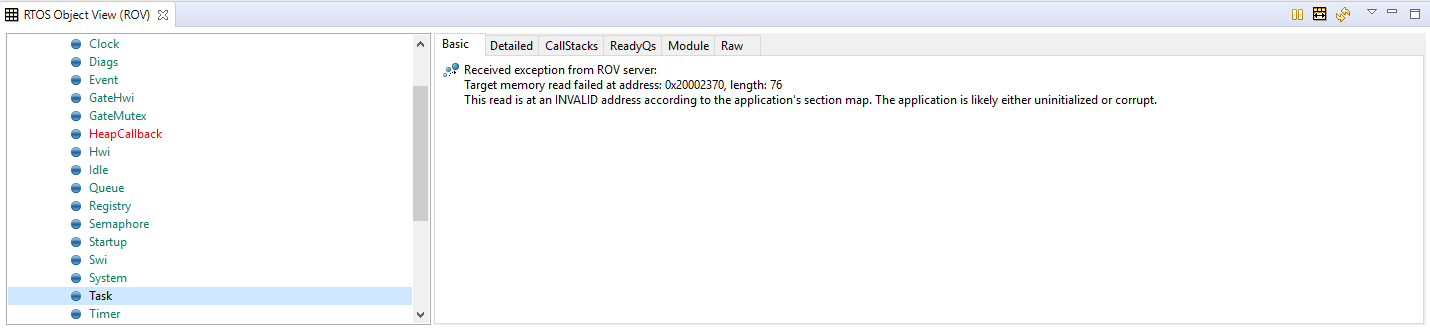
    I cant read tasks in ROV anymore. SWI and HWI are normal. Therefore I have followed the instruction at the Debugging User Guide. 

    Before I press the start Button in Debug Mode it looks


    and if I press the start button and pause the program.


    Furthermore the execution graph is empty. It doesn't matter if the kernel is in Flash or RAM.

    Do you have an idea what's wrong?


    Thanks,

    Christian

  • Hi Christian,

    Did you make sure to disable using the kernel from ROM as well as enabling BIOS.logEnabled? I tried adding what you did along with these changes and for me it all works as intended. Remember you also have to halt the CPU to display the logged information.
  • Here is my fix (and way of checking it)

    1. new workspace

    2. project -> import

    3. choose the simple_peripheral example.

    4. right click on the project from the project explorer and choose properties.

    5. choose configuration to "FlashRom_Debug"  -- HERE IS A BUG!  THIS CONFIGURATION IS EMPTY OR SOMETHING IS WRONG.

    so keep using the configuration "FlashRom_Release".

    6. copy the content of the file "ble_debug.cfg" to "ble_release.cfg", it will be easy then changing the config file somewhere. (it's because of step 5 bug).

    7. add the LoggingSetup configures at the end of the file like Christian1405 wrote.

    and also add this:

    var Load = xdc.useModule('ti.sysbios.utils.Load');

    under Clock configuration.

    8. build the project and run debug.

    9. when debuging, press Tools  -> Runtime Object view, connect to the debugger.

    10. in the ROV, press settings and add "Add-on views" and import the CPU Graph.

    11.add the CPU graph.

    refresh the graph.

    It  works.

  • Thanks to Netanel Unger  and M-W,

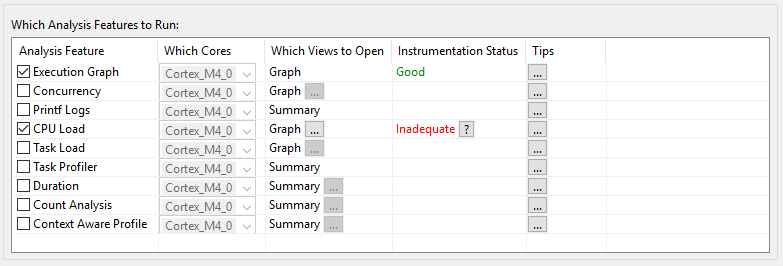
    the Execution Graph works. But I can't see the CPU Load (see picture below)

    I have added

    var Load = xdc.useModule('ti.sysbios.utils.Load');

    to the clock configuration section of "cc2640_r2_csdk.cfg" , and added

    /*
    * LoggingSetup configures TI-RTOS modules to capture user-specified information
    * such as CPU Load, Task Load and Task Execution so that it can be
    * displayed by System Analyzer.
    *
    * loadLogging: (default = true) If true, LoggingSetup will add the kernel's
    * load module, which measure the CPU load. See the BIOS API
    * documentation for usage details
    */
    var LoggingSetup = xdc.useModule('ti.uia.sysbios.LoggingSetup');
    LoggingSetup.loadLogging = true;
    LoggingSetup.loadLoggerSize = 256;
    LoggingSetup.loadTaskLogging = true
    LoggingSetup.mainLoggerSize = 512;
    LoggingSetup.sysbiosLoggerSize = 2048;
    LoggingSetup.sysbiosSwiLogging = true;
    LoggingSetup.sysbiosHwiLogging = false;
    LoggingSetup.sysbiosSemaphoreLogging = true;

    at the end of the .cfg-file.

    Do u have any idea why CPU load is inadeqate?

  • Hi Christian,

    Have you made sure to set "BIOS_logsEnabled" to true and disabling the power policy in the board file?

    const PowerCC26XX_Config PowerCC26XX_config = {
    
        .policyInitFxn      = NULL,
    
        .policyFxn          = &PowerCC26XX_standbyPolicy,
    
        .calibrateFxn       = &PowerCC26XX_calibrate,
    
        .enablePolicy       = false,
    
        .calibrateRCOSC_LF  = true,
    
        .calibrateRCOSC_HF  = true,
    
    };

    Also, do you have any build warnings in the kernel that suggest you are missing anything (missed dependencies for UIA are typically displayed as warnings).

  • Hi M-W,

    I think u mean BIOS.logsEnabled in "cc2640_r2_csdk.cfg"? Yes, it was set to true.

    Yes, I have disabled the power policy in the board file.

    And no. I don't have any warnings.

    Regards,

    Christian

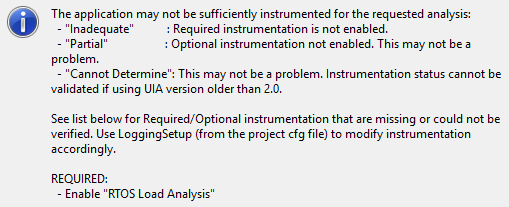
  • Could you share the while cfg file so that I can go over it? Also, what does CCS tell you if you check the "Inadequate" question mark?
  • Hi M-W,

    if i click on the question mark i see

    My whole .cfg file:

    cc2640_r2_csdk.cfg

    Thanks,

    Christian

  • Hi Christian,

    I have the same basic configuration as you and I do not see the "inadequate" issue. I expect to see this if LoggingSetup.loadTaskLogging = true is set to false which I could verify.

    Have you tried this out on a basic "empty" example to see if you get it to work before doing it on the BLE project?