This thread has been locked.

If you have a related question, please click the "Ask a related question" button in the top right corner. The newly created question will be automatically linked to this question.

RTOS/LAUNCHXL-CC2640R2: Central Bidirectional Audio Missing Frames

Part Number: LAUNCHXL-CC2640R2
Other Parts Discussed in Thread: CC2650RC, CC3200AUDBOOST

Tool/software: TI-RTOS

Hi 

I am using the central bidirectional audio project for the CC2640R2 in order to connect and receive voice from a CC2650RC but I keep getting the same error when it is streaming the signal as it is shown below. This happens when I click on the MIC button for 1 or 2 seconds. The missing frames happen even if I do a fast click.

Also, this project was supposed to be used with a CC3200AUDBOOST in order to hear the audio but, how can I do it without this? The voice.py is not detecting any USB device as well.

Thanks in advance,

Guilherme Paulo

  • Are you using out of box examples? Do you have the booster pack to run this demo?
  • Hi

    I'm running out of the box examples on both CC2650RC and CC2640R2 but I'm not using the booster pack as I don't have one, I wanted to, instead sending the data to the booster pack, sending it via UART or something in order to process it.

    Regards,
    Guilherme Paulo
  • Which version of software are you using?
    Can you specify version so we can verify the SW?
  • Sure, I'm using CCS v7.4.0.00015
    Compiler: TIv19.9.6.LTS
    For the CC2640R2 I'm using CC2640R2SDK Version 1.50.0.58

    For the CC2650RC I'm using BLE SDK version 2.2.2

    Regards,
    Guilherme Paulo
  • Hello Guilherme

    I have the same problem, but, If I remove the Display_print of the "Missing Frames" I no longer get the Default Spinlock Error even thought the frames are still missing.

    Thanks,

    João Louro

  • Where you able to replicate this issue Christin?

  • Hi,

    The issue is with the frame format.

    The CC2650RC will split a 100B voice frame across five 20B notifications. However, in order to improve throughput the CC2640R2 bidirectional voice demo will use Data Length Extension to send the entire voice frame in a single packet.\

    In order to make the two compatible you can either modify the RC project to use DLE and 100B frames or modify the central project to re-assemble the frame from the 5 notifications before passing it to the decode function.
  • Hi Sean,

    How can I put the Remote using DLE and what is it?

    Right after I click on the MIC button, to send data I'm getting disconected and I'm getting the reason 8.

    I changed the RC project to use 100B frames but not sure what the DLE is.

    Tried rejecting the DEFAULT_ENABLE_UPDATE_REQUEST but if I do this it will freeze and doesn't disconnect even if I don't have the MIC pressed.

    Regards,

    Guilherme Paulo

  • Hi Guilherme,

    Do you have a sniffer available, it would be very helpful to see exactly what is going on over the air?

    DLE is Data Length Extension, the bidirectional project will use it by default in order to prevent the notifications from being fragmented at the BLE controller level.

    Reason code 0x08 is consistent with a connection timeout, the sniffer capture will give us more information about this.
  • Hi Sean,

    I don't have a sniffer available, is there any other way to find the problem?
    Can it be due to the header? Because the header for 20B frame might be different from the 100B one which the bidirectional is expecting...

    Regards,
    Guilherme Paulo
  • Hi Sean,

    I used a sniffer and I'm getting this:
    [15:30:55:226] : 'Characteristic Value Notification' event received
    [15:30:55:226] : Attribute Handle: 0x002A
    [15:30:55:226] : Value: [04]

    Which is the start command, after this, if All Notifications are enabled, I get nothing and get disconected.


    Regards,
    Guilherme Paulo

  • Hi Guilherme,

    You are right about the frame size. The duplex audio expects frames to be 100B long.
    However, it only expects 1B for commands.

    The start/stop are processed in AudioDuplex_processData(), can you set a breakpoint and see what happens when the start command is sent?
  • Hi Sean,

    When in AudioDuplex_processData(),  it will check the data_type and the data_type is "AudioDuplex_start_stop" as it is a char instead of data.

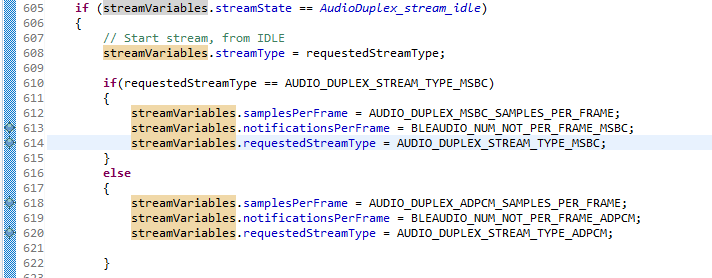
    Then checks the type of stream and it is ADPCM so it calls the function "AudioDuplex_startStreaming(AUDIO_DUPLEX_STREAM_TYPE_ADPCM)" and shows "ADPCM Stream Started".

    But in the "AudioDuplex_startStreaming" it says that the requested stream type is MSBC as well as ADPCM, first it assigns the streamVariables as ADPCM and then it assigns them as MSBC

    Regards,

    Guilherme Paulo

  • After a day I get to the conclusion that the problem is with how the remote is sending as it doesn't send anything if I change the notification size, it only sends the start comand.
    How can I put DLE working to check if the problem is the lack of that extension.

    Regards,
    Guilherme Paulo
  • Hi Guilherme,

    Data length extension can be enabled in the build_config.opt file in the stack project.
    From the Software Developer's Guide (www.ti.com/.../swru393) you would need to do the following:

    1. Build with DLE, Section 5.9 set EXT_DATA_LEN_CFG
    2. Set MAX_PDU_SIZE to be the same as the bidirectional audio example, this will allow large MTU to be negotiated
    3. Change HIDAdvRemote_transmitAudioFrame() to send a single 100B notification as opposed to 5 20B notifications.