This thread has been locked.

If you have a related question, please click the "Ask a related question" button in the top right corner. The newly created question will be automatically linked to this question.

LAUNCHXL-CC2640R2: data loss in connection mode

Part Number: LAUNCHXL-CC2640R2
Other Parts Discussed in Thread: BLE-STACK, CC2640R2F

Hi,
I want to transfer 20 byte and 80 Hz packet data using BLE connection by CC2640R2 LaunchPad. I add a service and characteristic in project zero using custom profile example. I enabled notification and received data in mobile application. But I saw some data loss. When I reduced data rate to 10 Hz, packet loss decreased. Connection interval was about 12 ms. I have these questions:
1. How much is maximum achievable data rate in BLE?
2. What must I do to reduce data loss? Does indication reduce data loss? I tried a little, but I found no example to implement in project zero.


With best regards!

  • Hi Eva,

    Can you tell me how you are detecting packet loss?

    In the Bluetooth Protocol, lost packets are re-transmitted, so you should not have any data loss.

    1. See this blog post from Bluetooth SIG: blog.bluetooth.com/exploring-bluetooth-5-how-fast-can-it-be
    2. I don't think switching from Notifications to Indication will help you. If you are seeing packet loss you will have to think on the fundamental RF level:
    - Shorter packets (less chance to be interrupted in the middle of the packet)
    - Switch to lower-throughput PHY (if you are using Bluetooth 5)
  • Hi Marie,
    Thank you for your reply.
    I use Bluetooth 4.2.
    I have a counter in my code which is 4 byte of my 20 byte data packet. I log the data using a mobile app and see how much does this counter increase. I have the number of logged data packet too and assume that the ratio of these two number is related to packet loss.
    For example if my counter increase 3000 but the number of logged data is 2950 the packet loss is related to 2950/3000=0.98 so I have 2% packet loss.
    I thought before that Indication is a method to see that whether a packet does receive to client or not and if it has lost, retransmit it again. So the packet loss will be zero. But you say that all lost packets are re-transmitted. So what is the usage of indication?
    Thanks.
  • Hi Eva,

    The use of Indications is to get a notification in the original transmitter device when the packet is received.

    I don't think your counter method is reliable. In the BLE protocol missed packets are retransmitted, meaning that if any of your packets are missed and re-transmitted the packets are not coming in in order with the counter.

    What version of the BLE-Stack and SDK are you using?
  • Hi Marie,

    I use sdk_2_20_00_49.

    After I log the received data in mobile app, I arrange them by counter number. However it’s not so important because I calculate the ratio of logged data to transmitted data (here means my counter).
    You said that “ In the BLE protocol missed packets are retransmitted” what does it mean? For example assume that the peripheral device transmit a data packet but the central device can’t receive it correctly. How the peripheral device realize that some packets are lost to retransmit them again?

    Also I have some other questions:
    1. Is there any error control coding at the physical layer? (I mean rate 1/2, rate 1/8 or no coding.)
    2. How can I extend the packet length?
    3. Can I send multiple packet per each connection? If yes how can I do that?

    Regards.
  • Hi Eva,

    Every packet sent in the connection has a sequence number (SN) and a next expected sequence number (NESN). The devices use these numbers to compare and see if the peer device has received it last transmitted packet. You can read more about this system online, e.g. www.novelbits.io/.../

    If one of the devices sees that the peer device did not receive its last transmitted packet it will retransmit this packet as soon as possible.

    1) If you use Bleutooth 5 you can use a Coded PHY (LE Coded S=2 or S=8). If you're not using Bluetooth 5 you are using the LE 1M PHY which does not use any coding.

    2) See the BLE-Stack User's Guide for instructions on adjusting the maximun transmit unit (MTU): dev.ti.com/.../l2cap.html

    3) Do you mean per connection event? Yes you can send multiple packets per connection event.

    The number of packets per connection events is dictated by the master device. It is decided based on the connection interval, the MTU and the MAX_NUM_PDU define for both the master and slave devices.

    If you want to limit the number of packet per connection event to one you can use the HCI_EXT_OnePktPerEvtCmd() API.
  • Hi marie,

    I’m so thankful for your replies.

    Is there any buffer in the ble layers in which unsuccessful packets are held to retransmit again? If yes how much is its size? Assume that two ble device are in a noisy peripheral with lots of obstacles and about 30% of packets can not receive to peer device and should be retransmitted. Assume again that data packets are long. Is retransmission helpful in this situation or due to buffer limitation some of our packets will be lost certainly?

    In my code I have a clock structure and in its callback I add an event to process queue. In process queue function I read sensors and update an array. Then I use myservice_setparameter function to send new values. In fact data packet length relates to this array length. I increase MTU but how can I send multiple packets per connection event?

    I try various condition. For example I set connection interval (in my code) equal to 10 ms, my clock structure period is 36 ms and my array length is 48 byte. Then I log data for a while (for example 200 second). Then I calculate transfer rate using this equation:

    Number of received packet * array length*8 (bit) / 200 (second).

    I can reach data rate about 10 Kbps.
    Is this method correct? How can I improve transfer rate?

    Regards.
  • Hi Eva,

    Packets are held in the BLE-Stack HCI packet buffer until acknowledged by the peer device. This buffer is defined by the MAX_NUM_PDU and the MAX_PDU_SIZE symbols (number of packets * max size of packet). 

    If there are a large number of packets being lost, too many to contain in the buffer, they will be truly lost. I must say, this sounds like an extreme situation. Because of channel hopping, there is rarely a 30% packet loss.

    The number of packets per connection events is dictated by the master device. It is decided based on the connection interval, the MTU and the MAX_NUM_PDU define for both the master and slave devices. 

    Are both the devices CC2640R2F devices?

    I would try with a higher connection interval (e.g. 100 or 200 ms) and MAX_PDU_SIZE set to 255. In theory you should be able to reach 800 kbps, so you have a lot of room for improvement. What kind of ATT packets are you using to transmit the data? The most efficient method is too use ATT Notifications (GATT_Notify()).

  • Hi Marie,

    The slave is a CC2640R2 launchpad but I use a Xiaomi Mi4i with nRF connect app as master. I can change the MTU in app but connection interval and Max num PDU aren't available in this app.

    I thought before that I should change my code to send multiple packet per connection event but as I realize from your reply it's not necessary and master device (in my case Mi4i) determines the number of packets per connection event. Am I right?

    I enable read and notification in characteristic as described in custom profile example in simplelink academy and I use notification in Mobile app to log data packet.

    Did you reach 800 Kbps in practice? What is your Central device?

    So your suggestion is that I set both connection interval and MTU to bigger values to read higher data rate? I read somewhere that multiple short packets and minimum connection interval are better to achieve higher data rate.

    Regards.
  • Hi Eva,

    If you can take a sniffer cpature of this I think it could help us understand why there is so little data being transmitted. E.g. see what the connection interval is, how many packes per connection event etc.

    If the problem is that the master device only accepts a few packets per connection event, you can try to send a connection parameter update request from the CC2640R2 device to get a shorter connection interval.

    Does the Xiaomi Mi4i device support Data Length Extensions (DLE, Bluetooth 4.2 feature)?

    With a smart phone as the master device I would not expect to get close to 800 kbps. I have not tested with Xiaomi, but with other android devices (that support DLE) I have seen 500-600 kbps.
  • With a CC2640R2F as the master device and CC2640R2F as the slave I have reached 780 kbps.
  • Hi marie,

    I used a sniffer but I didn’t realize anything more.


    I changed MUX_NUM_PDU to 254 and MUX_PDU_SIZE to 248 in ble_user_config.h and in mobile app I can get 244 bytes. So I think that Xiaomi Mi4i supports Data Length Extension. However it’s Bluetooth version is 4.1 not 4.2 . Is it reasonable?

    I use simplelink academy 2.20.3 Project zero and add my service to this project. Which example do you use to reach 500-600 kbps? Does it available on TI examples or github?

    Regards.

  • Hi Eva,

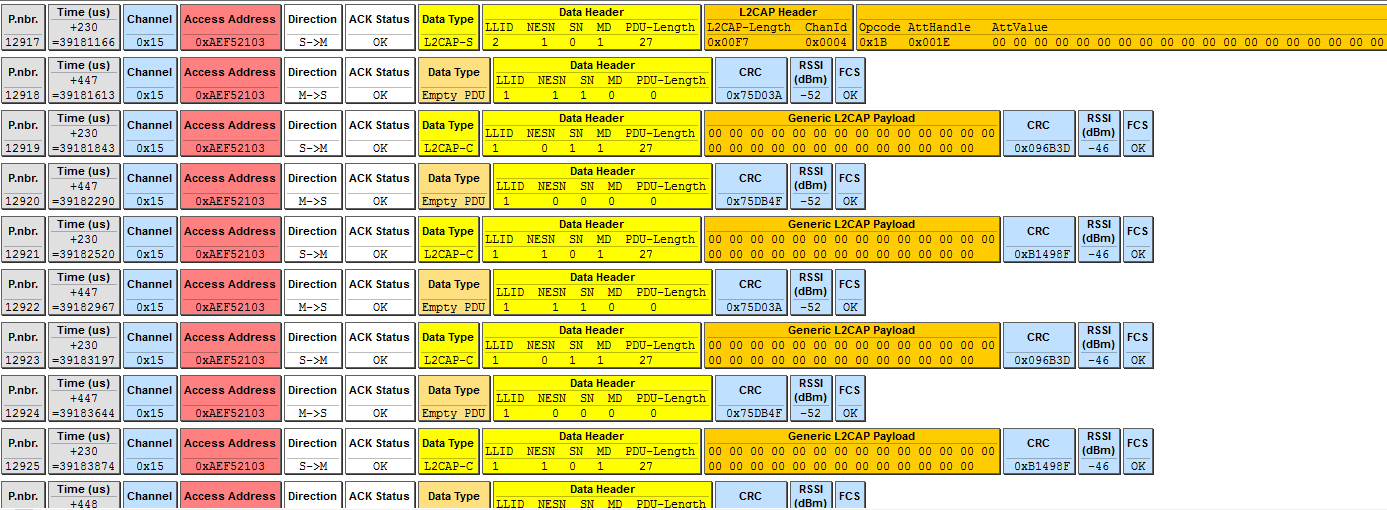
    Based on your sniffer log, the devices are already sending multiple packets per connection event. (See the timing between packets, which is on us level, and see the channel number for each packet. In the BLE protocol, the channel is changed for every connection event.)

    On the other hand, your sniffer capture screen shot does not show how long the connection interval is. Can you look at how long time passes between two packets on different channels to see how long the connection interval is?

    Your Xiomi Mi4i does not support data length extensions. From the sniffer log you can see that each packet contains 27 bytes of payload. Your PDU can still be large (255 bytes), but the BLE-Stack fragments it into smaller units that go over the air (MTU). This is called L2CAP fragementation and you can read more about it here: dev.ti.com/.../l2cap.html

    The project we used to demonstrate BLE throughput is found here on github: github.com/.../simplelink_sdk-1.40 . However it is based on the Bluetooth 5 stack so I do not know how useful you will find it.