This thread has been locked.

If you have a related question, please click the "Ask a related question" button in the top right corner. The newly created question will be automatically linked to this question.

LAUNCHXL-CC2640R2: Simple Central doesn't stay connected to BLE devices

Part Number: LAUNCHXL-CC2640R2


I'm trying to connect to my Bluetooth beacons through the simple central project. I'm able to discover some devices but in the *Connect to menu I'm not sure if I'm even seeing the beacons. Are the values that you discover the devices Bluetooth address? I'm not seeing my beacon's Bluetooth address on the list if that is the case. 

Also when I try to connect to any of the devices, I get a Paring fail: 5, then this: 
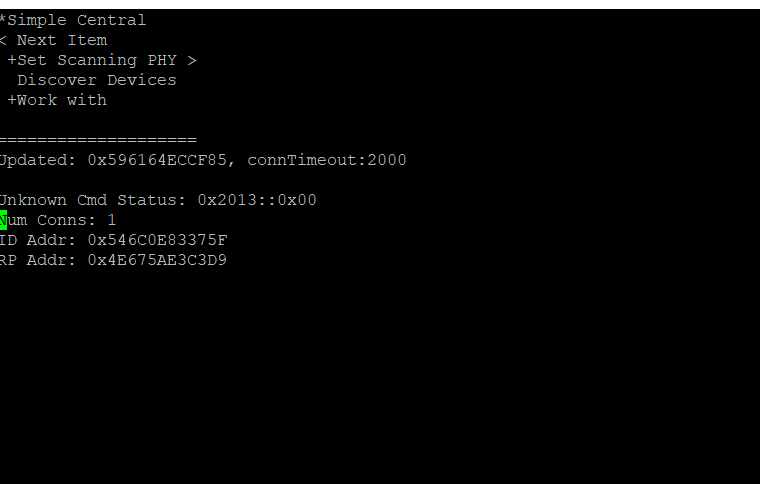
  

and then the device disconnects and I can't even do any of the +Work with menu stuff. 

Any advice? Do I need to configure my beacons or the code in some special way so it doesn't disconnect after a few seconds? 

  • Hi Aaron,

    What kind of devices are you trying to connect to? Are you sure they are connectable? Did you remove the filtering or UUID in the simple central sample app?

  • HI Joakim, 

    I'm trying to connect to BlueCats AA Bluetooth Beacons. https://www.bluecats.com/aa-bluetooth-beacon/ They are standard Bluetooth beacons that can do Eddystone or iBeacon protocols. 

    I was actually able to identify the beacons on the list by connecting them to my laptop and seeing that they have a different identifier from the Bluetooth address on the app that allows me to manage them from my phone. 

    My only problem now is that when I try to connect to them in the simple_central project. 

    I'm able to connect to a beacon, and if I'm quick enough I'm actually able to view some RSSI values.

    Every time though, after just a few seconds of being connected, I get a message on the console saying "Param update: 0" then it disconnects and the message says "Disconnected: Reason 19."

    I've tried changing the DEFAULT_UPDATE_CONN_TIMEOUT, but it didn't seem to extend the duration of the connection.

    Regards, Aaron


  • Hello Aaron,

    Disconnect reason 19 means LL_STATUS_ERROR_PEER_TERM (ll.h). This means that the beacon issued a disconnect possibly due to undesired connection parameters. I cannot guess without a sniffer log of the connection.

    You can try to adjust the connection interval settings for connection paramters update request (DEFAULT_UPDATE_MIN_CONN_INTERVAL, DEFAULT_UPDATE_MAX_CONN_INTERVAL). But a sniffer log can help.

  • Hi Aaron,

    From what I know the Simple Central works with Simple Peripheral which uses Simple Gatt Profile. For the Simple Central to work with your beacons you need to modify it.

    Alternatively you can use free mobile apps for bluetooth beacons that is if you just want to see to contents of the beacon advertisement packets.

    -kel

  • Hello Eirik,

    Adjusting the connection interval settings doesn't change anything either. 

    And how do I get a sniffer log of the connection? 

    Regards, Aaron

  • You were right with your initial assumption. The program and beacons are both functioning correctly. I contacted the company and the beacons are the ones issuing a disconnect. Thanks for the help!